A normal, unmodified Xbox One or Xbox Series X|S is not a Windows PC, so ordinary Windows viruses are not expected to run on it. That does not make every risk impossible: fake virus alerts can trick you into revealing your Microsoft password, and an infected USB drive can still put a Windows PC at risk. If you entered your password or see unfamiliar account activity, secure the Microsoft account before considering a console reset.
Can an Xbox get a virus?
Xbox One and Xbox Series X|S run in a controlled console environment rather than as general-purpose Windows desktops. A Windows executable or ordinary PC virus is not designed to run as an Xbox game or app. A Microsoft Community moderator describes Xbox consoles as locked-down systems that run digitally signed code, but that community guidance is not a guarantee that the platform is immune to every vulnerability or future attack. Microsoft Community discussion of Xbox and viruses
Downloading a suspicious file in the Xbox browser does not, by itself, show that the console has been infected. A serious vulnerability or unofficial console modification could create risks beyond ordinary browsing, but the available evidence does not establish that visiting a suspicious page commonly infects consumer Xbox consoles.
“Virus” can mean several different problems
People often use the word for a self-replicating virus, other malware such as spyware or ransomware, a browser scam, a stolen Microsoft account, corrupted game data, an unauthorized purchase, or a suspension. Those are different problems and call for different responses. A crash or ban alone does not prove malware.
Quick wins for a faster PC:
Fix the driver behind crashes, sound loss and screen glitchesFind Drivers →Clear out junk files and repair common Windows errorsFree Scan →Scan for outdated or missing drivers - takes under a minuteDriver Scan →#1 Best Overall

- 【Necessary for Xbox Series X】---- This product integrates many functions, such as top cooling fan, dust-proof, light strip, USB interface for data transmission and USB port for charging. It helps to prevent for Xbox Series X console from over-heating and dust to extend the life of your console. (NOTE:When the console is working, the dust cover of the fan can be removed to speed up the heat dissipation effect. Alige the two holes under the dust cover first, then cover the dust cover.)
- 【Efficient Fan System】---- A high-speed large fan are built in the colorful dust-proof cooling fan,which can accelerate the hot air exhausted from the top of the console and reduce the temperature for Xbox series X console. The cooling fan stand with 3 gears and is a touch switch. The low gear is orange, the second gear is blue, and the high gear is green.The heat dissipation effect is more obvious, and the noise is very low, which you can hardly feel.
- 【Colorful Light Strip】---- The cooling bracket for Xbox seris X supports colorful lights and can change the light color with an independent touch switch. The light strip contains 6 monochromes and 1 mixed color. You can use the independent touch switch to change your favorite colors and own a more atmosphere in the process of the game. (NOTE: pressing the light switch for the 7th time will turn light off.)
- 【3.0 USB & USB Charge Port】---- There are 2 USB interfaces in total, one blue 3.0 USB interface supports 3.0 data transmission, another white 2.0 sub interfaces ONLY can charge more products, such as controller, mobile phones, small desk lamps, etc.It is convenient to provide USB interface in the process of your game.
- 【Dust Cover Filter】---- The cooling top bracket for Xbox seris X supports top dust proof,At the same time, the product contains 2 sets * dust cover compatible with Xbox Series X, 1 set * silicone dust plugs,which have accurate size and easy to install and replace without additional tools. Prevent dust from entering the USB and HDMI ports for Xbox Series X, extend the life of your console.
What can actually put you at risk?
A fake virus warning
A web page can display a frightening alert without infecting the console. Some fake warnings claim a device has a virus and urge the reader to call a number or pay for help. Microsoft identifies these messages as a technical-support scam. Close the page; do not call the number, pay, download software, or share a password or security code because of a pop-up. Microsoft guidance on online scams and attacks
Phishing and Microsoft account takeover
A fake sign-in page can steal credentials if you type them in. With access to an account, an attacker may be able to sign in to Xbox services, change profile or security details, send messages, use stored payment methods, buy content, or interfere with access to connected Microsoft services. The exact impact depends on the account and its security settings.
Platform isolation does not stop you from voluntarily entering a password on a deceptive site. Check the address before signing in, and reach Microsoft account security by navigating there yourself rather than following a link in an unexpected alert. Never give a password or one-time code to someone who contacts you unexpectedly.
Malware on another device or a USB drive
A file that the Xbox cannot execute may still be dangerous if you later open it on a Windows PC. Microsoft describes unsafe websites, malicious files, and USB-related attacks as ways malware can affect PCs; its guidance does not establish that ordinary USB malware infects current Xbox consoles. Do not open an unknown file on a computer simply because the drive was previously used with an Xbox. Microsoft: How malware can infect your PC
Rank #2

- 🍃The new upgrade, black design tailored for Xbox Series S 1TB.LED Temperature Display-You can always know the temperature of your Xbox Series S console. It helps to prevent your Xbox Series S console from over-heating to extend the life of your Xbox Series S.
- 🍃Intelligent Control & Custom fan speed-[Automatic Mode]: The chip of G-STORY Xbox Series S cooling fan can automatically sense the temperature to adjust the fan speed, you can just enjoy the game and leave the heat to our cooling fan. (when the temperature is <35℃/95℉, it will stop working.) [Manual Mode]:Press the button to select the 3 speed you need, the LED will change color with the speed. (Note: Press down the button for 3s to switch between manual and automatic mode.)
- 🍃Three Level Fan Speed: Depends on the temperature of your xbox console, the Xbox Series S fan cooling system has 3 levels of fan speed(1500/1750/2000RPM) with RGB LED (Green light: 35~43℃/95~109℉; Blue light: 44~48℃/110~118℉; Red light: >48℃/119℉), it can cool your console at the most appropriate speed to protect your console.
- 🍃Low Noise & Light Weight: The Xbox Series S cooling fan is low noise and light-weight, it's powered by your xbox console, it's super portable and won't take too much space.
- 🍃Easy to Install: Just simply place the cooling fan on your console, and connect the cable to your xbox console, it will start to work.
Unofficial modifications
Jailbreaking, unofficial firmware, cheats, and pirated software can bypass the protections present on an unmodified console. That raises security and service risks, but it is a different situation from seeing a browser pop-up on a standard Xbox. If a modified console behaves abnormally, restore official software if possible or contact Xbox Support.
What an exploited vulnerability could mean
In theory, a serious platform vulnerability could permit unauthorized code execution, data or credential access, altered game or system behavior, network activity, persistence, or instability. These are possible consequences of a successful exploit, not evidence that routine Xbox browsing produces them or that ordinary owners commonly face them.
Which symptoms point to an account issue?
More useful evidence than a slow console is unexpected activity tied to the account. Microsoft’s Recent activity page shows significant events from the previous 30 days, including successful sign-ins, unusual activity, and security or profile changes. It does not show every action, so an empty page is not conclusive proof that nothing happened. Microsoft: Recent activity page
- Sign-ins from places or devices you do not recognize.
- Password-reset notices you did not request, or security information or aliases changed without your permission.
- Unfamiliar purchases, messages sent from your account, or unexpected profile changes.
- A device or application you do not recognize, or repeated sign-in failures after account details changed.
A slow dashboard, game crash, failed download, overheating, or online lag is not, by itself, evidence of malware. Software bugs, damaged local data, storage, network conditions, updates, and hardware faults are more ordinary explanations.
Free tools Windows power users keep installed
One-click scans. No signup required.
Rank #3

- VERTICAL COOLING STAND FOR XBOX SERIES S ONLY: This stand holds the Series S console upright to save desk space; not for Xbox Series X and not for Xbox One S consoles - please check your console model first.
- DUAL BUILT-IN COOLING FANS: 2 high speed fans under the base of the console pull heat away during long play sessions and help keep it dust free, working as a compact cooling station for Xbox Series S setups.
- 3 SPEED SETTINGS WITH LED INDICATOR: One button switches the fan speed between 3200, 2800, and 2300 RPM or turns the fans off; the LED shows the active level and the power-off memory recalls your last speed.
- 2 EXTRA USB PORTS ON THE COOLER: One port for charging and one for data transfer connect controllers or other gaming peripherals, and the whole unit is powered by the console through the included Type-C cable.
- REMOVABLE COOLING SYSTEM: Detach the cooler module and the base works as a simple vertical stand when active cooling is not needed; note that the USB ports and speed button sit on the removable cooler section.
| What you notice | More likely explanation | First response |
|---|---|---|
| “Your Xbox has a virus” pop-up | Browser scam or scareware | Close it; do not call or pay. |
| Unknown Microsoft sign-in | Possible credential compromise | Secure the account and review activity. |
| Unknown purchase | Possible account or payment compromise | Secure the account and contact Microsoft/Xbox billing support. |
| Game crash | Game bug, update, storage, or corrupted data | Restart and troubleshoot the game. |
| Overheating | Airflow or hardware issue | Power down, improve ventilation, and seek hardware support if it continues. |
| Slow online play | Network or service issue | Test the network and check service status. |
| Suspicious file on USB | Potential risk to a PC that opens it | Do not open it on Windows; scan removable media safely. |
What should you do now?
If you only saw a pop-up or visited a page
- Do not call any number displayed, pay, download a support tool, or enter a password or code.
- Close the browser page. If you gave it no information and did not open a downloaded file on another device, the pop-up alone is not evidence that the console is infected.
- If the console is also misbehaving, restart it, check the network, and install normal system or game updates. Troubleshoot the specific symptom rather than assuming malware.
If you entered a Microsoft password or security code
Treat the account as potentially compromised. If you used a Windows PC to sign in and suspect it may be infected, Microsoft’s recovery guidance puts scanning that PC before changing the password: changing it on an infected computer could expose the new password too. On Windows, the documented path is Windows Security > Virus & threat protection > Scan options > Full scan > Scan now. Then change or reset the Microsoft password from a trusted device, inspect account settings for changes, and use Microsoft’s sign-in helper or compromised-account recovery flow if you cannot sign in. Microsoft compromised-account recovery guidance
Turn on two-step verification
- Sign in to your Microsoft account Security page.
- Select Manage how I sign in.
- Under Additional security and Two-step verification, select Turn on.
- Follow the prompts and keep at least two recovery methods available.
Two-step verification can make recovery harder if you lose access to your verification methods. Xbox 360 and some older apps may require an app password because they cannot use ordinary security codes; that exception should not be assumed to apply to current Xbox One or Series consoles. Microsoft two-step verification guidance
Review activity, purchases, and devices
On Recent activity, check unfamiliar sign-ins, security-info changes, new aliases, application permissions, purchases, and profile changes. Where Microsoft offers the choice, mark an event This wasn’t me if it was not yours. Check purchases separately and contact Microsoft/Xbox billing support about unauthorized transactions. The page’s 30-day scope and limited event list mean it is a useful check, not a complete record.
If you suspect an account is signed in elsewhere, Microsoft’s Sign out everywhere feature can take up to 24 hours to sign out of browsers, apps, and most trusted devices. Microsoft explicitly says it does not sign you out of an Xbox console. If you can access the console, sign out there separately and change the account password. Microsoft: Sign out of your Microsoft account everywhere
Rank #4
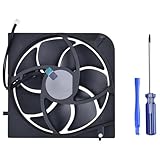
- Only Fit: Brand new and silent Replacement Xbox Series S Internal Cooling Fan
- Compatible With: This 7 blades Replacement Internal Fan ONLY compatible with Xbox Series S Console
- Good Quality: Each Fan was tested before shipping to make sure you will get a workable fan! This 5 blades Xbox Series X fan will have a better low-frequency noise to offer a better experience!
- Package Contain: 1x Replacement Xbox Series X 7 Blades Fan, 1x T8 Screwdriver
- Each replacement CPU coolong fan was tested before shipping.
If you used a suspicious USB drive
Do not open its files on a Windows computer. Scan removable media on a protected computer before opening anything, and scan any PC on which you already opened a suspicious file. If you only connected the drive to a normal Xbox, that alone does not establish a console infection.
Should you factory-reset the Xbox?
A reset is not the first response to a browser scare or stolen password. It can remove local accounts and settings, but it cannot change a stolen Microsoft password, secure a compromised email account, undo payment activity, or clean another device. Secure the account separately.
A reset may be appropriate if the console was jailbroken or modified, unofficial software was installed, system software remains corrupted, Microsoft or Xbox Support recommends it, or you are transferring ownership. Microsoft advises backing up and resetting an Xbox before selling, gifting, or recycling it. Microsoft guidance for recycling, selling, or gifting an Xbox or Windows PC
For a transferred or sold console, Microsoft’s account-device steps are: open the Microsoft account Devices page, sign in, find the console, select Show details, then More actions > Remove and confirm. Microsoft also documents an Unlink option to remove a device from the account’s Microsoft Store device association. Removing or unlinking a device is separate from resetting the console.
The Tool Desk
Outbyte Driver Updater FREEScan for outdated or missing drivers - takes under a minuteDriver Scan →Outbyte PC Repair FREEClear out junk files and repair common Windows errorsFree Scan →Quick Recap
How to reduce the risk next time
- Use a unique Microsoft-account password and secure the email account used for recovery.
- Enable two-step verification and keep recovery methods current.
- Do not sign in through unexpected links or trust Microsoft/Xbox branding on a warning page without checking the address.
- Keep the console updated through normal system updates; do not install unofficial firmware, cheats, or pirated software.
- Treat unknown USB files as a potential PC risk, even if the Xbox did not run them.
- Never grant remote access or pay someone who contacts you unsolicited claiming to remove an Xbox virus.
Product prices and availability are accurate as of the date/time indicated and are subject to change. Any price and availability information displayed on Amazon at the time of purchase will apply.




