
Crashes, No Sound, or Screen Glitches?
Random freezes, missing sound and display glitches usually trace back to one bad driver. Find and replace yours safely.Free scan · under a minutePC Slower Than It Used to Be?
A free scan shows the junk files, broken settings and background clutter dragging Windows down - then fixes them in one click.Free scan · Windows 10 & 11Discord icons are easiest to decode by location: beside an avatar, beside a channel, inside a call, on a profile, or beside a server. Here is what the major symbols mean—and which ones are controlled by individual servers rather than Discord itself.
Discord icons are easiest to understand by where they appear. A colored dot beside an avatar usually describes presence; an icon beside a channel identifies its type; symbols in a voice call control your microphone, audio, camera, or screen share; badges on a profile describe an account or achievement; and icons beside a username may come from a server’s roles rather than Discord itself.
As an Amazon Associate I earn from qualifying purchases.
Colored status icons beside a user
These are presence indicators, not permanent labels about a person. Discord commonly uses five status states:
Do these 3 things before closing this tab:
1Fix the driver behind crashes, sound loss and screen glitches2Repair Windows errors before they cause bigger problems3Scan for outdated or missing drivers - takes under a minute| Color or appearance | Meaning |
|---|---|
| Green | Online — Discord shows the user as connected and available. |
| Yellow | Idle — Discord may have detected that the user is away from their device, or the user may have selected Idle manually. |
| Red | Do Not Disturb — the user selected DnD. Discord automatically mutes desktop notifications for that user. |
| Purple | Streaming — the user is marked as streaming. |
| Gray or no colored dot | Invisible or Offline — the user may be genuinely offline, or may have selected Invisible. |
Idle does not mean offline
Idle generally means Discord considers the person away, but the account can still be connected and usable. A manually selected Idle status can remain active rather than changing immediately when the user returns.
#1 Best Overall
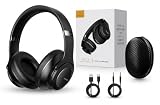
- 2-IN-1 HEADPHONES & WIRELESS SPEAKER Enjoy private listening in headphone mode or rotate the earcups to switch into Bluetooth speaker mode and share your music with friends and family. A unique design that combines two devices in one.
- POWERFUL SOUND WITH 3 EQ MODES Dual 40mm dynamic drivers deliver deep bass, clear vocals, and balanced audio. Choose between Bass Boost, Balanced, or High Definition sound modes to match your music, movies, and daily listening preferences.
- BLUETOOTH 5.3 & TF CARD PLAYBACK Experience a fast and stable wireless connection up to 33 feet. Insert a TF card and enjoy your favorite music without needing a phone, making it perfect for travel, workouts, and everyday use.
- CLEAR CALLS & ALL-DAY COMFORT Built-in microphone supports hands-free calling while soft protein leather ear cushions, memory foam padding, and an adjustable headband provide lasting comfort for work, study, travel, and entertainment.
- 18 HOURS PLAYTIME & PREMIUM GIFT PACKAGE Recharge with modern USB-C charging and enjoy extended listening. Includes a premium carrying case and elegant retail packaging, making it a thoughtful gift for men, women, teens, students, and music lovers.
Invisible does not prove that someone has left Discord
Invisible is a privacy setting. It makes the user appear offline to other people while allowing them to continue using Discord. A gray avatar therefore cannot tell you with certainty whether the account is disconnected.
What the red DnD icon really tells you
Do Not Disturb mainly communicates a status and notification preference. It does not necessarily mean that the person is unavailable, away, or unwilling to respond. They may still be reading messages or participating in a call.
Icons beside channel names
Channel-list icons identify the channel’s underlying type. A custom name or emoji can make a channel look distinctive, but it does not necessarily change what the channel does.
Free tools Windows power users keep installed
One-click scans. No signup required.
| Icon or marker | Channel type | What it is for |
|---|---|---|
| # | Text channel | Written messages, files, reactions, and other text-based communication. |
| Speaker | Voice channel | Joining a shared audio space to talk. Depending on permissions, it may also support video or streaming. |
| Megaphone | Announcement channel | A special text channel whose published messages can be followed and distributed to servers that follow it. |
| Forum marker | Forum channel | Organized discussions built around individual posts instead of one rapidly moving message stream. Forum channels require Community to be enabled on the server. |
| Stage marker | Stage channel | An event-style voice channel where selected members speak while an audience listens. Stage channels are available on Community servers. |
Why a megaphone matters
The megaphone is not simply decoration. An Announcement channel has publishing and following behavior that an ordinary text channel does not. Messages published there can be distributed to servers that follow the channel, subject to Discord’s features and the relevant permissions.
Forum and Stage icons
Forum channels are intended for separate, organized topics, making them useful when a server needs discussions that can be browsed and revisited. Stage channels are designed for presentations, interviews, panels, or other events in which speakers and listeners have different roles. Both features depend on the server’s Community setup and permissions.
Rank #2

- Digital Stereo Sound: Fine-tuned drivers provide enhanced digital audio for music, calls, meetings and more
- Rotating Noise Canceling Mic: Minimizes unwanted background noise for clear conversations; the rotating boom arm can be tucked out of the way when you’re not using it
- Handy In-line Controls: Simple in-line controls on the headset cable let you adjust the volume or mute calls without disruption
- Plug-and-Play USB Computer Headset: Simply plug the USB-A connector into your computer and you’re ready to talk or listen without the need to install software
- Padded Comfort: Comfortable headphones with adjustable headband features swivel-mounted, leatherette ear cushions for hours of comfort and is easy to clean
Microphone, headset, camera, and streaming icons
Icons inside a voice channel or call are controls or live audio/video indicators. The two most commonly confused symbols are the slashed microphone and the slashed headset.
| Icon | Meaning |
|---|---|
| Slashed microphone | Your microphone is muted, so other participants should not receive your voice. A server moderator may also have server-muted you. |
| Slashed headset | You are deafened, so you cannot hear voice audio. A server moderator may also have server-deafened you. |
| Camera | Turns camera video on or off when video is available and permitted. |
| Screen-share or streaming icon | Starts screen sharing or Go Live, if you have permission to stream in that voice channel. |
Muted versus deafened
Muting affects what other people hear from you. Deafening affects what you hear from the call. You can be muted without being deafened, deafened without muting your microphone, or both at once.
What’s actually slowing this PC down?
Pick the symptom - the matching free tool is one click away.
There is also a difference between changing your own controls and being restricted by a server moderator. A self-muted microphone or self-deafened headset reflects your setting. A server mute or server deafen is imposed by a person with the necessary moderation permission and cannot normally be undone from the ordinary call control.
What the camera and stream icons do
The camera control enables video. The screen-sharing or Go Live control lets an eligible participant share an application window or their entire screen in a server voice channel or voice call. Other participants can select the stream to watch. Whether the control is available depends on the channel’s permissions and Discord’s current client behavior.
Profile badges: account history, subscriptions, and achievements
Badges shown on a profile are not live presence indicators. They describe an account attribute, subscription, achievement, or history. A badge remains conceptually different from the colored dot beside an avatar.
Rank #3

- Immersive 7.1 Surround Sound: This gaming headset delivering stereo surround sound for realistic audio. Whether you're in a high-speed FPS battle or losing yourself RPG adventures, this Ps5 headset provides crisp treble, punchy bass, and precise directional cues, giving you a competitive edge
- Great Humanized Design: Comfortable and breathable permeability protein over-ear pads perfectly on your head, adjustable headband distributes pressure evenly, you’ll enjoy lasting comfort during hours of gaming and suitable for all gaming players of all ages
- Sensitivity Noise-Cancelling Microphone: 360° omnidirectionally rotatable sensitive microphone, premium noise cancellation, sound localisation, your voice comes through loud and natural, ensuring your teammates catch every callout, even in chaotic battle scenes.
- Universal Compatibility: This gaming headphone support for PC, Ps5, Ps4, Xbox one, Xbox Series X/S, Switch, Laptop, Mobile Phone and other devices with 3.5mm jack.Note 1: When you use headset on your PC, be sure to connect the "1-to-2 3.5mm audio jack splitter cable" (Red-Mic, Green-audio). (Please note you need an extra Microsoft Adapter when connect with an old version Xbox One controller)
- Cool style gaming experience: Colorful RGB lights create a gorgeous gaming atmosphere, adding excitement to every match. Heightening immersion for FPS, MOBA, and action titles. These eye-catching lights give your setup a gamer-ready look while maintaining focus on performance. (*Note: The USB connector is for LED lighting only)
| Badge | What it generally indicates |
|---|---|
| Nitro | The account is subscribed to Discord Nitro, Nitro Classic, or Nitro Basic, depending on the badge and the account’s subscription history. |
| Server Booster | The user directly supports a server through Server Boosting. The badge can develop with an uninterrupted boosting streak. |
| Discord Quests | The user completed a Discord Quest. |
| Orbs | The user purchased the badge from the Orbs shop. |
| Legacy Username | The user retained a legacy username/discriminator associated with Discord’s earlier username system. |
| Bug Hunter, Discord Staff, and other legacy badges | The account met a special eligibility requirement or received recognition under a particular Discord program or period. |
Evolving Nitro badges
Discord has also documented Nitro badges whose designs evolve as a subscriber reaches membership milestones. This evolving version is for Nitro subscribers; Discord’s documentation says it is not available for Nitro Basic or Nitro Classic.
A Nitro badge does not mean that the user is online. A Quest badge does not mean that they are currently playing a particular game. Similarly, a Booster badge describes account support or its streak rather than serving as a real-time presence signal.
Role icons, username colors, and the crown
Some symbols that look like Discord-wide badges are actually controlled by an individual server.
Custom role icons
A small icon next to a username in a server may be a custom role icon. It is not a universal Discord badge. Custom role icons are a Level 2 Server Boosting perk: a server can assign an icon to a role, and the icon appears for members who have that role.
When several eligible roles have icons, Discord displays only the highest eligible role icon beside the user’s name in chat or the member list. Other role icons may be visible by opening the user’s profile.
Rank #4

- Stereo Headset with Microphone for Classroom or Home - The Cyber Acoustics AC-5002 stereo wired headset with microphone delivers clear audio for lessons, calls, and everyday listening. A unidirectional noise-canceling microphone reduces background distractions, making this headset with microphone for PC ideal for K-12 classrooms, online learning, and home use.
- Adjustable Computer Headset with Durable Braided Cable – Designed for all-day comfort, the Cyber Acoustics AC-5002 wired headset with microphone features an adjustable headband, flexible boom mic that can be worn on the left or right, and soft leatherette earpads. The braided TuffCord cable resists tangles and wear, making this computer headset ideal for classrooms, home offices, and daily use.
- Connects to Gaming Console Controllers – Use this wired gaming headset with compatible Xbox and PlayStation controllers using the integrated 3.5mm connector. Enjoy reliable audio and voice chat for PS5, PS4, Xbox Series X|S, and Xbox One gaming.
- Plug-and-Play 3.5mm Headset for PC and Laptop - The Cyber Acoustics AC-5002 computer headset with microphone connects instantly with a standard 3.5mm audio jack, requiring no drivers or installation. This wired headset with mic works easily with PCs, Macs, laptops, tablets, and other devices with a 3.5mm connection.
- Complete Cyber Acoustics Headset Package - Includes the Cyber Acoustics AC-5002 Analog Stereo Headset and User Guide, backed by a 1-year warranty. Designed for classrooms, offices, and home learning, this Cyber Acoustics headset provides dependable audio and long-lasting performance.
Colored usernames
A colored username normally reflects the server’s role hierarchy. Discord generally displays the color of the member’s highest role that has a color. The same person can therefore have a different username color in another server—or no special color at all.
Do not interpret a colored username as a standardized status such as Online, staff, or Nitro. Its meaning comes from that server’s role configuration.
The crown icon
The crown identifies the server owner in the member list under Discord’s applicable display conditions. It can disappear when the owner assigns an Administrator role that is displayed separately. Changing role-display settings can make the crown reappear. The absence of a crown is therefore not always evidence that ownership changed.
Independent reader supportYour contribution helps us test, update, and keep practical guides available for everyone.Server badges and server identity icons
Icons near a server’s name can describe the server itself rather than any individual member. A server may display an indicator for being a Community, Verified, Partnered, or Discoverable Community server. Hovering over the badge usually provides more detail about the server type and, where relevant, its verification or partnership status.
Server Tags are different from server-type badges
A Server Tag is a custom four-character label paired with an icon that members can display on their profiles. It is a server identity feature, not the same thing as a Verified or Partnered badge. Discord’s current documentation says Server Tags can be unlocked by a server owner or administrator using three Server Boosts.
Best Value

- LONG BATTERY LIFE: With up to 50-hour battery life and quick charging, you’ll have enough power for multi-day road trips and long festival weekends.(USB Type-C Cable included)
- HIGH QUALITY SOUND: Great sound quality customizable to your music preference with EQ Custom on the Sony | Headphones Connect App.
- LIGHT & COMFORTABLE: The lightweight build and swivel earcups gently slip on and off, while the adjustable headband, cushion and soft ear pads give you all-day comfort.
- CRYSTAL CLEAR CALLS: A built-in microphone provides you with hands-free calling. No need to even take your phone from your pocket.
- MULTIPOINT CONNECTION: Quickly switch between two devices at once.
How to identify an unfamiliar Discord icon
- Look beside an avatar. A colored dot is probably a presence status. A small emblem opened from the profile is more likely to be a badge.
- Look beside a channel name. The symbol probably identifies a text, voice, announcement, forum, or Stage channel.
- Look inside a call toolbar. It probably controls the microphone, headset/audio, camera, screen sharing, or stream viewing.
- Look beside a username in only one server. It may be a custom role icon or a role color configured by that server.
- Look beside the server name or in the server list. It may identify the server’s Community, verification, partnership, discovery, boosting, or custom identity status.
- Hover or tap it. Discord commonly provides a tooltip or profile detail. Location matters because the same general shape can have a different function in another part of the app.
Common mistakes about Discord icons
- “Gray means the person cannot use Discord.” Not necessarily. An Invisible user can continue using Discord while appearing offline.
- “Red DnD means the person is unavailable.” Not necessarily. It mainly communicates a selected status and muted desktop notifications.
- “A badge tells me whether someone is online.” No. Profile badges describe account attributes or history; presence dots describe status.
- “A role icon has the same meaning everywhere.” No. Custom role icons and role colors are controlled by individual servers.
- “A microphone slash and headset slash mean the same thing.” No. The microphone concerns transmitting your voice; the headset concerns receiving call audio.
- “The megaphone is just a decorative channel symbol.” No. It identifies an Announcement channel with publishing and following behavior.
Why an icon may look different on your device
Discord changes icon artwork, labels, placement, and feature availability over time. Desktop, browser, iOS, and Android can also present the same control in different locations. Servers may have different permissions, Community settings, role configurations, and enabled features.
For that reason, this guide covers the major icon families rather than promising an exhaustive catalog of every temporary experiment, custom emoji, server image, or feature-specific button. When an icon is unfamiliar, its location, tooltip, profile panel, and surrounding controls are more reliable clues than its shape alone.
Frequently Asked Questions
Does a gray Discord icon mean someone is offline?
No. Invisible lets a person appear offline while continuing to use Discord. A gray avatar can also represent a genuinely offline account, so the icon alone cannot distinguish the two.
What is the difference between the microphone and headset slash?
No. A slashed microphone means your microphone is muted and affects what other people hear from you. A slashed headset means you are deafened and cannot hear voice audio.
Are Discord profile badges the same as online status?
No. Nitro, Booster, Quest, Orbs, and legacy badges describe account attributes, achievements, or history. They are separate from live presence indicators such as Online, Idle, Do Not Disturb, and Invisible.
What does a small icon beside a username mean?
Usually it is a custom role icon or role color configured by that server. Its meaning may be completely different in another server, and it is not automatically a Discord-wide badge.
The Bottom Line
The quickest rule is: avatar dot means presence, channel icon means channel type, call icon means an audio/video control, profile badge means account history or recognition, and username icon or color often means a server role. If the symbol remains unclear, hover over it or tap it for Discord’s contextual explanation.
The Tool Desk
Outbyte PC Repair FREEClear out junk files and repair common Windows errorsFree Scan →Outbyte Driver Updater FREEScan for outdated or missing drivers - takes under a minuteDriver Scan →Quick Recap
Product prices and availability are accurate as of the date/time indicated and are subject to change. Any price and availability information displayed on Amazon at the time of purchase will apply.

