
A custom PS Vita dashboard runs on top of a HENkaku/taiHEN homebrew environment; it is not a standalone application that replaces the console’s firmware by itself. Choose the exploit route for your firmware, bootstrap with VitaDeploy, keep VitaShell available for file transfer and VPK installation, and then install the dashboard in the format its developer documents. Ensō can make the environment activate at boot on supported firmware, but it modifies the system and carries more risk than a temporary exploit.
The exact dashboard package is the remaining variable. There is no single universal “custom dashboard” installer: projects differ in firmware support, whether they are VPKs or plugins, and which taiHEN configuration they expect.
As an Amazon Associate I earn from qualifying purchases.
What the dashboard actually requires
Think of the setup as layers rather than one download. The dashboard is the visible application or interface. Under it, the Vita needs a working homebrew framework, a way to move files onto the console, and an installer that can register the dashboard correctly.
- Firmware-matched exploit: HENkaku, h-encore, h-encore² or another documented route must match the firmware already on the Vita.
- taiHEN: This is the custom-firmware framework on which HENkaku homebrew and plugins run. The project documentation describes taiHEN as “a CFW framework for PS Vita™.”
- VitaDeploy: The bootstrap toolbox used to continue the custom-firmware setup and manage relevant firmware tasks.
- VitaShell: The file manager used for FTP or USB transfers and for installing VPK packages.
- Optional Ensō: On compatible firmware, Ensō runs an exploit at boot so HENkaku is available after a reboot without manually triggering an exploit each time.
- The dashboard package: This may be a VPK, a plugin, or another format specified by its own documentation.
Because each layer has a separate job, installing a dashboard file before HENkaku and taiHEN are working will not create a functioning custom interface. Establish the base environment first, then add the dashboard.
#1 Best Overall

- Read It Before Buying: The SD2Vita is a third-party memory card adapter. It requires you to currently be on an unlocked 3.60 firmware, such as HENkaku/Ensō, and is also supports 3.60+ firmware 3.65-3.72, which has been released. Note: Please insert it into the game card slot as if it were a PS Vita game cartridge. (Not suitable for the memory card slot)
- Perfect Fit & Seamless Experience: 1:1 precision molding with PS Vita game cartridge. It’s easy to insert and remove without any sticking or popping out. The precise molding ensures smooth operation, but please insert or remove the card slowly to avoid bending or breaking the internal pins
- Wide Compatibility: This PS Vita memory card adapter is compatible with all PlayStation Vita models, including PS Vita 1000, 2000, and PlayStation TV (PSTV). It provides fast game loading with no delays, making it a perfect upgrade for passionate gamers
- Meets All Your Gaming Needs: The included 128GB micro SD card offers lightning-fast read speeds of up to 140MB/s, so you won’t need to spend extra money on additional memory cards. Start your gaming experience right away! Latest version 6.0 SD2VITA microSD card adapter supports any standard microSD card (up to 512GB) to replace expensive PS Vita official memory cards. Enjoy faster loading speeds—20% to 30% faster than the original PS Vita game card
- Never Worry About Running Out of Storage: Sunloy high-speed TF cards feature Class 10, U3, V30, UHS-I, and A1 speed ratings—delivering ultra-fast transfer speeds with exceptional stability. Perfect for storing games, high-res photos, and full HD/4K UHD videos recording. Compatible with smartphones, tablets, cameras, GoPro, laptops, drones, dash cams, DSLRs, computers, security camera, Nintendo Switch, PS Vita, and other portable gaming consoles
Choose the exploit path from the Vita’s firmware
Check the exact system software version in the Vita’s Settings before choosing a guide. A nearby version is not interchangeable: the documented exploit family changes across the 3.60–3.74 range.
| Firmware | Documented route | What it means for a dashboard setup |
|---|---|---|
| 3.60 | HENkaku; Ensō can provide persistent activation | The classic HENkaku route. The 3.60 Ensō procedure lists an FTP client, Ensō and VitaShell as requirements. |
| 3.65 | Ensō when the device cannot be downgraded to 3.60; h-encore is also documented for 3.65–3.68 | Select the procedure that matches the console’s situation and the dashboard’s stated support. Some homebrew written only for 3.60 may not work on 3.65. |
| 3.66–3.68 | h-encore | Use the h-encore family documented for this range, then install the common VitaShell/taiHEN tooling. |
| 3.69–3.70 | h-encore²; Trinity is also listed as a known exploit path for this range | Follow one complete, compatible guide rather than mixing files from different exploit methods. |
| 3.71–3.74 | h-encore² | Use the h-encore² route documented for these later firmware versions and verify that the dashboard supports the resulting environment. |
Why 3.65 needs extra care
Firmware 3.65 appears in two parts of the documented setup landscape. Ensō is available when the device cannot be downgraded to 3.60, while h-encore covers 3.65–3.68. That does not mean every 3.65 owner should install both. Pick the path intended for the console and the guide you are following, and check the dashboard’s compatibility notes before committing to a persistent installation.
Why later firmware is not the same as 3.60
A package built only for 3.60 can depend on behavior that is absent or different on later firmware. The 3.65 guidance explicitly warns that some homebrew written only for 3.60 may not work there. Treat “the Vita is hacked” and “this dashboard supports my firmware” as two separate checks.
The Tool Desk
Outbyte PC Repair FREERepair Windows errors before they cause bigger problemsFix Now →Outbyte Driver Updater FREEScan for outdated or missing drivers - takes under a minuteDriver Scan →Identify the hardware before moving files
Storage requirements differ by model, so record whether the console is a PS Vita 1000, PS Vita 2000 or PlayStation TV before following storage instructions.
Rank #2
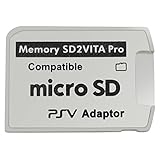
- Read This Before Buying: sd2vita is a third party memory card adapter which requires you to currently be on an unlocked 3.60 firmware like HENkaku/ Ensō, also supports 3.60+ firmware 3.65-3.68, which has been released
- sd2vita can’t be used as ps vita memory card, it doesn’t fit the memory card slot, put this in your game card slot as the PSV game cartridge
- Latest Version 5.0 SD2VITA microSD card adapter, you can replace the expensive PS Vita memory card with any microSD card up to 256GB, loading speed is 20% - 30% faster than original game card
- 1:1 precise molding from the PS Vita game cartridge, easy to push in and eject, no stuck or stick out problem as the sd2vita 3.0 version or lower, perfect fit in your PS Vita
- Fully compatible with all Playstation Vita devices – PS Vita 1000/ 2000/ PlayStation TV
PS Vita 1000
The h-encore guide states that a PS Vita 1000 requires an official Sony memory card unless its internal memory has been unlocked. If the internal-memory modification is not already available, plan on the official card as part of the initial setup. This is a model-specific requirement, not a rule for every Vita.
PS Vita 2000 and PlayStation TV
The 2000 model and PS TV can have different storage and setup requirements. Do not copy a 1000-specific storage assumption onto either device. Confirm the model in the guide you are using, then use the paths that guide gives for that hardware.
Computer and connection
You need a computer-side FTP client if you are transferring through FTP. VitaShell also supports USB transfer, so a USB cable and a computer can replace FTP for the file-copy step. The dashboard’s documentation may specify a particular transfer location; when it does, follow that location instead of treating ux0:data as universal.
Install the base homebrew environment
The following order keeps the exploit, tools and dashboard separate. It assumes the Vita is connected to a network and that you have selected the exploit instructions for its exact firmware.
Rank #3

- The Official PlayStation Vita Memory Card
- Required for most game play on PS Vita
- Store game saves, PSN downloads, and personal media
- Save up to : 8 to 16 full PlayStation Vita games, 24 movies, 9,136 songs, or 6,400 photos
- Open the Vita browser at
jailbreak.psp2.dev. Use the HENlo flow provided there to install HENkaku. If the browser exploit does not match the firmware or does not complete, stop and return to the firmware decision tree rather than installing random packages. - Install VitaDeploy from the bootstrap menu. VitaDeploy is the toolbox that lets you continue the custom-firmware setup and handle supported firmware-management tasks. Let its installation finish before adding optional dashboard files.
- Confirm that VitaShell is installed. The Ensō procedures use VitaShell for FTP or USB transfer and for VPK installation. If it is missing, install it through the route documented by the guide you selected.
- Verify the taiHEN layer. HENkaku homebrew depends on the taiHEN custom-firmware framework. Do not assume that a dashboard’s icon appearing in a file browser means taiHEN is correctly active; follow the framework guide’s verification step.
- Decide whether persistent activation is appropriate. On supported firmware, Ensō can run an exploit at boot and avoid manually triggering an exploit after every reboot. It also makes a system-level change, so read the current Ensō procedure and its recovery cautions before selecting it. A temporary activation is the less invasive choice when you are only testing a dashboard.
Install the dashboard package
Once VitaShell and taiHEN are working, read the dashboard project’s own installation notes. The package type determines what you do next.
For a VPK dashboard
- Use VitaShell’s FTP server or USB mode to copy the VPK to
ux0:data, unless the dashboard documentation specifies another location. - Exit the transfer connection cleanly so VitaShell can see the complete file. A partially copied VPK can fail in ways that resemble a firmware problem.
- In VitaShell, browse to the copied VPK and select it to start installation.
- Wait for the installation to finish, then check that the dashboard’s application or bubble appears where its documentation says it should.
- Only reboot after confirming that the package is intended for your firmware and that any required taiHEN plugin configuration has been applied.
For a plugin-based dashboard
A plugin is not installed like a normal VPK application. Follow the project’s documented file path and taiHEN configuration instructions exactly. The key questions are which file must be copied, where it belongs, and which configuration entry enables it. If a project requires a particular taiHEN plugin arrangement, installing its files without that configuration will leave the dashboard inactive even though the transfer succeeded.
For another documented format
Some projects may provide a format other than a VPK or a standalone plugin. Use the project’s stated installer and destination. VitaShell remains useful for moving files, but its VPK installer is not a universal solution for every homebrew format.
Recommended Free Tools
How to compare dashboard projects before installing one
When several custom dashboard projects look similar, compare the implementation details rather than screenshots or feature lists. These checks reveal whether a project can run on your console and how recoverable the installation will be.
Rank #4

- Read It Before Buying: The SD2Vita is a third-party memory card adapter. It requires you to currently be on an unlocked 3.60 firmware, such as HENkaku/Ensō, and is also supports 3.60+ firmware 3.65-3.72, which has been released. Note: Please insert it into the game card slot as if it were a PS Vita game cartridge. (Not suitable for the memory card slot)
- Perfect Fit & Seamless Experience: 1:1 precision molding with PS Vita game cartridge. It’s easy to insert and remove without any sticking or popping out. The precise molding ensures smooth operation, but please insert or remove the card slowly to avoid bending or breaking the internal pins
- Wide Compatibility: This PS Vita memory card adapter is compatible with all PlayStation Vita models, including PS Vita 1000, 2000, and PlayStation TV (PSTV). It provides fast game loading with no delays, making it a perfect upgrade for passionate gamers
- Meets All Your Gaming Needs: The included 64GB micro SD card offers lightning-fast read speeds of up to 80MB/s, so you won’t need to spend extra money on additional memory cards. Start your gaming experience right away! Latest version 6.0 SD2VITA microSD card adapter supports any standard microSD card (up to 512GB) to replace expensive PS Vita official memory cards. Enjoy faster loading speeds—20% to 30% faster than the original PS Vita game card
- Never Worry About Running Out of Storage: Sunloy high-speed TF cards feature Class 10, U3, V30, UHS-I, and A1 speed ratings —delivering ultra-fast transfer speeds with exceptional stability. Perfect for storing games, high-resolution photos, recording and storing full HD/4K videos, and other data types. It’s compatible with smartphones, tablets, cameras, GoPro/action cameras, laptops, desktop PCs, DSLR cameras, drones, Nintendo Switch, PlayStation Vita, and other portable gaming consoles
| Check | Question to answer | Why it matters |
|---|---|---|
| Firmware support | Does the project explicitly support your exact firmware, not merely “Vita” in general? | Exploit compatibility does not guarantee application compatibility. |
| Persistence | Does it work after a normal reboot, or only while HENkaku is temporarily active? | This determines whether you need to trigger the exploit again and whether Ensō is relevant. |
| Install format | Is it a VPK, a plugin, or another documented package? | The installation path and failure diagnosis differ. |
| Tool dependencies | Does it require VitaShell, VitaDeploy or another utility? | Missing tools can block transfer, installation or recovery. |
| taiHEN configuration | Does it require a particular plugin entry or configuration file? | A correctly copied file may still be ignored if taiHEN is not configured to load it. |
| Recovery instructions | Does the project explain how to disable or remove it? | A documented rollback is especially important for plugins and persistent changes. |
The available technical guidance establishes the firmware and framework prerequisites, but it does not identify one universal custom-dashboard package. The dashboard author’s compatibility statement remains the authority for that package.
Independent reader supportYour contribution helps us test, update, and keep practical guides available for everyone.Persistence: temporary HENkaku or Ensō
Temporary activation
A temporary HENkaku activation is suitable for testing. After a reboot, you may need to trigger the exploit again before taiHEN homebrew and the dashboard are available. This extra step is inconvenient, but it lets you evaluate a package without adding boot-time persistence.
Ensō on supported firmware
Ensō is designed to run an exploit during boot, setting up the HENkaku environment automatically. The Vita Hacks Guide describes it as a complete custom-firmware solution that avoids manually triggering an exploit after each reboot. Use it only on firmware and hardware covered by the current Ensō instructions. Because it changes the boot process, treat installation as a higher-risk decision than launching a temporary exploit; read the guide’s warnings and recovery procedure first.
What’s actually slowing this PC down?
Pick the symptom - the matching free tool is one click away.
Common failure points and the correct response
The browser exploit does not work
Recheck the displayed firmware number and return to the matching exploit family. A 3.69–3.74 system needs the h-encore² documentation, while 3.65–3.68 uses h-encore in the documented route; Trinity is listed as a known path for 3.69–3.70. Do not solve a version mismatch by repeatedly reinstalling the dashboard.
Best Value

- The memory card expands the storage capacity and multimedia capabilities for Sony PlayStation Vita handheld system.
- This memory card can store save data for games, songs, photos, movies, and games for PlayStation Vita, depending on the file sizes.
- You can transfer files from other devices or download directly from internet.
- Required for most game play for PS Vita system. Store game saves, game downloads, and personal media. Provide storage for up to: 4-8 full games for PS Vita system, or 12 movies, or 4500 songs, or 3200 photos
- Compatible with: All Sony PS Vita PSV 1000 / 2000 consoles (PCH-1000 / PCH-2000)
VitaShell cannot see the dashboard file
Confirm that the transfer completed and that the file was copied to the destination named by the dashboard documentation. For the standard VPK workflow, that destination is commonly ux0:data. If you used FTP, close the FTP session and refresh VitaShell; if you used USB, safely end the connection before browsing the file system again.
The VPK installs but no dashboard appears
Check whether the package is actually a VPK application or whether it also requires a plugin. Then verify firmware support and any taiHEN configuration entry. Installation success only confirms that VitaShell accepted the package; it does not prove that the dashboard supports your firmware or that every dependency is enabled.
The dashboard worked until reboot
This usually indicates that the environment was temporary or that the dashboard depends on a plugin loaded only while HENkaku is active. Trigger the documented exploit again, then inspect the project’s persistence requirements. Ensō is an optional solution on supported firmware, not a prerequisite for every dashboard.
The console lacks the expected storage path
Identify the model first. A PS Vita 1000 may require an official Sony memory card unless internal memory has been unlocked, while PS Vita 2000 and PS TV instructions can differ. Follow the hardware-specific guide rather than creating arbitrary folders on a different storage device.
A practical pre-install checklist
- Record the exact firmware version shown in Settings.
- Record the hardware model: PS Vita 1000, PS Vita 2000 or PS TV.
- Choose one matching exploit guide and follow it end to end.
- Have VitaDeploy available for the bootstrap and VitaShell for transfer and VPK installation.
- Prepare FTP or USB transfer, depending on which the guide supports.
- Confirm whether the dashboard is a VPK, plugin or another format.
- Read the dashboard’s firmware and taiHEN requirements before copying it.
- For a PS Vita 1000, confirm whether internal memory is unlocked; otherwise plan for an official Sony memory card.
- Decide whether you need Ensō persistence or prefer temporary activation while testing.
- Keep the project’s removal or recovery instructions available before installing.
What a correct end state looks like
A successful setup has distinct, verifiable layers. The Vita can activate HENkaku through the firmware-appropriate exploit; taiHEN is available; VitaDeploy and VitaShell remain usable; the dashboard files are in the documented location; and the dashboard starts under the firmware and plugin configuration it supports. If any one of those statements is false, troubleshoot that layer instead of reinstalling everything.
In short, firmware determines the entry route, HENkaku and taiHEN provide the homebrew foundation, VitaDeploy helps bootstrap the system, VitaShell moves and installs files, and the dashboard package supplies the interface. Ensō is an optional boot-time convenience on supported firmware, while the console model determines whether a memory card is part of the initial setup.
Quick Recap
Product prices and availability are accurate as of the date/time indicated and are subject to change. Any price and availability information displayed on Amazon at the time of purchase will apply.
Do these 3 things before closing this tab:
1Scan for outdated or missing drivers - takes under a minute2Repair Windows errors before they cause bigger problems3Fix the driver behind crashes, sound loss and screen glitches
