
A PS3 that will not turn on can have a simple power or display problem—or a serious hardware fault. Start by identifying the light pattern: no light points toward power delivery, solid red means standby power is present, green with no picture usually indicates a video problem, and green followed by yellow or blinking red is commonly a hardware-protection failure known as YLOD. Work through the low-risk checks first, protect your saved data, and do not treat a heat-gun reflow as a dependable repair.
First, identify what “won’t turn on” means
Before replacing parts or opening the console, observe exactly what happens when you press the physical power button. The PS3 family includes original “fat” models, Slim models, and Super Slim models, and light behavior and internal hardware are not identical across every revision.
As an Amazon Associate I earn from qualifying purchases.
| What you see | Likely category | First action |
|---|---|---|
| No light at all | Outlet, cable, rear switch, power supply, control board, or motherboard fault | Test the outlet and cable; check the rear switch |
| Solid red light, but no green light | Standby power is present, but the power control path or main hardware may be faulty | Use the physical power button and disconnect accessories |
| Green light, but the TV says “No Signal” | HDMI, display input, cable, or video-output setting | Check the TV input and reset video output |
| Green, then yellow, followed by blinking red | Likely serious hardware-protection failure, commonly called YLOD | Stop repeatedly cycling the console and arrange a diagnosis |
| Green, then immediate shutdown | Possible power-supply, thermal, motherboard, or protection-circuit problem | Note the shutdown timing and identify the CECH model |
Also note whether you hear a beep, whether the fan starts, whether the drive spins, and whether the problem began after a power outage, update, move, overheating event, liquid spill, or hard-drive replacement. These details help distinguish a display fault from a console that is genuinely failing to boot.
Quick wins for a faster PC:
Fix the driver behind crashes, sound loss and screen glitchesFind Drivers →Repair Windows errors before they cause bigger problemsFix Now →Safe power checks to try first
- Test the wall outlet. Plug another device into it, or move the PS3 directly to a known-working outlet.
- Bypass questionable power strips. Connect the console directly to the wall while testing.
- Reseat the AC cable. Remove and firmly reconnect it at both ends. Inspect for cuts, crushed sections, looseness, bent contacts, or heat damage. If you have a known-compatible replacement cable, test it.
- Check the rear power switch. Original fat and some Slim models have a physical switch at the back. It must be on before the front button can work.
- Disconnect accessories. Remove USB devices, external drives, hubs, memory-card adapters, Ethernet, and other peripherals. Eject a disc if the console allows it.
- Perform a complete power reset. Turn the rear switch off where applicable, unplug the console for several minutes, reconnect it, and test once.
These checks are recommended before disassembly because a failed outlet or cable is cheaper and safer to eliminate than an internal fault. General PS3 troubleshooting guidance also begins with checking the power cable and outlet (iFixit’s PS3 troubleshooting guide).
#1 Best Overall

- ETL Certified for Peace of Mind: This power cord features a pure copper core for stable power delivery, dependable durability, and safe daily use—ideal for home, office, and outdoor applications
- Wide Compatibility: Compatible with Sony PS5, PS5 Slim, PS4, PS4 Slim, PS3 Slim, and PS3 Super Slim consoles. Also fit for Xbox Original, Xbox One S, Xbox One X, Xbox Series S, Xbox Series X, and other devices with a matching power port, such as TVs, printers, speakers, and monitors
- Please Check Before Purchase: Not compatible with Sony PS1, PS2, original PS3 Fat, PS4 Pro, Xbox One Fat, or Xbox 360 Core/Pro/Elite/Slim/E models
- Power Cord Type: Non-Polarized 2-Prong Figure 8 Power Cord (IEC 60320 C7 to NEMA 1-15P), 18 AWG, rated for 125V AC, 7A Max
- Multiple Length Options: Choose the length that fits your setup. Please check the product images to confirm the connector type before purchase. Contact us with any questions
Stop immediately if you smell burning, see smoke, hear crackling, notice unusual electrical noise, or find liquid damage. Do not repeatedly power-cycle a console showing signs of electrical failure.
If the PS3 has a red standby light
A solid red light means the console is receiving at least some standby power. It does not prove that the main power supply, front control board, or motherboard is healthy.
- Press the console’s physical power button rather than relying on a controller.
- If using a controller, connect it with a USB cable and make sure it has charge.
- Disconnect every accessory and try again.
- Try another compatible AC cable if available.
- Watch whether the red light changes to green, stays red, or begins blinking.
If the light never changes, the fault may involve the button or front control board, the power supply, or another internal circuit. That symptom alone cannot identify the failed component.
The Tool Desk
Outbyte PC Repair FREEClear out junk files and repair common Windows errorsFree Scan →Outbyte Driver Updater FREEScan for outdated or missing drivers - takes under a minuteDriver Scan →If the PS3 turns on but shows no picture
A green light, startup sound, fan activity, or drive activity can mean the PS3 is running even though the television displays “No Signal.” Treat this as a video problem before treating it as a dead console.
- Confirm that the television is set to the HDMI or composite input actually being used.
- Reseat both ends of the video cable.
- Try another compatible HDMI or composite cable.
- Disconnect other video connections.
- Try another television or display if one is available.
- Reset the PS3’s video-output configuration.
To reset video output, turn the PS3 off so the indicator is red. Press and hold the power button until the console beeps a second time, then release it and allow the system to redetect the display. If the console stays powered, Safe Mode is another recovery route.
How to enter PS3 Safe Mode
Safe Mode is useful when the PS3 can remain on long enough to respond. It cannot repair a completely dead power supply or a motherboard that shuts down immediately.
Rank #2

- LENGHT: Use this versatile 5ft (1.5m) power cable to reach your gear & deliver safe reliable power Perfect for Monitors computers and other gadgets
- STURDY AND FLEXIBLE: Features a fully molded design that provides maximum durability and long life.
- PLUG: Replaces lost or worn-out power cords Universal design works with your PC monitor TV printer or other devices with a 3 pin power connection
- DURABILITY: Heavy-duty 18 AWG gauge cord is fully molded for maximum durability
- Turn the PS3 off until the indicator is red.
- Press and hold the power button.
- Continue holding through the initial beep and later beeps.
- Release the button when the rapid double-beep sequence indicates Safe Mode.
- Connect a controller with a USB cable and press the controller’s PS button when prompted.
The beep procedure is documented in community repair references such as this iFixit Safe Mode answer. The exact on-screen wording can vary by system state and model.
Free tools Windows power users keep installed
One-click scans. No signup required.
Choose Safe Mode options in risk order
Do not jump straight to a factory reset. If the console still boots, back up important saves and media first whenever possible. Then use the least destructive option that matches the symptom.
- Restart System: exits Safe Mode and attempts a normal boot.
- Restore File System: checks and attempts to repair file-system problems on the internal storage. It is appropriate after corruption or an interrupted shutdown, but backup first if the system remains usable.
- Rebuild Database: reconstructs storage indexes and may help with missing content or XMB/database problems. It can take time; do not interrupt it.
- Restore Default Settings: resets settings and can affect certain user or account-related information. It is not the same as erasing the entire system, but it should not be treated as risk-free.
- Restore PS3 System: factory-resets the console and deletes all content in system storage. Use this only when data loss is acceptable or a backup has been made.
Sony’s official PS3 manual states that Restore PS3 System deletes system-storage data, restores default system software settings, and cannot be undone. It also warns that turning off the console during restoration can damage the system software and may require service or exchange.
What the PS3 lights mean
No light
There is no visible standby power. Check the outlet, cable, rear switch, and accessories first. If those are good, possible causes include the internal power supply, fuse, front control board, or motherboard. Do not assume the power supply is automatically the only failed part.
Solid red
The console is in standby, but the main startup sequence has not begun. A failed button or control board is possible, as are power-supply or motherboard faults.
Solid green
The PS3 has begun powering on. If there is no picture, focus on the display input, cable, and video-output configuration. If it shuts down, investigate hardware or thermal symptoms instead.
Rank #3

- [Compatible With] This power cord is compatible with Sony PS3 Slim & Super Slim / PS4 Slim / PS5 ; Microsoft Xbox One S, Xbox One X, Xbox Series S, Xbox Series X. ▶NOTE: NOT Compatible With Original PS3 Fat
- [CompatiIbility] High Quality 18 AWG 2 Slot Figure 8 AC Power Cord (IEC320 C7 to NEMA 1-15P ), Work For: Game Consoles, LED LCD TV, Monitor, Sound Bar, Printers and other devices requiring 2 Slot Power cord.
- Quality Assurance: adopt thickened PVC material, pass 1000+ bending test, the cable has tensile resistance, safety, long service life.
- [materials] Using high quality materials, high quality copper core wire, safe and fast charging your equipment.
- [After-sale] The charging cable is sold under strict quality control. Please rest assured to purchase. If there is any quality problem, please contact us.
Yellow followed by blinking red
The classic sequence is green, a brief yellow flash, then a blinking red light, often with beeps. This is commonly called the Yellow Light of Death, or YLOD.
What YLOD actually means
YLOD is a symptom of a serious hardware error, not a diagnosis of one specific component. Current repair documentation lists possible causes involving the CELL or RSX processors, thermal material, NEC/TOKIN capacitors, board shorts, and failed RSX hardware (iFixit’s YLOD repair guide).
Older advice often attributes every YLOD to cracked solder joints or overheating. That is too certain. A brief fan start may offer a clue about whether the motherboard or power supply is involved, but it is not a component-level diagnosis.
A heat gun or improvised “reflow” may temporarily restore operation, but it can also damage the board and does not reliably repair a failed processor or flip-chip connection. Durable repair may require advanced BGA work or processor replacement. If the console has important data, collector value, or backward-compatible hardware, seek a technician who can explain the diagnosis, repair method, expected durability, and warranty in writing.
When the PS3 turns on and then shuts down
Rapid shutdown indicates that the console may be entering a protection state. The timing matters:
- Immediate shutdown: may indicate a power-supply, motherboard, short-circuit, or protection fault.
- Green followed by yellow and blinking red: treat it as likely YLOD hardware failure.
- Shutdown after roughly 10 seconds: this is noted as a possible power-supply issue in Super Slim-specific troubleshooting, but it should not be generalized to every PS3.
- Shutdown only after extended use: check ventilation and dust, but do not assume overheating is the only explanation.
Record the CECH model and the exact light and beep sequence before ordering a part. Model-specific diagnosis is more useful than a generic “PS3 power supply” search.
Rank #4

- Compatible with: Sony PS5 / PS5 Slim / PS5 Pro / PS4 / PS4 Slim / PS3 Slim/ PS3 Super Slim ; Xbox Series S, Xbox Series X, Xbox One S, Xbox One X
- UL Listed / Safety: this power cord are Tested, Approved, and Certified by UL to ensure safety for you and your device. UL testing is authorized by OSHA - US Federal Agency, this certification provides peace of mind that this power cord meets rigorous safety standards for electrical products
- Power Cord Type: Non Polarized 2 Prong C7 Figure 8 Power Cord, 125V 7A, 18 AWG (American wire gauge)
- Durable & Sturdy: built with pure copper wire / heavy-duty flame-retardant cable Jacket, resistant to bending and daily wear for long-lasting use
- Wide Compatibility: works with most Game Consoles, TVs, Printers, Speakers and Other Devices that use the same 2-prong figure-8 power connector
Hard-drive and corrupted-storage problems
A damaged internal hard drive can prevent normal startup or cause repeated recovery screens. File-system corruption may follow an interrupted update, forced shutdown, or failing drive. Safe Mode’s Restore File System and Rebuild Database options may help when the console remains powered.
If the drive was recently removed or replaced, it may need to be initialized and supplied with the appropriate PS3 system software. Use Sony’s current support instructions for the correct software and installation procedure rather than relying on an outdated download link.
Replacing the drive is not automatically data recovery. PS3 saves may be encrypted or tied to the original console or account context, so a new drive will not necessarily preserve saves. Do not format or replace the original drive if its data matters until you understand the recovery options.
Independent reader supportYour contribution helps us test, update, and keep practical guides available for everyone.If an update caused the problem
Do not repeatedly unplug the PS3 during an update or system recovery. If it can enter Safe Mode, try Restart, Restore File System, or Rebuild Database before considering a system-software reinstall. Any restoration or formatting operation can erase data, and the console must remain powered throughout the process.
For system software, use Sony’s current PlayStation support documentation and installation files applicable to the PS3. Procedures and download locations can change, so avoid treating an old third-party link as authoritative.
Do these 3 things before closing this tab:
1Clear out junk files and repair common Windows errors2Fix the driver behind crashes, sound loss and screen glitches3Repair Windows errors before they cause bigger problemsIdentify the PS3 model before buying parts
The model number normally appears on the rear or underside label and begins with CECH. Record it before ordering a power supply, hard drive, or board component.
Best Value
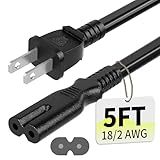
- Specifications: 5 feet tv power cord, non polarized 2 prong figure 8 power Cord (C7 to NEMA 1-15P ), 7A, 18AWG, 125V, NISPT-2, ETL listed
- Compatible: This ac power cable is fit for Sony PS5 / PS4 Slim / PS4/PS3 Slim/ PS3 Super Slim/Microsoft Xbox One S/Xbox One X/ Xbox Series X/Xbox Series S and other electronic devices such as TVs, printers, speakers, monitors, etc
- ETL Listed / Safety: This PS5 power cord is constructed with 100% pure copper and a flexible PVC jacket, providing high conductivity and minimal power loss
- Compatibility Note: To ensure compatibility, please verify that the connector matches your device's power port as illustrated in the product images
- Power Your Devices with the Perfect Reach: Select from multiple lengths to find your ideal match; this cord ensures safe, stable power for your game console, sound bar, speaker system and more
- Fat models: larger original designs, with some versions offering important backward-compatibility features.
- Slim models: revised hardware and different internal parts from the fat systems.
- Super Slim models: a later design with different access panels, drive mechanisms, and power hardware.
Power supplies are not universally interchangeable. Match the CECH model, connector layout, physical dimensions, and electrical specifications. Sony’s PS3 online user-guide index is a useful first-party reference for model-dependent operations.
When repair is better than replacement
Repair is more defensible when the console is a valuable backward-compatible fat model, contains important saves, has sentimental or collector value, or a reputable technician can identify a specific fault and provide a warranty.
Replacement may make more sense for a common later model with YLOD, multiple faults, unavailable parts, or an uncertain reflow quote. Compare the complete repair cost—including shipping—with a tested replacement. There is no universal price threshold because local availability, model, condition, region, and backward compatibility change the calculation.
Windows Errors? Fix Them Before They Spread
Repair common Windows errors and clear accumulated junk for a smoother, more stable PC - no reinstall needed.Free scan · no reinstallCrashes, No Sound, or Screen Glitches?
Random freezes, missing sound and display glitches usually trace back to one bad driver. Find and replace yours safely.Free scan · under a minuteFor either choice, look for exact model identification, tested-working status, a return window, clear exclusions for YLOD or no-power faults, and written warranty terms.
When to stop troubleshooting
Stop DIY troubleshooting and seek professional diagnosis or replacement when:
- The console shows the green-yellow-blinking-red YLOD sequence.
- It repeatedly shuts down immediately after starting.
- There is no standby light after outlet, cable, and rear-switch checks.
- You smell burning, see smoke, hear crackling, or detect excessive heat.
- Liquid entered the enclosure or the console suffered a hard impact.
- Safe Mode cannot be reached despite the console powering on.
- A correctly matched replacement power supply does not solve the problem.
- The suspected fault requires mains-electronics testing, soldering, BGA rework, or motherboard repair.
The enclosure contains hazardous electrical areas that can remain dangerous after unplugging. Do not probe a live power supply or attempt improvised heat-gun repairs unless you have the appropriate training, tools, and safety equipment.
Quick Recap
Final diagnosis checklist
- Identify the CECH model.
- Write down the exact light, beep, fan, and shutdown pattern.
- Test the outlet, cable, rear switch, and ventilation.
- Disconnect accessories.
- Separate “no picture” from “no power.”
- Reset video output if the PS3 stays green but the TV is blank.
- Enter Safe Mode if the console can remain on.
- Back up data before destructive recovery.
- Leave Restore PS3 System until every non-destructive option has failed.
- Stop and seek diagnosis for YLOD, electrical damage, liquid damage, or repeated protection shutdowns.
Product prices and availability are accurate as of the date/time indicated and are subject to change. Any price and availability information displayed on Amazon at the time of purchase will apply.
What’s actually slowing this PC down?
Pick the symptom - the matching free tool is one click away.

