What’s actually slowing this PC down?
Pick the symptom - the matching free tool is one click away.
The Garden Guide is Grow a Garden’s in-game index and progress menu. It brings together information about game items, collection tracking, achievements, and player-level progress. It launched as a book players opened from their inventory or hotbar, but an update later moved it into the user interface, so look for an on-screen button if you cannot find the book.
What the Garden Guide does
Introduced in the Beanstalk update on August 16, 2025, the Garden Guide was described as an index for plants, pets, cosmetics, and other game content. Its purpose is both reference and tracking: you can consult item information, keep track of collections, review achievements, and see level progress. The archived update log records its introduction in update 1.19.0.
It is an in-game feature, not a real-world gardening manual or a separate item you need to buy.
Where to find and open it
The original instructions no longer necessarily match the current interface. A walkthrough published on August 17, 2025 described selecting the Garden Guide from the hotbar or inventory and clicking while holding it. But the archived update log records that update 1.22.1 moved the feature into the user interface on September 6, 2025. The walkthrough is useful as historical guidance; if there is no book in your inventory, look for the Garden Guide button in the game UI instead.
Do these 3 things before closing this tab:
1Fix the driver behind crashes, sound loss and screen glitches2Clear out junk files and repair common Windows errors3Scan for outdated or missing drivers - takes under a minute#1 Best Overall
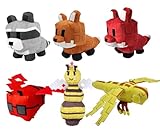
- 【High-Quality Material】This plush made of soft PP cotton and short plush, is comfortable, elastic and skin-friendly. It resists deformation after compression, is washable, and offers a nice, cozy touch.
- 【Unique Design】These cute plush toys is highly restore game pets. It is colorful and cute, and perfectly captures the essence of game pets characters.
- 【Gifts and Party Decorations】Its cute look makes it a favorite among fans. Perfect as a kids' gift, it fits bedrooms, living rooms, offices—great for decor, collecting, playing, or displaying on shelves.
- 【Quality Assurance】We offer 100% satisfactory service. Any questions? Contact us—we'll solve it within 24 hours.
- 【Purchase Note】Made with premium fabric and high-quality PP cotton. Due to vacuum shipping, it may arrive slightly flat—no need to worry! Simply knead gently after opening, and it will fluff back to its original shape within 1-2 days.
The available sources do not establish the exact controls for PC, mobile, or console as of October 2026. Button placement and interaction may vary with the live game version or platform.
What you can browse inside
Documented sections have included player progress, achievements, and indexes for plants, pets, cosmetics, food, and mutations. The archived update notes describe a Mutation Index and limited achievements arriving in update 1.22.0; later notes place Fall event achievements under Mini Achievements in update 1.24.0. These are records of past additions, not confirmation that every section or event achievement is currently available.
Rank #2
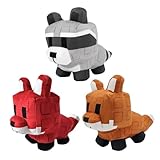
- 【High-Quality Material】This plush made of soft PP cotton and short plush, is comfortable, elastic and skin-friendly. It resists deformation after compression, is washable, and offers a nice, cozy touch.
- 【Unique Design】These cute plush toys is highly restore game pets. It is colorful and cute, and perfectly captures the essence of game pets characters.
- 【Gifts and Party Decorations】Its cute look makes it a favorite among fans. Perfect as a kids' gift, it fits bedrooms, living rooms, offices—great for decor, collecting, playing, or displaying on shelves.
- 【Quality Assurance】We offer 100% satisfactory service. Any questions? Contact us—we'll solve it within 24 hours.
- 【Purchase Note】Made with premium fabric and high-quality PP cotton. Due to vacuum shipping, it may arrive slightly flat—no need to worry! Simply knead gently after opening, and it will fluff back to its original shape within 1-2 days.
Once the Guide is open, choose the section relevant to what you want to check: an index for item or collection information, or the achievement and progress areas for your player milestones. Section names and availability can change as the game is updated, and the available documentation does not verify the live menu’s current tab count.
Independent reader supportYour contribution helps us test, update, and keep practical guides available for everyone.If you cannot find it
- No book in inventory or hotbar: Use the current UI button; the feature was relocated into the interface in update 1.22.1.
- The menu differs from an older walkthrough: Check the in-game labels and sections, since the archived notes document additions and interface changes over time.
- Controls are unclear on your device: The documented sources do not specify current, platform-by-platform controls. Follow the prompts shown in your version of the game.
The launch description is preserved in Grow a Garden’s Roblox listing, while historical interface and section changes are recorded in the archived update log.
Crashes, No Sound, or Screen Glitches?
Random freezes, missing sound and display glitches usually trace back to one bad driver. Find and replace yours safely.Free scan · under a minuteWindows Errors? Fix Them Before They Spread
Repair common Windows errors and clear accumulated junk for a smoother, more stable PC - no reinstall needed.Free scan · no reinstallQuick Recap
Rank #3

- 【High-Quality Material】This plush made of soft PP cotton and short plush, is comfortable, elastic and skin-friendly. It resists deformation after compression, is washable, and offers a nice, cozy touch.
- 【Unique Design】These cute plush toys is highly restore game pets. It is colorful and cute, and perfectly captures the essence of game pets characters.
- 【Gifts and Party Decorations】Its cute look makes it a favorite among fans. Perfect as a kids' gift, it fits bedrooms, living rooms, offices—great for decor, collecting, playing, or displaying on shelves.
- 【Quality Assurance】We offer 100% satisfactory service. Any questions? Contact us—we'll solve it within 24 hours.
- 【Purchase Note】Made with premium fabric and high-quality PP cotton. Due to vacuum shipping, it may arrive slightly flat—no need to worry! Simply knead gently after opening, and it will fluff back to its original shape within 1-2 days.
Product prices and availability are accurate as of the date/time indicated and are subject to change. Any price and availability information displayed on Amazon at the time of purchase will apply.




