The left analog stick on the Nintendo GameCube controller is officially called the Control Stick. It sits on the left side of the controller, directly above the +Control Pad. The separate stick on the right side is the C Stick, so the two are not interchangeable names.
Official names for the two sticks
Nintendo’s own terminology distinguishes the two components. The left stick is the Control Stick, and the right stick is the C Stick. Nintendo’s September 5, 2003 terminology guide records both names as accepted component terms, and Nintendo Support’s current GameCube controller diagram labels both parts the same way.
| Component | Official name | Location on the controller |
|---|---|---|
| Left analog stick | Control Stick | Left side, above the +Control Pad |
| Right analog stick | C Stick | Right side, near the C-shaped button cluster |
If you have read that the GameCube’s left stick is “the C Stick,” that is a common mix-up. The C Stick is the right-hand component.
What the Control Stick does
The GameCube controller does not assign a single fixed function to the Control Stick. Nintendo’s system manual treats its effect as game-specific: what pushing the stick in a given direction does depends on the title you are playing. A platformer may use it to move a character, while a fighting game may use it to select options or perform special inputs. The game’s own instruction booklet is the authoritative reference for its controls.
Do these 3 things before closing this tab:
1Clear out junk files and repair common Windows errors2Scan for outdated or missing drivers - takes under a minute3Repair Windows errors before they cause bigger problems#1 Best Overall

- Replacement thumbsticks is compatible with Nintendo GameCube Controller.
- Replace the damaged or broken joystick caps.
- Replacement thumbsticks is made of ABS material, sturdy and strong for long-lasting use.
- Package includes 3pcs yellow joystick caps, 3pcs grey joystick caps.
- Note : Please check that our items are what you need before you buy.
For that reason, it is not accurate to describe the Control Stick as always moving a character or always controlling the camera. Those roles are set by individual games.
Neutral position and the power-on warning
Both sticks are expected to rest in the center, or neutral, position when the console starts. Nintendo’s GameCube system manual warns that if the Control Stick or C Stick is held away from neutral when the console is powered on, the displaced position can be read as neutral. The result is incorrect control: a character may drift, or a menu may seem to move on its own.
Rank #2

- Solder-Free Installation: No need for tech skills or soldering wizards. Just pop it in and get ready to play! It's that simple.
- Gamecube Style Stick: Feel the nostalgia and comfort of the Gamecube era while dominating your favorite N64 games. This stick is designed for maximum comfort and a competitive edge, making long gaming sessions a breeze.
- Hall Effect Sensors: Say goodbye to drift and hello to unparalleled accuracy! Our Hall Effect sensors ensure your movements are precise, responsive, and durable. This joystick is built to withstand the test of time and intense gaming marathons.
- Longevity: Increase the life span of your original controller by giving it a generational upgrade!
How to reset the sticks to neutral
If a stick is registering incorrectly, follow the manual’s reset procedure:
Quick Recap
Best Value

- ❉These joystick caps are specially designed for Nintendo GameCube, which can provide effective protection for your analog sticks
- ❉The thumb grips caps are made of premium rubber, soft and long lasting, improve comfort through your game play.
- ❉These joystick caps enhance gaming experience, prevents fingers from slipping for easier control, improve performance through your game play.
- ❉Easy to install, it only takes a few seconds to install the thumb grip caps on the console joystick. Fit in perfectly, compact with the joystick after install.
- ❉If there is any problem with the product, please do not hesitate to contact us, we will help you solve the problem.
Rank #4
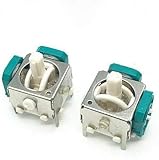
- Brand New , High Quality.
- This 3D Analog Sensor Module is used for fixing your controller.
- Package Includes: 2 x 3D Joysticks .
- It just fit to generic game pad stick. Please carefully check the picture and the details of the joystick in the picture to make sure that this version of the 3D joystick is what you need.Because some versions may not work with this 3D joystick.
Rank #3

- A good replacement for your damaged or non-working 3D Joystick Axis Analog Sensor Module.
- Needs moderate soldering. Professional installation is highly recommended, instruction and soldering tools are not included.
- Compatible with for N-G-C controller,restore your controller back to its former glory with this replacement analogue stick
- Package includes:12Pcs Analog Joystick Stick Replacement
- We are very grateful to all customers for their suggestions on improving sales. If you are not satisfied, please contact us to find the best solution
- Release all buttons and let both the Control Stick and the C Stick return to their resting position without touching them.
- Hold X, Y, and START/PAUSE together for three seconds.
- Check whether the stick still drifts in a game that uses it. If it does, the reset did not correct the fault, and the problem may be physical wear rather than a power-on position error.
Key points
- The left stick is the Control Stick, located above the +Control Pad.
- The right stick is the C Stick, a separate component.
- What the Control Stick does depends on the game, so check that game’s booklet for its controls.
- Both sticks should be centered when the console powers on; the manual’s X, Y, and START/PAUSE combination resets them if one was held off-center.
Product prices and availability are accurate as of the date/time indicated and are subject to change. Any price and availability information displayed on Amazon at the time of purchase will apply.
What’s actually slowing this PC down?
Pick the symptom - the matching free tool is one click away.



