Recommended Free Tools
Keep using The Sims 4 legally: the base game is free, buy only the packs you actually want, and use reputable mods and custom content. Do not replace Anadius or Simmerella-related tools with a random “successor,” mirror, patched executable, or manual unlocker. Community reports are inconsistent, and there is no reliable basis for endorsing an unofficial tool as safe.
Keep using The Sims 4 legally: the base game is free, buy only the packs you actually want, and use reputable mods and custom content. Do not replace Anadius or Simmerella-related tools with a random “successor,” mirror, patched executable, or manual unlocker. Community reports about what happened and about replacement downloads are inconsistent, and there is no reliable basis for endorsing an unofficial tool as safe.
As an Amazon Associate I earn from qualifying purchases.
What happened to Anadius and Simmerella?
Anadius was associated with the unofficial Sims 4 Updater and a wider DLC-unlocking ecosystem. Recent reporting said that Anadius had discontinued the updater. The same report discussed community claims concerning Simmerella-related access, including allegations that some distribution was restricted or supported through Patreon. Those details come from secondary reporting and community claims—not from an official EA announcement—so they should not be treated as a complete, independently verified account of every person or service involved.
The practical conclusion is less ambiguous than the backstory: players should not assume that a tool claiming to be a replacement is genuine, maintained, or safe merely because it uses a familiar name. A download described as an “Anadius mirror,” “new updater,” “successor,” or “manual fix” may be unrelated to the original software.
#1 Best Overall

- Charges 2 DualSense wireless controllers
- Simple charging design
- Charges and displays controllers in style
- Powered by AC Adapter
- Officially licensed for PlayStation 5
GamesRadar’s report provides context, but it does not turn third-party downloads into verified or authorized products.
Your legitimate options
1. Continue with the free base game
The Sims 4 base game has been free to download since October 18, 2022. EA lists versions for PC, Mac, Steam, Epic Games, PlayStation, and Xbox. On PC and Mac, the EA app is EA’s primary launcher, while Steam and Epic Games also provide supported download routes.
Use EA’s official Sims 4 base-game installation guide for the current platform-specific instructions. Storefront labels and launcher requirements can change, so use the official page rather than an old tutorial or an installer linked from a video description.
Quick wins for a faster PC:
Fix the driver behind crashes, sound loss and screen glitchesFind Drivers →Repair Windows errors before they cause bigger problemsFix Now →You do not need to own an expansion pack to keep playing the base game. It includes the core create-a-Sim, build, and live-mode experience, and legitimate custom content can substantially extend it.
Rank #2

- Charging Dock for Nintendo - The Joycon charger support nintendo switch joycons and nintendo pro controller and ps5 controller. Imitate official track design is simple to plug and unplug, Easy to set up plug and play.
- Ideal Accessories for Switch - The charging station could charge 4 joycons and 2 nintendo pro controller or 2 ps5 controller at same time. 6 in 1 charging station accessories for nintendo and playstation.
- More Way to Charge Joycons - The joy-con charging base station can provide power by game console, usb charging hub or wall charger. Usb-type c charging port design that easy to power.Support charging status LED indicator.
- Built Protection IC Chip - The switch controller charging dock built smart IC chip that provide over-charging,over-voltage, over-current,short-circuit protection. Fireproof panel design ensure safe to charge switch controllers.
- Package Description - Include a joy con charging dock and a 80cm usb-c charging cable and one year quality promise. Note:No any joycons switch controller include.Product is a charging dock for switch joycon controller.
2. Buy only the DLC that adds something you want
The sensible alternative to an all-or-nothing DLC collection is selective buying. Decide which feature you actually want—such as a world, careers, build objects, family gameplay, or a particular game system—and purchase that pack through an official storefront when the price and content make sense for you.
EA describes Sims 4 content as licensed digital content, not as a physical product that needs to be shipped. The official Sims 4 purchase information is the appropriate reference for current digital purchasing terms. Availability, pricing, regional catalogs, and discounts vary, so check the store for your country before buying.
A useful rule is to watch gameplay or read the official feature list first, then buy the individual pack that solves a specific want. Avoid purchasing a large bundle simply because unofficial tools made collecting every pack seem like the default way to play.
Do these 3 things before closing this tab:
1Clear out junk files and repair common Windows errors2Fix the driver behind crashes, sound loss and screen glitches3Repair Windows errors before they cause bigger problems3. Check EA Play, but verify the current benefits
EA’s help documentation says EA Play members receive an EA Play Edition that includes Get to Work, while EA Play Pro members receive that edition plus Kids Room Stuff. Membership benefits and catalog contents can change by region and over time, so confirm the current offer and renewal price before subscribing.
Rank #3

- 【2-Hours Fast Charging with Intelligent Chip】Equipped with a 34.8 inches USB fast charging cable, this PS 5 charger station can draw power from the front or back of the PS 5 console, the original AC Adapter, a laptop, or other devices. It can fully charge 2 PS 5 controllers in just 2 hours. Built in a protective chip, this PS 5 remote charger safeguards the PS 5 controllers and your devices against over-current, over-voltage, or short-circuit. Charge with confidence, even if left charging overnight. for Playstation Consoles
- 【Compatible with Dualsense & Edge Controller】PS 5 charger is specially designed to charge dual PS 5 Edge or Dual Shock controllers simultaneously. Upgrade PS 5 charging dock is compact which is say goodbye to messy cables, taking up less space. It's a must have PS 5 accessories for PS 5 controller storage and charging. for Playstation Consoles
- 【LED Indicators & ON/OFF Switch】The red light of PS 5 charging station indicates charging while blue light indicates full charge/standby. PS 5 charging kit is set with on/off switch button which can control all power. The PS 5 controller charger station ensures a stable and secure charging experience, allowing you to focus on your gaming adventures without any worries. for Playstation Consoles
- 【Multiple RGB Lighting Effects】The PS 5 controller charger features 10 RGB light modes which transforms your gaming space with vivid RGB lights, making every gaming session feel like an epic adventure. With touch control, PS 5 charging station supports light switching for short press, and light on/off for long press. for Playstation Consoles
- 【Multiple RGB Lighting Effects】The PS 5 controller charger features 10 RGB light modes which transforms your gaming space with vivid RGB lights, making every gaming session feel like an epic adventure. With touch control, PS 5 charging station supports light switching for short press, and light on/off for long press. for Playstation Consoles
EA’s base-game and EA Play information is more reliable than an old comparison video. Also check whether the edition is available on your platform: subscription benefits are not necessarily identical across PC, console, Steam, and other storefront arrangements.
Use mods and custom content—not DLC unlockers
If what you miss is new furniture, clothing, hair, lots, gameplay systems, or quality-of-life improvements, legitimate mods and custom content are the safest way to expand the base game without buying every official pack.
EA describes mods and custom content as fan-created additions. EA also identifies CurseForge as the official Sims 4 mod repository created through EA’s collaboration with Overwolf. CurseForge is a source for user-created content—not a source for official expansion packs and not a replacement for DLC ownership.
For another established community resource, Mod The Sims offers Sims 2, Sims 3, and Sims 4 downloads, tutorials, help, and modding discussions. As with any user-created download site, read the creator’s instructions and comments, check compatibility, and keep backups of your saves.
Rank #4
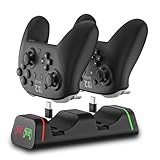
- Controller Charging Dock / Charging Station (2-Port): Dual controller charger dock for Switch Pro & Switch 2 Pro controller, PS5 controller, Xbox Series X|S controller and Xbox Elite Series 2—charge 2 controllers at once.
- Not Compatible with PowerA / 3rd-Party Controllers: This controller charging station does NOT support PowerA, Luna, or other 3rd-party pro controllers (please confirm your controller model before purchase).
- 5V2A Power for Fast Charging: For faster and stable charging, use a 5V/2A USB wall adapter (not included). Low-power USB ports may cause slow or intermittent charging on this controller charger.
- USB Type-C Adapters Included: Removable Type-C (USB-C) adapters for easy drop-in charging and less wear. Tip: insert the adapter fully and remove thick protective cases if the controller doesn’t charge.
- LED Indicator & Smart Protection: Front LED indicator shows Red = Charging / Green = Full. Built-in smart chip protection with low power consumption, compact and stable charging base for desk/TV setup.
Basic Sims 4 mod safety
- Download from a creator’s established page or a recognized community repository, not a shortened link or a random file-hosting mirror.
- Read the installation instructions and the supported game version.
- Keep mods in the correct Sims 4
Modsfolder and lots, households, and rooms in the appropriateTraylocation. - Do not run an executable merely because a mod page says it is needed. Most ordinary Sims 4 package and script mods do not require a “DLC unlocker.”
- Back up your saves before changing a large mod collection, and remove outdated or conflicting files methodically.
- After a game update, expect some mods to require an update from their creator. Disable or remove broken mods rather than downloading an alleged all-in-one “fix” from an unknown source.
CurseForge’s Sims 4 installation documentation explains the current mod and Tray-folder process. Folder names and launcher paths may differ slightly depending on your operating system and installation.
Why replacement unlockers are a bad bet
A Reddit discussion about what players should do without Anadius contains conflicting claims about replacement utilities. Some commenters describe alternatives as working; others make explicit allegations that particular downloads may steal data. Those user comments do not prove that every named file is malicious, and they are not independent malware-analysis reports. They are nevertheless enough to make a safety endorsement impossible.
The risk is not limited to losing access to a game. An untrusted executable can potentially install unwanted software, modify system files, harvest browser data, or expose accounts and saved credentials. A “mirror” can also be repackaged after the original project stops receiving updates. Search ads, Discord attachments, random video descriptions, and file hosts provide no dependable guarantee that the file is authentic.
The Tool Desk
Outbyte PC Repair FREEClear out junk files and repair common Windows errorsFree Scan →Outbyte Driver Updater FREEScan for outdated or missing drivers - takes under a minuteDriver Scan →For that reason, do not download or recommend:
- “Anadius mirrors” or supposed successor updaters;
- patched game executables or launchers;
- manual DLC-unlocking packages;
- password-protected archives whose password is supplied by a video or Discord post;
- tools that ask you to disable antivirus protection or Windows security features; or
- files that require administrator access without a clear, independently verifiable reason.
This is a security warning, not a claim that every replacement file is malware. The accurate position is that unresolved warnings exist and there is no reliable basis for endorsing these downloads.
Best Value

- Better Replacement for Nintendo Switch Original & OLED Model Joycon Charging Dock: This Switch controller charger dock pairs perfectly with your Switch TV dock (for both OLED and Original models) — and charges 6 joycon controllers all at once. It’s a must-have Nintendo Switch controller charger dock for Switch gamers: this joycon charging station even adds 8 slots for game cartridges, keeping your gaming setup tidy and space-saving.Charges Joycon ONLY Console & Original Dock NOT Included.
- Easy To Use Switch accessories: Cradles around your Switch joycon charger and uses 6 joy-controller slots on the side to charge all 6 joycon controllers simultaneously. It is securely fixed to the dock with double-slided adhesives.Great Nintendo Switch charging dock.
- Detials Optimization: This joycon charging dock has built-in an additional light guide plate is added to reflect the green TV light on the dock. This Nintendo Switch controller charger will show the TV modes (On or off). Turn the Nintendo Switch charging dock on and off with the button.
- Safe & Reliable: This Nintendo Switch interactive gaming figures joycon charging station has built-in intelligent protection chips. These are designed to prevent over-currents, over-heating, over-voltage, short-circuits — and as a precaution, it will never overcharge your Nintendo Switch consloe. It’s a trusted Nintendo switch docking station for your Original Switch & OLED gear.
- KDD: Keep durable and distinctive! ONLY FOR JOYCON CHARGING NOT A TV DOCK DOES NOT CHARGE SWITCH CONSOLE. Note: The Nintendo switch joycons, Nintendo console, Nintendo switch dock, Nintendo switch games are not included.KDD: If any issue arrives, please feel free to contact us. Our after-sale service support team will offer help you to the best of our abilities!
If you already ran an untrusted Sims tool
Do not panic, but treat the computer as potentially exposed until you have checked it. The steps below are general precautions, not a forensic diagnosis.
- Stop using the suspicious program. Do not reopen it to test whether it works, and do not download a second “cleaner” from another random site.
- Disconnect the computer from the internet if you suspect active compromise. Disconnect Wi-Fi or unplug Ethernet while you assess the situation. Reconnect only when you need to update security software or seek help.
- Protect important accounts from a clean device. Change your email, EA, Steam, Epic, Microsoft, console-network, banking, and other high-value passwords, especially if they were saved in the browser or entered after running the file. Use unique passwords and enable multifactor authentication where available.
- Run a full scan with reputable, up-to-date security software. Allow it to quarantine or remove detected threats, then follow up with the software vendor’s remediation guidance. Keep Windows and your browser updated.
- Review account activity. Look for unfamiliar logins, password-reset messages, purchases, new recovery details, or changed security settings. Use the affected service’s official account-recovery process if anything is wrong.
- Check persistence and seek expert help when necessary. If detections return, security features are disabled, unknown accounts appear, or the machine behaves strangely, consult a qualified technician or consider backing up personal documents and performing a clean operating-system reinstall.
If the computer is simply slow or unstable after installing software, a general Windows PC cleanup tool such as Outbyte PC Repair may be relevant for troubleshooting performance and unwanted-program issues. It is not proof that a particular Sims download was malicious, and Outbyte states that PC Repair is intended to complement—not replace—an antivirus product. Use your security software first, and do not treat any single utility as a complete malware-removal solution.
What players should do now
| If your goal is… | Best next step | Do not do this |
|---|---|---|
| Keep playing Sims 4 | Install or update the free base game through EA, Steam, Epic, PlayStation, or Xbox. | Use an unofficial launcher or cracked executable. |
| Get a specific official feature | Research and buy the relevant pack through an official storefront, ideally during a legitimate sale. | Download a “DLC unlocker” or buy access from an unverified intermediary. |
| Add furniture, clothing, lots, or gameplay changes | Use compatible mods and CC from CurseForge or established community resources such as Mod The Sims. | Assume mods are substitutes for expansion packs or run unexplained executables. |
| Investigate a suspicious download | Stop running it, scan the system, update software, and secure accounts from a clean device. | Disable antivirus protection or install another random cleaner. |
Bottom line
The end or disruption of an unofficial updater does not end The Sims 4. The base game remains free, official packs can be purchased selectively, EA Play may provide limited additional content depending on your region and membership, and legitimate mods and custom content can add considerable variety. What is not worth the trade-off is gambling with your computer and accounts on an unverified replacement tool just to acquire DLC through an unauthorized route.
Frequently Asked Questions
Can I still play The Sims 4 without Anadius?
No. The Sims 4 base game is free to download through supported EA, Steam, Epic Games, PlayStation, and Xbox distribution channels. Expansion packs and other DLC are separate purchases, but you do not need every pack to continue playing.
Are Anadius replacements or mirrors safe?
There are community claims about replacement utilities, including allegations that some downloads may steal data, but the available discussion does not independently prove that every named file is malicious. Because authenticity and safety cannot be reliably verified, do not endorse or run random mirrors, patched executables, or successor unlockers.
Where can I find legitimate Sims 4 mods and custom content?
CurseForge is identified by EA as the official Sims 4 mod repository created through its collaboration with Overwolf. Mod The Sims is another established community resource. Both provide user-created mods or custom content, not official expansion packs or DLC unlocks.
What should I do if I already ran a suspicious Sims executable?
Stop running the file, disconnect the computer if you suspect active compromise, run a full scan with reputable up-to-date security software, update Windows and your browser, and change important passwords from a clean device. Review account activity and seek professional help if detections or suspicious behavior continue.
The Bottom Line
Keep the free base game, use official EA access when it fits your budget, and get additional variety from reputable mods and custom content. Avoid mirrors, patched executables, and replacement DLC unlockers: community warnings are unresolved, and there is no dependable basis for calling them safe.
Quick Recap
Product prices and availability are accurate as of the date/time indicated and are subject to change. Any price and availability information displayed on Amazon at the time of purchase will apply.




