If your Xbox fan has stopped, is making unusual noise, or the console is overheating, first shut the console down if it is hot, then check airflow and external obstructions. If the fan still will not run or the console continues overheating after those checks, treat it as a possible internal hardware fault and look up service options for your exact model before opening it.
What to do first if your Xbox is overheating
Turn the console off and let it cool in an open, ventilated area. Do not keep playing a demanding game to see whether the fan starts. Poor ventilation, dust, software load, third-party accessories, and internal hardware problems can all contribute to overheating, but the symptom alone does not identify the cause. iFixit’s Xbox Series X overheating guidance discusses these as possible contributors.
Check airflow and external obstructions
- Move the console into open air. Take it out of an enclosed cabinet and away from soft surfaces that may block ventilation openings.
- Clear the exterior vents. Remove visible dust and obstructions from accessible openings. Do not push tools or objects into the console.
- Disconnect external cooling accessories. Temporarily remove third-party cooling fans and other accessories, then test the console without them. Some external coolers can divert airflow and contribute to overheating, according to iFixit. If the symptom improves, reconnect accessories one at a time to identify a possible contributor.
- For Xbox One, consider a power cycle. The iFixit Xbox One fan troubleshooting page recommends unplugging the console for 10 seconds before reconnecting it. That interval is specific to the cited Xbox One guidance; it should not be treated as a universal Microsoft instruction for every Xbox generation.
When an Xbox fan problem needs service
If the fan remains stopped, makes persistent abnormal noise, or the console continues overheating after exterior checks, an internal fan or another component may be faulty. The symptom by itself cannot confirm which part has failed. Checking whether an internal fan is damaged, connected, and receiving power involves opening the console; it is not an external troubleshooting step.
Before opening the console, check current official Xbox repair options and warranty terms for your country and exact model. Availability and terms vary, and the guidance below is not a substitute for model-specific service information.
What’s actually slowing this PC down?
Pick the symptom - the matching free tool is one click away.
#1 Best Overall

- 【Necessary for Xbox Series X】---- This product integrates many functions, such as top cooling fan, dust-proof, light strip, USB interface for data transmission and USB port for charging. It helps to prevent for Xbox Series X console from over-heating and dust to extend the life of your console. (NOTE:When the console is working, the dust cover of the fan can be removed to speed up the heat dissipation effect. Alige the two holes under the dust cover first, then cover the dust cover.)
- 【Efficient Fan System】---- A high-speed large fan are built in the colorful dust-proof cooling fan,which can accelerate the hot air exhausted from the top of the console and reduce the temperature for Xbox series X console. The cooling fan stand with 3 gears and is a touch switch. The low gear is orange, the second gear is blue, and the high gear is green.The heat dissipation effect is more obvious, and the noise is very low, which you can hardly feel.
- 【Colorful Light Strip】---- The cooling bracket for Xbox seris X supports colorful lights and can change the light color with an independent touch switch. The light strip contains 6 monochromes and 1 mixed color. You can use the independent touch switch to change your favorite colors and own a more atmosphere in the process of the game. (NOTE: pressing the light switch for the 7th time will turn light off.)
- 【3.0 USB & USB Charge Port】---- There are 2 USB interfaces in total, one blue 3.0 USB interface supports 3.0 data transmission, another white 2.0 sub interfaces ONLY can charge more products, such as controller, mobile phones, small desk lamps, etc.It is convenient to provide USB interface in the process of your game.
- 【Dust Cover Filter】---- The cooling top bracket for Xbox seris X supports top dust proof,At the same time, the product contains 2 sets * dust cover compatible with Xbox Series X, 1 set * silicone dust plugs,which have accurate size and easy to install and replace without additional tools. Prevent dust from entering the USB and HDMI ports for Xbox Series X, extend the life of your console.
Repair guidance depends on the Xbox model
| Console | Repair information | Compatibility caution |
|---|---|---|
| Xbox One | Troubleshooting guidance and a linked fan replacement guide are available. | Use a guide and replacement part intended for the exact Xbox One model. |
| Xbox Series X | iFixit provides a fan replacement guide; a separate guide covers the Digital Edition. | An iFixit replacement listing identifies compatibility with models RRT-00010 and RRT-00013. Do not assume it fits other models or revisions: check the listing against your console. |
| Xbox Series S | The replacement guide involves substantial disassembly, including chassis and power-supply removal. | Fan assemblies have physically incompatible variants. For the five-blade version described in the parts listing, match the original blade count and last three digits of the fan serial number. Verify the exact part against the original fan and console before buying. |
Replacement fans are not universal. Before ordering a part, verify its compatibility with the exact console model and revision, compare any identifier or blade-count requirements with the original fan, and check whether a mounting bracket is included. Do not choose a generic fan based only on the console family name.
What internal fan repair involves
Opening an Xbox is model-specific work, not a quick extension of exterior cleaning. The Series X repair guides instruct users to power down completely and unplug cables; Microsoft’s XBOX Digital Series X Service Guide (revision M1340630RevA) identifies an anti-static wrist strap and ESD-safe mat among its requirements. The Series X guide calls for a TR8 security driver, while the Series S guide uses T8 and T10 drivers at different steps.
Rank #2

- 🍃The new upgrade, black design tailored for Xbox Series S 1TB.LED Temperature Display-You can always know the temperature of your Xbox Series S console. It helps to prevent your Xbox Series S console from over-heating to extend the life of your Xbox Series S.
- 🍃Intelligent Control & Custom fan speed-[Automatic Mode]: The chip of G-STORY Xbox Series S cooling fan can automatically sense the temperature to adjust the fan speed, you can just enjoy the game and leave the heat to our cooling fan. (when the temperature is <35℃/95℉, it will stop working.) [Manual Mode]:Press the button to select the 3 speed you need, the LED will change color with the speed. (Note: Press down the button for 3s to switch between manual and automatic mode.)
- 🍃Three Level Fan Speed: Depends on the temperature of your xbox console, the Xbox Series S fan cooling system has 3 levels of fan speed(1500/1750/2000RPM) with RGB LED (Green light: 35~43℃/95~109℉; Blue light: 44~48℃/110~118℉; Red light: >48℃/119℉), it can cool your console at the most appropriate speed to protect your console.
- 🍃Low Noise & Light Weight: The Xbox Series S cooling fan is low noise and light-weight, it's powered by your xbox console, it's super portable and won't take too much space.
- 🍃Easy to Install: Just simply place the cooling fan on your console, and connect the cable to your xbox console, it will start to work.
Follow the instructions for your exact model if you proceed. The Microsoft service guide says to pull the fan connector rather than its cable; the Series S guide likewise warns against pulling the wires when disconnecting the fan. If you do not have the appropriate tools or are not comfortable with disassembly and electrostatic-discharge precautions, use a repair service instead.
Independent reader supportYour contribution helps us test, update, and keep practical guides available for everyone.Why the fan matters
Microsoft’s XBOX Digital Series X service guide describes the fan’s function this way: “The fan is used to cool the internal components of the XBOX, preventing overheating and ensuring device optimal performance.” A stopped or noisy fan therefore deserves attention, but no failure rate or average fan lifespan is established by the cited sources.
Quick Recap
Rank #4
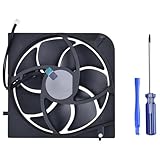
- Only Fit: Brand new and silent Replacement Xbox Series S Internal Cooling Fan
- Compatible With: This 7 blades Replacement Internal Fan ONLY compatible with Xbox Series S Console
- Good Quality: Each Fan was tested before shipping to make sure you will get a workable fan! This 5 blades Xbox Series X fan will have a better low-frequency noise to offer a better experience!
- Package Contain: 1x Replacement Xbox Series X 7 Blades Fan, 1x T8 Screwdriver
- Each replacement CPU coolong fan was tested before shipping.
Rank #3

- VERTICAL COOLING STAND FOR XBOX SERIES S ONLY: This stand holds the Series S console upright to save desk space; not for Xbox Series X and not for Xbox One S consoles - please check your console model first.
- DUAL BUILT-IN COOLING FANS: 2 high speed fans under the base of the console pull heat away during long play sessions and help keep it dust free, working as a compact cooling station for Xbox Series S setups.
- 3 SPEED SETTINGS WITH LED INDICATOR: One button switches the fan speed between 3200, 2800, and 2300 RPM or turns the fans off; the LED shows the active level and the power-off memory recalls your last speed.
- 2 EXTRA USB PORTS ON THE COOLER: One port for charging and one for data transfer connect controllers or other gaming peripherals, and the whole unit is powered by the console through the included Type-C cable.
- REMOVABLE COOLING SYSTEM: Detach the cooler module and the base works as a simple vertical stand when active cooling is not needed; note that the USB ports and speed button sit on the removable cooler section.
Product prices and availability are accurate as of the date/time indicated and are subject to change. Any price and availability information displayed on Amazon at the time of purchase will apply.



