Do these 3 things before closing this tab:
1Repair Windows errors before they cause bigger problems2Scan for outdated or missing drivers - takes under a minute3Clear out junk files and repair common Windows errorsThe PlayStation 2 had no single screen resolution. Most games sent standard-definition video: 480i on NTSC-region consoles and 576i on PAL-region consoles. A smaller number of titles supported 480p progressive scan, and only a handful supported 1080i over component video. These are video output modes. They do not tell you the internal render size of any particular game.
Why there is no single answer
The PS2 was built for televisions of its era, and the output it sent depended on the region the console was sold in, the cable connected to the TV, and in some cases the game itself. A question about “the” PS2 resolution therefore has to be split into three parts: the video mode the console outputs, the scan method used to draw each frame, and the internal rendering resolution the game uses before the image reaches the TV. The first two are well documented. The third varied from game to game and is not covered by any single published figure.
Standard-definition modes by region
For ordinary games, the baseline was standard definition. The table below lists the modes that the sources consulted for this article describe, with the qualifications that apply to each.
| Mode | Scan type | Where it applied | Qualification |
|---|---|---|---|
| 480i | Interlaced | NTSC-region games, the common baseline | Typical for ordinary titles. It is not a guarantee for every game or every special mode. |
| 576i | Interlaced | PAL-region games, the common baseline | Typical for ordinary titles. Whether PAL consoles supported progressive output in the same way is not established by the sources reviewed. |
| 480p | Progressive | Specific titles and a documented DVD-playback feature on the SCPH-79002/SCPH-79003 model | Requires a TV and AV cable that support progressive scan. Not every game supports it. |
| 1080i | Interlaced high definition | A small set of games over component video | Game-specific and rare. It required compatible cables and display hardware. Not the standard PS2 mode. |
480p progressive scan
Progressive scan draws each frame in one pass rather than alternating odd and even lines, which gives a steadier image on displays that handle it well. On the PS2, 480p was a feature of certain games rather than a console-wide setting. Sony’s instruction manual for the SCPH-79002 and SCPH-79003 DVD-playback models states: “This feature is available only if your TV and AV Cable* support progressive scan (480p).” The manual identifies the separately sold Component AV Cable as compatible.
#1 Best Overall

- WORKS WITH PS2 & PS1 — PHAT AND SLIM — Connect your PS2 (both original Phat and Slim models) or PS1 directly to any modern HDTV, monitor, or projector via HDMI. No drivers required. Just plug in and play your classic game library on your modern display within minutes.
- WHAT TO EXPECT FROM THE PICTURE — This adapter converts your PS2/PS1's analog AV signal to HDMI so it works on modern TVs. The PS2 hardware outputs a standard-definition signal (480p max) — the adapter upscales this to 720p for a cleaner look, but cannot go beyond the console's own limits. Great for retro gaming; not a 4K upgrade.
- 4:3 / 16:9 ASPECT RATIO SWITCH — One button to toggle between classic 4:3 and widescreen 16:9 display. Supports 480p and 720p resolution output. Low-latency signal processing for responsive, lag-free gameplay — ideal for action and rhythm games where timing matters.
- POWER REQUIRED — PLEASE READ BEFORE BUYING — This adapter requires an external DC 5V/1A USB power source to operate. A USB cable is included; a USB power adapter is NOT included. Use any standard phone charger or plug into your TV's USB port. No power = no signal output.
- IMPORTANT — PS2 AND PS1 ONLY — Works exclusively via the PS2/PS1 AV output port. Does NOT support PS3, PS4, or PS5. Does NOT work with HDMI capture cards, splitters, or passthrough devices — connect directly from console to TV. Not compatible with BlackMagic brand displays.
That wording describes a DVD-playback feature on those models. It does not establish that every PS2 game supports 480p, and readers should not treat it as proof of progressive output in the games themselves.
1080i: a rare exception
A few games supported 1080i over component video. Speed Demos Archive’s PS2 connector capture reference notes that only a few titles offered this mode and that component cables were required. Because it was game-specific, 1080i should never be described as the normal PS2 output. A 1080i game also says nothing by itself about how sharp or detailed the game looks, since that depends on how the game renders its frames.
Rank #2

- 🎮HD LINK🎮Convert and upscale the analog RGB signals to digital HDMI signals for modern HDTVs/monitors/projectors, which makes the HD link cable compatible with classic PS1, PS One, Fat PS2, Slim PS2
- 🎮EASY TO USE🎮Plug and play with well-prepared cables. Detachable design, so high-end or extended HDMI cables can be used
- 🎮AWESOME IMAGE🎮Provide the best upscaled signal processing with great precision, colors, resolution and details at this price
- 🎮ASPECT RATIO SWITCH & LOW LATENCY🎮Support 4:3 and 16:9 with a toggle switch & unnoticeable lag when playing games
- 🎮ONE-YEAR WARRANTY🎮Offer the free replacement without asking and helpful customer service
Output resolution is not internal rendering resolution
The video mode a console sends to the TV is only one stage of the image pipeline. A game may draw its scene at a lower or different resolution internally, and the console then delivers the result in one of the output modes above. For that reason, a 480i or 576i signal should be read as the connection standard, not as a measurement of how many pixels the game drew. Pixel dimensions for the internal render of individual games are not established by the sources behind this article, and no universal figure should be assumed.
Independent reader supportYour contribution helps us test, update, and keep practical guides available for everyone.What PS3 upscaling changes
Sony’s PS3 game settings guide explains that PS2-format video is recorded in standard-definition modes and can be upscaled by a PS3 for display at higher resolutions, such as 720p, 1080i or 1080p. This is a separate process from native PS2 output. If a PS2 game is played on a PS3 and shows a 1080p picture, that picture is the PS3’s upscaled version of standard-definition source video. It does not mean the original PS2 rendered or output 1080p for that game.
Quick Recap
Best Value

- Composite to HDMI Converter: Converts analog AV composite (Yellow, White, Red) input to HDMI 720P/1080P (60HZ) output, displayed on smart TV, Projector or HD Display, which bring back your old and cherish memories.
- Plug to Play: This HDMI Converter no extra drivers need, just plug and play,easy to use. Please hook up the USB Power Cable (included) to 5V power source during use. Note: The Video Converters only support converts AV to HDMI, can't converts HDMI to AV.
- Widely Used: This composite to hdmi adapter is widely applied to PS1, PS2, PS3, Xbox, N64, Wii, STB, VHS, VCR, DVD Players and other devices with standard composite AV input. Note: It can only be used when PS2 is set to RGB output.
- Wide Compatibility: This Video Audio Converter Adapter supports source formats of PAL, NTSC3.58, NTSC4.43, SECAM, PAL/M, PAL/N standard TV. Provide advanced signal processing with great precision, colors, resolutions, and details. Important Note: This converter can't improve video quality!
- Attention & Package: Please ensure to connect this av hdmi converter to power source to make it work. Package include: 1*AV to HDMI Adaptor, 1*USB Power Cable(adapter not included), 1*User Manual.
Rank #4
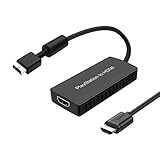
- PS2 Adapter: Convert PlayStation1/2/3 signal to HDMI signal (sony playstation game console connection to HDTV)
- No need to install drivers, portable, flexible, plug and play.
- PS2 to HDMI Converter: Support HDMI 16:9/ 4:3 output switch.
- NOTE: Compatible with PlayStation1/2/3 only.(Note: It's just a converter, you also can play PS1 games on PS2)
- RGB signal mode display. Video signal transfer only, can't improve the video quality.
Rank #3

- Avoid Black Screen – Easy Setup Required: Make sure to set your PS2 output to YPbPr/YCbCr (component mode) before using this HDMI converter. Search “How to set up PS2 to HDMI adapter” online to avoid black screen or “out of range” errors..
- Wide Compatibility – Works with HDTVs & Monitors: This PS2 to HDMI adapter supports all standard PS2 display modes (480i, 480p, 576i) and connects seamlessly to HDTVs, HDMI monitors, projectors, and more for a great gaming experience.
- High-Definition Video & Audio Output: Enjoy crystal-clear digital video and audio via HDMI with perfect sync. This converter only supports YPbPr/YCbCr signals (component), delivering lossless quality for your classic PS2 games. (Note: CVBS signals are not supported.)
- Designed for Original PS2 Consoles Only: Our converteronly compatible with PS2 console models (10000/ 30000/ 50000/ 70000 series). Not for PS2 90000 consoles. If your PS2 has been hardware- or software-modified, the PS2 HDMI adapter may not function correctly, potentially resulting in a black screen or loss of signal.
- Plug & Play with USB Power Supply: No drivers needed. Simply connect the converter between your PS2 and display, with no complex drivers required, this PS2 to HDMI converter ensures a straightforward installation for a seamless gaming experience.
Checking what your PS2 and game are doing
- Confirm the region. NTSC consoles produce 480i as the baseline; PAL consoles produce 576i.
- Match the cable to the goal. Composite and S-Video connections are associated with 480i in the connector reference. Progressive or 1080i output requires component video and a compatible cable.
- Check the TV. A progressive-scan or 1080i signal is only usable if the display accepts it. If the TV does not support the mode, the picture will not be shown in that mode.
- Check the game. Progressive or 1080i support is title-specific. Do not assume it from the console’s capabilities.
- Check any upscaler. A PS3, a scaler or a TV may change the displayed resolution. Note whether the image is native console output or processed by external hardware.
Product prices and availability are accurate as of the date/time indicated and are subject to change. Any price and availability information displayed on Amazon at the time of purchase will apply.




