Recommended Free Tools
Your Minecraft worlds are managed through the game’s Play screen and Settings > Storage > Manage Worlds—not a Windows-style folder you can browse on Xbox. A world may be stored on the console, in Xbox cloud storage, or in both places. Check its status before deleting or moving a copy.
How to find your Minecraft worlds on Xbox
-
Open Minecraft and go to the Play screen. The world list shows whether each world is on the console, in the cloud, or both.
-
For storage details, open Settings > Storage > Manage Worlds. Select the information control beside a world to see details such as file size, last-played date, and storage location. Minecraft’s storage guide explains these controls.
On the Play screen, no status icon means the world is cloud-synced; a cloud icon means cloud-only; and a hard-drive icon with an upward arrow means local-only. Those labels describe where copies are, not whether a world is available to play right now.
What’s actually slowing this PC down?
Pick the symptom - the matching free tool is one click away.
#1 Best Overall

- PERFECT FOR GAMERS: Elevate your gaming experience with the Kytok Controller Stand, a perfect gamer organizer that will delight any avid gamer. Whether for a birthday, holiday, or special occasion, this stand combines sleek design and functionality, making it a great solution for gamer.
- HEADSET HOLDER: Gaming headset stand is not only a practical accessory, but also a fashionable addition to your gaming lifestyle. After using your headphone, you can easily hang them on the headphone hanger. The vertically designed game headphone stand does not take up any extra space, making your gaming area neat and orderly.
- ALUMINUM ALLOY METRIAL: Immerse yourself in worry-free gaming sessions with the ps5 controller holder. Crafted from high-quality aluminum alloy, the main body not only ensures stability and durability but also provides a premium look and feel. Bid farewell to wobbling or instability—your controllers are securely cradled.
- ORGANIZE YOUR GAMING SPACE: Transform your gaming area into a clean and organized haven with xbox controller holder. Keep your controllers within arm's reach, neatly displayed and ready for action. This switch stand is not just a functional accessory; it's a statement piece that adds a touch of sophistication to your gaming sanctuary.
- 4-STEP SIMPLE INSTALLATION: Say goodbye to complicated setups and hello to simplicity. The Kytok Controller Stand is thoughtfully designed for hassle-free installation. With user-friendly features, you can have it up and running in no time, allowing you to focus on what matters most.
What the cloud and local labels mean
| Status | Where the world is | What to know |
|---|---|---|
| Cloud-synced | On this Xbox and in the cloud | There is a local copy and a cloud copy. |
| Cloud-only | In the cloud, not on this Xbox | Download it from Manage Worlds to put a copy on the console. |
| Local-only | On this Xbox, not in the cloud | Upload it from Manage Worlds if you want it backed up or available to sync. |
Current Minecraft guidance says Xbox backs up worlds to the cloud when the console is online and signed in. Newly created worlds are backed up when created online; a world created offline is backed up the first time it is played online. Worlds that have not been played may remain only on the device until backed up. Older local-only worlds can be uploaded manually.
Upload, download, or remove a copy
In Settings > Storage > Manage Worlds, use the action for the copy you need:
-
Back up a local-only world: choose its upload-to-cloud action.
Rank #2
 MANMUVIMO Controller Holder for 16 Xbox PS5 PS4 Gaming Controller, Video Game Controller Holder Headphone Stand for Desk, Gamer Gifts for Men, Gaming Room Accessories Maximum Organizer Rack
- 🎮︎【MAXIMUM GAMING CONTROLLER STORAGE FOR TOP GAMERS】Unprecedented Design! MANMUVIMO's latest video game controller holder can perfectly organize 16 gaming controller at once, the largest capacity controller organizer to date! Designed for game enthusiasts, and it is the perfect gaming gifts for men! An essential gaming accessories for game room!
- 🎮︎【Universal Controller Stand for Desk】The game controller works with almost all versions of controllers and is compatible with all kinds of retro and wired controllers, uch as: PlayStation PS5/PS4/PS3/PS2, Xbox One, the Xbox Series X/S/Elite, etc. In addition you can also store other devices, similar to mobile phone, headphone, game console and so on. Give your controllers and video game accessories their own place, and keep your desktop tidy.
- 🎮︎【Weighted Metal Base Provides Maximum Stability】The controller stand for desk base is designed with a weighted iron to hold the display firmly on the desktop, even if the game stand is loaded with 16 heavy controllers, it will remain completely stable and provide protection for your precious controllers. Perfect for use in the gaming room, office, studio, bed room or next to the TV. In addition, the connecting tube of the gaming organization is made of aluminum alloy, which greatly extends its service life.
- 🎮︎【Super Easy to Assemble and Use Without Tools】This detachable controller storage is very sturdy and easy install, no tools or helpers needed, just put the parts together, align the holes for installation and you have a complete controller stand. If you want to organize and display your game controller, this universal video game controller stand is highly recommended.
- 🎮︎【Stylish Special Design】Our game controller display rack is designed with beautiful shape and elegant texture, the remote stand is in harmony with the game controller, showing a luxurious feeling, finish storing the game controller and also a perfect display stand. The stand design is convenient for the controller to dissipate heat after playing games. Our controller stand can meet your various game management needs. This is top gifts for gaming enthusiasts!
-
Get a cloud-only world onto the Xbox: choose its download-from-cloud action.
Windows Errors? Fix Them Before They Spread
Repair common Windows errors and clear accumulated junk for a smoother, more stable PC - no reinstall needed.Free scan · no reinstallOutdated Drivers Are Slowing You Down
One free scan finds every outdated or missing driver and matches the right update for your exact hardware.Free scan · exact hardware matchSpecial offer. See more information about Outbyte and uninstall instructions. Please review EULA and Privacy policy. -
Free cloud storage: move a less important world to local-only storage or remove its cloud copy. Removing the cloud copy leaves the local copy on the console.
-
Remove a console copy: use the separate delete-local-copy action. This is different from removing the cloud copy.
Rank #3
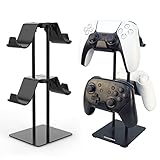 Monzlteck Desktop Controller Holder for PS4/PS5/Xbox ONE/Switch Pro/Headset, Controller Organizer,Gaming Accessories
- 1: The problem: I have different controllers for all kinds of game machines, such as PS4, PS5, SWITCH, XBOX and pc games. Nowhere to settle them. The Solution: Set up a home for them, a universal controller holder which has 2 tier 4 places.
- 2: Easy to mount? Absolutely Yes. Follow the description of our manual, one screwdriver two steps 3 minutes and you get 4 places.
- 3: Space Saving: This bracket makes good use of the upward space, allowing the handles to be placed in two layers, Space saved and much more tidier.
- 4: Simple but Stable: The weighted base design makes the stand more stable, and it is not easy to fall over during the handling of the handles.
- 5: Careful and Reliable: The handle hook is made of plastic, make sure the handles will not be scratched. The base is padded to prevent scratches on the desktop.
Check the status and choose the copy you intend to keep before confirming a deletion. Minecraft’s guide describes the storage actions and status indicators.
Why you cannot browse to an Xbox world folder
The official Xbox instructions document in-game storage management and the console’s saved-data recovery flow; they do not give players a normal filesystem path to open or a direct procedure to export a world file from Xbox. Do not use Windows Bedrock or Java Edition folder paths as if they were Xbox locations. The documented Bedrock method for moving a world to another device is through Realms.
The Tool Desk
Outbyte Driver Updater FREEFix the driver behind crashes, sound loss and screen glitchesFind Drivers →Outbyte PC Repair FREEClear out junk files and repair common Windows errorsFree Scan →Recover a world or a newer cloud copy
Minecraft says the most recent cloud save is restored automatically when device files are missing. If the console has an out-of-date copy and the current version is safely in the cloud, Minecraft’s documented recovery sequence is to delete the console’s saved data for the profile and then relaunch Minecraft so it can sync the cloud save.
Rank #4
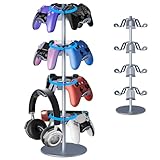
- 【Premium Aluminum Alloy Material】This gamepad stand is made of high-quality aluminum alloy, which is sturdy and durable, not easy to deform or get damaged. It ensures long-term and stable support for your gaming accessories, so you don't need to worry about collisions and wear during daily use.
- 【Rotatable Adjustment Function】The stand is equipped with flexible rotating joints. You can freely adjust the angle according to your personal needs. Whether you are sitting or lying down to play games, you can always find the most comfortable viewing angle and fully enjoy the immersive gaming experience.
- 【Three-tier Large Capacity Design】With three independent storage layers, it can hold multiple gamepads, headphones, and other small gaming accessories at the same time. It helps you easily organize your desktop and say goodbye to clutter, making your gaming equipment within easy reach.
- 【Stable Anti-slip Base】The bottom is designed with a wide anti-slip rubber pad. When placed on the desk or the floor, it has excellent stability and effectively prevents the stand from sliding or tipping over, safeguarding your valuable gaming equipment.
- 【Universal Compatibility】Specially designed to meet the needs of all kinds of gamers, it is compatible with the controllers and accessories of mainstream game consoles such as Xbox, PS5, PS4, and Switch Pro. One stand fits all, so you don't need to worry about compatibility anymore.
-
On Xbox, go to My games & apps > See all > Minecraft > Menu > Manage game > Saved data.
-
Select the profile, then choose Delete from console.
-
Launch Minecraft and allow it to sync the latest cloud save.
Special offer. See more information about Outbyte and uninstall instructions. Please review EULA and Privacy policy.Best Value
 UPERGO Solid Wood Headphone Stand with Controller Holder for Desk
- Two-in-One Desk Organizer - Holds Headphones & Controllers: Cleans up your desk with a dedicated spot for your headset and controller in a single compact stand. Works as a PS5 controller stand, Xbox controller holder, or Switch accessory organizer - no more tangled cables or cluttered surfaces. A practical gamer gift for men that keeps the setup ready for action
- 100% Natural Solid Wood- Built to Outlast Plastic: Unlike hollow plastic stands that wobble over time, this solid wood headphone holder holds its weight. Sturdy base and smooth sanded finish handle daily use without scratches,peeling, or bending -whether on a gaming desk or home office setup. A premium headphone stand that doubles as desktop decor
- Universal Fit -PS5,Xbox, Switch Headphones & Controllers: Fits all standard headphone styles plus PS5, Xbox Series S/X, and Switch Pro controllers. The base stays planted with non-slip grips - no wobble when you grab a controller. Sets up in under 2 minutes with the included hardware. A dedicated PS5 headset stand and controller hold ready for your game nights
- Gamer Gift That Looks Good on Any Desk: More than a headphone stand- a natural wood accent piece that turns clutter into decor. The warm wood grain pairs with any room, from bedroom gaming setups to office desks. An easy birthday or holiday gift for boyfriends, brothers,teens, or the gamer friend who already has everything
- Gift-Ready Box + Reliable Daily Use: Comes in a sleek, ready-to-gift box- no wrapping needed. The solid wood headphone stand with controller holder handles daily use on PC gaming desks or living room setups. Lightweight yet sturdy, it's designed to hold your gear steady for the long haul
This removes the console copy for that profile; it is not a way to recover a version that never reached the cloud. Confirm that the cloud contains the version you want before using the procedure. See Minecraft’s Xbox saved-data instructions.
Independent reader supportYour contribution helps us test, update, and keep practical guides available for everyone.Move a Bedrock world to another device with Realms
Minecraft’s documented cross-device transfer route for Bedrock is to upload the single-player world to a Realm slot and download it on the destination device. The instructions require an active Realms trial or paid subscription and up-to-date Minecraft on both devices. Minecraft’s Realm transfer guide provides the current steps.
Upload the world from the source device
-
Open Play, select the Realm, and open Realms Hub.
-
Edit a world slot. Choose Upload World for an empty slot, or Replace World if you intend to overwrite the world already in that slot.
Download it on the destination device
-
Sign in with the Microsoft account used for the Realm, then open the Realm’s hub.
Do these 3 things before closing this tab:
1Clear out junk files and repair common Windows errors2Scan for outdated or missing drivers - takes under a minute3Repair Windows errors before they cause bigger problemsSpecial offer. See more information about Outbyte and uninstall instructions. Please review EULA and Privacy policy. -
Edit the relevant world slot and choose Download World. The downloaded copy appears in the destination device’s Worlds tab with “- Copy” appended to its name.
Restore a Realm backup only if you want to roll back
A Realm backup can help undo unwanted changes or address corrupted files, but restoring it rolls the world back to the captured point. Builds and items added after that backup will not be in the restored version. Minecraft’s Realm backup instructions explain how to select and restore a manual or automatic save.
Quick Recap
Product prices and availability are accurate as of the date/time indicated and are subject to change. Any price and availability information displayed on Amazon at the time of purchase will apply.




