Outdated Drivers Are Slowing You Down
One free scan finds every outdated or missing driver and matches the right update for your exact hardware.Free scan · exact hardware matchPC Slower Than It Used to Be?
A free scan shows the junk files, broken settings and background clutter dragging Windows down - then fixes them in one click.Free scan · Windows 10 & 11On a real PSP running compatible custom firmware (CFW), put the ISO in an ISO folder at the root of the Memory Stick—for example, X:/ISO/game.iso. The ISO folder belongs beside PSP, not inside it. Copying an ISO to storage does not make it playable on unmodified official firmware.
What folder do I put ISO files in on PSP?
Use the top-level ISO directory on the Memory Stick. If the card appears on your computer as drive X:, the file path would look like this:
X:/ISO/game.iso
Here, X: is only an example drive letter. The folder is a sibling of the existing PSP folder, not a folder inside PSP/GAME.
How to copy an ISO to the Memory Stick
- Connect the PSP storage to a computer, or remove the card and use a card reader. A USB cable is not required if you use a reader.
- Open the Memory Stick’s top-level directory. It commonly contains folders such as
PSP,MUSICorPICTURE. - Create a folder named
ISOat that level if one is not already there. - Copy the ISO file directly into
ISO. Extract it first if it is inside a ZIP or RAR archive; do not put the image inPSP/GAME. - Safely disconnect the storage, then check the PSP’s Game/Memory Stick view while compatible CFW is active. Menu labels and behavior vary by firmware.
The resulting layout should resemble this:
Memory Stick root/
├── ISO/
│   └── game.iso
└── PSP/
    └── GAME/
Does this work on official PSP firmware?
No—not as a general folder-copy procedure. ISO loading from storage is a custom-firmware use case; Sony’s user manual does not document this workflow. If the PSP is running unmodified official firmware, do not expect an ISO copied to the Memory Stick to appear as a playable game.
What’s actually slowing this PC down?
Pick the symptom - the matching free tool is one click away.
#1 Best Overall

- Compatible with MagicGate copyright protection technology
- Can be used to perfect on the PSP adn digital camera
- Memory Stick PRO-HG Duo is ideal for high-speed data transfer and for continuous shooting
- 16GB capacity Flash memory Ideal for burst shooting with DSLR Up to 30MB/s read/write speed
- Can be used to perfect on the PSP(PSP1000/2000/3000/3000) and digital camera.
PPSSPP is a separate emulator, not PSP firmware. Its instructions for opening ISO or CSO files through device storage navigation do not describe how a real PSP reads games from a Memory Stick. PPSSPP’s guidance also covers using games you own or otherwise obtained legitimately, including making a copy from a UMD; do not download commercial game images from unauthorized sources. See PPSSPP’s guide to getting games.
Which file formats can the PSP read?
ISO is the common disc-image format for this folder. CSO is a compressed ISO format that can also work on real PSP hardware with compatible CFW: PPSSPP describes it as compatible with various custom firmwares and playable from a Memory Stick. That does not mean every firmware or loader supports every format.
Rank #2
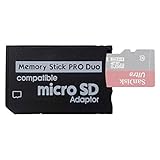
- 2026 Latest Version - Funturbo Micro SD to MS Pro Duo Adapter
- Replace your Memory Stick PRO Duo with any microSD card (MicroSD Card NOT included)
- Up to 128GB Micro SD/SDHC/SDXC Card Compatible
- Compatibility Tested – Fully compatible with MagicGate Memory Stick DUO and Memory Stick PRO Duo, all known issues fixed
- Works perfectly on PSP 1000/2000/3000, Sony camera and handycam, format your card in your device for first time use
Support depends on the CFW and its loader. For example, ARK-4’s ISO Driver documentation describes automatic driver selection and lists ISO, CSO, PBP and other compressed formats. Treat that as ARK-4-specific documentation, not a universal format list for PSPs.
What to check if the ISO does not appear
- Check the folder level:
ISOshould be at the Memory Stick root, alongsidePSP. - Check the file placement: put the extracted image directly in
ISO, not in an archive, nested folder orPSP/GAME. - Check firmware and format support: compatible CFW must be active, and the loader must support the file type. Confirm details in the documentation for that CFW.
- If the Memory Stick is not recognized: Sony’s PSP-3004 guide advises formatting a card with the PSP if a card formatted on another device is not recognized. Back up its contents first: formatting erases data. See Sony’s Memory Stick instructions.
- If the file is too large: Sony’s 2009 PSP-3004 User’s Guide states that the Memory Stick file system limits files recorded or played to less than 4 GB per file. This figure is specific to the manual’s PSP-3004 Memory Stick guidance; do not assume it describes every possible storage configuration. See the PSP-3004 User’s Guide.
Do I need a USB-Mini cable?
No. You can transfer files by connecting the PSP to a computer or by using a card reader. PPSSPP’s documented UMD-dumping workflow uses a USB-Mini cable, but that is one transfer method rather than a requirement for placing files in the Memory Stick’s ISO folder. See PPSSPP’s UMD-dumping instructions.
Do these 3 things before closing this tab:
1Fix the driver behind crashes, sound loss and screen glitches2Repair Windows errors before they cause bigger problems3Scan for outdated or missing drivers - takes under a minuteQuick Recap
Best Value

- Perfect Compatibility: This PSP memory stick adapter is fully compatible with MagicGate Memory Stick DUO and Memory Stick PRO Duo, ensuring reliable and high-speed data transfer
- Latest Upgraded Adapter: Convert your Memory Stick PRO Duo to any Micro SD/SDHC/SDXC card up to 128GB, allowing you to expand your storage based on your needs. (32GB Micro SD card included. Note: The 128GB memory card is only supported on PSP systems 6.60 and above. The maximum capacity supported by the adapter may vary depending on the device model.)
- Wide Device Compatibility: Works seamlessly with PSP 1000, 2000, 3000 and PSP E1000 models, as well as Sony Cybershot cameras and Handycam, offering excellent versatility for various devices
- Cost-Effective Storage Expansion: The included 32GB Micro SD card provides ample space for games, media, and more. It’s compatible with smartphones, tablets, cameras, GoPro/action cameras, laptops, desktop PCs, DSLR cameras, drones, Nintendo Switch, PlayStation Vita, and other portable gaming consoles. Say goodbye to expensive Memory Stick PRO Duo cards. Use affordable Micro SD cards for an efficient and budget-friendly storage solution
- Easy Setup: Simply insert a Micro SD/SDHC/SDXC card into the adapter, then insert it into your device. First-time use? Format your card directly in your PSP or camera for optimal performance
Rank #4

- Featuring extensive compatibility design, the system enables seamless interconnection between your rare PSP (full series 1000/2000/3000 models), everyday Cyber-Shot cameras, professional DSLRs, and Handycam recorders. As a multifunctional content nexus, it systematically manages diverse digital content including game storage, photographic works, and video documentation.
- High-Speed Large Capacity Storage: Utilizes a 128GB Memory Stick PRO Duo flash memory card, providing reliable storage support for DSLR high-speed continuous shooting. With read/write speeds up to 30MB/s, it rapidly completes the writing of high-resolution footage, effectively improving shooting efficiency and workflow smoothness.
- Benefit from blazing-fast transfers with remarkable performance. When working with huge high-resolution photo sets or transferring large video and game data, it enables instant access and seamless sharing, maintaining your creative workflow without interruption.
- Compact Design: Engineered with a miniature footprint, this memory card maintains exceptional capacity within an ultra-compact form, offering ample space to effortlessly and joyfully preserve every special moment.
- Featuring MagicGate copyright protection compatibility, it provides a secure and protected download environment.
Rank #3

- 64GB Memory Stick Pro Duo
- This consists of a 64GB memory card and a memory stick ADAPTER.Can be used the PSP(PSP1000/2000/3000/3001)and digital camera.
- Compatible with MagicGate copyright protection technology
- 64GB capacity Flash memory Ideal for burst shooting with DSLR Up to 30MB/s read/write speed
- Compact Design:The memory stick duo pro has small and compact design does not affect storage, and the sufficient capacity allows you to capture every wonderful moment easily and happily.
Product prices and availability are accurate as of the date/time indicated and are subject to change. Any price and availability information displayed on Amazon at the time of purchase will apply.



