If other players see a default character instead of your custom Minecraft skin, start by checking the viewer’s settings—not just yours. In Bedrock Edition, a player may need to turn off Only Allow Trusted Skins on their own device to see some custom skins. If the skin is missing even for you, confirm it imported and is equipped, then check the same setting.
First, work out who cannot see the skin
Ask each affected player what they see. If your skin looks correct on your screen but appears as Steve, Alex, or another default character to a friend, begin with that friend’s settings. Mojang’s Bug Tracker issue MCPE-78206 advises that viewers may need to disable “Only Allow Trusted Skins” to see some other players’ skins, and specifically says friends who cannot see your skin should check the toggle on their own profiles: Mojang Bug Tracker: MCPE-78206.
That setting’s menu location is not described consistently across the official material: the bug tracker refers to Settings > Profile, while Microsoft Learn’s skin-pack guide points to Settings > General. Menu labels can vary by version, so check both areas if needed. Microsoft Learn recommends toggling the setting off if Minecraft does not recognize an imported skin: Microsoft Learn: Packaging a world template.
Check the skin on your own device
If you cannot see your own skin in-game, first confirm it appears in your skin selection screen and is actually equipped. For a Bedrock skin pack, Microsoft Learn documents a flow that includes opening the .mcpack file, going to Dressing Room, choosing Classic Skin if prompted, selecting the skin, and equipping it. Follow the guide for the relevant pack type and Minecraft version: Microsoft Learn’s skin-pack guide.
Free tools Windows power users keep installed
One-click scans. No signup required.
#1 Best Overall
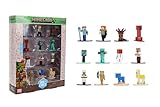
- Epic Minecraft lineup in your hands; features 12 fan-favorite characters including Steve, Alex, and Snow Golem
- Die-cast durability meets blocky style; each figure crafted in solid metal with pixel-perfect detailing for display or play
- Sized for collectors and kids alike; 1.65-inch scale fits easily on shelves, desks, or in toy worlds of their own
- Ready for creative adventures; includes animals, mobs, and heroes like Glow Squid, Yellow Llama, and Wild Axolotl
- Jada Toys – official Minecraft partner; trusted for authentic die-cast figures from the world’s biggest brands
- Open the skin pack file and wait for Minecraft to finish importing it.
- Open Dressing Room and choose Classic Skin if Minecraft prompts you to choose a skin type.
- Select the imported skin and equip it.
- If Minecraft does not recognize it, find Only Allow Trusted Skins in Settings and toggle it off.
These steps establish whether the skin is available and selected locally; they do not guarantee that every other player or server will display it.
Make sure everyone is on the same edition
Check whether each player is using Java Edition or Bedrock Edition. Minecraft Help says Java players can join Java-hosted games, while Bedrock players need Bedrock-hosted games. Matching editions are a multiplayer requirement, but an edition mismatch by itself does not prove why a skin is invisible once players are in a compatible game. See Minecraft Help: How to Play Minecraft Multiplayer.
Rank #2

- Minecraft fans can create snuggles and stories with plush figures inspired by favorite characters from the video game universe!
- Each soft doll is 8 inches tall and made with a mix of premium fabrics, making them fun to hold and cuddle.
- They wear their iconic costumes so they're easily recognizable and ready for gaming adventure!
- Pixelated details give them an extra element of collectability!
- The selection of Minecraft plush makes a fun video-themed gift for kids and collectors ages 3 years old and up (each sold separately, subject to availability)
Also note the device and game version for each player. Console players may need the relevant online multiplayer subscription to join online games; that is a separate access requirement, not a skin-visibility fix.
Compare an imported skin with an in-game look
Java skins are selected through the Launcher, while Bedrock players can customize character looks through the in-game customization system. If available, try a built-in or already-owned Marketplace look as a diagnostic comparison. If that look appears to other players but the imported skin does not, the issue may be specific to the imported skin or its handling. This comparison is not a guaranteed fix, and buying Marketplace content is not necessary as a first troubleshooting step.
The Tool Desk
Outbyte PC Repair FREEClear out junk files and repair common Windows errorsFree Scan →Outbyte Driver Updater FREEScan for outdated or missing drivers - takes under a minuteDriver Scan →Rank #3

- Minecraft fans can create snuggles and stories with plush figures inspired by favorite characters from the video game universe!
- Each soft doll is 8 inches tall and is made with premium fabrics, making them fun to hold and cuddle.
- They wear their iconic costumes so they're easily recognizable and ready for dreams of adventure!
- Pixelated details give them an extra element of collectability!
- The selection of Minecraft plush makes a great gift for kids and collectors ages 3 years old and up (each sold separately, subject to availability).
- For the Java skin path, see Minecraft: Java Edition skins.
- For Bedrock customization, see Minecraft Character Creator and Minecraft Marketplace.
If the skin is still invisible
There is no single verified fix for every multiplayer skin-loading problem. The Mojang tracker records MCPE-78206 as confirmed and resolution-fixed, but that status does not establish that every current issue across platforms, servers, accounts, and versions is resolved.
When asking for help, include the details that distinguish those cases:
Quick Recap
Best Value

- MINECRAFT TOY FOR KIDS – The Nether Lava Battle is a small LEGO Minecraft set that provides big build-and-play fun for boys and girls 6 years old and older who play the popular video game
- PRETEND PLAY – This playset includes a buildable section of the Nether fortress bridge, and minifigures including Alex, a wither skeleton, plus blaze and strider LEGO Minecraft figures with weapons and accessories
- LEGO MINECRAFT FORTRESS ACTION – Players will need their skills to collect ancient debris, escape a lava fall, battle mobs and ride a Minecraft figure to safety
- MINECRAFT FIGURES – The skeleton wields a stone sword, the whirling blaze spins its rods, the strider features posable legs and a saddle, and Alex carries the game’s familiar diamond sword
- FUN GIFT IDEAS – This hands-on video game set is a great birthday, holiday, or any-day treat for boys and girls who love small build-and-play toys packed with activity
Rank #4

- Capture the excitement and adventurous play of Minecraft!
- Each 3.25-inch scale Minecraft action figure comes with an accessory to recreate favorite in-game moments!
- Each also includes 1 Redstone Building Piece -- fans can collect the figures and combine all 6 building pieces to build a working TNT Cannon (each sold separately, subject to availability).
- For even more ways to play and display, the pixelated character figures are posable with movable joints!
- The collectible figures make a great toy for video-game players and fans ages 6 years old and up, who will want them all! (Each sold separately, subject to availability.)
- Java or Bedrock, device, and game version
- Whether the game is a Realm, hosted world, LAN game, or public server
- Whether the skin is imported or selected through the in-game customization system
- Whether the skin appears in your own Launcher or Dressing Room
- Which players cannot see it, and whether they have checked their trusted-skins setting
Product prices and availability are accurate as of the date/time indicated and are subject to change. Any price and availability information displayed on Amazon at the time of purchase will apply.



