Recommended Free Tools
You can’t dock a Nintendo Switch Lite to a TV because the Switch Lite does not support TV mode. Nintendo’s compatibility guidance also lists the standard Nintendo Switch dock and the dock with LAN port as incompatible with the Lite, so a dock that works for other Switch models won’t give you TV output with this one. The Lite is built for handheld play and also supports tabletop play on its own screen.
What “docking” means on the Switch Lite
When people say “dock,” they usually mean connecting the console to a television so the game appears on the TV. Nintendo calls this TV mode. The Switch Lite is the one current Switch model that has no TV mode at all. Nintendo’s support page on connecting a Switch to a TV states that the Switch Lite does not support TV mode, and its play mode overview repeats the same limitation.
That makes this a product limitation, not a setup problem. No setting, cable, or firmware step turns on TV output for the Lite, and no dock fault explains it.
What Nintendo’s compatibility chart shows
Nintendo’s play mode, accessory, and features compatibility FAQ answers the question model by model. For the Switch Lite, it lists:
#1 Best Overall

- Dock included with the Nintendo Switch system
- Does not include Ac Adapter or HDMI Cable
- Maintain multiple Switch docks in your home to easily move from one TV to another
- Nintendo Switch box set does not include the console or controllers
- Original OEM product is completely compatible with the Switch
| Question | Switch Lite result (per Nintendo Support) |
|---|---|
| Supports TV Mode? | No |
| Supports Handheld Mode? | Yes |
| Supports TableTop Mode? | Yes |
| Works with the standard Nintendo Switch dock? | No |
| Works with the Nintendo Switch dock with LAN port? | No |
Two things follow from this. First, the dock is not a missing accessory you can swap for a cheaper one; Nintendo says the Lite is not compatible with either dock. Second, the Lite’s supported modes are handheld and tabletop. Nothing on the chart gives it a third option for TV output.
Why Nintendo doesn’t explain the hardware reason
Nintendo’s support material establishes the compatibility rule but does not describe the engineering behind it. It does not name a specific chip, connector function, or video protocol as the cause, and this article does not either. What you can rely on is the official statement that the Lite does not support TV mode and is not compatible with the Nintendo Switch docks.
Rank #2

- 🎮 (NOTE: This dock lacks a built-in Ethernet/LAN port and is not compatible with Switch 2)【Seamless TV Docking & Fast Charging】: Effortlessly connect your console to different TVs using the high-bandwidth HDMI cable (Supports 1080p@60Hz). Simultaneously charge your device at high speeds (up to 39W PD) thanks to the integrated power delivery system. Built-in cable management keeps your setup clean and organized.
- 🎮【Intelligent & Safe High-Wattage Charging】: Features intelligent power delivery to maintain stable high-wattage charging (up to 39W) for your console. A multi-protection system with thermal monitoring actively safeguards against over-current, over-voltage, and overheating during extended use, ensuring operational safety.
- 🎮【Versatile Connectivity Hub】: Expand your setup with this 3-in-1 hub featuring HDMI output, a high-speed USB 3.0 port, and two standard USB 2.0 ports. The non-slip base with integrated cable channels provides stable support for the console's tabletop mode and convenient accessory expansion.
- 🎮【Complete & Portable Docking Solution】: Get everything you need in one kit: a compact TV dock, HDMI cable, and PD charger. Designed for portability, these components easily fit into most travel bags or laptop sleeves, making it your perfect on-the-go docking station.
- 🎮【Reliable Compatibility & Stable Performance】: Engineered with an original-grade premium chipset, this dock ensures stable and reliable 1080p video mirroring to your TV. Enjoy peace of mind with enhanced compatibility designed for seamless operation.
Which Switch models support TV play
Nintendo’s normal dock-to-TV instructions apply to the original Nintendo Switch and the Nintendo Switch – OLED Model. If you need the game on a television, one of those two consoles is the supported route. The compatibility material cited here covers those models and the Switch Lite. For newer Nintendo hardware, check Nintendo’s current compatibility chart before assuming how a dock or accessory will behave.
Playing on the Switch Lite with a stand (tabletop mode)
If the real goal is to set the console down and play hands-free, tabletop mode is the supported option. Nintendo says the Switch Lite has no built-in stand, so you need a separate one. Two accessories are named for this purpose:
Rank #3

- [Compatibility]: The SiWiQU dock only works with Nintendo Switch/Switch OLED. The switch docking station is not work with Nintendo Switch 2 (2025). (NOTE: Only docking station included, no cable or charger.)
- One-touch Display Switching: Press the TV/Tabletop Mode button at the back of the dock, you can choose Tabletop Mode or TV Output Mode.
- Special Design: The guide notch have a spring buffer function, You don't have to worry about damaging the port over time when docking the console in. The switch fits into the dock tight and secure (NOT compatible with protective cases). The anti-skid pad at the bottom prevents it from sliding around or falling over by accident.
- Charge While Playing: The charging stand allows the Switch system to be charging while in TV or tabletop mode. Built in smart original chip, having Short-circuit Protection, Over Power Protection, Recovery Protection and Overheating Protection.
- Portable and Lightweight: This Switch dock with classic red and blue colour match is only 109g(0.24lb), 7.5 in * 2.3 in * 1.3 in size, which is much more portable and lightweight than official dock. Its work capability is the same as official standard.
Nintendo Adjustable Charging Stand
Nintendo sells an Adjustable Charging Stand for the Nintendo Switch family, which it names as a tabletop option for the Lite. It is sold separately.
HORI Dual USB PlayStand for Nintendo Switch Lite
Nintendo lists the HORI Dual USB PlayStand for Nintendo Switch Lite as a licensed third-party option for tabletop play. It is also a separate purchase.
Rank #4

- (Note: This dock lacks a built-in Ethernet/LAN port and is not compatible with Switch 2)🎮Seamless TV Docking & Fast Charging : Easily connect to any TV via the included high bandwidth HDMI cable (supports 1080p@60Hz). The integrated 39W PD charger powers your console while you play, and built-in cable management keeps your setup tidy.
- ⚡ Intelligent & Safe High-Wattage Charging : Smart power delivery ensures stable 39W charging, while a multi-protection system with thermal monitoring guards against over-current, over-voltage, and overheating—even during marathon gaming sessions.
- 🎮 Versatile 3-in-1 Hub : Expand your connectivity with HDMI output, one USB 3.0 port, and two USB 2.0 ports. The non-slip base with integrated cable channels provides stable support for tabletop mode and easy accessory hookups.
- 🎒 Complete Portable Kit – Includes a compact TV dock, HDMI cable, and PD charger—all designed to fit easily into travel bags or laptop sleeves. A true all in one docking solution for gaming on the go.
- 🔧 Reliable Performance – Built with an original-grade premium chipset to deliver stable 1080p video mirroring and smooth, hassle free compatibility with your Switch or Switch OLED.
Neither stand adds TV output. Both only hold the console on a table so the built-in screen can be viewed while you play.
Controllers in tabletop mode
- Compatible Joy-Con or Nintendo Switch Pro Controllers can be used wirelessly for games that support tabletop mode.
- Joy-Con charging requires a Nintendo Switch system or a Joy-Con Charging Grip.
- Tabletop support is per game, so check the next section before buying a stand for a specific title.
Check that a game supports your play mode
Switch Lite can only play software that supports handheld mode, and not every game supports tabletop play. Nintendo directs buyers to three places to check:
What’s actually slowing this PC down?
Pick the symptom - the matching free tool is one click away.
Best Value
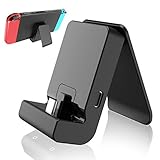
- ✔New Switch Stand: Specifically designed for Nintendo switch and switch lite and allows the Switch system to be charging while in Tabletop mode,Switch Stand is in a great charging speed,enabling longer play sessions.NOTE: Charing cable do NOT included.
- ✔Adjustable&Portable:Nintendo Switch stand & Switch Lite stand offers multi adjustable angle, very portable, perfect to put it into your pocket or bag and take it to everywhere you like.
- ✔High Quality: Nintendo Switch Charging Dock.Nintendo Switch stand it's very sturdy, keeps Switch Lite charging stand stable from slipping.
- ✔ Secure: Nintendo Switch adjustable charging stand upgraded design for Longer Lifetime. Using Type-C USB3.1interface,suitable for a variety of usb adapter.Includes short-circuit and over-voltage protection your Switch.
- ✔Tips: For thick case, it may not fit the base. Please remove the protective case of the game console when using this stand.Please do not use it to a smartphone, the size may not match.
- The packaging of a physical game, which lists supported modes.
- The game’s detail page on Nintendo’s website.
- The game’s listing in the Nintendo eShop.
Troubleshooting: symptoms and what they mean
- The TV shows no picture after docking a Switch Lite. This is expected. The Lite does not output to a TV, so the fix is to play on the Lite’s screen or use a different Switch model for TV play.
- You bought a Switch dock for the Lite and it won’t work. Nintendo lists the standard dock and the dock with LAN port as incompatible. Returning the dock or pairing it with a different console is the practical route.
- Joy-Con won’t charge while using a stand. Charge them through a Nintendo Switch system or a Joy-Con Charging Grip, as Nintendo specifies.
- A game won’t run in tabletop mode on the Lite. Check the game’s supported modes on its packaging, Nintendo’s game-detail page, or the eShop listing. The game may only support handheld mode.
The Switch Lite does not support TV mode, so there is no troubleshooting path to television output on this console.
Quick Recap
“
Product prices and availability are accurate as of the date/time indicated and are subject to change. Any price and availability information displayed on Amazon at the time of purchase will apply.




