A black Nintendo Switch screen usually means one of three things: the console has no usable power, it has frozen while still running, or the display or its internal board has failed. The screen alone cannot tell you which. Start with a correct charge and a careful look at the console, avoid resets that erase data, and contact Nintendo support if the screen stays blank or the console shows physical damage.
Identify your model first
The charging method and the repair categories both depend on which Switch you own. Nintendo’s charging instructions on its Japanese Switch charging page separate the standard and OLED models from the Switch Lite:
| Model | Designation | Charging with dock | Charging with AC adapter directly |
|---|---|---|---|
| Nintendo Switch (standard) | HAC-001 | Yes, in a compatible dock | Yes, using the supplied adapter (HAC-002 (JPN) in Nintendo’s Japanese instructions) |
| Nintendo Switch (OLED Model) | HEG-001 | Yes, in a compatible dock | Yes, using the supplied adapter (HAC-002 (JPN) in Nintendo’s Japanese instructions) |
| Nintendo Switch Lite | HDH-001 | No, the Lite cannot be placed in the dock | Yes, charge it directly |
If you own a Lite, do not try to seat it in a dock while troubleshooting. A dock cannot charge it, so an apparently dead Lite may simply have been sitting in the wrong charging setup.
Check the charge before anything else
- Connect the supplied compatible AC adapter to a wall outlet you know works. For a standard or OLED unit, you can instead place it in a compatible dock.
- Insert the cable straight and without force. Nintendo warns that forcing an incompatible cable can damage the connector or the cable itself, so a plug that does not seat easily is a reason to stop and check the connection, not to push harder.
- Leave the console charging with the console asleep. Nintendo states that a full charge takes about three hours in that state. This is full-charge guidance from Nintendo for the stated setup. It does not guarantee that a blank screen will recover after three hours, and a deeply drained battery can take that long before anything appears.
- After charging, note whether any charge indicator appears on the console or dock. Record what you see before trying anything else, because it tells you which branch below applies.
Work out which branch you are in
A black screen can come from three separate categories. Nintendo’s Japanese reference repair table groups symptoms this way, which is useful for reading your own situation. The table is a service classification, not a diagnosis. A console that shows nothing may still have a power problem, and a cracked screen can sit on top of a working board.
Quick wins for a faster PC:
Clear out junk files and repair common Windows errorsFree Scan →Fix the driver behind crashes, sound loss and screen glitchesFind Drivers →Repair Windows errors before they cause bigger problemsFix Now →#1 Best Overall

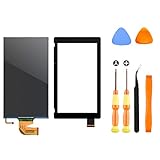
- 【Compatible – Check Your Console Model】Suitable for Nintendo Switch HAC-001 V1 and HAC-001(-01) V2.This is a full LCD + touch screen assembly – touch is fully functional. Does NOT fit Switch Lite or Switch OLED. Please check your model in System Settings before ordering.
- 【What This Fixes – LCD + Touch Together】Replaces both cracked LCD and broken touch at once. Fixes: cracked screen, dead pixels, touch not working, unresponsive touch, display issues, wrong colors, frozen screen. One assembly restores full display + touch function.
- 【Installation Warning – Read Before You Start】⚠️ Test before final mounting – connect the new screen first without mounting accessories. Confirm display and touch work. Do not bend the LCD cable over 90°. Professional installation recommended if you lack experience. Watch a YouTube tutorial before starting.
- 【What‘s in the Box – No Hidden Costs】Includes: 1x LCD + Touch Screen Assembly for Switch HAC-001 V1 / HAC-001(-01) V2, 1x Tempered Glass Screen Protector, 1x Repair Tool Kit (screwdrivers, pry tools, etc.), 1x Mounting Accessories. Everything you need – open the box and start.
- 【Warranty & Support】All screens are fully tested before shipment. 6-month warranty for manufacturing defects (non-man-made damage). 24/7 customer support via Amazon message – we reply within 24 hours.
| What you observe | Branch to investigate | Service category Nintendo associates with it |
|---|---|---|
| Screen stays black after a full charge, no indicator, no response | Power or charging, or an internal fault | CPU board (failure to power on, charging issues) |
| Console seems on but the display is unresponsive or frozen | Frozen or unresponsive system | CPU board (freezing) |
| Cracked panel, abnormal output, visible display damage | Display fault or physical damage | Display (LCD or OLED unit) |
Power or charging problem
If the console shows no charge indication after the steps above, check the adapter, outlet, and cable for an alternative that you know works. A different compatible adapter or outlet is a cheap way to rule out the charging path. If nothing changes, the fault may be internal, and that is a support question rather than a home fix.
Frozen or unresponsive console
A console that appears to be on but never responds may be frozen rather than dark. Before attempting any forced restart, read the restart instructions for your exact model on Nintendo’s support pages. This article does not list a forced-restart button sequence, because the instructions differ by model and the sequence should be checked against the page for your console.
Rank #2
- √【COMPATIBILITY】: Compatible with Nintendo Switch 2017, replace your broken Nintendo Switch screen. (Warning: its the 2017 LCD replacement not for 2019 Switch, not for switch lite or switch OLED).
- √【STRICT QUALITY CONTROL】: We tested every NS Screen before shipment, make sure the screen has no scratches or spots.(Remove The 2 Sides Film Before Installation)
- √【EASY INSTALLATION】: Installing this replacement screen is simple and easy. It comes with an installation kit and can also be installed in Youtube with the video. Need professional skills.
- √【PACKAGE INCLUDE】: 1 X LCD screen, 1 X Digitizer, 2 X warp tabs,1*Y Screwdriver, 1*+ Screwdriver, 1* Tweezer, 1* Opener
- ❤【WORRY-FREE-AFTER SALES】: If you have any dissatisfaction after purchasing the product, please feel free to contact us by email, we will do our best to solve your problem and 7*24 hours waiting for you.
Display fault or physical damage
Cracks, lines, spots of abnormal colour, or any visible damage to the screen point to the display category. Do not open the console to inspect it. Physical damage is a reason to contact Nintendo support or an authorised repair channel rather than attempt a home repair.
Restart and reset without losing your data
Full initialization is the wrong early step for a black screen. Nintendo states that full initialization erases the console’s memory data. For a console that is behaving abnormally, Nintendo recommends initializing while keeping save data. Read the Japanese initialization page before choosing any reset, and confirm the option that preserves save data is the one you select. If you have cloud saves or important data in another location, confirm that first as well.
PC Slower Than It Used to Be?
A free scan shows the junk files, broken settings and background clutter dragging Windows down - then fixes them in one click.Free scan · Windows 10 & 11Outdated Drivers Are Slowing You Down
One free scan finds every outdated or missing driver and matches the right update for your exact hardware.Free scan · exact hardware matchRank #3

- NOTICE*: Please Remove the film before installation. Not for Switch Lite
- GOOD COMPATIBILITY : The LCD Screen is Compatible with NS (Switch) HAC-001/HAC-001(-01). Not for Switch Lite(Touch Screen Digitizer is not included).
- VALUABLE PACKAGE : Come with 1pc LCD Screen. Great collocations to repair your NS Switch controller. (Touch screen digitizer is not included).
- INSTALLATION NOTICES : Very convenient and portable, good replacement for your damaged LCD screen. But needs to be professional skill and very careful to replace the screen. We are not responsible for any damage to the switch during repair.(Instructions manual, installation tool sets, adhesive are not included).
- AFTER SALE SERVICE : With one year quality satisfaction service, if you have any request or problem please contact us asap, we will offer you the best solution.
Prevent the damage that causes many failures
Nintendo’s Japanese notice on circumstances that may cause failure lists drops, pressure on the console, improper cable insertion, and long periods without charging as conditions that can contribute to damage or battery deterioration. Nintendo advises charging the device at least once every six months after a long period of inactivity. A console that sits in a drawer for a year is the case where that advice matters most.
When to contact Nintendo support or a repair channel
Escalate when the console stays black after a full charge with the correct setup, when it freezes and will not respond, or when the display shows cracks or abnormal output. Nintendo’s Japanese contact page directs console repair inquiries to the Nintendo service centre and links to fault diagnosis, repair costs, and troubleshooting. That page accepts inquiries only in Japanese. Outside Japan, use your local Nintendo support site and the repair process it describes.
Rank #4

- 【Device Match – Check Before Order】Suitable for Nintendo Switch HAC-001 and HAC-001(-01) (original model, 6.2 inch). ⚠️ This is LCD display only – touch screen is NOT included. Does NOT fit Switch Lite or Switch OLED. Please check your console model before ordering.
- 【What This Fixes】Perfect for: cracked glass, dead pixels, display issues, wrong colors, or frozen screen. ⚠️ Does NOT fix touch issues – if your touch screen is broken or unresponsive, this LCD only replacement will not help. You need a full LCD + digitizer assembly.
- 【Quality You Can Trust】Each screen is fully tested before shipment – no dead pixels, no scratches, no display defects. We don‘t ship flaws. Just reliable quality for your repair.
- 【What’s in the Box】Complete kit – no hidden costs. Includes: 1x LCD Screen, 1x Tempered Glass Screen Protector, 1x Repair Tool Kit (screwdrivers, pry tools, etc.), 1x Mounting Accessories.
- 【Installation Tips】Test before installation – connect the screen without mounting accessories first. Watch YouTube tutorial "For Switch screen replacement" before starting. Professional installation recommended if you lack experience. Contact us via Amazon message for help – we reply within 24 hours.
Repair cost reference for Japan
The following figures come from Nintendo Support Japan’s reference repair price table. They are Japan-market amounts and are not quotes for any other country. Prices may change, so check current estimates with your local Nintendo support service before you commit to repair.
| Model | Display category | CPU-board category |
|---|---|---|
| Nintendo Switch (HAC-001) | ¥9,900 (LCD unit) | ¥14,300 |
| Nintendo Switch OLED Model (HEG-001) | ¥12,100 (OLED display) | ¥16,500 |
| Nintendo Switch Lite (HDH-001) | Not stated on the Japanese reference table | Not stated on the Japanese reference table |
Replacing a lost or damaged charger
If your original adapter is missing or damaged, a replacement may be a reasonable step, but check regional compatibility first. Nintendo’s Japanese instructions specify the HAC-002 (JPN) adapter for the standard and OLED models. A replacement charger can rule out a faulty adapter. It will not repair a cracked screen or an internal fault, so if the screen stays black with a known-good adapter, the problem lies elsewhere.
Quick Recap
Best Value

- COMPATIBILITY----Touch Screen Replacement only For Nintendo Switch V1 HAC-001 (Only Digitizer Screen Replacement, without LCD Screen). Please check your tablet's model carefully before ordering.
- Package List----1x Screen, 1x Opening Tools Kits, 1x Double-sided Adhesive Tape. Our products are professionally packaged to ensure that the products will not be damaged during transportation. If the packaging is damaged when you receive the product due to uncontrollable reasons and the product is damaged, please take a photo and send it to us, we will immediately reissue a new product for you.
- APPLICATION----It is used to replace or repair faulty screen: such as the touch screen been damaged, the touch function does not work, and the touch function is not sensitive. Note: If your device is not only a problem with the touch screen, if the LCD screen is also not working, please do not buy the screen from this link, you need to replace both the LCD screen and the touch screen.
- INSTALLATION PRECAUTIONS----Removal and installation of touch screen requires professional equipment to separate the touch screen and the LCD screen, If you are not a professional maintenance personnel, you have no experience in installing screens and no professional maintenance equipment, we recommend that you go to local repairs shop to have a professional replace the screen for you to avoid unnecessary damage to your device.
- LIFE-TIME SERVICE----There is a 100% inspection by professional QC team for each screen before shipping. We provide LIFE-TIME exchange for non-human damages to make your purchase risk-free. If you need further help for any problem about this touch screen replacement, we highly suggest to contact us for technical support and to get satisfactory solutions.
Product prices and availability are accurate as of the date/time indicated and are subject to change. Any price and availability information displayed on Amazon at the time of purchase will apply.



