Black Ops III crashing on PS4 has no single cause that Activision or PlayStation has confirmed for the game. The likely fault areas are the disc or installed game data, the PS4’s system software, the storage the game runs from, and, less often, the console itself. The useful approach is to narrow down which of these applies to your setup, one check at a time. The steps below help isolate the problem, but none of them is guaranteed to fix it.
What the official sources do and do not establish
- Activision’s support guidance for crashes says that “Games can freeze or crash during gameplay for a variety of reasons.” It does not name one cause for Black Ops III.
- Activision’s known-issues page for Black Ops III, published in 2019 with an issue table labelled as updated in 2018, documents a PS4 installation freeze and recommends updating system software and restarting the console. That is a documented past problem, not evidence of a current widespread one.
- No published statistic gives the frequency or causes of Black Ops III crashes on PS4. Any percentage you see on other sites should be treated as unverified.
Because the evidence points to several possible areas, the goal of troubleshooting is to find out which area the crash belongs to. The sequence below moves from the cheapest checks to the most disruptive ones.

Troubleshooting sequence
- Record the failure. Note whether the crash happens during installation, at launch, in the campaign, in Zombies, or in multiplayer, and write down any error code. Activision’s PS4 crash guidance mentions the code CE-34878-0 and a generic application or system-software error.
- Restart the console and update system software. Power the PS4 off, turn it back on, then open Settings and check for a PS4 system software update. If an update was installed, retry the game once.
- Test the game’s source. If you play from a disc, inspect and test it as described in the disc section below. If you play a digital copy, skip to the storage section.
- Check ventilation. Make sure the console has clear airflow around its vents and is not enclosed in a cabinet with no ventilation. Activision lists ventilation among its checks for crashes.
- Check where the game is installed. If it is on USB extended storage, confirm the drive is properly connected, then follow the storage section below.
- Rebuild the database in Safe Mode and restore licenses if appropriate, as described in the Safe Mode section.
- Escalate with details if the crash continues, using the steps in the support section below.
Disc copies: separating a disc fault from a console fault
Inspect the disc for dirt, scratches, or damage. Clean it with a soft cloth, following PlayStation’s disc guidance, and do not use solvents. Then compare the behaviour against other discs and, if you can, another PS4. The table shows how to read the results.
| What you observe | What it most likely points to |
|---|---|
| Black Ops III crashes on your PS4 with the disc, and the same disc crashes the same way on another PS4 | The disc. Activision’s guidance says a problem that follows the game to another PS4 most likely implicates the disc. |
| Only Black Ops III crashes, and other discs play normally on your PS4 | The game disc or its installed data, not the console’s disc reading in general |
| Other discs also fail on your PS4 | A possible console issue with disc reading, which is not specific to this game |
| A digital copy fails the same way on your PS4 | Not a disc fault. Look at system software, installed data, and storage. |
These results are diagnostic clues rather than proof of a root cause. A replacement Call of Duty: Black Ops III PS4 disc is only a sensible purchase when you play from a disc and the tests above implicate the disc itself. It is not a general fix, and digital owners do not need one.
What’s actually slowing this PC down?
Pick the symptom - the matching free tool is one click away.
#1 Best Overall

- INTRODUCING A NEW ERA OF BLACK OPS:Call of Duty is a dark, gritty future where a new breed of Black Ops soldier emerges and the lines are blurred between our own humanity and the cutting-edge military robotics that define the future of combat.
- A CALL OF DUTY CAMPAIGN UNLIKE ANYTHING BEFORE IT: Treyarch elevates the Call of Duty social gaming experience by delivering a campaign with the ability to play cooperatively with up to four players online, using the same battle-tested network
- PREPARE FOR A LEVELED-UP MULTIPLAYER With Black Ops III, Treyarch premieres a new momentum-based chained-movement system, allowing players to fluidly move through the environment with finesse, using controlled thrust jumps, slides, and mantlin
- FIGHT THE UNDEAD IN AN ALL-NEW HORROR STORY No Treyarch title would be complete without its signature Zombies offering - a full-game experience with its own distinct storyline right out of the box. Black Ops 3 Zombies is the most immersive and
Installed games and USB extended storage
If Black Ops III is installed on USB extended storage, verify that the drive is connected before launching. PlayStation’s general launch guidance lists this check. If the game still fails, PlayStation recommends deleting and reinstalling it, preferably over a wired internet connection when possible. Reinstalling is most useful when the crash starts during installation or when the failure began after the game’s files were damaged or interrupted.
Comparing internal storage with USB extended storage is one of the most useful isolation tests. If the game crashes only from the USB drive, the drive connection or the drive itself becomes the prime suspect. If it crashes from internal storage as well, storage is less likely to be the cause.
Rank #2
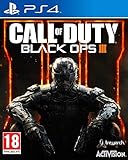
- This EU edition has English Language packaging and is rated PEGI 18
- There is no difference in gameplay to the UK standard edition
- The item has a different barcode to the standard UK edition
Safe Mode: rebuilding the database and restoring licenses
To start Safe Mode, turn the PS4 off completely, then press and hold the power button until you hear the second beep. From the Safe Mode menu, choose Rebuild Database. PlayStation describes this as scanning the drive and creating a new database of system content. It is a separate function from initializing the console, and it is the first Safe Mode step to try.
If the game is not recognised as licensed on the console, PlayStation’s guidance also covers restoring licenses, which is appropriate only in that situation. After rebuilding the database, restart the console and retry the game.
The Tool Desk
Outbyte Driver Updater FREEFix the driver behind crashes, sound loss and screen glitchesFind Drivers →Outbyte PC Repair FREEClear out junk files and repair common Windows errorsFree Scan →Rank #3

- Eight fully remastered Zombies maps
- GobbleGum functionality for the very first time
- Chew on 10 all new GobbleGums, including 2 new Whimsical GobbleGums
Initialization is a last resort
Initialization options delete user data, and Initialize PS4 (Reinstall System Software) also removes system software. Back up saved data and anything else you need before you start, and treat initialization as a step for after the checks above have failed. It can make a console-level fault easier to test, but it does not target a Black Ops III-specific problem.
When to contact PlayStation Support
If the crash continues after the steps above, contact PlayStation Support with the information it asks for: the error code, a detailed description of the failure, the steps that reproduce it, and screenshots or video where available. Include whether the crash happens on a disc or digital copy, whether other games run normally, and whether the crash also happens on another PS4 with the same disc. That information is what support staff need to narrow the problem.
Independent reader supportYour contribution helps us test, update, and keep practical guides available for everyone.What not to rely on
- Third-party “cleaner” or “optimizer” utilities are not a supported recommendation for a PS4 game crash. Outbyte is one such product that official sources do not endorse for this issue.
- A console repair or storage service becomes relevant only if the official checks fail and your diagnostics suggest a hardware or storage fault. No specific repair program has been verified as a solution for Black Ops III on PS4.
PlayStation’s general troubleshooting pages and Activision’s support pages can be updated, so check their current wording if a step seems to differ from what is described here.
Quick Recap
Best Value

- Call of Duty: Black Ops III Gold Edition includes the full base game, DLC 1 Awakening for Black Ops III, plus the Nuk3town Multiplayer Map.
- Call of Duty: Black Ops III combines three unique game modes: Campaign, Multiplayer, and Zombies, providing fans with the deepest and most ambitious Call of Duty ever.
- Awakening features four Multiplayer maps and one Zombies map. Multiplayer showcases Gauntlet, Splash, Rise, and Skyjacked, a reimagined version of a fan-favorite Black Ops II Multiplayer Map Hijacked. Zombies introduces Der Eisendrache, the first chapter of Call of Duty: Black Ops III’s Zombies DLC adventure that takes players on an epic journey with the Origin characters Richtofen, Nikolai, Takeo, and Dempsey.
- Call of Duty: Black Ops 3 deploys its players into a future where bio-technology has enabled a new breed of Black Ops soldier. Players are now always on and always connected to the intelligence grid and their fellow operatives during battle. In a world more divided than ever, this elite squad consists of men and women who have enhanced their combat capabilities to fight faster, stronger, and smarter.
- Treyarch elevates the Call of Duty social gaming experience by delivering a campaign with the ability to play cooperatively with up to four players online, using the same battle-tested network infrastructure and social systems that support its world-class Multiplayer and Zombies game modes..
Product prices and availability are accurate as of the date/time indicated and are subject to change. Any price and availability information displayed on Amazon at the time of purchase will apply.




