Ordinary copies of PlayStation game discs may not boot because a retail PS1 or PS2 game is not simply a folder of files copied onto a recordable disc. Sony’s historical developer documentation says licensed masters required approved equipment and software to write territory and copy-protection information. A copied disc can also fail because of scratches, dust, recording problems, unsupported formats, or region compatibility. The exact cause depends on the disc and console; there is no single diagnosis for every PS1 or PS2.
Why a copied PlayStation disc may not boot
Sony Computer Entertainment Europe’s Developers Guide 2.9 explains that final PlayStation master discs were made with approved Sony CD-ROM burners and CD Generator software. The guide says that this equipment and software wrote the necessary territory and copy-protection information, and describes territory-specific license files and executables. An ordinary copy may not reproduce characteristics a retail console expects.
A technical filing hosted by the USPTO also describes additional copy-protection information on PlayStation production discs and distinguishes them from master discs. This is historical technical context, not a universal diagnosis of every PlayStation generation or console revision. The available sources do not establish one exact mechanism that explains every copied PS1 or PS2 disc that fails.
Other reasons a disc may fail
A disc that does not play is not automatically evidence of copy protection or a broken console. Sony’s 2010 PS2 guidance lists scratches, dust, and recording problems among possible causes, and recommends checking the disc type and condition. Format and region are separate compatibility questions: a PS2 must support the software format, while Sony’s DVD-video guidance also calls out region and broadcast-standard checks. Do not assume movie-DVD region guidance applies identically to every game disc.
Free tools Windows power users keep installed
One-click scans. No signup required.
#1 Best Overall

- 4X MASSIVE CAPACITY - 60 BLOCKS: Upgrade your retro gaming setup with 4MB of storage space, providing 60 memory blocks (4 times a standard 1MB card). Effortlessly store large save files from data-intensive RPGs or sports titles without the painful need to delete your childhood progress or constantly swap cards.NOTE: This product can only save PS1 game data (including data for PS1 games played on a PS2 console) and must be formatted before use.
- SEAMLESS CONTROLLER-BASED SWITCHING: No more getting up to press physical buttons on the console! Easily cycle through 4 independent virtual storage pages (15 blocks each) directly via your controller using the "SELECT + R1" shortcut. Experience modern convenience while enjoying your favorite retro classics.
- ZERO DATA LOSS: Unlike older 1MB cards that often require manual formatting and suffer from corrupted saves, our card is equipped with premium flash chips for reliable plug-and-play performance. Enjoy high-speed data transfer and secure, long-term save retention for ultimate peace of mind.
- SMART MULTI-PAGE ORGANIZATION: The 4MB memory is intelligently partitioned into 4 virtual cards. This allows you to beautifully categorize your game library by genre (e.g., RPGs, Racing, Action) or assign specific pages to different family members, keeping all your save data perfectly organized and safe from accidental overwrites.
- PERFECT CONSOLE COMPATIBILITY: Designed for a flawless fit with PS1 and PS One consoles. It also functions perfectly on PS2 (Fat and Slim) consoles specifically for saving and loading PS1 games. (Note: Must align port areas to switch pages—e.g., Memory Card in Slot 1 requires Controller in Port 1).
- Disc condition: Scratches, dirt, or other damage can prevent reliable reading. Inspect legitimate discs and clean them gently according to the console manual.
- Recording quality or format: Recordable media may have recording problems or may not be a supported type for the intended use. Sony says recordable DVD video discs must be finalized; that requirement is for DVD video and does not make a copied game compatible.
- Region or software format: Check the exact console model’s manual and the disc’s documented region and format rather than treating all PlayStation discs as interchangeable.
Safe checks to narrow down the cause
- Identify the console and disc. Note the exact PS1 or PS2 model, the disc format, and whether the disc is a legitimate pressed game, recordable media, or DVD video. Without those details, compatibility cannot be established.
- Check the manual. Use the model-specific manual to confirm supported software and media. Sony’s PS2 guides list PlayStation and PlayStation 2 format software for the documented systems, but those guides do not settle compatibility for every console revision.
- Inspect an original disc. Check for scratches, dust, and damage; clean it gently as directed by the manual. Avoid drawing conclusions from a single disc with uncertain condition.
- Compare with known-compatible original software. If an original disc works while one other disc does not, the problem may be specific to that disc or its compatibility. If several known-compatible original discs also fail, a broader console-reading problem becomes more plausible, but this comparison alone does not prove the laser has failed.
- For DVD video only, check the relevant DVD details. Confirm region and broadcast standard, and make sure a recordable DVD video disc has been finalized.
- Seek model-specific service guidance if originals also fail. The cited Sony material does not establish a universal laser replacement, repair method, or fix.
What Sony says about illegally copied discs
Sony’s 2010 PS2 product guide gives a direct warning: “Do not play illegally copied discs. This may cause a malfunction or damage to the PlayStation(R)2.” Use legitimate discs for play and troubleshooting; the sources do not support treating a modification or bypass as a safe or universal solution.
Quick Recap
Best Value

- Support PS1/PS one: ①Can create virtual memory cards (128KiB) for PS1 game saves, compatible with both PS1 / PS one and PS2. ②Supports launching FreePSXBoot using Unirom or Tonyhax.
- Support PS2: ①Can create virtual memory cards for PS2 game saves, compatible with PS2, PSX, and arcade systems. ②Supports launching FreeMCBoot, OpenTuna, and other exploits. ③Supports setting PS2 Virtual Memory Card sizes: 1MB, 2MB, 4MB, 8MB, 16MB, 32MB, or 64MB.
- Support Game ID: It can automatically detect running games and create dedicated virtual memory cards to help players save game saves and enhance their gaming experience.
- Unlimited Storage: ①Supports Micro SD cards up to 2TB. ②The included 8GB Micro SD card can store over 60,000 128KB PS1 memory cards or over 8,000 8MB PS2 memory cards.
- User-Friendly Display and Controls: ①Equipped with a 128x64 pixel OLED display to show the current system status. ②Navigate the settings menu easily with two front buttons, making operation more convenient.
Rank #4
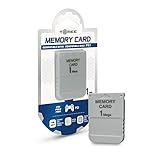
- 1MB memory block
- compatible with PSone/PS
- Work with PS2 for PS1 games
Rank #3
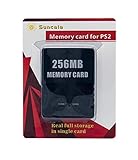
- Upgrade innovation chip that process and save the games faster by 15% than older version, smooth and steady without interruption.
- Fully compatible with Sony Playstation 2 and playstation 2 Slim.
- Improved storage system now compatible with more game than ever.
- Newly design package, fresh and elegant look. Sleek package allows you to easily slip the memory card in and out.
- 60 months worry free warranty. Friendly and supportive customer service is there to answer all your questions within hours.
Rank #2

- Can create virtual memory cards (128KiB) for game saving, compatible with both PS1 / PS/PS2 and and arcade systems.
- For PS1/PS one: Supports launching FreePSXBoot using Unirom or Tonyhax.
- For PS2: Supports launching FreeMCBoot, OpenTuna, and other exploits.
- Tips:Supports setting PS2 Virtual Memory Card sizes: 1MB, 2MB, 4MB, 8MB, 16MB, 32MB, or 64MB.
- Save at any time: It can automatically detect running games and create dedicated virtual memory cards, so players can save game at any time, keep their gaming experience.
Product prices and availability are accurate as of the date/time indicated and are subject to change. Any price and availability information displayed on Amazon at the time of purchase will apply.




