Quick wins for a faster PC:
Fix the driver behind crashes, sound loss and screen glitchesFind Drivers →Clear out junk files and repair common Windows errorsFree Scan →First identify which feature you mean: a PokéStop or Gym AR Mapping scan, or AR during a Pokémon encounter or photo. They fail for different reasons. The PokéStop/Gym scanning feature may no longer be available: June 2026 reporting quotes a Niantic Spatial spokesperson saying AR scanning was discontinued during Pokémon GO’s transition to Scopely, though the official support pages reviewed do not confirm its current status. For encounter or photo AR, check device compatibility, Camera permission, and the conditions the camera needs to detect a surface.
Which kind of AR scan is not working?
Pokémon GO uses “AR” for more than one feature. A missing PokéStop scan task is an availability question; an AR camera that will not start or find a surface is more likely a device, permission, or environment issue.
| What you see | Likely issue to investigate |
|---|---|
| A PokéStop or Gym scan task or scanning option is missing | Feature availability. June 2026 reporting says AR scanning was discontinued during the transition to Scopely; current official confirmation remains unclear. |
| AR will not start during catching, Buddy Snapshot, or GO Snapshot | AR-specific device support, Camera permission, or camera detection conditions. |
| The camera works, but your location seems inaccurate | Location accuracy, buildings, congestion, or network conditions rather than AR surface detection. |
If the PokéStop or Gym scan option is missing
Do not assume that changing phone settings will bring back a missing AR Mapping task. June 2026 reporting quotes a Niantic Spatial spokesperson saying, “The discontinuation of AR scanning and the end of data sharing with Niantic Spatial were part of the transition planning associated with Pokémon Go’s move to Scopely.” That is secondary reporting, not a current Pokémon GO support notice; the official support pages reviewed do not settle whether the feature is currently available.
For an account-specific question or confirmation of current availability, contact Pokémon GO support through the app. Niantic’s October 2020 AR Mapping announcement described the original task flow, including scanning selected PokéStops, but those launch details do not establish present-day eligibility or availability.
#1 Best Overall

- WIDE SCREEN COMPATIBILITY — PHONE TO TABLET: X5 Lite is a versatile phone controller that stretches up to 213mm to fit iPhone 15/16, most Android phones, iPad mini 6/7, and compatible Android tablets. Secure Type-C connection keeps gameplay stable and responsive.
- MOBILE, CLOUD & REMOTE GAMING: Play supported mobile games like Zenless Zone Zero, or stream console and PC games through Xbox Game Pass, Steam Link, Moonlight, and remote play. Enjoy physical controls wherever you play.
- HALL EFFECT STICKS — PRECISE CONTROL: GameSir Hall Effect sensing sticks deliver smooth 360° control for accurate aiming, movement, and camera adjustments. Built for fast-paced mobile games and streamed console or PC titles.
- LIGHTWEIGHT & ERGONOMIC — 135.4G: At just 135.4g, X5 Lite stays lightweight during extended gaming. Ergonomic, laser-engraved textured grips provide a secure, comfortable hold at home or on the go.
- CUSHIONED MEMBRANE CONTROLS — COMFORTABLE & QUIETER: Cushioned membrane buttons and triggers provide comfortable feedback for repeated inputs while keeping operation quieter. Ideal for extended sessions or gaming in shared spaces.
If AR is failing during catching or photography
Check the AR-specific device requirements
General Pokémon GO compatibility does not guarantee that a phone supports its AR features. Niantic’s GO Snapshot guidance specifies an iPhone running iOS 15 or later. On Android, AR requires a supported 64-bit device that is ARCore-capable, with ARCore installed from Google Play. If your Android phone is compatible, check Google Play for ARCore and install it if needed.
Niantic’s general supported-device baseline lists iOS 15 or later on iPhone 6s or later, or Android 9 or later, along with GPS/location services and connectivity. The company cautions that it cannot guarantee every model or configuration will work. For AR, use the more specific iPhone and Android requirements above.
Rank #2

- Bluetooth Controller for iPhone & Android: Mocagen mobile gaming controller Compatible with all iPhone models (including 18/17 series) and Android devices. Pairing steps: 1. Turn on Bluetooth on your phone and go to the pairing screen. 2. Press and hold the Home button for 3 sec until LED4 flashes. 3. Find "XBOX Wireless Controller" on your phone and tap to pair. Quick reconnect: After first pairing, simply press the Home button once (with Bluetooth on) to reconnect
- Play Most Controller-Compatible Games: This iPhone game controller supports cloud gaming (e.g., Xb*x Game Pass, GeForce NOW), Xbox Remote Play, emulator games, and native mobile games (e.g., Apple Arcade). Enjoy effortless control and play Fortnite, Call of Duty, Roblox, Genshin Impact, and many more anytime, anywhere. Note: Controller only works with games that support controller input, and does not support PS Remote Play
- 5M-Cycle Lifespan & Zero Drift: MC1 mobile gaming controller features a Hall-effect joystick with a 5M cycle lifespan, 2.5x longer than standard carbon-film sticks. Its innovative electromagnetic induction technology ensures drift-free operation, enabling precise character control in intense games and significantly extending this phone game controller durability
- Ergonomic Grip Design: The handle is ergonomically shaped with a l*ser-engraved texture for anti-slip and enhanced grip, effectively reducing fatigue during long gaming sessions. The scientifically designed joystick and button layout ensures smooth operation. Whether for personal use or as a gift, it delivers a more comfortable and healthier gaming experience
- 7-Color RGB Light Ring & 600mAh Battery: The mobile game controller features a 7-color adjustable light ring on the joystick(ABXY button lights can be turned off, but their colors are not adjustable). The lighting is vibrant yet eye-friendly. The built-in 600mAh battery provides up to 6 hours of battery life in brightness mode — enough for a full day of gaming
Allow camera access
In your phone’s app settings, make sure Pokémon GO is allowed to use the camera. Allow Location as well when the feature or gameplay needs it. Niantic recommends Camera and Location access for full gameplay; a camera permission denial can prevent camera-based AR from working.
Give the camera a surface it can detect
Try again in good light, facing an open, flat area. Slowly pan the camera across the surroundings and avoid shaking it, obstructed views, and uneven ground. Niantic’s AR encounter guidance recommends choosing a place where you can move safely; do not walk around while looking at the screen.
PC Slower Than It Used to Be?
A free scan shows the junk files, broken settings and background clutter dragging Windows down - then fixes them in one click.Free scan · Windows 10 & 11Crashes, No Sound, or Screen Glitches?
Random freezes, missing sound and display glitches usually trace back to one bad driver. Find and replace yours safely.Free scan · under a minuteRank #3

- ✅【Using Tips】These Mobile Game controllers are using the sensitive real mouse micro switch inside. So there are several phones which have the electromagnetic problems. This will cause the triggers touch the screen automatically. Please do not worry about this and you just need to turn off the screen for 10 seconds and turn on the screen again. This issue will solved right away.
- ✅【Perfect Compatibility】These Mobile Game controllers are compatible with iPhone, iPad and most Android Phones, without even remove your case.(The thickness of the compatible mobile phone should be not more than 13mm.) These 6-fingers-operation mobile game controllers are suitable for a variety of shooting games, including PUBG, Call of Duty, Fortnite, Knives Out, Rules of Survival, Survivor Royale, Critical Ops etc. As long as the game allows customizing and draging the keys.
- ✅【Small and Lightweight】The PUBG game triggers are portable and tiny for you to put them into your pocket, and have them for gaming when in office, school, trip, camping and play games anywhere and anytime. With the 6 trigger PUBG mobile controller, you can simultaneously move, turn, aim and shoot by using the index fingers to press the buttons, which can eliminate the trouble that use thumbs only to make all operations.
- ✅【Mechanical Touch】4 triggers PUBG mobile controller designed for longevity with greater durability and responsiveness, more than 2 million click. Fast mechanical keys with medium resistance, precise actuation, audible click sound, and tactile bump feedback. Easy To Use, High Sensitive, Physical Button Feedback. Using this PUBG mobile game controller, you can move, angle adjust, aim and shoot at the same time with the thumbs and index fingers of the left and right hand.
- ✅【Super Gaming Experience】This PUBG game triggers is made of ABS and alloy, durable and ergonomic. 6 trigger PUBG mobile controller electroplated alloy materials, mouse buttons, smooth touch, six-finger linkage, auxiliary pressure grab, one-second burst, dominate the game battlefield, and enjoy the ultimate gaming experience. Call of Duty mobile controller are sensitive to shoot and aim, no Power supply and driver needed, easy to use and high precision, increase your game score!
What if AR is unsupported or you only need a photo?
Some Pokémon GO photo workflows offer a static-background option when AR is unsupported or disabled. Niantic’s AR guidance distinguishes among encounters, Buddy Snapshot, and GO Snapshot, so a fallback available in one workflow should not be assumed to exist in another. If you only need a picture, check the options shown in that specific photo mode.
Independent reader supportYour contribution helps us test, update, and keep practical guides available for everyone.If the problem is location rather than camera detection
If your avatar or location appears misplaced, check that Location access and location accuracy are enabled on the phone. Niantic notes that tall buildings in urban areas, network congestion, and unstable connectivity can affect location behavior. Those conditions are different from a camera that cannot detect an open surface.
Quick Recap
Best Value
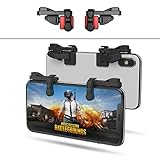
- SUPPORTED DEVICE - Compatible for iPhone and Android Phones(less than 11mm thickness mobile phone with 4.5-6.5 inch screen), the phone can be used with a screen protector and a phone case. SUPPORTED GAMES - Compatible with PUBG Mobile, Fortnitee Mobile, Knives Out, Call of Duty Mobile and the other shooting mobile games.
- GOOD GAME EXPERIENCE - Easy To Use, High Sensitive, Physical Button Feedback. Using our mobile game controller, you can move, angle adjust, aim and shoot at the same time with the thumbs and index fingers of the left and right hand.
- EXCELLENT DESIGN - Compared with similar products, our mobile gaming controller uses a unique clip design that provides long-lasting elasticity and protects the screen from scratches. High-quality ABS conductive plastics are durable, and the minimalist design reduces the use of the phone screen and avoids occlusion of the phone camera and the map in the game.
- 1mm Anti-misoperation Design - Avoid accidental pressing of the mobile phone's side buttons(such as volume buttons, power button and so on) in game, LOW SCREEN OCCUPANCY - Our mobile game controller has the lowest screen usage in the similar products, it can't affect the fluency of the game operation.
- HOW TO USE - Before playing game, customize your shoot and aim buttons(in button setting fo the game) under the touch pad of the our mobile gaming controller.
Rank #4

- Compatible with Xbox wireless Controllers, Xbox One Controllers / Xbox Elite Controllers / Xbox Controllers 2020+
- Expandable Clip to fit large smartphones - Min: 49mm, Max 86mm
- Foldable for easy transport when gaming on-the-go
- Includes all clips for compatibility with all listed Xbox wireless Controllers
Product prices and availability are accurate as of the date/time indicated and are subject to change. Any price and availability information displayed on Amazon at the time of purchase will apply.



