What’s actually slowing this PC down?
Pick the symptom - the matching free tool is one click away.
Three beeps alone do not identify a specific PS3 fault. Watch the power light: a brief green-to-yellow change followed by flashing red and shutdown is the pattern iFixit describes for the Yellow Light of Death (YLOD), but three beeps can also occur during a Safe Mode procedure on a PS3 Super Slim. First check the power connection and airflow; if the console keeps shutting down, it needs model-specific diagnosis rather than a guessed replacement part.
What the beeps and light pattern can tell you
Note what the console does as well as how many times it beeps. In iFixit’s description of the YLOD sequence, the indicator briefly changes from green to yellow, then flashes red as the PS3 beeps three times and shuts down: iFixit’s YLOD guide. That pattern is a clue, not proof of which component failed.
Beep count alone is especially inconclusive: iFixit’s PS3 Super Slim Safe Mode procedure also includes three beeps. Record whether the light stays red, turns green, briefly turns yellow, flashes red, or alternates red and green, and whether the fan starts. These observations can help a repair professional, but do not establish a diagnosis.
Try these safe checks first
- Turn the PS3 off and unplug it. Check that the power cord is firmly connected and inspect the outlet by testing it with another suitable device or using a known-working outlet. iFixit’s general PS3 troubleshooting guide recommends ruling out the cable connection and outlet.
- Check airflow and let the console cool. Move obstructions away from the vents and make sure the PS3 is not in a hot location. Sony’s PS3 manual and setup guidance says a flashing red indicator when the system is not operating can indicate excessive internal temperature; stop the flashing and leave the system unused until it cools before trying again.
- Retry once and observe the sequence. Note the light changes, beeps, shutdown timing, and whether the fan starts. Sony also advises turning the system off and letting it cool if the indicator alternates red and green; see its PS3 manual and setup guidance.
- If it shuts down again, stop repeated attempts. Arrange diagnosis for the exact PS3 model rather than repeatedly power-cycling it or replacing parts at random.
What might be wrong if it still will not start?
A power-supply fault or a motherboard fault are among the possible causes discussed in iFixit’s PS3 troubleshooting guide and YLOD guide. The symptoms described here do not distinguish reliably between them, and fan behavior is not a definitive test. The PS3 model number is also needed before identifying compatible replacement parts.
#1 Best Overall
![3 Prong AC Power Cord Compatible with Sony PS3 First Generation(Fat), Original PlayStation 3, Xbox 360 1st Generation(Fat) Universal Power Cable Replacement [UL Listed]](https://m.media-amazon.com/images/I/41wGbV5GFcL._SL160_.jpg)
- Compatible with: Sony Playstation 3 First Generation (power connector is 3-slot)
- Power Cord Type: 18 AWG, 125V 10A; Length: 4 Feet
- Universally Compatible: Works with most PCs, TVs, Monitors and Other Devices that Accommodate a 3-pin Power Connector. ▶NOTE: Please check pictures to confirm compatibility before purchasing
- Safety / UL Listed: Tested, Approved and Certified by UL
Do not treat a settings reset as a no-power repair. Sony warns that restoring default settings changes user settings and can cause data loss or corruption; the console must be able to run the operation. See Sony’s PS3 manual and setup guidance.
Independent reader supportYour contribution helps us test, update, and keep practical guides available for everyone.When to seek repair
If the external checks do not resolve the problem and the shutdown repeats, ask a repair professional to diagnose the console before buying a power supply or attempting a board repair. When comparing services, ask which PS3 models they support, what diagnosis includes, what work and price are covered by the quote, and whether the repair carries a warranty. A repair or replacement should follow a confirmed diagnosis, not the beep count alone.
Quick Recap
Best Value
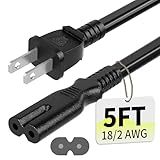
- Specifications: 5 feet tv power cord, non polarized 2 prong figure 8 power Cord (C7 to NEMA 1-15P ), 7A, 18AWG, 125V, NISPT-2, ETL listed
- Compatible: This ac power cable is fit for Sony PS5 / PS4 Slim / PS4/PS3 Slim/ PS3 Super Slim/Microsoft Xbox One S/Xbox One X/ Xbox Series X/Xbox Series S and other electronic devices such as TVs, printers, speakers, monitors, etc
- ETL Listed / Safety: This PS5 power cord is constructed with 100% pure copper and a flexible PVC jacket, providing high conductivity and minimal power loss
- Compatibility Note: To ensure compatibility, please verify that the connector matches your device's power port as illustrated in the product images
- Power Your Devices with the Perfect Reach: Select from multiple lengths to find your ideal match; this cord ensures safe, stable power for your game console, sound bar, speaker system and more
Rank #4

- Compatible with: Sony PS5 / PS5 Slim / PS5 Pro / PS4 / PS4 Slim / PS3 Slim/ PS3 Super Slim ; Xbox Series S, Xbox Series X, Xbox One S, Xbox One X
- UL Listed / Safety: this power cord are Tested, Approved, and Certified by UL to ensure safety for you and your device. UL testing is authorized by OSHA - US Federal Agency, this certification provides peace of mind that this power cord meets rigorous safety standards for electrical products
- Power Cord Type: Non Polarized 2 Prong C7 Figure 8 Power Cord, 125V 7A, 18 AWG (American wire gauge)
- Durable & Sturdy: built with pure copper wire / heavy-duty flame-retardant cable Jacket, resistant to bending and daily wear for long-lasting use
- Wide Compatibility: works with most Game Consoles, TVs, Printers, Speakers and Other Devices that use the same 2-prong figure-8 power connector
Rank #3

- ETL Certified for Peace of Mind: This power cord features a pure copper core for stable power delivery, dependable durability, and safe daily use—ideal for home, office, and outdoor applications
- Wide Compatibility: Compatible with Sony PS5, PS5 Slim, PS4, PS4 Slim, PS3 Slim, and PS3 Super Slim consoles. Also fit for Xbox Original, Xbox One S, Xbox One X, Xbox Series S, Xbox Series X, and other devices with a matching power port, such as TVs, printers, speakers, and monitors
- Please Check Before Purchase: Not compatible with Sony PS1, PS2, original PS3 Fat, PS4 Pro, Xbox One Fat, or Xbox 360 Core/Pro/Elite/Slim/E models
- Power Cord Type: Non-Polarized 2-Prong Figure 8 Power Cord (IEC 60320 C7 to NEMA 1-15P), 18 AWG, rated for 125V AC, 7A Max
- Multiple Length Options: Choose the length that fits your setup. Please check the product images to confirm the connector type before purchase. Contact us with any questions
Rank #2

- ➽EADP-220BB Power Supply Replacement and Repair for Sony PlayStation 3 PS3 Slim CECH2001 / CECH2101 / CECH2501
- ➽Power Supply Unit PSU Replacement, special for PS3 Slim Console PS3 2000 2500 120GB 160GB 250GB 320GB
- ➽Replacing your old part with this good one will solve your problem! This replacement is what works for the game doctor in you! Save money and fix your system by replacing it at a fraction of the original one price!
- ➽If your PS3 will not turn on at all and you don't even see the red light on the front of the system, this part may be all you need. you can change it with this newer power supply model which does not got hot.
- ➽Note: please note this item is a Disassembly parts from original device. (may get a little scratches) if you mind the condition, please do not order this
Product prices and availability are accurate as of the date/time indicated and are subject to change. Any price and availability information displayed on Amazon at the time of purchase will apply.




