Start with the exact PowerA controller model and the console or device it’s connected to: wired Xbox, wireless Xbox, Switch, and Switch 2 controllers can require different fixes. Check power and cable or battery first, then follow the pairing or input steps for your specific model. If those checks don’t help, use the model’s PowerA support page.
Identify your controller before troubleshooting
Find the model name or SKU on the packaging, manual, or product support page. Then select instructions for the matching platform and controller family. A wireless Xbox controller that uses a 2.4 GHz adapter, for example, does not pair the same way as a Bluetooth controller.
PowerA’s support index can help you locate the product-specific instructions. Check the model’s manual before trying a reset, firmware update, or calibration procedure.
If your wired Xbox controller isn’t working
- Make sure the Xbox is powered on and the display is set to the input showing the console.
- Check that the controller cable is firmly connected at both ends. If your model has an inline-release connector, make sure that connection is seated too.
- If the controller connects but its inputs don’t work, check whether it is assigned as Player 1.
If those checks don’t resolve the issue, consult the console guide and the controller’s product-specific support page. PowerA’s wired-controller troubleshooting guide covers these checks.
#1 Best Overall

- Dual Rumble Motors - Take your gaming experience to the next level, providing tactile feedback and sensations that bring your virtual worlds to life.
- Immersive Impulse Triggers – provides haptic feedback sensations using built-in motors so you can feel the action of the game.*
- Extra Long USB-C Cable - Provides you with 10 ft. of distance for more comfort and flexibility than shorter cables.
- Ergonomic Design – Lightweight and comfortable for long gaming sessions.
- Headset Compatible – Plug in your favorite 3.5 mm headset through the stereo headset jack
If your wireless Xbox controller won’t turn on or pair
Check its charge and connection mode
Charge the controller using its supplied cable or a compatible charging connection. Battery indicators and charging behavior vary by model, so check the manual. Make sure you’re following the procedure for the controller’s connection mode: Bluetooth and 2.4 GHz adapter pairing are different.
A compatible USB-C cable can help charge or test a controller with a USB-C connector, but first confirm the connector on your model. A cable does not necessarily solve a pairing problem.
Rank #2

- Works with Nintendo Switch 2. C button not available
- Wireless controller with Bluetooth 5.0 technology
- Rechargeable lithium-ion battery: Up to 30 hours per charge
- Two mappable Advanced Gaming Buttons and immersive motion control
- Embedded anti-friction rings for smooth thumbstick control
Pair a 2.4 GHz controller with its adapter
- Connect the controller’s 2.4 GHz adapter to the Xbox or PC.
- Put the controller into pairing mode using its SYNC control, following the model’s manual.
- Press the adapter’s sync control as directed in that manual.
If pairing still fails, some PowerA manuals specify a reset-hole reset followed by another pairing attempt. Use that procedure only if your exact model has the documented reset hole, and follow its manual. PowerA’s wireless-controller troubleshooting guide provides model-dependent guidance.
If your Switch or Switch 2 controller isn’t working
Switch 2 wired controllers
Check that the cable is connected at both ends, the console is on and connected to an external display, and the console has the latest available system software. See PowerA’s Switch 2 controller FAQ for the instructions that apply to your model.
Free tools Windows power users keep installed
One-click scans. No signup required.
Rank #3

- Quick-Twist Thumbsticks – Easily adjust the height for each thumbstick in the middle of a game with a simple twist: no need to swap out parts. Three height settings for each thumbstick let you customize them to your gameplay style
- Hall Effect Modules – Contact-free magnetic sensors in the thumbsticks provide a more fluid pro-level feel to help with precision and longevity
- Advanced Gaming Buttons – Get an edge over the competition with 4 mappable buttons that you can program on the fly, mid-game—no system settings to configure
- 3-Way Trigger Locks – Set the travel distance of the triggers with three different positions to pull off quicker actions in your favorite FPS games or go full throttle in a high-end race car
- Immersive Gaming – Dual rumble motors and impulse triggers add lifelike tactile details to your games while a 3.5mm stereo jack delivers clear dynamic audio*
Wireless pairing
Charge the controller and repeat the pairing sequence in its manual. PowerA’s Switch 2 FAQ says a controller can pair with one Switch system at a time, so check whether it is already paired with another system.
For an older Switch wireless controller, follow its manual’s charging and pairing steps. If pairing fails, use the reset button only if the manual for that model documents one. PowerA’s wireless Switch-controller troubleshooting guide describes model-specific steps.
Rank #4

- Works with Nintendo Switch 2
- C button not available
- Wireless Freedom – Play wirelessly on Nintendo Switch – OLED Model, Nintendo Switch and Nintendo Switch Lite
- Motion Controls - Tilt, turn and twist your way through dynamic and unique gameplay
- AA Battery Powered – Game for up to 40 hours with new alkaline AA batteries* or add your own rechargeable AA batteries
If the sticks drift or the screen scrolls by itself
For an older Switch wireless model, PowerA advises reconnecting without touching the sticks and checking that the battery is not depleted. Check for the latest available console system update rather than relying on an older version number shown in dated support guidance.
Independent reader supportYour contribution helps us test, update, and keep practical guides available for everyone.If buttons or sticks seem miscalibrated
PowerA’s Gamer HQ app can test inputs and, on supported models, provide calibration and firmware functions. Availability depends on the controller model and computer operating system. Before using the app, check its FAQ and your controller’s product-support page to confirm compatibility and instructions.
Best Value
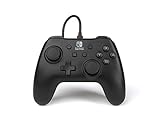
- Matte black design
- Ergonomic controller shape with Nintendo Switch button layout
- Instant plug and play connection (no sync required)
- Detachable 10ft (3m) USB cable with Velcro strap
When to contact PowerA
If the model-specific checks don’t fix the problem, find the controller’s product page through the PowerA support index or contact PowerA support. The correct next step depends on the model; avoid applying reset, calibration, or firmware instructions intended for a different controller.
Quick Recap
Product prices and availability are accurate as of the date/time indicated and are subject to change. Any price and availability information displayed on Amazon at the time of purchase will apply.




