KB5063060 was Microsoft’s emergency Windows 11 24H2 update for the Easy Anti-Cheat compatibility problem that could unexpectedly restart affected PCs when a protected game launched. Fortnite was one recognizable game in the discussion, but this was not a Fortnite-only patch: Microsoft described the issue as affecting games that use Easy Anti-Cheat.
The update was released on June 11, 2025, and moved Windows 11 24H2 to build 26100.4351. It included the June 10 security update, KB5060842, plus the Easy Anti-Cheat fix. In August 2026, KB5063060 is no longer the update you should manually seek. The correct action is to install the latest applicable Windows 11 24H2 cumulative update through Windows Update.
As an Amazon Associate I earn from qualifying purchases.
What KB5063060 fixed
Windows 11 24H2 had a compatibility problem with some versions of Easy Anti-Cheat, the anti-cheat service bundled with certain multiplayer PC games. On affected systems, launching a game that invoked the service could trigger an unexpected Windows restart.
Quick wins for a faster PC:
Fix the driver behind crashes, sound loss and screen glitchesFind Drivers →Clear out junk files and repair common Windows errorsFree Scan →Microsoft’s description applies to Easy Anti-Cheat games generally. Fortnite is relevant because its PC installation uses Easy Anti-Cheat, but the available evidence does not establish that every Fortnite player was affected, nor that Fortnite was the only affected game.
#1 Best Overall
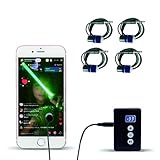
- Release your finger: This phone screen auto clicker supports 2 methods of clicks for various applications. It is very easy to use, just stick the click head on the screen or use the screen clip to simulate automatic finger clicks. Suitable for games, live broadcast likes, and task rewards will save you a lot of time.
- Anti-Cheat Prevention: Many online games have anti-cheat systems that look for automated clickers and other programs. Even if you're using the latest auto-click app, the game may update to detect it. A physical auto-clicker circumvents this problem.
- Adjustable Speed: The automatic tapper for the phone screen has 3 setting buttons with 31-speed gears, the fastest is 33 times a second, which is 5 times faster than the human hand and the slowest is 1 click in 60 seconds. The last used gear parameter will be automatically memorized and saved after power off, one-press start, and stop at any time. Supports imitation finger (irregular) clicks.
- Multi-device compatible: Just connect the USB interface to the power source and you can use the auto clicker immediately. It is compatible with Android and IOS systems, using space mapping click technology instead of the traditional mechanical click method, zero noise, more sensitive and stable click, and longer service life.
- High quality products: Yakboman's automatic screen clicking devices are built to last. Each product is rigorously tested before shipment to ensure that no technical problems occur and that it can adapt to the screen of mobile phones, tablet computers, and laptops with touch screens and support up to 4 screen devices at the same time.
Microsoft’s broader Windows release-health documentation described related symptoms on affected systems as freezes or blue screens, including a possible MEMORY_MANAGEMENT error. That broader description should not be read as proof that every user who installed KB5060842 and played Fortnite received a blue screen. The documented headline symptom for the update incident was an unexpected restart when a game using Easy Anti-Cheat opened.
KB5060842 versus KB5063060
The confusion comes from the timing of two June 2025 updates:
| Date | Update | Build | What it did |
|---|---|---|---|
| June 10, 2025 | KB5060842 | 26100.4349 | June security update for Windows 11 24H2 |
| June 11, 2025 | KB5063060 | 26100.4351 | Out-of-band cumulative update containing KB5060842’s fixes plus the Easy Anti-Cheat compatibility fix |
Microsoft said KB5060842 was not offered to devices with Easy Anti-Cheat installed. That update targeting reduced exposure for many systems, so some users never encountered the failure. KB5063060 was then released outside the normal monthly schedule to address the compatibility issue and deliver the June security content.
Do these 3 things before closing this tab:
1Repair Windows errors before they cause bigger problems2Fix the driver behind crashes, sound loss and screen glitches3Clear out junk files and repair common Windows errorsKB5063060 also included servicing-stack improvements through SSU KB5059502, version 26100.4193. Because it was cumulative, it was not a small Fortnite-specific hotfix that had to remain installed separately.
Rank #2

- Optimizes in mobiles battles, automatic app tasks, or streamlines live streaming interactions without triggering anti cheat detection systems common in online game
- Designing with space mapping clicking technology, the device delivers across all touchscreens while maintaining compatibilities with smartphones / tablets
- Anti-cheating: Many online game have anti-cheating systems, look for automatic tapping tool and other programs Even you using the auto clicking application, this game may be updated to detection it Physical automatic tapping tool can avoid this problem
- It is very simple to use, just stick the tapping tool on the screen or use the screen clip to simulate the automatic clicking of fingers Suitable for game, live broadcasts, and task reward will save you a lots of time
- Ideal for mobile gamers, live streamers, and users requiring repetitive screen action, this tool eliminates finger fatigue in clicking intensive game
Is Fortnite broken by Windows 11 24H2?
Not as a general rule. The problem was an interaction between Windows 11 24H2 and incompatible Easy Anti-Cheat software or drivers on affected systems. Fortnite was a prominent example because it uses the service, but blaming Fortnite alone gives the wrong troubleshooting path.
Microsoft later said the broader compatibility issue affected only systems with Intel Alder Lake-or-newer processors and the vPro platform, with most affected systems using Easy Anti-Cheat drivers released before April 2024. Microsoft placed a compatibility hold on devices with incompatible drivers, identified as safeguard ID 52325539 for Windows Update for Business reporting.
That hold was recorded as removed on July 24, 2025. Microsoft also cautioned that the availability of an Easy Anti-Cheat update depended on the game publisher. An old, inactive Easy Anti-Cheat installation was not expected to cause the problem unless a game actually launched it.
The Tool Desk
Outbyte Driver Updater FREEFix the driver behind crashes, sound loss and screen glitchesFind Drivers →Outbyte PC Repair FREEClear out junk files and repair common Windows errorsFree Scan →What you should do now
If you are troubleshooting Fortnite or another Easy Anti-Cheat game in August 2026, do not search only for KB5063060. It is a historical milestone from June 2025. Later cumulative updates supersede it, and Microsoft’s Windows 11 24H2 release history lists substantially newer builds, including build 26100.8973 from July 28, 2026 through KB5101684.
Rank #3

- Release your finger: This phone screen auto clicker supports 2 methods of clicks for various applications. It is very easy to use, just stick the click head on the screen or use the screen clip to simulate automatic finger clicks. Suitable for games, live broadcast likes, and task rewards will save you a lot of time.
- Anti-Cheat Prevention: Many online games have anti-cheat systems that look for automated clickers and other programs. Even if you're using the latest auto-click app, the game may update to detect it. A physical auto-clicker circumvents this problem.
- Adjustable Speed: The automatic tapper for the phone screen has 3 setting buttons with 31-speed gears, the fastest is 33 times a second, which is 5 times faster than the human hand and the slowest is 1 click in 60 seconds. The last used gear parameter will be automatically memorized and saved after power off, one-press start, and stop at any time. Supports imitation finger (irregular) clicks.
- Multi-device compatible: Just connect the USB interface to the power source and you can use the auto clicker immediately. It is compatible with Android and IOS systems, using space mapping click technology instead of the traditional mechanical click method, zero noise, more sensitive and stable click, and longer service life.
- High quality products: Annrybo's automatic screen clicking devices are built to last. Each product is rigorously tested before shipment to ensure that no technical problems occur and that it can adapt to the screen of mobile phones, tablet computers, and laptops with touch screens and support up to 4 screen devices at the same time.
- Check your Windows edition and build. Open Settings > System > About and look under Windows specifications, or press Windows+R, enter
winver, and press Enter. Confirm that the system is running Windows 11 version 24H2 and note the OS build. - Install the latest Windows update. Go to Settings > Windows Update, select Check for updates, install the latest applicable cumulative update, and restart when prompted. Do not intentionally remain on KB5063060 if Windows offers a newer 24H2 update.
- Update Fortnite and the Epic Games Launcher. Let the launcher finish pending game and service updates before starting Fortnite. Restart the PC after updates if the launcher or Windows requests it.
- Repair Easy Anti-Cheat if Fortnite says it is missing or damaged. This is separate from Windows Update and repairs the game’s anti-cheat installation.
- If crashes continue, broaden the investigation. Check current graphics and chipset drivers, firmware, memory stability, and Fortnite-specific error messages. A crash occurring in 2026 should not automatically be attributed to the June 2025 KB5060842 incident.
How to repair Easy Anti-Cheat for Fortnite
Epic’s documented repair route is handled through the Epic Games Launcher:
- Open Epic Games Launcher.
- Open your Library and locate Fortnite.
- Use the game’s three-dot menu and choose Manage.
- Open the Fortnite installation location.
- Navigate to
FortniteGame > Binaries > Win64 > EasyAntiCheat. - Run the Easy Anti-Cheat executable and choose the repair option when available.
The exact file or dialog wording can vary with the installed game version. This procedure addresses a missing or damaged Fortnite anti-cheat installation; it does not install Windows updates and cannot substitute for updating Windows itself.
Can you still install KB5063060 manually?
Microsoft originally distributed KB5063060 through Windows Update and Microsoft Update, with automatic installation targeted at devices that had Easy Anti-Cheat installed or had not yet installed KB5060842. It was also listed in the Microsoft Update Catalog, which provided separate packages for x64-based and Arm64-based Windows 11 systems.
Recommended Free Tools
Those channels explain how the update was delivered in June 2025, not what a current user should do now. Manually installing an old cumulative update can create unnecessary confusion when a newer cumulative update already contains its fixes. Use the Catalog only when an administrator has a specific compatibility or deployment reason and has confirmed the correct architecture and servicing requirements.
Rank #4

- 147 SHORTCUTS. ZERO SEARCHING. – Keep essential commands for Windows, Word, Excel, PowerPoint and Adobe Photoshop directly beneath your fingertips so you can find answers fast and keep your workflow moving.
- YOUR DESK. SMARTER. – Turn everyday desk space into a powerful productivity tool that helps beginners learn faster, experienced users work more efficiently and busy minds stay focused.
- LARGE WORKSPACE, ALL-DAY COMFORT – The 27.6 x 11.8-inch surface creates ample room for a keyboard and mouse, while the soft 2 mm cushioning supports smooth, comfortable work, study and gaming sessions.
- PRECISION IN EVERY MOVE – The finely woven fabric surface supports fast, accurate mouse tracking, while the natural rubber base grips the desk to prevent distracting slips and shifting.
- BUILT FOR REAL-WORLD WORKDAYS – A rugged stitched edge helps prevent fraying, and the water-resistant, stain-resistant surface protects against scratches, spills and everyday wear—because smarter desks should work harder.
Other issues listed for KB5063060
The Easy Anti-Cheat restart problem was not the only item Microsoft documented on the KB5063060 support page:
- Blurry CJK text: Some users could see unclear Chinese, Japanese, or Korean text at 96 DPI or 100% display scaling in Chromium-based browsers. Microsoft said increasing display scaling improved clarity.
- Microsoft Print to PDF: Enterprise customers and administrators could encounter a Microsoft Print to PDF problem inherited from an earlier update. Microsoft identified KB5060829 as addressing that issue.
These known issues should be kept separate from Fortnite and Easy Anti-Cheat troubleshooting. They do not mean that every gaming-related problem after KB5063060 had the same cause.
When Windows Update will not work
Recovery media is a fallback, not a requirement for KB5063060. If Windows will not boot, built-in recovery fails, or you need to reinstall Windows, Microsoft’s installation-media process requires a blank USB flash drive with at least 8 GB. Its contents will be erased when the media is created, so back up the drive first.
A blank 8GB-or-larger USB flash drive can therefore be useful for creating Windows installation or recovery media. It is not a “KB5063060 USB,” does not contain a special Fortnite fix, and is not needed for an ordinary Windows Update installation. Back up important files before using recovery tools or reinstalling Windows.
Independent reader supportYour contribution helps us test, update, and keep practical guides available for everyone.Timeline
- June 10, 2025: Microsoft released KB5060842 for Windows 11 24H2, build 26100.4349.
- June 11, 2025: Microsoft released KB5063060 out of band, bringing systems to build 26100.4351 and addressing the Easy Anti-Cheat compatibility problem.
- June 26, 2025: Microsoft’s 24H2 release history listed KB5060829 at build 26100.4484.
- July 24, 2025: Microsoft recorded the broader Easy Anti-Cheat compatibility hold as resolved and removed.
- July 28, 2026: Microsoft’s 24H2 release history listed build 26100.8973 through KB5101684, confirming that KB5063060 is no longer current.
Bottom line for Fortnite players
KB5063060 fixed a real Windows 11 24H2 and Easy Anti-Cheat compatibility problem associated with the June 2025 update. Fortnite was one affected-game context, not the complete scope of the patch.
Best Value
- Ideal for mobile gamers, live streamers, and users requiring repetitive screen action, this tool eliminates finger fatigue in clicking intensive game
- Designing with space mapping clicking technology, the device delivers precise across all touchscreens while maintaining compatibilities with smartphones/tablets
- It is very simple to use, just stick the tapping tool on the screen or use the screen clip to simulate the automatic clicking of fingers. Suitable for game, live broadcasts, and task reward will save you a lots of time
- Optimizes performances in mobiles battles, automatic app tasks, or streamlines live streaming interactions without triggering anti cheat detection systems common in online game
- Anti-cheating prevention: Many online game have anti-cheating systems, look for automatic tapping tool and other programs. Even if you using the auto clicking application, this game may be updated to detection it. Physical automatic tapping tool can avoid this problem
If you are troubleshooting today, check winver, install the newest applicable Windows 11 24H2 cumulative update, update Fortnite, and repair Easy Anti-Cheat if the Epic Games Launcher reports that it is missing or damaged. Only move to recovery media or a Windows reinstall after ordinary update and game-repair steps fail.
Frequently Asked Questions
Was KB5063060 a Fortnite-only update?
No. Microsoft released KB5063060 to fix a Windows 11 24H2 compatibility problem involving Easy Anti-Cheat. Fortnite was one recognizable game using the service, but Microsoft’s scope covered games using Easy Anti-Cheat generally.
Free tools Windows power users keep installed
One-click scans. No signup required.
What Windows build did KB5063060 install?
KB5063060 brought Windows 11 version 24H2 to OS build 26100.4351. It was released on June 11, 2025.
Should I install KB5063060 now?
Usually no. It is a superseded June 2025 cumulative update. In August 2026, check Windows Update and install the latest applicable Windows 11 24H2 cumulative update instead.
Can repairing Easy Anti-Cheat replace Windows Update?
No. Repairing Easy Anti-Cheat fixes a missing or damaged game service. Windows Update is still required to receive Windows fixes, including the compatibility correction delivered in KB5063060.
Does every Fortnite player need to worry about this issue?
No. The documented problem affected particular Windows 11 24H2 and Easy Anti-Cheat combinations. Microsoft later narrowed the broader compatibility issue to systems with Intel Alder Lake-or-newer processors and the vPro platform, with additional driver-version considerations.
The Bottom Line
KB5063060 was the June 2025 emergency fix for Windows 11 24H2 restarts triggered by Easy Anti-Cheat—not a permanent Fortnite-only patch. Install the latest 24H2 cumulative update available through Windows Update, then update or repair Easy Anti-Cheat through the Epic Games Launcher if Fortnite still reports a service problem.
Quick Recap
Product prices and availability are accurate as of the date/time indicated and are subject to change. Any price and availability information displayed on Amazon at the time of purchase will apply.




