The “no music bug” refers to reports that background music stopped playing in Wuthering Waves while other game audio could remain. The reports date to May 2024, so they do not establish whether the issue still affects current versions. If music has disappeared for you, check the in-game music volume and your system audio output first; then restart the game.
What was the Wuthering Waves no music bug?
In May 2024, players reported that music—and, in some cases, background effects—could disappear while combat and character sounds continued. One account said music could return after a delay. Background music was expected during exploration, as well as on login and loading screens, according to contemporaneous guides.
Dot Esports associated the issue with certain Resonance Beacon or Nexus teleports, switching applications with Alt-Tab, and skipping world-boss rewards before teleporting away. esports.gg attributed reports to patch 1.0.19 on May 27, 2024. These are historical secondary reports, not official confirmation of the cause or evidence that the same bug remains in the game today.
What to try when music is not playing
- Check the game’s audio settings. Open the in-game settings and confirm that Music Volume is not muted or set too low. Check the other game volume controls too, so music is not being masked by other sounds. Guides describing the setting include Sportskeeda and GameLeap.
- Check your system’s audio output and mixer. Make sure your computer or device is sending sound to the output you intend to use, and that Wuthering Waves is not muted in the system volume mixer. If appropriate, reconnect the audio device. The May 2024 Dot Esports guide also recommends checking the selected output: Dot Esports.
- Restart the game. Fully close and relaunch it, or return to the main menu and re-enter. May 2024 coverage described restarting or relogging as the most consistent player-reported workaround, but it interrupts play and does not establish a permanent fix. See Dot Esports and esports.gg.
- If the problem followed a game-state transition, try another transition. Some players reported entering a domain or training area and then returning to the overworld as a workaround. This is anecdotal and may only help temporarily; it is not a guaranteed repair. Reports are discussed by esports.gg and GameLeap.
- On PC, leave more involved checks until later. Check for audio-driver issues and verify the selected output. One guide suggests disabling spatial sound and restarting; another suggests using the launcher’s repair option. These are troubleshooting suggestions, not established causes or certain fixes. See Sportskeeda and GameLeap.
- Report a persistent problem to Kuro Games. If the checks and restart do not help, use Kuro Games’ support/reporting channel to describe what happened and the platform and game version you are using.
How to interpret the old trigger reports
If the missing music started after teleporting, using Alt-Tab, or leaving a world-boss reward screen, that resembles triggers described in May 2024 coverage. The reports do not prove those actions caused the problem, nor that they explain a present-day occurrence. Treat them as clues about when to restart or test a game-state transition—not as a diagnosis.
#1 Best Overall

- RAZER HYPERSPEED WIRELESS & BLUETOOTH — Game lag-free with ultra-fast 2.4 GHz wireless and pair a compatible Razer mouse to the same dongle via multi-device support; multi-task swiftly by toggling between 3 Bluetooth devices
- HOT-SWAPPABLE DESIGN — Compatible with 3 or 5-pin switches, the keyboard’s socketed PCB allows an easy swap out of its pre-loaded switches for custom ones to achieve desired key feel
- OPTIMIZED TYPING EXPERIENCE — Enjoy a clean typing sound and feel, achieved through a top-mounted stainless-steel plate, tape-enhanced PCB, lubricated stabilizers, and two layers of sound dampening foam
- MULTI-FUNCTION ROLLER & 3 CONTROL BUTTONS — Streamline control with a multi-function roller and dedicated buttons for audio, media, and battery settings—each fully remappable
- UP TO 980 HR BATTERY LIFE — Enjoy uninterrupted use regardless of whether it’s in Razer HyperSpeed Wireless or Bluetooth mode; minimize downtime and stay in the action with fast charging
Is the bug fixed now?
The cited reports are from May 2024 and do not establish whether Kuro Games fixed the issue, whether it is currently acknowledged, or which present-day versions and platforms might be affected. Without newer official confirmation, it is not accurate to say either that the bug is still active or that it has been fixed. The steps above are historical troubleshooting suggestions, not confirmation of current bug status.
Independent reader supportYour contribution helps us test, update, and keep practical guides available for everyone.Which troubleshooting step should you start with?
Start with the reversible checks: the game’s Music Volume, the system mixer, and the selected output device. Restarting is also straightforward, but it interrupts play and can require signing in again. A domain or training-area transition is less predictable and may only help temporarily. Driver changes and launcher repair are more involved, so try them only after the simpler checks.
Quick Recap
Best Value

- Official collaboration with WUCHANG: Fallen Feathers. Compatible with Windows PC, Apple, Steam, and Android devices – 2.4G and wired connection for Windows, and Bluetooth for SteamOS, Apple and Android.
- TMR Joysticks - Delivers higher sensitivity, precision, and durability, featuring an RGB Fire Ring and wear-resistant joystick rings.
- Integrated charging dock keeps your controller always charged and ready, with auto-reconnection. Features customizable 6-Axis motion control, turbo, and rumble. Supports 8BitDo Ultimate Software V2.
- Trigger mode switch - Easily switch between linear Hall Effect triggers and non-linear tactile triggers for optimal control across different gaming scenarios.
- 1000Hz polling rate (for 2.4G and wired connection) & 8Speed Wireless Technology. The exclusive "8Speed" wireless tech ensures ultra-low latency (<1ms), strong anti-interference, and virtually lag-free performance up to 10m.
Rank #4

- Compatible with Windows and Android.
- 1000Hz Polling Rate (for 2.4G and wired connection)
- Hall Effect joysticks and Hall triggers. Wear-resistant metal joystick rings.
- Extra R4/L4 bumpers. Custom button mapping without using software. Turbo function.
- Refined bumpers and D-pad. Light but tactile.
Rank #3
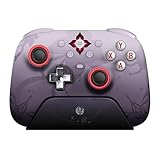
- Officially licensed by Honkai: Star Rail
- Compatible with Windows PC, Apple, Steam, and Android devices – 2.4G and wired connection for Windows, and Bluetooth for SteamOS, Apple and Android.
- TMR Joysticks - Delivers higher sensitivity, precision, and durability, featuring an RGB Fire Ring and wear-resistant joystick rings.
- Integrated charging dock keeps your controller always charged and ready, with auto-reconnection. Features customizable 6-Axis motion control, turbo, and rumble. Supports 8BitDo Ultimate Software V2.
- 1000Hz polling rate (for 2.4G and wired connection) & 8Speed Wireless Technology.
Rank #2

- Officially Licensed Wireless Controller for Xbox: As GameSir’s first wireless controller for Xbox, it features 2.4G wireless connection and one-press wake-up for Xbox consoles, providing you with fast, reliable gameplay and effortless console activation.
- Tri-mode connectivity: The G7 Pro Wuchang: Fallen Feathers edition supports seamless connectivity across Xbox, PC, and Android. Effortlessly switch between modes using the convenient physical mode switch. Choose from 2.4G Wireless & Wired for Xbox consoles and PC; Bluetooth 5.3 for Android.
- Hall Effect Analog Triggers: The GameSir precision-tuned Hall Effect analog triggers provide unmatched smoothness and linear input for precise control. Featuring clicky Micro Switch trigger stops, gamers can easily switch based on their preferences. Additionally, the G7 Pro Wuchang: Fallen Feathers edition offers a Hair Trigger Mode that can be activated by holding the M+LT/RT buttons. Whether you need precise linear control or ultimate responsiveness, it gives you the competitive edge.
- 1000Hz Polling Rate: Experience ultra-responsive gaming with a 1000Hz polling rate on PC, available through both wired and 2.4G wireless connections. This ensures instantaneous input registration, reducing lag and optimizing your performance for the most competitive gameplay.
- Smart Auto Start-Stop Charging Station: The G7 Pro Wuchang: Fallen Feathers edition comes with a smart auto start-stop charging station and a built-in 1200mAh battery, delivering extended battery life for hours of uninterrupted gameplay. Simply place the controller on the station to begin charging, and pick it up to play. The station also includes a receiver storage compartment at the base, allowing you to extend the cable’s reach or to securely store the receiver when not in use.
Product prices and availability are accurate as of the date/time indicated and are subject to change. Any price and availability information displayed on Amazon at the time of purchase will apply.



