PC Slower Than It Used to Be?
A free scan shows the junk files, broken settings and background clutter dragging Windows down - then fixes them in one click.Free scan · Windows 10 & 11Crashes, No Sound, or Screen Glitches?
Random freezes, missing sound and display glitches usually trace back to one bad driver. Find and replace yours safely.Free scan · under a minuteMotorbunny’s Fluffer PlayMate relays certain signals from a compatible USB-C game controller to a separately paired Motorbunny or Fluffer device. It does not vibrate or provide sensation itself. In the standard setup, you pair PlayMate and the receiving device through the Fluffer app; a separate direct-connect option is available for specific Motorbunny Original and BUCK machines with the required upgraded controller.
What PlayMate does—and what it doesn’t
PlayMate is a haptic relay accessory. A connected controller’s haptic signals and tilt-related input can be forwarded to a compatible receiving device. The toy or machine is what provides the sensation; PlayMate is the link between controller and device. Motorbunny describes the accessory and its compatibility options on its official PlayMate product page.
“Console control” is shorthand, not a promise that every console controller or game will work alike. The documented connection uses a USB-C controller plugged into PlayMate’s dongle, and the experience depends on the signals the controller provides. Motorbunny’s support guide says Gaming Mode can use PlayMate’s IMU (accelerometer) to drive the paired device through tilt input.
How to connect PlayMate with the Fluffer app
Motorbunny’s documented app-mediated setup uses Bluetooth for pairing PlayMate with the app and a USB-C connection for the game controller. Follow the current instructions in the Motorbunny PlayMate pairing guide if the app’s labels or screens differ.
Recommended Free Tools
#1 Best Overall
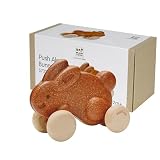
- MONTESSORI INSPIRED MOVEMENT AND COORDINATION DEVELOPMENT – The PlanToys Brown Push Along Bunny encourages toddlers to explore balance, rhythm, walking confidence and gross motor coordination through hands on Montessori aligned movement play. As the bunny hops along, children stay engaged, curious and motivated to move.
- STRENGTHENS GROSS MOTOR SKILLS, BALANCE AND BODY AWARENESS – Pushing the brown bunny helps build leg strength, enhances walking stability, improves posture and supports whole body coordination. Children practice pacing, direction control and spatial awareness, laying essential foundations for early childhood physical development.
- SUPPORTS CAUSE & EFFECT, RHYTHM AND EARLY SENSORY PROCESSING – The bunny’s rhythmic hopping introduces toddlers to early cause & effect concepts, auditory feedback and consistent movement patterns. This fosters cognitive development, timing, pattern recognition and emergent STEM skills through natural physical play.
- ENCOURAGES IMAGINATION, LANGUAGE DEVELOPMENT AND PRETEND PLAY – The friendly brown bunny inspires storytelling, character-based play and expressive communication. Children build vocabulary as they describe movements, create adventures and narrate playful scenes, supporting emotional expression and early language growth.
- ECO FRIENDLY MATERIALS WITH DURABLE WOODEN CRAFTSMANSHIP – Made from sustainably sourced wood and finished with non toxic, child safe materials, the PlanToys Brown Push Along Bunny provides smooth textures, durability and safe sensory rich play. Ideal for Montessori homes, toddler playrooms, early learning classrooms, therapy settings and eco conscious families.
- Connect PlayMate to the Fluffer app over Bluetooth.
- In the app, pair PlayMate with the primary Motorbunny or Fluffer device that will receive the signals.
- Plug a compatible USB-C game controller into the PlayMate dongle.
- Use the app’s Gaming Mode. Controller haptics can be relayed to the paired device, and tilt input can be used through PlayMate’s IMU.
The exact behavior depends on the controller, game, app, and receiving device; the available official descriptions do not establish that every game exposes usable haptics or that all controllers provide the same inputs.
When the direct-controller route applies
Motorbunny also offers a direct route using its LINK Controller PlayMate Edition (2025). According to the LINK Controller PlayMate Edition product page, this connects PlayMate directly with a Motorbunny Original or BUCK that has an upgraded controller, without using the app.
This is a specific hardware path, not a universal plug-and-play option for existing owners. Check the machine model and controller generation before relying on it; an Original or BUCK without the specified upgraded controller may not meet the stated conditions.
Rank #2

- Hands-on Learning: this adorable rolling bunny activity provides kids a fun lesson in motion while playing and using their imagination. Babies will see the cause and effect when they push or pull the toy, and watch it roll and go! It’s physics for toddlers!
- Develop Skills: Encourage development in balance, motor skills, hand-eye coordination, and spatial awareness, concentration, and physical development with this wooden rolling push toy.
- Child Safe + Eco Friendly: This adorable bear toy is made from eco friendly bamboo and finished with a baby safe protective varnish. Rest easy knowing all of our toys and games were designed with your children’s safety and development in mind.
- Keepsake Quality: This sturdy wood toy comes in an adorable window box, perfect for baby shower or birthday gifts. Our classic montessori inspired toys are durable and made to be kept for years to come, and also make beautiful artistic decor in your home or nursery. Measures approximately 5.5 inches x 6 inches.
- The Wee Gallery Story: We've built a fun and creative world of animals and nature themes for curious boys and girls, thoughtfully designed to entertain and educate as they grow from baby to toddler to young children of 3, 4, and 5. Our sustainable unisex toys are created for each stage of child development to encourage learning through play. We pride ourselves in creating top notch modern learning resources for babies and toddlers in the form of educational toys and games.
What to check before buying
- Receiving device: Confirm that your exact Motorbunny or Fluffer toy or machine supports the connection you intend to use. The product page lists broad compatibility categories, but its available information does not provide a complete model-by-model matrix.
- Connection route: Decide whether you will use Bluetooth pairing through the Fluffer app or the specified direct LINK Controller route.
- Controller and hardware: Check that your game controller has the required USB-C connection and that your machine has the required upgraded controller if you plan to connect directly.
- Game behavior: Do not assume every game sends haptic signals that PlayMate can use. The official descriptions explain the relay and tilt input, but do not promise universal controller or game support.
Motorbunny’s product information and support instructions are the best places to verify current compatibility and setup details for your specific hardware.
The Tool Desk
Outbyte Driver Updater FREEFix the driver behind crashes, sound loss and screen glitchesFind Drivers →Outbyte PC Repair FREERepair Windows errors before they cause bigger problemsFix Now →What Motorbunny says about the app
Motorbunny’s press kit attributes this statement to co-founder Brooks Butler: “Motorbunny has been the established leader in wireless sex machine control, and the natural evolution of the technology is manifested in the much more robust Fluffer app.” That is a company co-founder’s promotional description, not an independent assessment of PlayMate’s performance. The press kit is available at Motorbunny’s press kit.
Quick Recap
Product prices and availability are accurate as of the date/time indicated and are subject to change. Any price and availability information displayed on Amazon at the time of purchase will apply.



