Quick wins for a faster PC:
Scan for outdated or missing drivers - takes under a minuteDriver Scan →Clear out junk files and repair common Windows errorsFree Scan →Fix the driver behind crashes, sound loss and screen glitchesFind Drivers →wwanconn.dll is a genuine Microsoft Windows component called Wireless WAN Connection Flows. When wwanconn.dll is missing, corrupt, or cannot be loaded, repair Windows first rather than downloading a replacement DLL.
The file belongs to Windows’ WWAN stack, which supports wireless wide-area networking and mobile broadband. That includes internal cellular modems and supported mobile-broadband devices. It is not a Visual C++ runtime, DirectX file, .NET component, or game-specific DLL.
As an Amazon Associate I earn from qualifying purchases.
Public Windows file inventories place it in:
C:WindowsSystem32wwanconn.dll
On 64-bit Windows, 32-bit compatibility files normally use C:WindowsSysWOW64, but do not manually choose a copy based on its filename or size. Windows servicing must restore the version that matches your edition, build, language, architecture, and updates.
Free tools Windows power users keep installed
One-click scans. No signup required.
Fix 1: Install Windows updates, then repair system files
Time needed: 15–30 minutes, excluding downloads
This is the safest first fix when the error says that wwanconn.dll is missing, corrupted, not designed to run on Windows, or could not be loaded.
#1 Best Overall

- BLAZING HIGH DOWNLOAD SPEED - The download speeds up to 2.5Gbps, enabling seamless streaming of high-definition content, fast downloads of large files, video conferencing, and online gaming. The high-quality USB Type C 3.1 cable provides optimal 5G data throughput, making it the ultimate solution for enhancing advanced security and work productivity. Simply plug and play for direct high-speed 5G internet. Special Note: VOS does not support Video Conferencing on macOS, iPadOS.
- SECURE PRIVATE INTERNET ACCESS - TRI CASCADE VOS 5G solution provides optimal data security, delivering secure and private internet access. Whether traveling, on a business trip, or in public spaces, there's no necessity to connect to a public Wi-Fi network or your mobile hotspot for internet access. A SSID (service set identifier) is not broadcasted, preventing vulnerability to Wi-Fi hacking apps.
- EFFORTLESS SETUP AND SEAMLESS COMPATIBILITY - Activate online with no store visit or driver downloads. Package includes a T-Mobile 5G SIM and activation guide. Supports Windows 10/11, macOS (for MacBook), Linux, and iPadOS (iPad). For iPads (10th-gen, 2022 and after. Not applicable to iPad air 3rd generation or below), Surface Pro (7th-gen) tablets, laptops, and personal computers. Also works as a Wi-Fi hotspot for Windows 11 and MacBook. Friendly Reminder: Not applicable to Android Pads.
- THREE 5G GLOBAL DATA PLANS WITH ONLINE ACTIVATION - Choose from three data plans offering unlimited roaming for as low as $20 per month with auto-pay. Simply scan the QR code from a phone or computer to activate online. You do not need to visit a telecom store. A T-Mobile SIM card is included. Ideal for anyone requiring secure wireless connectivity wherever you need a secure private internet connection. Data Plan Services are provided by T-Mobile and is subject to T Mobile Terms and Conditions.
- PORTABLE AND CONVENIENT ADAPTER - The TRI CASCADE VOS 5G USB-C network adapter is a pocket-size dongle – compact and easy to carry – making it an ideal companion for travelers and those constantly on the move. Stay connected effortlessly while enjoying the freedom and security of wireless connectivity. Provides a 1-Year Warranty and online technology support; simply write to us, and we’re willing to assist you.
Check Windows Update
On Windows 11:
- Open Start > Settings.
- Select Windows Update.
- Click Check for updates.
- Install everything available.
- Restart the computer, even if Windows does not insist on it.
On Windows 10:
- Open Start > Settings.
- Select Update & Security.
- Open Windows Update.
- Click Check for updates.
- Install the updates and restart.
Windows updates can replace damaged protected files and complete servicing operations that previously stopped halfway. Microsoft’s Windows Update instructions cover the same process.
Run DISM and SFC
After restarting:
- Open Start.
- Type
cmd. - Right-click Command Prompt.
- Choose Run as administrator.
- Approve the User Account Control prompt.
- Run this command:
DISM.exe /Online /Cleanup-image /Restorehealth
Wait for DISM to finish. It repairs the Windows component store, which SFC may need as its source. Then run:
sfc /scannow
Leave the window open until verification reaches 100 percent. Microsoft specifically recommends running DISM before SFC when repairing missing or corrupted Windows components. See Microsoft’s System File Checker and DISM guidance.
The Tool Desk
Outbyte Driver Updater FREEScan for outdated or missing drivers - takes under a minuteDriver Scan →Outbyte PC Repair FREERepair Windows errors before they cause bigger problemsFix Now →A successful result usually says that SFC found no integrity violations or found corrupt files and successfully repaired them. Restart Windows and launch the program that showed the error.
If SFC says it could not repair some files, restart and run the DISM and SFC commands once more. If the same error remains, continue with the application, antivirus, and recovery checks below instead of copying a DLL manually.
If repeatedly running DISM and SFC leaves you unsure which component is damaged, Outbyte PC Repair can scan for the underlying problems; its free scan shows what it found, while repair requires the full version. It is optional, and Windows Update plus DISM/SFC remain the normal repair path.
Fix 2: Check whether antivirus quarantined the file
Time needed: 5–10 minutes
Security software can remove or quarantine a damaged file during malware cleanup. A filename match alone does not prove that the quarantined item is safe.
In Windows Security:
- Open Start.
- Type Windows Security and open it.
- Select Virus & threat protection.
- Click Protection history.
- Review recent actions for a file named
wwanconn.dll. - Open the entry and inspect its path, threat classification, and action.
Only consider restoring the file if it was located in the expected Windows directory and its Microsoft signature and integrity are verifiable. Do not restore an item merely because its name matches the missing file. Microsoft warns that allowing a genuinely malicious file can put the device at risk; its Protection History guidance explains the available actions.
If the item was found in a download, temporary, user-profile, or random application directory, leave it quarantined. Run a full scan, then return to Fix 1 to repair Windows.
Rank #2
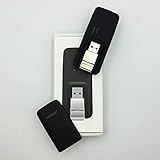
- Easy to adjust; The USB connector folds into your modem for a quick and convenient way to carry it in your laptop bag, backpack or pocket; Make connecting a breeze with a swivel designed to adjust to any USB port orientation
- SIM card is Not included
- Easy to adjust The USB connector folds into your modem for a quick and convenient way to carry it in your laptop bag, backpack or pocket; Make connecting a breeze with a swivel designed to adjust to any USB port orientation
- SIM CARD IS NOT INCLUDED
Fix 3: Repair the application named in the error
Time needed: 5–20 minutes
A program can show a wwanconn.dll error even when the Windows copy is present. The message may come from a broken application installation, an incompatible application manifest, or a missing dependency. “The specified module could not be found” can also mean that a dependency failed to load.
First determine which program triggers the dialog:
- Note the application name in the error window.
- Close the dialog.
- Start other programs.
- If only one program fails, treat its installation as the primary suspect.
For a Microsoft Store or supported Windows application:
Do these 3 things before closing this tab:
1Scan for outdated or missing drivers - takes under a minute2Clear out junk files and repair common Windows errors3Fix the driver behind crashes, sound loss and screen glitches- Open Start > Settings.
- Select Apps > Installed apps.
- Find the affected application.
- Click the three-dot menu.
- Choose Advanced options.
- Click Repair.
- Test the application.
If Repair does not help, return to the same screen and choose Reset if available. Resetting can remove the application’s local settings and data, so check the program’s documentation first.
For a traditional desktop program:
- Open Start > Settings > Apps > Installed apps.
- Select the program.
- Choose Uninstall, or use its own installer’s Repair option if offered.
- Restart Windows.
- Reinstall it from the developer’s official installer or launcher.
- Apply the program’s updates before launching it.
Do not place a downloaded wwanconn.dll beside the executable. If the program incorrectly requests a private Windows component from its own folder, reinstalling the program is the correct way to rebuild its files and manifest.
Fix 4: Repair the WWAN or modem driver
Time needed: 10–25 minutes
This fix is most relevant when the computer has a cellular modem and the symptoms include lost mobile-broadband connectivity, a missing cellular adapter, or a modem error in Device Manager. A driver reinstall does not directly repair the Windows DLL, but it can fix the hardware path that calls the WWAN stack.
Check Device Manager
- Right-click Start.
- Select Device Manager.
- Expand Network adapters.
- Look for a cellular, WWAN, mobile-broadband, or modem device.
- Also check Modems, Other devices, and entries with a warning icon.
- Right-click the relevant device and choose Properties.
- Read the message under Device status.
If the device is disabled, right-click it and choose Enable device. If it has a warning icon:
- Right-click the device.
- Select Uninstall device.
- If offered, select the option to remove the driver only when you have a replacement from the PC or modem manufacturer.
- Restart Windows.
- Install the current driver supplied for your exact computer or modem model.
Prefer the manufacturer’s support page for the PC or modem. Check the model, Windows edition, and 32-bit or 64-bit architecture before installing. Do not force a driver from a different model.
If you are tired of hunting through several hardware support pages and comparing driver versions, Outbyte Driver Updater can scan for outdated drivers; its free scan identifies issues, while driver installation requires the full version. It is optional, and the manufacturer’s driver remains the preferred source for a WWAN device.
Microsoft describes the relationship between the cellular service, modem drivers, and Windows components in its cellular architecture documentation and mobile-broadband overview.
Rank #3

- True Double-Carrier Coverage — Works on both AT&T and T-Mobile networks, not locked to a single carrier. Automatically connects to the strongest signal. SIM card included in the box — no separate purchase needed.
- Plug & Play Portable WiFi — Plug into any USB port (wall adapter, laptop, car charger, power bank) and create a personal WiFi hotspot in seconds. No software, no drivers, no setup. Up to 10 devices connected simultaneously.
- Built for Life On the Go — Road trips, RV camping, remote cabins, job sites, coffee shop backup. Anywhere there's cellular signal, there's your WiFi. Fits in your pocket — smaller than a pack of gum.
- Not a USB WiFi Adapter — This creates its OWN internet from cellular data. Doesn't need a cable modem, home broadband, or public WiFi. True mobile internet wherever your phone gets a signal.
- 500MB Trial Data— Start with a $10 plan and get an extra 500MB of data to test your coverage. If the SIM can't connect or doesn't work with your device, contact us within 7 days for a refund. Works, or it's on us.
Do not enable random Windows Features
wwanconn.dll is not normally fixed by turning on .NET Framework, DirectPlay, legacy components, or another optional Windows Feature. Open Settings > Optional features only when a separate error specifically identifies a missing Windows feature. Enabling unrelated components does not replace a damaged WWAN file.
Windows Errors? Fix Them Before They Spread
Repair common Windows errors and clear accumulated junk for a smoother, more stable PC - no reinstall needed.Free scan · no reinstallOutdated Drivers Are Slowing You Down
One free scan finds every outdated or missing driver and matches the right update for your exact hardware.Free scan · exact hardware matchFix 5: Use System Restore after a recent change
Time needed: 20–45 minutes
Use System Restore if the problem began immediately after a driver installation, Windows update, cleanup utility, or security-software event.
- Press Win+R.
- Type:
rstrui.exe
- Press Enter.
- Select Choose a different restore point if that option appears.
- Pick a restore point dated before the failure began.
- Click Next, then Finish.
- Allow Windows to restart.
System Restore changes system files, registry settings, and installed programs but does not normally remove personal files. It may remove a recently installed driver or application, so reinstall that software only after confirming that Windows starts normally. Microsoft explains the process in its System Restore guide.
Fix 6: Perform an in-place Windows repair
Time needed: 30–90 minutes
Use this when Windows Update, DISM, SFC, antivirus checks, and application repair have not resolved a system-wide failure.
On supported Windows 11 systems:
- Open Start > Settings.
- Select System > Recovery.
- Find Fix problems using Windows Update.
- Click Reinstall now.
- Follow the prompts.
Microsoft says this reinstalls the same Windows version while preserving apps, files, and settings. The option is not available on every edition or configuration.
What’s actually slowing this PC down?
Pick the symptom - the matching free tool is one click away.
If it is absent, use supported Windows installation media for an in-place repair. Start setup.exe from within Windows and choose the option to keep personal files and apps. Do not boot from the media and choose a clean installation unless you have backed up your data and deliberately want to erase the existing installation. Microsoft provides the installation-media repair procedure.
Why regsvr32 wwanconn.dll is usually the wrong fix
Do not treat regsvr32 as a general DLL repair command. It registers DLLs that expose a registration entry point such as DllRegisterServer; it does not replace a missing file, repair the component store, or correct a mismatched dependency.
Running:
regsvr32 wwanconn.dll
will generally not solve a Windows WWAN component error. It can also produce another error that distracts from the original problem. Microsoft documents regsvr32 as a registration tool, not as a standard repair step.
Rank #4

- ◇Introduction: USB to GSM is a four-frequency GSM/GPRS module, its stable performance, and can meet a variety of customer needs. Integrated USB to serial port chip, directly plug in the computer can be debugging. The operating frequency of SIM800C is GSM/GPRS 850/900/1800/1900mhz, which can be used worldwide. It can realize the transmission of voice, SMS messages, and data information with low power consumption, and can be suitable for various compact product design requirements.
- ◇ On-board original SIM800C GSM/GPRS module; On-board CH340T USB to serial port chip, simple driver installation and high compatibility; self-elastic SIM card slot design, can use 2G/3G/4G Micro SIM and Nano card;
- ◇The USB to GSM module will automatically start up and connect to the network when it is powered on. It does not need to control the startup with buttons, which saves the troublesome startup process;
- ◇Support SMS sending and receiving, provide management software; provide reference host computer source code (c#, vb) supporting materials and instructions for use; support GPRS data transmission under 2G network, which can be used in mobile meter reading and other occasions;
- ◇Support Bluetooth data transmission, IEEE802.15 bluetooth standard, 2.4GHz working frequency band; support adaptive baud rate; with working indicator, no network, no SIM card or when the SIM card is inserted backward, the LED light flashes quickly at 1-second intervals, normal Blinks once every 3 seconds when connected to the network.
Why random DLL downloads are unsafe
There is no Microsoft wwanconn.dll redistributable package. Downloading an isolated DLL from a random site can give you:
- Malware disguised as a system file
- The wrong Windows build or servicing level
- The wrong architecture
- An invalid or missing Microsoft signature
- A file with incompatible dependencies
- A replacement that leaves the component store inconsistent
The safe sources are Windows Update, DISM and SFC, System Restore, supported Windows recovery, the PC or modem manufacturer’s driver package, and the official installer for the application named in the error.
How to verify the file
If wwanconn.dll exists:
- Browse to
C:WindowsSystem32. - Right-click
wwanconn.dll. - Select Properties.
- Open the Details tab.
- Confirm the description identifies Wireless WAN Connection Flows and the company identifies Microsoft where that metadata is available.
- Open Digital Signatures and inspect the signer.
- Use Signature Details to confirm Windows accepts the signature.
A copy in a random game folder, download directory, temporary folder, or user-profile path deserves extra suspicion. A file’s size or version alone does not establish that it is the correct replacement. Windows servicing changes system files over time, so old catalog versions are not interchangeable.
Likely causes and the matching fix
| Likely cause | Best response |
|---|---|
| Corrupted or deleted Windows component | Windows Update, then DISM and SFC |
| Incomplete Windows servicing | Retry updates, restart, then run DISM and SFC |
| Antivirus quarantine | Review Protection History and verify the file before restoring |
| Broken application installation | Repair or reinstall the named application |
| WWAN or modem driver problem | Reinstall the manufacturer’s compatible driver |
| Disk or profile corruption | Check disk health, test another profile, or use System Restore |
| Missing dependency or application manifest problem | Repair the calling application rather than replacing the DLL |
FAQ
Is wwanconn.dll a legitimate Windows file?
Yes. It is associated with Microsoft Windows and the Wireless WAN Connection Flows component. A genuine copy should be in the Windows component store or the expected Windows system directory and should have trustworthy Microsoft metadata and signing information.
Does every PC need it?
The file can be included in Windows even when a computer has no cellular modem. Most users never interact with it directly. A PC without WWAN hardware should not normally show a popup involving this file unless Windows, an application, or a damaged installation is calling it incorrectly.
Is wwanconn.dll a driver?
No. It is a Windows DLL in the WWAN software stack. A cellular modem still needs a compatible device driver, and that driver may be the real source of a connectivity problem.
Will installing Visual C++ Redistributable fix it?
Usually not. There is no evidence that wwanconn.dll is a Visual C++ runtime file. Repair Windows or the application that is requesting it instead.
What if the file exists in System32 but the error remains?
Check the exact program named in the dialog, its dependencies, application manifests, and side-by-side servicing. A missing dependency can produce “the specified module could not be found” even when the named DLL is present. Repairing or reinstalling the calling application is often more useful than replacing the system file.
Should I copy the 32-bit file into System32?
No. On 64-bit Windows, 64-bit system components normally use System32, while 32-bit compatibility components normally use SysWOW64. Let Windows repair determine the correct file and location.
Recommended Free Tools
Quick Recap
Product prices and availability are accurate as of the date/time indicated and are subject to change. Any price and availability information displayed on Amazon at the time of purchase will apply.




