
What’s actually slowing this PC down?
Pick the symptom - the matching free tool is one click away.
No—the Xbox Series S does not have a dedicated audio port on the console. Xbox’s official specifications list one HDMI 2.1 port and three USB 3.1 Gen 1 ports, but no 3.5 mm headphone socket and no optical (Toslink) output. Sound normally travels through HDMI to your television, monitor, receiver or other HDMI audio system. For private listening, Xbox says compatible headsets work with Series S, although the available official information does not establish a specific connector location or connector standard for every headset setup.
What ports does the Xbox Series S actually have?
The official Series S port list contains four connections:
As an Amazon Associate I earn from qualifying purchases.
| Port | What the specification establishes | Audio implication |
|---|---|---|
| HDMI 2.1 | One console connection carrying the system’s video and HDMI audio capabilities | This is the normal route to speakers in a connected display or HDMI audio system |
| USB 3.1 Gen 1 | Three USB ports are listed | They are not identified in the official port list as dedicated analog or optical audio outputs |
| 3.5 mm audio jack | Not listed | There is no official evidence of a headphone socket on the console itself |
| Optical audio (Toslink) | Not listed | There is no official evidence of an optical audio output |
This conclusion is about the console’s published port list, not a claim that every accessory or controller has identical hardware. If you are asking whether you can plug a normal 3.5 mm cable directly into the small console, the answer is no based on Xbox’s official specifications.
Free tools Windows power users keep installed
One-click scans. No signup required.
How the Series S delivers game sound
The Series S uses its HDMI connection for audio as well as video. That means the console sends sound to whatever compatible device is handling the HDMI signal: commonly a television, a monitor with speakers, an HDMI-equipped receiver, or another HDMI audio system.
#1 Best Overall
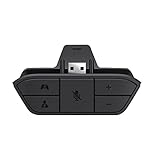
- COMPATIBILITY --> This Xbox headset adapter enables most wired stereo gaming headsets to work with Xbox controllers such as Xbox One/One S/X/Elite 1/Elite2/Series X|S Controllers.
- FOR 3.5mm AUDIO HEADSET --> Most stereo gaming headsets with a 3.5mm audio jack (that use the CTIA plug standard) can get chat and stereo game audio directly through the Xbox One.
- EASY TO CONNECT --> Connect to the bottom of your controller with your headphones hooking up to the 3.5mm port on the xbox one headset adapter
- HOW TO USE --> Controller & figure logo on adapter balance gaming & chatting sound separately (Beep sound happens when the maximum or minimum). Plus & minus logo adjust the volume up and down simultaneously. Microphone logo mute or unmute your sound during chatting
- 1 YEAR WARRANTY --> If there are any problems with our products, please contact us, we will get back to you within 24 hours.
Xbox lists these HDMI audio capabilities for Series S:
- Linear PCM (L-PCM) up to 7.1 channels
- Dolby Digital 5.1
- DTS 5.1
- Dolby TrueHD with Atmos
These are capability specifications, not a promise that every television, soundbar or receiver accepts every format. Your display or audio system still needs to support the format you select. A two-channel television may play a compatible signal as stereo, while a surround-capable system can use the multichannel formats it understands.
What HDMI means in a typical setup
- Connect the Series S HDMI output to an HDMI input on your television, monitor or audio/video system.
- Select that HDMI input on the receiving device.
- Set the receiving device to the speakers or audio output you want to use.
- If the system offers several audio-format choices, use a format supported by the connected equipment. The exact settings and labels can differ by device and software version.
There is no separate audio cable from the Series S in this arrangement. HDMI is carrying the picture and sound together.
Rank #2

- 🎮FEATURE🎮Control audio balance (game sound and voice chat), volume & mic directly without adjusting chat mixer setting on Xbox system every time or taking your hands off the controller
- 🎮EASY TO USE🎮Connect to the bottom of your controller with your headphones hooking up to the 3.5mm port on the xbox one headset adapter
- 🎮3.5MM AUDIO JACK🎮Any headsets with CTIA standard can be used properly
- 🎮INSTRUCTION🎮Controller & figure logo on adapter balance gaming & chatting sound separately (Beep sound happens when the maximum or minimum). Plus & minus logo adjust the volume up and down simultaneously. Microphone logo mute or unmute your sound during chatting
- 🎮WHAT ELSE🎮Offer the replacement without asking within 1 year & helpful customer service anytime
Can you use headphones with an Xbox Series S?
Yes, Xbox states that compatible headsets work with Series S and provides headset-connection guidance. That gives you a private-listening option even though the console has no dedicated audio jack.
The official information available for this topic does not confirm the precise location of a controller connector, the connector standard used by every headset, or whether a particular adapter will work. Do not assume that any headset, USB device or passive adapter is universally compatible. Check the headset’s Xbox compatibility information and follow the current Xbox support instructions for that model.
What to check before buying a headset
- It should explicitly identify Xbox Series S or Xbox console compatibility.
- Confirm whether it is wired or wireless and what connection method the manufacturer requires.
- Check whether chat audio and the microphone are supported, not only game audio.
- Verify that any required adapter is included and intended for Xbox use.
- Read the current product instructions rather than relying on a generic “works with PC” statement.
A compatible wired gaming headset is a practical category to consider for private listening, but the console’s lack of a built-in audio jack means the headset’s connection method matters. The fact that a plug fits a USB port, for example, does not by itself establish that the console supports that headset as an audio device.
Rank #3

- 【Enhanced Compatibility with X-b0x One Controllers】Unlock the potential of your gaming experience with our headset adapter. Seamlessly connect most wired stereo gaming headsets to a wide range of X-b0x One controllers, including X-b0x One, One S, X, Elite 1, Elite 2, Series S, and Series X Controllers.
- 【Universal Compatibility with Gaming Headsets】Designed to accommodate the majority of stereo gaming headsets equipped with a 3.5mm audio jack following the CTIA plug standard. Immerse yourself in rich chat and stereo game audio, directly through your X-b0x One console
- 【Effortless Setup and User-Friendly Design】Experience gaming convenience like never before. Simply plug your x-one headset adapter into your controller, connect your headset, and you're ready to dive into the action. No complicated console connections required. A microphone is required for chat.
- 【Precision Craftsmanship, Trusted Performance】Crafted by OLCLSS, our stereo mic adapter delivers seamless functionality comparable to the original Microsoft design. Enjoy easy usability without compromising quality
- 【Your Satisfaction is Our Priority】We are committed to providing a top-notch gaming accessory. Enjoy peace of mind with our 60-day money-back guarantee and a 24-month warranty. If you have any concerns or inquiries, contact us through Amazon, and our dedicated team will promptly respond within 12 hours. Your package includes: 1* OLCLSS stereo adapter. Elevate your gaming experience today
Best connection method for each listening setup
| Your goal | Use this route | Important qualification |
|---|---|---|
| Use the television’s speakers | Connect the Series S by HDMI to the television | The television must be on the correct HDMI input and have its own audio enabled |
| Use an HDMI-equipped audio system | Connect through the HDMI path supported by that system | The system must accept the audio format being sent |
| Listen privately | Use a compatible Xbox headset and follow Xbox’s connection guidance | Connector details vary; confirm the specific headset’s Series S support |
| Use a display with no speakers | Use a compatible headset or an HDMI audio device that provides speakers | The Series S does not provide a separate analog or optical output for a simple cable to headphones |
Step-by-step: getting sound through HDMI
When the console is connected to a television or audio system but you hear nothing, work through the signal path in order.
- Check the physical HDMI connection. Make sure the cable is fully inserted into the Series S and the receiving device. The console has one HDMI port, so the other end must go to an HDMI input on the display or audio system.
- Select the matching input. Use the television, monitor or receiver’s input control to select the HDMI socket where the console is connected.
- Check mute and volume. Confirm that the receiving device is not muted and that its volume is high enough to hear.
- Test the receiving device with another source. If another HDMI source also produces no sound, the problem is probably in the display or audio system rather than the Series S.
- Review audio-format compatibility. If a surround format fails but basic sound works, choose an audio format the connected device supports. The Series S supports L-PCM up to 7.1, Dolby Digital 5.1, DTS 5.1 and Dolby TrueHD with Atmos, but the receiving equipment may support only some of them.
- Restart the signal chain. Turn off the display or audio system, disconnect and reconnect the HDMI cable, then power the devices back on. This can force them to renegotiate the HDMI connection.
If video appears but sound does not, focus first on the receiving device’s mute, volume, input and audio-output settings. If neither video nor audio appears, investigate the HDMI input selection and cable connection before changing audio formats.
Step-by-step: using a compatible headset
- Confirm compatibility. Use a headset that specifically supports Xbox consoles or Series S, not merely one described as PC-compatible.
- Identify the headset’s required connection. Follow the manufacturer’s instructions for its wired or wireless method. The official Series S port list does not identify a console headphone socket.
- Follow Xbox’s headset setup guidance. Xbox provides instructions for connecting a compatible headset; use those instructions for the current console software and headset model.
- Check game and chat audio separately. If you can hear the game but not party chat, or vice versa, inspect the headset and console audio controls for the relevant balance or output setting.
- Test the microphone if chat matters. A headset can deliver game sound while its microphone remains disabled, muted or unsupported. Confirm microphone support in the headset’s documentation.
Because connector details are not established by the available official page text, a general claim such as “plug every headset into the controller’s 3.5 mm jack” is too broad. The correct connection depends on the specific compatible headset and the instructions supplied for it.
Rank #4

- -|Compatibility to Headsets|- Work with most stereo headsets with a 3.5mm audio jack (use the CTIA plug standard)
- -|For Xbox Controllers|- Enables most wired stereo gaming headsets to work with Xbox One controllers, such as Xbox One S/ Elite 1 /Elite 2/ Series S|X Controllers.
- -|Plug & Play|- Connect to the bottom of your controller with your headphones hooking up to the 3.5mm port on the xbox one headset adapter
- -|INSTRUCTION|- Controller & figure logo on adapter balance gaming & chatting sound separately (Beep sound happens when the maximum or minimum). Plus & minus logo adjust the volume up and down simultaneously. Microphone logo mute or unmute your sound during chattin
- -|1 YEAR WARRANTY|- This product is eligible for 1 year warranty policy.
Common misunderstandings about Series S audio
“The USB ports are audio ports.”
Xbox lists three USB 3.1 Gen 1 ports, but the published specification does not label them as universal audio outputs. A USB socket’s shape is not proof that a particular USB headset, DAC or adapter will work. Confirm support for the exact device before buying it.
“HDMI is only for the picture.”
HDMI carries the console’s audio as well as its video. A television or HDMI audio system can therefore provide sound without a separate audio cable connected to the Series S.
“An optical cable should plug into the back.”
The official port list does not include an optical/Toslink output. If your existing sound system accepts only optical audio, the Series S itself does not offer that connection directly. You would need an independently verified, compatible way to obtain audio from the HDMI signal; the available information does not establish a particular adapter or converter.
Best Value

- SCOUT MODE PLUS FOUR EQ PRESETS: One button lets you hear the quiet directional cues in a match, the footsteps and reload sounds that a flat stereo mix buries. A second button cycles four EQ presets, Voice, Music, Movie and Game, so party chat, a film and a firefight each get their own curve without you opening a menu.
- FIVE BUTTONS UNDER YOUR RIGHT HAND: The adapter carries volume up, volume down, one-button mic mute, the EQ cycle and Scout Mode. Mute is the one you use most, and the volume-down button flashes twice to confirm the microphone is off, so you can check your mic status with a glance instead of pausing the game.
- COMPATIBILITY – 3.5MM-JACK CONTROLLERS ONLY: Fits Xbox One, Xbox One S, and Xbox Series X|S controllers that have a 3.5mm headphone jack on the bottom. NOT compatible with the original Xbox One controllers WITHOUT a 3.5mm jack (pre-2015 models), or with PlayStation, Nintendo Switch, or any non-Xbox controllers. Please confirm your controller has a 3.5mm jack before buying.
- NO BATTERY, NO DRIVER, NO POWER LEAD: The adapter draws what it needs from the controller, so there is nothing to charge, nothing to install and no firmware step before you play. It weighs 15 g and measures 56 x 40 x 24 mm, which keeps the profile close to the grip rather than hanging off it.
- READ THIS BEFORE YOU BUY: This adapter takes a wired 3.5mm headset with a CTIA four-pole plug. Bluetooth and wireless headsets will not work through it, and headsets wired to the older OMTP standard can give you sound with no microphone. The buttons set headset volume, chat volume and mic mute, not a separate game and chat balance. This is a third-party product and is not an official item for Xbox.
“Every monitor will provide sound.”
A monitor can accept HDMI video without having speakers or a usable audio output. Check the monitor’s own specifications. If it lacks speakers, use a compatible headset or an HDMI audio device rather than expecting the console to supply a separate headphone signal.
Choosing between HDMI speakers and a headset
| Priority | HDMI to display or audio system | Compatible headset |
|---|---|---|
| Private listening | Usually not the goal | Designed for listening without using room speakers |
| Setup certainty | Uses the Series S HDMI connection listed by Xbox | Depends on the specific headset and its confirmed Xbox support |
| Surround formats | Can use the formats supported by both the console and receiving system | Depends on the headset’s own capabilities and Xbox compatibility |
| Extra hardware | Requires a display or HDMI audio system with working speakers | Requires a compatible headset and any accessories specified for it |
For ordinary living-room play, HDMI is the simplest path because it is the console’s listed audio connection. For late-night or private play, choose a headset explicitly confirmed for Xbox and follow the applicable setup instructions.
What the official specifications do—and do not—prove
The specifications establish the console connections and HDMI sound capabilities. They support a clear answer about the console itself: there is no separately listed 3.5 mm or optical audio port. Xbox’s product and support information also establishes that compatible headsets can be used with Series S.
Those sources do not establish the physical location of a controller jack, a universal connector standard, compatibility for every USB headset, or a guaranteed setup for every television, receiver, soundbar or monitor. Treat those as model-specific questions and verify them against the current device documentation.
Bottom line for Series S owners
The Xbox Series S has no dedicated audio port on the console. Use its HDMI 2.1 connection for sound through a connected display or HDMI audio system, or use a compatible Xbox headset for private listening. The console’s published specifications list HDMI and USB connections, not a 3.5 mm headphone output or optical audio output, so do not plan on plugging headphones or a Toslink cable directly into the Series S itself.
Quick Recap
Product prices and availability are accurate as of the date/time indicated and are subject to change. Any price and availability information displayed on Amazon at the time of purchase will apply.

