The League of Legends message “You need to have Vanguard running to play” means the game cannot confirm that Riot Vanguard is available. It does not, on its own, prove that Vanguard is stopped or identify the cause. Restart your PC, then check whether the Vanguard service is running. If the message persists, gather the details below and contact Riot Support rather than changing firmware settings or installing third-party utilities as a first response.
What the message means—and what it does not
League of Legends is refusing to continue because it cannot recognize Vanguard as available. Community reports describe the message appearing even when players believe Vanguard processes and its service are already running, so the wording is not a precise diagnosis. A local service issue is one possibility, but not the only one.
There has also been at least one historical regional issue: in a League of Legends patch bug thread, a Riot employee asked whether affected players were in Japan and said a regional issue had been fixed. That report shows that not every occurrence must originate on a player’s PC; it does not establish that there is a current Japan-specific or wider outage. Riot employee response reproduced in a League of Legends bug thread.
Try these low-risk checks first
1. Restart the PC
Save your work and restart Windows, then launch League of Legends again. This is a reasonable first diagnostic, not a guaranteed fix for this message.
#1 Best Overall
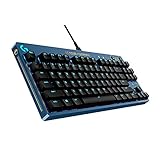
- Designed to inspire, chosen for champions: Take your game to the next level with the proven Logitech G PRO Mechanical Gaming Keyboard, crafted to inspire League of Legends players
- Pro-Grade: The gaming keyboard features 1 ms report rate engineered for speed and responsiveness; built with and for esports athletes and gamers for competition-level performance, speed and precision
- Durable GX Brown Tactile Switches: The mechanical keyboard features Brown Switches, delivering discernable feedback to ensure confidence and precision in actuation without being loud or distracting
- Compact and portable: Tenkeyless design frees up table space for mouse movement, while the compact form makes the portable keyboard easy to pack up and transport to gaming tournaments
- Customizable: Personalize your keyboard with LIGHTSYNC to highlight backlit keys and program static lighting patterns to onboard memory for tournament systems that don’t allow G HUB installations
2. Check the Vanguard service
If the message returns, check whether the Vanguard service is running in Windows Services. The service is commonly identified as vgc. If it is stopped, that may help explain why League cannot recognize Vanguard; if it is running, the error can still have another cause. Service checks and restarts are troubleshooting leads, not a confirmed universal remedy.
If Vanguard appears to be running already
Do not assume the message proves the service is stopped. Community reports describe the same error when players believed Vanguard was running, as well as varied attempted workarounds; those reports do not validate a single fix. Avoid disabling security protections, using third-party driver-cleaning utilities, or buying hardware based solely on this message.
Rank #2

- 【65% Compact Design】GEODMAER Wired gaming keyboard compact mini design, save space on the desktop, novel black & silver gray keycap color matching, separate arrow keys, No numpad, both gaming and office, easy to carry size can be easily put into the backpack
- 【Wired Connection】Gaming Keybaord connects via a detachable Type-C cable to provide a stable, constant connection and ultra-low input latency, and the keyboard's 26 keys no-conflict, with FN+Win lockable win keys to prevent accidental touches
- 【Strong Working Life】Wired gaming keyboard has more than 10,000,000+ keystrokes lifespan, each key over UV to prevent fading, has 11 media buttons, 65% small size but fully functional, free up desktop space and increase efficiency
- 【LED Backlit Keyboard】GEODMAER Wired Gaming Keyboard using the new two-color injection molding key caps, characters transparent luminous, in the dark can also clearly see each key, through the light key can be OF/OFF Backlit, FN + light key can switch backlit mode, always bright / breathing mode, FN + ↑ / ↓ adjust the brightness increase / decrease, FN + ← / → adjust the breathing frequency slow / fast
- 【Ergonomics & Mechanical Feel Keyboard】The ergonomically designed keycap height maintains the comfort for long time use, protects the wrist, and the mechanical feeling brought by the imitation mechanical technology when using it, an excellent mechanical feeling that can be enjoyed without the high price, and also a quiet membrane gaming keyboard
If restarting and checking the service do not resolve the problem, contact Riot Support for League of Legends. Include your Windows version, when the message appears, any VAN error code shown, and whether the Vanguard service appears to be running. This information can help distinguish a local issue from a broader one.
Independent reader supportYour contribution helps us test, update, and keep practical guides available for everyone.When Windows 11 TPM 2.0 or Secure Boot may matter
Riot has discussed Vanguard’s TPM 2.0 enforcement on Windows 11, including cases where players bypassed TPM 2.0 enforcement while installing Windows 11. That context may be relevant to some Windows 11 compatibility problems or VAN-code errors, but it does not establish that TPM 2.0 or Secure Boot causes every “You need to have Vanguard running to play” message. Riot update on Vanguard and Windows 11 TPM 2.0 enforcement, reproduced on Reddit.
Rank #3

- Take your gaming skills to the next level: The Logitech G413 SE is a full-size keyboard with gaming-first features and the durability and performance necessary to compete
- PBT keycaps: Heat- and wear-resistant, this computer gaming keyboard features the most durable material used in keycap design
- Tactile mechanical switches: Uncompromising performance is always within reach with this wired gaming keyboard
- Premium color, material and finish: Elevate your gaming setup with this backlit keyboard featuring a sleek, black-brushed aluminum top case and white LED lighting
- 6-Key rollover anti-ghosting performance: Experience reliable key input with this anti-ghosting keyboard versus non-gaming mechanical keyboards
Before changing firmware settings, verify Riot’s current requirements and consult your PC or motherboard documentation. Do not change TPM or Secure Boot settings simply because this message appeared; the available evidence does not establish them as the standard fix for this error.
Quick Recap
Best Value

- Near-instantaneous responsiveness: Experience elite gaming performance with an 8 kHz report rate for quick signal transmission and precise, game-ready response times
- Personalize your play: Hot-swappable switches and double shot PBT keycaps allow you to easily customize the look and feel of your mechanical gaming keyboard, and helps with shine resistance
- Intuitive on-board controls: Joyful and interactive LED dot-matrix display and dial let you easily control report rate, volume, brightness, and media without leaving your game
- Premium sound and feel: Gasket-mounted structure with sound-dampening silicone and foam layers provides a refined, quiet typing experience and satisfying tactile feedback
- Dynamic LIGHTSYNC RGB lighting: interactive light bar reacts to your setup and dial adjustments, customize 30 different light zones and per key lighting for a truly immersive gaming environment
Rank #4

- Brilliant Color Illumination- With 11 unique backlights, choose the perfect ambiance for any mood. Adjust light speed and brightness among 5 levels for a comfortable environment, day or night. The double injection ABS keycaps ensure clear backlight and precise typing. From late-night tasks to immersive gaming, our mechanical keyboard enhances every experience
- Support Macro Editing: The K671 Mechanical Gaming Keyboard can be macro editing, you can remap the keys function, set shortcuts, or combine multiple key functions in one key to get more efficient work and gaming. The LED Backlit Effects also can be adjusted by the software(note: the color can not be changed)
- Hot-swappable Linear Red Switch- Our K671 gaming keyboard features red switch, which requires less force to press down and the keys feel smoother and easier to use. It's best for rpgs and mmo, imo games. You will get 4 spare switches and two red keycaps to exchange the key switch when it does not work.
- Full keys Anti-ghosting- All keys can work simultaneously, easily complete any combining functions without conflicting keys. 12 multimedia key shortcuts allow you to quickly access to calculator/media/volume control/email
- Professional After-Sales Service- We provide every Redragon customer with 24-Month Warranty , Please feel free to contact us when you meet any problem. We will spare no effort to provide the best service to every customer
Product prices and availability are accurate as of the date/time indicated and are subject to change. Any price and availability information displayed on Amazon at the time of purchase will apply.




