Quick wins for a faster PC:
Scan for outdated or missing drivers - takes under a minuteDriver Scan →Repair Windows errors before they cause bigger problemsFix Now →Fix the driver behind crashes, sound loss and screen glitchesFind Drivers →The best Fallout: New Vegas mods depend on whether you want a more reliable game, quality-of-life changes, or entirely new content. For a PC vanilla-plus setup, start with a maintained guide such as Viva New Vegas: it distinguishes stability and performance foundations from optional, modular changes. Then add player-facing mods that suit your preferences rather than installing a large collection blindly.
This is a curated shortlist, not an objective ranking or a promise that every combination is compatible. Check the live guide and each mod page for requirements before installing; support and compatibility can change.
| # | Preview | Product | Price | |
|---|---|---|---|---|
| 1 |
|
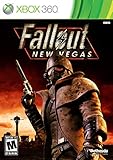
Fallout: New Vegas - Xbox 360 (Renewed) | $26.71 | Buy on Amazon |
| 2 |

|
Fallout: New Vegas - Playstation 3 (Renewed) | $26.71 | Buy on Amazon |
| 3 |

|
Fallout: New Vegas - Xbox 360 Ultimate Edition | $149.79 | Buy on Amazon |
Before you install: check your game version and choose a guide
The current Viva New Vegas guide says its supported setup is an English copy with all DLCs on Steam, GOG, or Epic Games Store. It does not support Microsoft Store versions, and it notes language-related conflicts, including incompatibility between xNVSE and the German no-gore release. These details can change, so confirm them in the live guide before starting.
Use a mod manager such as Vortex or Mod Organizer 2, and follow the guide’s exact installation instructions. PC Gamer specifically calls out archive validation and BSA redirection as setup considerations; do not assume that a mod’s download-and-enable steps alone are enough. The Viva New Vegas guide cautions: “It is still incredibly important that you read all the instructions very carefully, even if you believe you are experienced enough to skip them.”
#1 Best Overall
- Not even nuclear fallout could slow the hustle of Sin City. Explore the vast expanses of the desert wastelands
- Feuding Factions, Colorful Characters and a Host of Hostiles
- Enjoy new additions to Fallout: Special melee combat moves have been added to bring new meaning to the phrase "up close and personal"
- With double the amount of weapons found in Fallout 3
- In a huge, open world with unlimited options you can see the sights, choose sides, or go it alone
The first six picks below are foundation or support mods. They mainly enable other mods, fix issues, or help the game run and handle interfaces. The final four are preference-led categories. The available guidance supports those categories, but does not establish a universally compatible named pick for each; use the guide’s current recommendations and the individual mod pages to choose a specific option.
Six foundation mods for a more dependable setup
1. xNVSE: the scripting foundation
xNVSE expands Fallout: New Vegas’s scripting capabilities, allowing other mods to do more than the base game permits. Its Nexus description says it works without modifying executable files on disk and lists Steam and GOG compatibility. Treat it as setup infrastructure rather than a player-facing overhaul: many more complex mods depend on it.
2. Yukichigai Unofficial Patch (YUP): broad bug fixes
YUP compiles fixes for the base game and DLC. Its Nexus listing describes it as a fix-focused mod, not a source of new features, balance changes, or restored content. That makes it a useful choice if your aim is to address bugs while keeping the game’s design intact.
3. JIP LN NVSE Plugin: extra functions and engine fixes
JIP LN NVSE Plugin extends NVSE with new functions and engine bug fixes, according to Viva New Vegas. It is another underlying component used by mods, rather than a standalone content expansion. Check the requirements of any mod that asks for it, and install it in the sequence specified by your chosen guide.
What’s actually slowing this PC down?
Pick the symptom - the matching free tool is one click away.
4. Stewie’s Tweaks and Engine Fixes: fixes plus optional control
Stewie’s Tweaks and Engine Fixes combines engine fixes with optional tweaks and features. Its Nexus page says these can be customized through an in-game menu and INI files, so its effect depends on which settings you enable. If you want a mostly vanilla experience, review the options rather than treating every tweak as mandatory.
Rank #2
- Feel the Heat in New Vegas: Not even nuclear fallout could slow the hustle of Sin City. Explore the vast expanses of the desert wastelands from the small towns dotting the Mojave Wasteland to the bright lights of the New Vegas strip
- Feuding Factions, Colorful Characters and a Host of Hostiles : A war is brewing between rival factions with consequences that will change the lives of all the inhabitants of New Vegas
- New Systems : Enjoy new additions to Fallout: Special melee combat moves have been added to bring new meaning to the phrase "up close and personal"
- An Arsenal of Shiny New Guns : With double the amount of weapons found in Fallout 3, you'll have more than enough new and exciting ways to deal with the threats of the wasteland and the locals
- Let it Ride : In a huge, open world with unlimited options you can see the sights, choose sides, or go it alone. Peacemaker or Hard Case, House Rules, or the Wild Card, it's all in how you play the game
5. NVTF – New Vegas Tick Fix: frame pacing and performance support
NVTF – New Vegas Tick Fix is described by Viva New Vegas as addressing micro-stuttering and performance, and as supporting higher frame rates up to a stated safe maximum of about 120. That is the guide’s characterization, not a guaranteed outcome on every PC. Use the current guide’s setup and configuration advice for your system.
6. UIO – User Interface Organizer: manage HUD extensions
UIO – User Interface Organizer helps manage multiple HUD extensions and resolve or prevent UI-related problems, according to Viva New Vegas. It can help preserve an intact interface as you add compatible UI mods, but it does not make incompatible interface mods compatible by itself.
Four optional directions for changing how the game feels
These picks are categories, not interchangeable fixes. Decide what you want to change, then choose a currently maintained mod whose requirements and compatibility match your setup. Viva New Vegas frames optional additions as modular and subjective; PC Gamer and PCGamesN also cover gameplay convenience, visuals, radio, and additional content as distinct choices.
Free tools Windows power users keep installed
One-click scans. No signup required.
7. Convenience or gameplay: sprinting
If traversal pace is your main frustration, consider a sprint mod such as Just Vanilla Sprint, which PC Gamer covers. A movement change affects moment-to-moment gameplay rather than simply correcting a bug. Check its current mod page and the guide you are following for requirements and compatibility before adding it.
8. Visuals or weather: choose the scale of change
Texture packs and weather changes can alter the game’s look substantially, so choose based on the visual style you want rather than stacking packs by reputation. PC Gamer discusses visual texture packs, while PCGamesN covers visual mods more broadly. Review each mod’s current page for requirements, conflicts, and the assets it replaces.
Rank #3
- Beyond the Wasteland: The world of New Vegas is more expansive than ever. Each new distinct area presents a fresh set of branching-quests, remarkable personalities and more chances to play the Savior or the Pariah to the natives of New Vegas.
- Dead Money: Lured into a trap masquerading as the Sierra Madre Casino, you are thrown into a high stakes game where you'll have to work with three other lost souls if you want to survive.
- Honest Hearts: An expedition into Utah's Zion National Park goes horribly wrong and you become embroiled in a war between tribes and put into a conflict between a New Canaanite missionary and the mysterious Burning Man.
- Old World Blues: Transported to the Big MT research crater, you are enlisted by the Think Tank to save them from their own science experiments that have gone horribly out of control.
- Lonesome Road: Ulysses, the original Courier Six, contacts you and promises to answer why he refused to deliver the Platinum Chip at the start of Fallout: New Vegas, but only if you make one last journey into the treacherous canyons of the Divide.
9. World activity: add encounters or bounties
Mods that add bounties or other activity can give you new things to do in the existing world without necessarily replacing the main campaign. PC Gamer discusses bounty quests as an option. Confirm whether a particular mod changes locations, factions, or other content you care about, and check its compatibility notes before installing.
10. Radio or quest content: add a new kind of material
Radio additions offer new listening material; quest mods add authored missions and can make a larger change to a playthrough. PC Gamer covers radio mods, and PCGamesN’s guide includes additional quests and campaigns. Pick one that matches the kind of content you want, then check its requirements and compatibility on its own page rather than assuming all content additions work together.
Do these 3 things before closing this tab:
1Scan for outdated or missing drivers - takes under a minute2Repair Windows errors before they cause bigger problems3Fix the driver behind crashes, sound loss and screen glitchesHow to choose the right ten for your playthrough
Do not compare a scripting prerequisite with a quest expansion as if they solve the same problem. Use each mod’s role to decide what belongs in your setup:
- For a stable, close-to-vanilla baseline: follow the foundation section of a maintained guide, then add only the player-facing changes you actually want.
- For fewer bugs: prioritize a focused fix compilation such as YUP, while following the guide’s required setup.
- For configurable gameplay adjustments: inspect Stewie’s Tweaks settings and enable only the changes that suit your playthrough.
- For a more personalized game: choose one or two optional directions—such as sprinting, visuals, world activity, radio, or quests—and verify their current requirements and conflicts.
Viva New Vegas describes its required setup as the part for making the game work and perform better, while its Extended section offers modular content changes. That distinction is a practical way to build a list: establish the supported foundation first, then add preferences deliberately. Recheck the maintained guide and each mod page at install time, especially if your game edition, language, DLC, or chosen mods differ from the guide’s supported setup.
Quick Recap
Product prices and availability are accurate as of the date/time indicated and are subject to change. Any price and availability information displayed on Amazon at the time of purchase will apply.




