Recommended Free Tools
These 10 mobile games are candidates for learning through play—not a proven ranking of what improves child development. Two have detailed publisher-described learning features in the sources available here: PBS KIDS Games and Khan Academy Kids. For the rest, the evidence supports treating them as options to inspect, not as independently validated educational tools. Use the list to match an activity to your child’s interests, then check the current age rating, content, privacy information, and purchase controls before installing.
How to use this list
The titles below come from a U.S. iPhone children’s chart snapshot, which can change and does not measure educational quality. The order is not a ranking. Only the first two entries have detailed feature information in the sources cited here; for the others, descriptions are limited to what the chart title or subtitle indicates. No independent study in the available evidence compares developmental outcomes for these 10 games.
| # | Preview | Product | Price | |
|---|---|---|---|---|
| 1 |
|
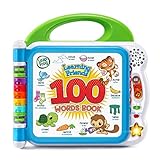
LeapFrog Learning Friends 100 Words Book (Frustration Free Packaging) | $14.99 | Buy on Amazon |
| 2 |

|
LeapFrog Mr Pencil's Scribble Write and Read, Green | $24.99 | Buy on Amazon |
| 3 |

|
LeapFrog Touch and Learn eReader, Teal | $14.49 | Buy on Amazon |
| 4 |

|
VTech Genio Bilingual JuniorBook Learning Laptop for Kids | $44.30 | Buy on Amazon |
| 5 |

|
LeapFrog 2-in-1 LeapTop Touch | $24.99 | Buy on Amazon |
A 2025 study in Early Childhood Education Journal evaluated 309 mobile apps for phonics and phonological awareness in Australian Apple and Google Play stores. In that study’s sample, 24.7% reached the authors’ “good” app-quality band and expert reviewers recommended 27.5%. The authors also found poor correlation between consumer star ratings and expert ratings. Those results concern early-reading apps in the study’s markets and methods—not every children’s game or app store. Read the study.
10 mobile game candidates for learning and play
1. PBS KIDS Games — broad early-learning activities
PBS KIDS describes its app as offering more than 280 free games for ages 2–8, spanning math, reading, science, art, puzzles, creativity, and social concepts. Those are publisher-described features, not independent evidence that the app improves development. Check the current App Store listing for availability and current details.
#1 Best Overall
- Interact With Friends: Meet learning friends Turtle, Tiger and Monkey who will introduce the alphabet through more than 100 age-appropriate words chosen by learning experts
- Learn Categories: This baby activity book includes word categories such as pets, animals, food, mealtime, colors, activities, opposites, outside and more
- Learn Sounds: Touch the words on the pages to hear new vocabulary, sound effects, and fun facts; hear the two theme songs by pressing the light-up star button
- Learn Languages: This highly engaging book for kids includes words, songs, and instructions heard in both English and Spanish to promote both language skills
- Included Features: This toy is intended for ages 18 months and up; requires 2 AA batteries; included for demo purposes only; new batteries recommended for regular use
2. Khan Academy Kids — literacy, math, and creative activities
Khan Academy says its free app includes activities for ages 2–8 in early literacy, reading, writing, language, math, creativity, and social-emotional growth. The publisher lists support for iOS, Android, Amazon tablets, phones, and Chromebooks. These are publisher statements; they do not establish comparative developmental outcomes. See Khan Academy Kids information.
3. Toca Boca World — open-ended play candidate
This title appeared in the U.S. iPhone children’s chart snapshot. The chart alone does not establish its learning benefits or current features. Check its present store listing, age rating, included content, and purchase terms before deciding whether its play suits your child.
4. Lingokids — learning-app candidate
Lingokids appeared in the same chart snapshot, but the evidence here does not establish its current curriculum, age fit, or subscription terms. Review the current product listing and in-app offer before treating it as a fit for a particular learning goal.
Rank #2
- Your new pal, Mr. Pencil shows kids how to write uppercase and lowercase letters step-by-step, then transforms the letters into animated animals and more
- Trace numbers by following the dotted lines, then watch them transform into objects you can count
- Customize by entering a child’s first, middle and last name so they can practice writing it
- Sound out new words by sliding Mr. Pencil across the screen and the sound-it-out bar lights up to follow along
- Intended for ages 3+ years; requires 3 AA batteries; batteries included for demo purposes only; new batteries recommended for regular use
5. LEGO Builder — construction and instructions
The chart subtitle describes 3D building instructions and solo or team building. That makes it a candidate for children interested in construction and following steps; it is not evidence of a measured developmental effect. Check device compatibility and the current app details.
Quick wins for a faster PC:
Scan for outdated or missing drivers - takes under a minuteDriver Scan →Repair Windows errors before they cause bigger problemsFix Now →Fix the driver behind crashes, sound loss and screen glitchesFind Drivers →6. ABCmouse — learning-games candidate
ABCmouse appeared with a learning-games descriptor in the chart. The available evidence does not verify its current content, age range, or subscription terms, so confirm those details in the product listing before choosing it.
7. Learn to Read – Reading.com — early-reading candidate
The chart subtitle highlights phonics and reading. For a reading game, look beyond that label: useful instructional features include an explicit sequence, cumulative practice and review, connections between speech sounds and letters, decodable text, and prompt corrective feedback. The study’s appraisal discusses these as literacy-design criteria; it does not establish that this particular app includes them. See the study’s discussion of literacy-app quality.
Rank #3
- Take ten tales, games and music anywhere with this eReader made just for preschoolers
- Five classic fairy tales including Jack and the Beanstalk, Goldilocks and Stone Soup immerse kids in magical worlds
- Read along and interact with five phonics stories that focus on the vowels and word building
- Enjoy exciting games, ace the Story Quiz and listen to music about reading and stories
- Intended for ages 3+ years; requires 3 AA batteries; batteries included for demo purposes only; new batteries recommended for regular use
8. Bluey: Let’s Play! — activity-based candidate
This title appeared in the chart snapshot. The evidence here does not establish its current activity mix, age fit, or purchase features. Check the live listing rather than inferring learning outcomes from the title or characters.
9. Coloring Games for Kids 2–6 — drawing and coloring
The title indicates drawing or coloring and names an age range. Treat those as the stated activity, not proof of a particular developmental benefit. Check the current rating, advertising, and purchase details.
PC Slower Than It Used to Be?
A free scan shows the junk files, broken settings and background clutter dragging Windows down - then fixes them in one click.Free scan · Windows 10 & 11Outdated Drivers Are Slowing You Down
One free scan finds every outdated or missing driver and matches the right update for your exact hardware.Free scan · exact hardware match10. Toca Boca Jr — creative-play candidate
The chart subtitle emphasizes play, creating, building, and exploring. Confirm which content is currently included and whether additional purchases are offered. The chart description does not establish an educational outcome.
Rank #4
- Designed to look and feel like a grown-up computer, this first laptop for kids helps build basic computer skills using a full-size QWERTY keyboard and cursor controller
- Explore over 80 activities, including apps like a weekly calendar, notebook, and music player or games that explore subjects including math, science, language arts, music and Spanish
- Fully bilingual, every activity can be played in English or Spanish so kids can be immersed in a new language
- No internet connection is needed; every activity comes pre-loaded and is ready to play offline
- Intended for ages 5+ years; requires 4 AA batteries; batteries included for demo purposes only; new batteries recommended for regular use
How to choose an educational game for your child
Start with the activity and your child’s age
Choose a game that fits what your child is ready to do and actually enjoys: sound-and-letter practice, counting, building, drawing, or imaginative play. A store age rating is a content-suitability signal, not proof that a game teaches effectively. For an app aimed at younger children, consider whether an adult needs to help navigate it or talk through what is happening.
For reading practice, inspect how the app teaches
A reading-focused label is not enough to show that an app offers structured instruction. Look for a clear progression, practice that builds on previously taught skills, regular review, explicit links between sounds and letters, decodable text, and feedback that helps a child correct mistakes. These criteria are specific to early literacy; they are not a universal score for open-ended creative-play apps.
Don’t use popularity as a learning measure
App-store rankings and star ratings can help identify titles people are browsing, but they do not establish instructional quality. The 2025 study’s weak correlation between consumer and expert ratings applies to its sample of early-reading apps; it is a reason to inspect a game’s actual teaching design rather than assuming that a high rating proves learning value.
Best Value
- 2-in-1 laptop toy for preschoolers features a screen that flips to convert from keyboard to tablet mode
- Learning laptop features a keyboard with letters A-Z and numbers 1-10, or swivel and transform it into a touch tablet
- Kids can pretend to be like mom and dad with role-play activities like e-mailing Scout; parents can customize to help their child spell their own name
- Five learning modes include ABCs, numbers, games, music and messages
- Intended for ages 2-5 years; requires 3 AA batteries; batteries included for demo purposes only; new batteries recommended for regular use
Check privacy, purchases, and interaction features
On Apple platforms, product pages can show age ratings, in-app purchases, privacy nutrition labels, and indicators for advertising, messaging, and user-generated content. Apple’s Kids category uses age bands of 5 and under, 6–8, and 9–11; parental gates are intended to moderate actions such as purchases and links outside an app. These are Apple-specific signals and controls, not a guarantee that an app is suitable for every child. Apple’s Kids Apps guidance explains the category and parental gates.
Before installing, review the current listing and the app itself for advertising, outside links, messaging, user-generated content, and purchases. A parent gate can help, but caregivers should still check the controls and device family settings.
Use device limits when they help your family
Apple says Screen Time can show time spent across apps and the web, schedule time away, and set time limits. Caregivers can review those controls alongside the app’s own settings. Apple’s Screen Time guide describes the available options.
What the evidence can—and cannot—tell parents
The 2025 literacy-app study focused on apps targeting phonics and phonological awareness in Australian Apple and Google Play stores. Its findings are useful context for judging early-reading app design, but they should not be generalized to all games, subjects, age groups, or regions. The study authors also report that more than 9,000 apps in the Apple and Google Play stores claimed to support early reading; that is the paper’s context figure, not a live count of apps today.
What’s actually slowing this PC down?
Pick the symptom - the matching free tool is one click away.
For the ten titles listed here, the strongest specific feature descriptions come from the publishers of PBS KIDS Games and Khan Academy Kids. Publisher descriptions can help establish what an app says it offers, but they are not independent evaluations of learning outcomes. For the other chart candidates, confirm current product details and judge fit against your child’s goal rather than assuming the chart placement or title proves a benefit.
Quick Recap
Product prices and availability are accurate as of the date/time indicated and are subject to change. Any price and availability information displayed on Amazon at the time of purchase will apply.




