Best overall: the Wooting 80HE is the strongest fit for players who want adjustable actuation and Rapid Trigger in a practical 80% layout. For a lower-cost pick from a major gaming brand, consider the Razer Huntsman V3 HE Magnetic TKL; the CORSAIR K70 PRO TKL is another strong option when its price is competitive.
Rapid Trigger can make repeated movement-key inputs more configurable, but it does not guarantee better counter-strafing, aim, or rank. A conventional mechanical keyboard still works in VALORANT, and many players will benefit more from stable frame rates, a high-refresh-rate display, a reliable mouse, or deliberate movement practice.
What makes a keyboard good for VALORANT?
For players focused on movement control, prioritize the way a keyboard registers presses and releases, the consistency of its software and calibration, and a layout that leaves room for your mouse. Rapid Trigger and adjustable actuation are useful features, but polling rate alone is not a sensible way to choose a board.
Rapid Trigger and adjustable actuation
On a conventional switch, a key generally has a fixed actuation point and reset point. Adjustable actuation lets you choose how far a key must travel before it registers. Rapid Trigger changes how the key’s press and release are detected, so it can register a release or a new press without waiting for the switch to return to its usual reset position.
#1 Best Overall

- 【60% Percent Layout Magnetic Switch Keyboard with RT Function】Equipped with adjustable hall effect magnetic switches, featured with customizable dynamic keystroke and rapid trigger function, this ATTACK SHARK X68HE keyboard allow you bind 4 functions according to 4 different pressing degrees to one key, adjust keystroke actuation point from a light 0.1mm to a strong 3.4mm, true 8000Hz polling rates, 0.01mm RT accuracy, effectively reducing keyboard latency to an impressive 0.125ms(theoretical value), ensure flexibility and ultra-response, perfect for FPS and rhythm game like Valorant, osu
- 【Programmable NKRO ANSI Keyboard】Web driver link: qmk.top, no need to install, you can use it to remap key function, set macro and hot keys, adjust light mode and DIY your own light effect, apply desired function to the key you want, and choose or customize keystroke activate or deactivate actuation point for your typing or gaming need, minimize latency, provide a revolutionary full control of fast and ultra-accurate keystroke, always gets pre-acted in the game, design for win
- 【Top Mount&HiFI Typing Sound】This wired mechanical keyboard adopts top-mounted structure for a quiet, stable and smooth typing operation, built with aluminum alloy anodizing process positioning plate and double layer PORON, enhances your gaming efficiency with satisfying keystroke feeling, making it one of the fastest gaming keyboards available, in addition, using fine tuned stabilizer pre-lubed satelite switches to ensure a smoother typing experience with less wobbliness on the big keys
- 【Light Up Keyboard with PBT Keycaps】Adopt premier built-in RGB LED lamp with rich spectrum of 16.8 million colors, this X68HE keyboard can offer multiple backlit mode and light color to shine your world, wear with solid pure color theme Cherry profile double shot PBT keycaps, more durable with clear letter, always attractive. South-facing LEDs ensure superior shine-through capabilities for an immersive experience
- 【Ergonomic Design& Wide Compatibility】This type-c wired gaming keyboard is crafted with scientific structure with compact 66 key and curved wrist rest, retains separate arrow keys, has non-slip mat for stable using, support full key anti-ghosting and FN key combination function, can compatible with pc mac laptop, support dual system switchable between Win and Mac by one button, attached with detachable unique streamer, very useful for more efficient work and gaming, provides precise control tailored to your playstyle, particularly beneficial in fast-paced games like FPS and RTS games
That can matter for repeated A/D inputs: press A to move, release it or press D, and the keyboard detects the directional state change according to the configured threshold. The practical difference is customizable input behavior, not a guarantee that the character stops sooner in every situation. Key detection, game processing, network processing, player reaction, and in-game movement are separate stages.
A 2026 paper examining keyboard input systems reports measurable differences in key travel and input behavior. It does not establish that a named commercial keyboard improves VALORANT win rate or rank. Read the paper.
Hall effect and analog optical are different technologies
Hall-effect switches measure the position of a magnet; analog optical switches use optical sensing. Either type can support adjustable actuation and Rapid Trigger. The technology label does not settle which board is better: firmware, calibration, software, feel, and reliability also matter. The Razer Huntsman V3 Pro is analog optical, while Razer’s Huntsman V3 HE Magnetic line uses Hall-effect switches. See a switch and Wooting comparison.
Polling rate is a supporting specification
An 8,000-Hz polling rate means the keyboard can report inputs at shorter intervals than a 1,000-Hz device, in theory. It does not mean eight times better in-game performance. The practical result depends on the whole input chain, game frame rate, CPU overhead, display refresh rate, and the player. Current comparison coverage lists the SteelSeries Apex Pro TKL Gen 3 at 1,000 Hz; that figure alone does not make it a poor choice. See the comparison.
Quick wins for a faster PC:
Clear out junk files and repair common Windows errorsFree Scan →Fix the driver behind crashes, sound loss and screen glitchesFind Drivers →Repair Windows errors before they cause bigger problemsFix Now →Layout, feel, and software matter day to day
- 60%: maximizes mouse room, but omits dedicated arrow and function keys; secondary actions rely on layers.
- 65%: keeps a compact footprint while adding dedicated arrows, a useful compromise for many players.
- 75%: adds a function row in a compact layout, making it suitable for gaming and productivity.
- TKL: keeps a familiar layout and navigation keys without a number pad.
- Full-size: makes sense if you use the number pad or extra controls, but takes more desk space.
Also consider key wobble, spring weight, noise, keycap durability, and typing comfort. Software should make it straightforward to adjust settings, save profiles, and restore a working configuration. Wireless can be convenient when implemented well; wired is the simplest way to remove battery and receiver variables.
15 keyboard recommendations for VALORANT
These are editorial picks based on the listed features and current comparison coverage, not a claim that every model was tested hands-on. Price and stock change by date, region, layout, and product variant; confirm the exact configuration and return policy on the linked manufacturer page before buying. Where the available information does not establish a specification or price, it is marked “not stated” rather than inferred.
Rank #2
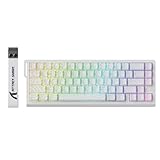
- 【60% Percent Layout Magnetic Switch Keyboard with RT Function】Equipped with adjustable hall effect magnetic switches, featured with customizable dynamic keystroke and rapid trigger function, this ATTACK SHARK X68HE keyboard allow you bind 4 functions according to 4 different pressing degrees to one key, adjust keystroke actuation point from a light 0.1mm to a strong 3.4mm, true 8000Hz polling rates, 0.01mm RT accuracy, effectively reducing keyboard latency to an impressive 0.125ms(theoretical value), ensure flexibility and ultra-response, perfect for FPS and rhythm game like Valorant, osu
- 【Programmable NKRO ANSI Keyboard】Web driver link: qmk.top, no need to install, you can use it to remap key function, set macro and hot keys, adjust light mode and DIY your own light effect, apply desired function to the key you want, and choose or customize keystroke activate or deactivate actuation point for your typing or gaming need, minimize latency, provide a revolutionary full control of fast and ultra-accurate keystroke, always gets pre-acted in the game, design for win
- 【Top Mount&HiFI Typing Sound】This wired mechanical keyboard adopts top-mounted structure for a quiet, stable and smooth typing operation, built with aluminum alloy anodizing process positioning plate and double layer PORON, enhances your gaming efficiency with satisfying keystroke feeling, making it one of the fastest gaming keyboards available, in addition, using fine tuned stabilizer pre-lubed satelite switches to ensure a smoother typing experience with less wobbliness on the big keys
- 【Light Up Keyboard with PBT Keycaps】Adopt premier built-in RGB LED lamp with rich spectrum of 16.8 million colors, this X68HE keyboard can offer multiple backlit mode and light color to shine your world, wear with contour line theme Cherry profile double shot side printed PBT keycaps, more durable with clear letter, always attractive. South-facing LEDs ensure superior shine-through capabilities for an immersive experience
- 【Ergonomic Design& Wide Compatibility】This type-c wired gaming keyboard is crafted with scientific structure with compact 66 key and curved wrist rest, retains separate arrow keys, has non-slip mat for stable using, support full key anti-ghosting and FN key combination function, can compatible with pc mac laptop, support dual system switchable between Win and Mac by one button, attached with detachable unique streamer, very useful for more efficient work and gaming, provides precise control tailored to your playstyle, particularly beneficial in fast-paced games like FPS and RTS games
| Pick | Keyboard | Layout / switch type | Rapid Trigger | Polling | Best for |
|---|---|---|---|---|---|
| 1 | Wooting 80HE | 80%; magnetic Hall-effect platform | Yes | 8,000 Hz | Overall competitive use |
| 2 | Razer Huntsman V3 HE Magnetic TKL 8KHz | TKL; Hall effect | Yes; Snap Flex feature | 8,000 Hz | Major-brand value |
| 3 | Razer Huntsman V3 Pro TKL 8KHz | TKL; analog optical | Yes; Snap Tap feature | 8,000 Hz | Optical alternative |
| 4 | SteelSeries Apex Pro TKL Gen 3 | TKL; Hall-effect magnetic | Yes | 1,000 Hz in current comparison coverage | Feature-rich mainstream TKL |
| 5 | CORSAIR K70 PRO TKL | TKL; Hall-effect MGX | Yes | Not stated in cited product information | Mainstream value |
| 6 | Wooting 60HE / 60HE v2 | 60%; magnetic Hall-effect platform | Yes | Not stated in cited information | Compact competitive setup |
| 7 | Logitech G PRO X TKL RAPID | TKL; adjustable magnetic input | Yes | Verify current edition | Logitech G users |
| 8 | Razer Huntsman V3 HE Magnetic Mini 65% | 65%; Hall effect | Yes | 8,000 Hz | Compact major-brand option |
| 9 | DrunkDeer A75 Pro | 75%; Hall effect | Yes | Not stated in cited information | Budget 75% option |
| 10 | DrunkDeer G60 | 60%; Hall effect | Yes | Not stated in cited information | Budget compact option |
| 11 | Keychron Q1 HE | 75%; Hall effect | Yes | Verify current specification | Typing and gaming |
| 12 | Keychron K2 HE | Compact; Hall effect | Yes | Verify current specification | More approachable Keychron HE option |
| 13 | ASUS ROG Falchion Ace HFX | Compact; magnetic switches | Yes | Verify current specification | Compact enthusiast alternative |
| 14 | CORSAIR K70 MAX | Full-size; magnetic MGX | Yes | Not stated in cited information | Players who need a number pad |
| 15 | SteelSeries Apex Pro Mini Gen 3 | 60%; OmniPoint magnetic | Yes | 1,000 Hz in current comparison coverage | Mainstream 60% option |
1. Wooting 80HE — best overall
The 80HE combines adjustable actuation, Rapid Trigger, an 8,000-Hz polling specification, and Wooting’s established configuration ecosystem in a layout that retains more everyday keys than a 60% board. Current comparison coverage puts it in roughly the $200 price class, but that is a snapshot, not a guaranteed current price. Check the official store for availability and regional options. See current VALORANT keyboard coverage.
Choose it if: you want a competitive-focused board and will actually tune and practice with the movement features. Skip it if: you need wireless or a number pad, or prefer a traditional tactile or clicky switch feel.
What’s actually slowing this PC down?
Pick the symptom - the matching free tool is one click away.
2. Razer Huntsman V3 HE Magnetic TKL 8KHz — best major-brand value
This TKL model uses Hall-effect magnetic switches, supports 8,000-Hz HyperPolling, and includes Razer’s Snap Flex feature. Razer’s U.S. store listed it at $139.99 when crawled; price and stock can change. The 65% Magnetic Mini was listed $20 above the TKL configuration on the product page, so compare the precise model before choosing for size. Check the TKL product page.
Choose it if: you want magnetic input features with a familiar mainstream brand and support ecosystem. Skip it if: you prefer Wooting’s software approach or want extensive enthusiast switch customization. As a newer product line, check current firmware and software information.
3. Razer Huntsman V3 Pro TKL 8KHz — best optical alternative
The Pro TKL uses Razer Analog Optical Gen-2 switches, not Hall-effect switches. It offers adjustable actuation, Rapid Trigger, analog input, Snap Tap, and onboard profile support. Razer lists multiple versions and prices; the standard black TKL was seen at $219.99 and some variants at $249.99. Treat these as time-sensitive U.S. snapshots and confirm the exact edition. See the Pro family.
Choose it if: you want Razer’s optical implementation or already use Synapse. Skip it if: Hall-effect sensing is a requirement. Before using an opposing-input feature in organized play, check current game and tournament rules.
PC Slower Than It Used to Be?
A free scan shows the junk files, broken settings and background clutter dragging Windows down - then fixes them in one click.Free scan · Windows 10 & 11Crashes, No Sound, or Screen Glitches?
Random freezes, missing sound and display glitches usually trace back to one bad driver. Find and replace yours safely.Free scan · under a minuteRank #3

- Built for the Stop-and-Shoot Moment - Next-gen UltraMag POM magnetic switches sense keypresses without physical contact, so your off-hand inputs in Valorant, CS or Apex land exactly when you mean it.
- Dual-Module Floating Structure - An anti-wobble independent switch-plate design gives a soft, silky, Hi-Fi bounce instead of a harsh, rigid clack, even in a compact one-handed layout.
- 8,000Hz Hyper-Polling, Adjustable Actuation - Wired connection transmits inputs up to 8x faster than standard keyboards, and each key's trigger point is fine-tunable in software for your playstyle.
- Detachable Wrist Rest for Long Sessions - Unclip the magnetic wrist rest whenever you want a smaller footprint, or keep it attached for comfort during marathon gaming sessions.
- Software-Powered Precision Tuning - Save multiple actuation profiles and calibrate the magnetic switches in the companion driver, so your off-hand setup stays consistent across games.
4. SteelSeries Apex Pro TKL Gen 3 — best feature-rich mainstream TKL
Its Hall-effect OmniPoint switches support adjustable actuation and Rapid Trigger; the feature set also includes an OLED display and SteelSeries software. Current comparison coverage lists a 0.1-mm minimum actuation and 1,000-Hz polling. Those features make it a strong conventional TKL option, especially for someone who values integrated controls and mainstream software more than the biggest polling number. The wireless version is also identified in current coverage as an option, but verify its exact features and availability before buying.
Choose it if: you want a familiar TKL layout with magnetic-switch adjustment and integrated features. Skip it if: your overriding priority is 8,000-Hz polling or the lowest price.
5. CORSAIR K70 PRO TKL — best mainstream value when discounted
CORSAIR’s official page identifies Hall-effect MGX V2 magnetic switches, Rapid Trigger, a TKL layout, and iCUE support. One U.S. listing showed $139.99, discounted from $169.99; another listing showed $169.99. The variation may reflect SKU or keycap differences, so check the exact listing rather than assuming the lower price is universal. Check the product page.
Choose it if: you want a Hall-effect TKL from a mainstream ecosystem at a competitive current price. Skip it if: you dislike iCUE or want a compact 60% layout.
6. Wooting 60HE / 60HE v2 — best compact Wooting option
The 60% footprint preserves desk space for broad mouse movement and brings Wooting’s Rapid Trigger platform to a compact layout. The exact model version, availability, and price should be checked at Wooting; the supplied product information does not establish a current price for each variant. Choose it if: you are comfortable with layers and do not rely on dedicated arrows or function keys. Skip it if: those keys are important for work, bindings, or daily use.
7. Logitech G PRO X TKL RAPID — best for Logitech G users
This esports-oriented TKL brings adjustable magnetic input into Logitech’s ecosystem. Confirm the exact edition’s polling, wireless behavior, software requirements, and profile features on Logitech’s current product page; those details are not established consistently in the available comparison information. Choose it if: you already use Logitech G software and want a conventional TKL shape. Skip it if: you want the lowest price or the most mature enthusiast-oriented configuration ecosystem.
Rank #4

- 【60% Percent Layout Magnetic Switch Keyboard with RT Function】Equipped with adjustable hall effect magnetic switches, featured with customizable dynamic keystroke and rapid trigger function, this ATTACK SHARK X68HE keyboard allow you bind 4 functions according to 4 different pressing degrees to one key, adjust keystroke actuation point from a light 0.1mm to a strong 3.4mm, true 8000Hz polling rates, 0.01mm RT accuracy, effectively reducing keyboard latency to an impressive 0.125ms(theoretical value), ensure flexibility and ultra-response, perfect for FPS and rhythm game like Valorant, osu
- 【Programmable NKRO ANSI Keyboard】Web driver link: qmk.top, no need to install, you can use it to remap key function, set macro and hot keys, adjust light mode and DIY your own light effect, apply desired function to the key you want, and choose or customize keystroke activate or deactivate actuation point for your typing or gaming need, minimize latency, provide a revolutionary full control of fast and ultra-accurate keystroke, always gets pre-acted in the game, design for win
- 【Top Mount&HiFI Typing Sound】This wired mechanical keyboard adopts top-mounted structure for a quiet, stable and smooth typing operation, built with aluminum alloy anodizing process positioning plate and double layer PORON, enhances your gaming efficiency with satisfying keystroke feeling, making it one of the fastest gaming keyboards available, in addition, using fine tuned stabilizer pre-lubed satelite switches to ensure a smoother typing experience with less wobbliness on the big keys
- 【Light Up Keyboard with PBT Keycaps a】Adopt premier built-in RGB LED lamp with rich spectrum of 16.8 million colors, this X68HE keyboard can offer multiple backlit mode and light color to shine your world, wear with contour line theme Cherry profile double shot side printed PBT keycaps, more durable with clear letter, always attractive. South-facing LEDs ensure superior shine-through capabilities for an immersive experience
- 【Ergonomic Design& Wide Compatibility】This type-c wired gaming keyboard is crafted with scientific structure with compact 66 key and curved wrist rest, retains separate arrow keys, has non-slip mat for stable using, support full key anti-ghosting and FN key combination function, can compatible with pc mac laptop, support dual system switchable between Win and Mac by one button, attached with detachable unique streamer, very useful for more efficient work and gaming, provides precise control tailored to your playstyle, particularly beneficial in fast-paced games like FPS and RTS games
8. Razer Huntsman V3 HE Magnetic Mini 65% — best compact major-brand pick
The 65% Magnetic Mini offers a smaller layout with Hall-effect features and 8,000-Hz polling. Razer’s product page listed it $20 above the TKL option at the time described, but prices and editions vary. Choose it if: mouse room matters and you still want dedicated arrow keys. Skip it if: you dislike compact layouts or want a full function row. Check Razer’s keyboard catalog.
9. DrunkDeer A75 Pro — best budget-oriented 75%
The A75 Pro is a lower-cost way to get a 75% layout with Hall-effect adjustment and Rapid Trigger. Price, regional stock, firmware experience, and support quality should be checked directly rather than assumed from the brand’s positioning. Choose it if: you want function-row access and are comfortable checking regional warranty and delivery terms. Skip it if: local support and polished mainstream software are top priorities.
Recommended Free Tools
10. DrunkDeer G60 — best budget compact option
The G60 pairs a compact 60% layout with the core Hall-effect Rapid Trigger proposition at an aggressive price point. The trade-offs to consider are support, build experience, and firmware rather than a promise of performance parity with more established ecosystems. Choose it if: you want a compact entry point and can verify return and warranty arrangements. Skip it if: you need dedicated navigation keys or easy local service.
11. Keychron Q1 HE — best typing-and-gaming hybrid
The Q1 HE is a 75% Hall-effect option for buyers who want a more substantial, typing-oriented board alongside gaming features. Its heavier construction and enthusiast angle may suit a shared work-and-play desk better than a lightweight esports setup. Verify current wireless, firmware, and software details for the exact version. Choose it if: typing feel and construction matter as much as VALORANT. Skip it if: you want the lightest competitive-focused board.
12. Keychron K2 HE — a more approachable Keychron HE option
The K2 HE offers the brand’s Hall-effect feature set in a more approachable format than the Q1 HE, with trade-offs in construction and software positioning. Check current configuration and feature details on Keychron’s site before purchase. Choose it if: you want one keyboard for mixed use and prefer the K2’s format. Skip it if: you expect the premium build of the Q-series.
13. ASUS ROG Falchion Ace HFX — compact enthusiast alternative
This compact ASUS ROG board adds a magnetic-switch option from a major PC hardware brand. Confirm its current price, layout, and software support for your region. Choose it if: you want a compact premium alternative and already use ASUS ROG products. Skip it if: you need a full-size layout or broad third-party customization.
Do these 3 things before closing this tab:
1Fix the driver behind crashes, sound loss and screen glitches2Clear out junk files and repair common Windows errors3Scan for outdated or missing drivers - takes under a minuteBest Value

- Valorant custom keycaps with laser engraving: These custom keycaps include each Valorant agent's portrait and skills! It fits with any mechanical keyboard or backlit gaming keyboard
- Various Options (19 Agents for Valorant) - Each package includes 7 PCS of Valorant custom keycaps: Logo, Role, Portrait, Basic(Q,C), Signature(E), Ultimate(X)
- Keycap Standard: OEM profile, Keycap Material: ABS plastic - Fit with any mechanical keyboard. The Cherry keycap profile can be mounted, but the height is slightly different
- Keycap Size - R4: Logo, Role, Portrait / R3: Basic Skill(Q), Signature Skill(E) / R1: Ultimate Skill(X), Basic Skill(C). Based on OEM profile keycap
- One More Thing! (Event): You will get a steel keycap remover to prevent damage to the gaming mechanical keyboard and gaming keycaps while exchanging it
14. CORSAIR K70 MAX — best full-size magnetic board
The K70 MAX uses adjustable MGX magnetic switches and includes Rapid Trigger. CORSAIR’s rapid-trigger category listed it at $249.99; this is a dated price signal, not a guaranteed current price. Its number pad and full-size footprint are useful for work, but offer little movement-input benefit in VALORANT. Choose it if: you genuinely use a number pad. Skip it if: the board is mainly for VALORANT and desk space is limited. See CORSAIR’s rapid-trigger range.
15. SteelSeries Apex Pro Mini Gen 3 — best mainstream 60% option
The Apex Pro Mini Gen 3 pairs a 60% layout with OmniPoint magnetic switches and SteelSeries software. Current comparison coverage lists 1,000-Hz polling. Choose it if: you want a compact mainstream option and are comfortable with the missing keys. Skip it if: dedicated arrows, function keys, or a higher polling specification matter more to you.
Independent reader supportYour contribution helps us test, update, and keep practical guides available for everyone.Which keyboard should you choose by priority?
- Best overall performance-oriented pick: Wooting 80HE.
- Major-brand value: Razer Huntsman V3 HE Magnetic TKL or CORSAIR K70 PRO TKL, depending on the live price and the software ecosystem you prefer.
- Optical switches: Razer Huntsman V3 Pro TKL 8KHz.
- Compact layout: Wooting 60HE if you want 60%, or the Razer Huntsman V3 HE Magnetic Mini if you want 65%.
- Budget Rapid Trigger: DrunkDeer A75 Pro or G60, after checking local stock, return terms, warranty, and software support.
- Typing and gaming: Keychron Q1 HE.
- Full-size with a number pad: CORSAIR K70 MAX.
- Wireless convenience: consider the SteelSeries Apex Pro TKL Gen 3 Wireless, but verify the current model’s availability and which advanced features work wirelessly.
Budget ranges are best treated as live comparisons rather than fixed promises: DrunkDeer is the budget-oriented route, the CORSAIR K70 PRO TKL and Razer Huntsman V3 HE TKL are midrange candidates when discounted, and the Wooting 80HE, Huntsman V3 Pro 8KHz, and Apex Pro TKL Gen 3 sit among the premium considerations. Check current regional pricing and return policies.
How to configure Rapid Trigger without making movement erratic
Exact menu names vary among Wootility, Razer Synapse, SteelSeries GG, iCUE, Logitech G HUB, and other software versions, so use the manufacturer’s current instructions rather than assuming a universal path.
- Connect the keyboard directly to the PC instead of an unpowered USB hub.
- Install the manufacturer’s current configuration software or open its official web configurator, if provided.
- Update firmware only by following the manufacturer’s documented process.
- Create a dedicated VALORANT profile so you can keep separate settings for other games or typing.
- Start with a conservative, moderate actuation point; do not begin at the minimum.
- Enable Rapid Trigger on movement keys first, rather than changing every key at once.
- Test A, D, W, S, Shift, Ctrl, and Space in the practice range. Check for accidental presses, missed releases, unwanted crouches, and unwanted jumps.
- Lower the actuation distance gradually only if you can avoid accidental activations.
- Save the profile to onboard memory if the keyboard supports it, then confirm the settings remain when the software is closed or the board is moved to another PC.
- Recalibrate if keys begin registering inconsistently.
If the settings feel wrong
- Accidental movement or ability inputs: increase the actuation distance.
- Movement seems to stop too easily: reduce Rapid Trigger sensitivity or use separate press and release thresholds if the software offers them.
- Settings disappear: check that the correct profile is active and that the software can save to onboard memory.
- A key behaves erratically: recalibrate and check firmware before concluding that the switch is defective.
- Opposing-input behavior is confusing: disable the feature and return to standard input handling.
When a Rapid Trigger keyboard is not the right upgrade
Minimum actuation settings can produce accidental movement, crouches, jumps, or ability inputs. Players who dislike software ecosystems, prefer heavier tactile or clicky switches, need a numpad, or have difficulty with light key presses may be happier with a conventional mechanical keyboard. For a casual player, or someone whose PC and display are the bottleneck, an expensive magnetic board may not be the most useful next purchase.
Before spending on a keyboard, assess whether you have stable high frame rates, a high-refresh-rate monitor, consistent system latency, a reliable mouse, suitable sensitivity, and stable network performance. Input settings can change how a key behaves; they cannot correct poor timing, network issues, or an incorrect movement technique.
Quick Recap
Sources and buying details
- ProSettings: VALORANT keyboard coverage.
- Dodge: 2026 keyboard comparison.
- GamingKeyboards.net: Rapid Trigger comparison.
- TechRadar: keyboard and polling-rate context.
- CORSAIR K70 PRO TKL alternate listing.
- CORSAIR TKL keyboard category.
- Razer Huntsman catalog.
- Windows Central: keyboard switch types.
Product prices and availability are accurate as of the date/time indicated and are subject to change. Any price and availability information displayed on Amazon at the time of purchase will apply.




