Quick wins for a faster PC:
Repair Windows errors before they cause bigger problemsFix Now →Scan for outdated or missing drivers - takes under a minuteDriver Scan →First, check your Corsair headset’s exact model: Xbox connection depends on the model, not just the Corsair brand. Compatible wired headsets plug into the controller’s 3.5 mm jack; the HS75 XB Wireless pairs through Xbox Wireless; and the Virtuoso MAX for Xbox uses its included USB transmitter in Xbox mode. A generic Corsair USB receiver or Bluetooth connection is not a universal Xbox solution.
Check your Corsair headset’s Xbox compatibility
Find the model name on the headset, packaging, or product label, then compare it with CORSAIR’s headset compatibility chart and its Xbox connection guidance. Compatibility varies by model and connection method: some headsets work through a wired 3.5 mm connection even though their wireless USB receiver is not supported for Xbox.
The steps below cover the methods documented for specific Corsair models. Use the instructions for your headset rather than trying another model’s pairing sequence.
Connect a compatible wired Corsair headset
- Confirm the model is listed for Xbox. Check CORSAIR’s compatibility information before connecting it.
- Plug the headset into the controller. Insert the headset’s 3.5 mm plug into the controller’s audio jack.
- Test game and chat audio. If the plug does not fit, do not force it; check the controller port as described below.
If your Xbox One controller has a 2.5 mm port
Some Xbox One controllers have an older 2.5 mm audio port. CORSAIR says an Xbox One Stereo Headset Adapter may be needed when the headset plug does not fit. Inspect the controller first; the adapter is only relevant to this port mismatch.
Windows Errors? Fix Them Before They Spread
Repair common Windows errors and clear accumulated junk for a smoother, more stable PC - no reinstall needed.Free scan · no reinstallCrashes, No Sound, or Screen Glitches?
Random freezes, missing sound and display glitches usually trace back to one bad driver. Find and replace yours safely.Free scan · under a minute#1 Best Overall

- Hours of Comfortable Gaming: Leatherette memory foam ear cups with soft fabric, a mesh grill ear cup design, and an adjustable headband with aluminum-reinforced construction provide lightweight comfort just 282g and durability
- Great Gaming Audio: High-quality, custom-tuned 50mm neodymium audio drivers deliver excellent sound with the range needed to hear everything on the battlefield, plus support for Sony Tempest 3D audio on PS5
- Dolby Atmos Spatial Audio on PC: Place the sounds of the game all around you with three-dimensional staging, so you can truly hear and experience the finest details your games have to offer
- SonarWorks SoundID Technology: For customized sound control that tailors your headset settings to your personal audio tastes on PC and Mac
- Omni-Directional Microphone: Accurately captures all your calls and commands, with a convenient flip-to-mute function
Pair the HS75 XB Wireless with Xbox
CORSAIR lists the HS75 XB Wireless for Xbox One and Xbox Series X|S. It connects directly through Xbox Wireless; CORSAIR’s product documentation says it does not need a wireless adapter for the Xbox connection. Do not confuse this with the USB wireless adapter used to connect the headset to a Windows PC.
- Turn the headset off.
- Press and hold the pairing button on the Xbox console.
- Press and hold the headset’s power button for around 10 seconds.
- Wait for the “Headset assigned” message to confirm pairing.
If you cannot locate the console’s pairing button, consult the console manual.
Connect the Virtuoso MAX for Xbox
- Plug the headset’s wireless USB transmitter into an Xbox USB port.
- Double-press the headset’s custom button to switch to Xbox mode.
- Check that the receiver LED is solid green, indicating Xbox mode.
In Xbox mode, CORSAIR says the volume control ring adjusts volume and the multifunction control ring adjusts game/chat balance.
Rank #2

- Massively multiplatform: Plug in the universal 3.5mm connector for immersive audio wherever you play – PC, Mac, PlayStation, Nintendo Switch, and more
- Enhanced comfort: A new adjustable floating headband design and soft fabric earpads provide long-lasting comfort perfect for marathon gaming sessions
- Clear omnidirectional mic: Get better teamwork and enjoy chatting with friends thanks to the crystal-clear communication from the HS35 v3’s omnidirectional mic
- 50mm neodymium drivers: Enjoy detailed, immersive audio thanks to custom-tuned 50mm neodymium drivers
- Convenient volume and mic mute: Mute your mic and quickly adjust the volume with convenient controls on the earcup
Fix common Xbox connection problems
The headset plug will not fit
Check whether the controller has a 2.5 mm audio port. If it does, CORSAIR identifies the Xbox One Stereo Headset Adapter as a possible solution for a connector mismatch. Do not buy one until you have checked the controller port.
The Tool Desk
Outbyte PC Repair FREERepair Windows errors before they cause bigger problemsFix Now →Outbyte Driver Updater FREEScan for outdated or missing drivers - takes under a minuteDriver Scan →A wireless headset will not pair
Recheck the exact headset model and its Xbox connection method. The HS75 XB’s Xbox Wireless pairing steps apply to that model; they are not generic instructions for other Corsair wireless headsets.
The USB transmitter is connected, but there is no audio
Confirm that your particular headset supports USB-transmitter audio on Xbox. For the Virtuoso MAX for Xbox, ensure the transmitter is connected and the headset has been switched to Xbox mode. A USB receiver that works on a PC is not automatically an Xbox-compatible connection.
Rank #3
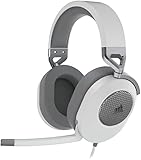
- Hours of Comfortable Gaming: Leatherette memory foam ear cups with soft fabric, a mesh grill ear cup design, and an adjustable headband with aluminum-reinforced construction provide lightweight comfort just 282g and durability
- Great Gaming Audio: High-quality, custom-tuned 50mm neodymium audio drivers deliver excellent sound with the range needed to hear everything on the battlefield, plus support for Sony Tempest 3D audio on PS5
- Dolby Atmos Spatial Audio on PC: Place the sounds of the game all around you with three-dimensional staging, so you can truly hear and experience the finest details your games have to offer
- SonarWorks SoundID Technology: For customized sound control that tailors your headset settings to your personal audio tastes on PC and Mac
- Omni-Directional Microphone: Accurately captures all your calls and commands, with a convenient flip-to-mute function
Game audio is missing on Xbox One
CORSAIR’s Xbox One guidance says to check Settings > All Settings > Display & sound > Volume > Chat Mixer and select Do Nothing. Menu wording may vary with console software.
Sound still comes from the TV or speakers
For Xbox One, CORSAIR’s published path is Settings > All Settings > Display & sound > Volume > Party Chat Output > Headset. Menu wording may vary with console software.
Should you update the headset firmware?
CORSAIR says firmware can be updated through iCUE on a Windows PC. An update is not established as a general fix for Xbox connection issues, so follow this step only if CORSAIR’s model-specific support instructions recommend it.
Can I use any Corsair wireless headset on Xbox?
No. Xbox support depends on the model and its documented connection method. The HS75 XB Wireless pairs through Xbox Wireless, while the Virtuoso MAX for Xbox uses its specific USB transmitter and Xbox mode. Other Corsair models may be limited to a wired 3.5 mm connection or may not be listed for Xbox. Check the compatibility chart for your exact model before relying on wireless USB or Bluetooth.
Quick Recap
Product prices and availability are accurate as of the date/time indicated and are subject to change. Any price and availability information displayed on Amazon at the time of purchase will apply.




