For the commonly listed PC defaults in Jurassic World Evolution 2, use WASD to move the camera, Q/E to rotate, and Page Up/Page Down to zoom. The F1–F6 keys open control-room tools. To see or change the bindings active in your game, open Keybindings from the in-game main menu; customized or updated layouts may differ from this quick reference.
Camera and navigation controls
The following keyboard shortcuts are reported as PC defaults by a third-party control reference. They are a quick guide, not an official complete Frontier control chart.
| Action | Default key |
|---|---|
| Move camera forward | W |
| Move camera backward | S |
| Move camera left | A |
| Move camera right | D |
| Rotate camera | Q / E |
| Zoom camera | Page Up / Page Down |
Control-room shortcuts
The listed F-key sequence opens these management tools:
| Key | Tool |
|---|---|
| F1 | Management |
| F2 | Expedition map |
| F3 | Fossils |
| F4 | Research |
| F5 | Staff management |
| F6 | Jurassic World Database |
Other useful PC shortcuts
| Action | Default key |
|---|---|
| Open management view | E |
| Open map | M |
| Toggle security-rating map | I |
| Go to nearest Park Response Team facility | R |
| Go to nearest Paleo-Medical facility | T |
| Follow notification | Tab |
| Enter capture mode | C |
| Enter demolish mode | Delete |
| Enter transport mode | F |
| Enter path mode | P |
Time and building placement
| Action | Default key |
|---|---|
| Normal speed | 1 |
| Fast speed | 2 |
| Super-fast speed | 3 |
| Pause | Space |
| Toggle snap placement | Shift |
| Rotate placement | Z / X |
| Random rotation | Ctrl + Space |
| Toggle rotation axis in placement mode | Space |
Space appears in both the time and placement references: it pauses the game in the time controls and toggles the rotation axis in placement mode. Check the on-screen prompt or Keybindings if the action is unclear in your current context.
What’s actually slowing this PC down?
Pick the symptom - the matching free tool is one click away.
#1 Best Overall
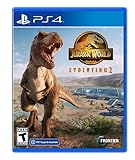
- An Original Jurassic Story- Immerse yourself in a compelling and original Jurassic World narrative set after the Earth-shattering events of Jurassic World: Fallen Kingdom
- Create your own Jurassic World - Take control with deeper management tools and creative options; Construct and customise new buildings and flex your managerial muscle across never-before-seen locations ranging from dense forests to rocky deserts
- Play with Chaos Theory- Chaos Theory mode lets you play through key moments of your favourite films - with a twist
How to check or change your keybindings
Frontier Support says, “Rebinding is currently available via the in-game main menu.” Open the main menu and select Keybindings to inspect or change assignments. The menu is the reliable reference for your current setup, especially if you have customized controls or are using a game version whose defaults differ from an older list.
Independent reader supportYour contribution helps us test, update, and keep practical guides available for everyone.Which control list applies to Evolution 2?
Use the Evolution 2 mappings above rather than control charts for the original Jurassic World Evolution. Search results can surface the earlier game’s list, which uses different F-key assignments. The Evolution 2 references agree on the F1–F6 sequence shown here, but Frontier’s support article confirms that rebinding is available; it does not publish or verify every default in this table. The cited control reference does not establish differences between PC storefronts.
Rank #2
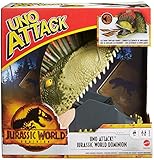
- UNO Attack Jurassic World Dominion card game adds extra surprise to game play with a dinosaur head-shaped card launcher featuring lights and sounds!
- Load cards into the monster machine, then play like the classic UNO game until…
- …the Attack card comes up: the dinosaur head will come to life with lights and sounds to shoot cards high into the air -could be one card, could be five!
- The anticipation grows as the lights and sounds change over time to help build suspense!
- Players must still yell "UNO!" when they are down to just one card in their hand
Jurassic World Evolution 2 is a single-player simulation and strategy game from Frontier Developments, released November 9, 2021. Steam’s listing identifies the game and release date. The key mappings above come from a third-party PC controls reference; Frontier’s key-rebinding support article explains where to change them.
Quick Recap
Best Value

- The Jurassic Park Classic Games Collection will come with the following fan-favorite titles, originally released across NES, Game Boy, SNES, and Genesis:
- Jurassic Park
- Jurassic Park Part 2: The Chaos Continues
- Jurassic Park: Rampage Edition
Rank #4

- PLAY YOUR FAVORITE GAME WITH THE WHOLE FAMILY: Put your luck & smarts to the ultimate test with your fellow fans at your next party or game night with this incredibly entertaining deck of Jurassic World playing cards that the whole family can enjoy
- PLAYING CARD DECK INCLUDES MULTIPLE IMAGES: This Jurassic World deck of playing cards includes multiple images. It's loaded with imagery and designed for fun for fans and players alike.
- LOOKING FOR JURASSIC WORLD GIFTS? This Jurassic World deck of cards is the ultimate gift for fans of all ages. Perfect for game night, birthdays, stocking stuffers, white elephant, and Holiday gifts, that everyone will absolutely love receiving as a gift.
- 100% OFFICIALLY LICENSED JURASSIC WORLD MERCHANDISE: This deck of Jurassic World playing cards is designed by AQUARIUS and officially authorized. It’s a perfect piece of Jurassic World memorabilia to add to your collection.
- THE AQUARIUS PROMISE: It's simple. We stand behind our products 100%! Click the yellow "Add to Cart" button today and buy with confidence
Rank #3

- The UNO game players love features graphics inspired by characters from Jurassic World Rebirth
- Game play matches the classic card game where players match colors and numbers to get rid of all their cards
- The special 'Attack of the T. Rex' rule has players trying to match a chosen color with cards in their hand or they must draw 5 cards
- The deck comes in a decorative, collectible tin for storage or display
- Designed for 2 to 10 players ages 7 years and older, this card game makes a great toy for fans of Jurassic World Rebirth
Product prices and availability are accurate as of the date/time indicated and are subject to change. Any price and availability information displayed on Amazon at the time of purchase will apply.
Quick wins for a faster PC:
Clear out junk files and repair common Windows errorsFree Scan →Fix the driver behind crashes, sound loss and screen glitchesFind Drivers →



