Yes—but first, clarify the symptom. If an automatic-transmission selector moves out of Park without the brake pedal pressed, the brake transmission shift interlock may not be working, creating a rollaway risk. Apply the parking brake whenever the vehicle is parked, keep people clear, and arrange an inspection. If the selector is stuck in Park even with the brake pressed, that is the opposite problem; some vehicles provide a model-specific manual release. Share the vehicle’s year, make, and model to get instructions that fit it.
What does “shift lock not locking” mean?
The brake transmission shift interlock (BTSI) is designed to prevent an automatic-transmission selector from moving out of Park until the service brake is applied. The National Highway Traffic Safety Administration (NHTSA) says the federal requirement applies to covered automatic-transmission vehicles with a Park position manufactured on or after September 1, 2010. That applicability date does not establish which system a particular vehicle has; designs and operating conditions vary. Consult the owner’s manual for the exact vehicle. NHTSA’s BTSI interpretation explains the requirement.


Two different symptoms are often described as a “shift-lock problem”:
- The selector moves out of Park without pressing the brake. The interlock may be failing to engage. Treat this as a safety fault.
- The selector will not move out of Park even when the brake is pressed. The interlock may not be releasing, or another fault may be preventing movement. Some owner manuals describe an emergency release for this symptom only.
What to do if the selector leaves Park without the brake
- Secure the vehicle whenever it is parked. Set the parking brake, keep people clear, and use wheel chocks if appropriate for the situation. Chocks can help secure a vehicle during inspection but do not repair the interlock. Follow the safety instructions in the vehicle’s manual.
- Do not bypass the interlock as a repair. A manual release is intended for a selector that will not leave Park, not one that fails to lock in Park.
- Arrange prompt, vehicle-specific diagnosis. Do not rely on the interlock to prevent a vehicle from moving until its operation has been checked.
- Check for a recall by VIN. Use NHTSA’s official recall lookup or contact a dealer. A recall notice for specified vehicles describes a locking pin that could stick open and permit shifting without brake application, increasing rollaway risk. That example does not mean an unidentified vehicle is covered.
Safe first checks before diagnosis
Check whether the brake lamps work
With the vehicle secured, press the brake pedal and check whether the brake lamps illuminate consistently. A brake-lamp problem is a useful warning sign, but working lamps do not prove that the shift interlock is functioning correctly. Use an appropriate helper or have someone observe the lamps without standing in the vehicle’s path. NHTSA service-report examples show that brake-lamp switch faults can be among the issues reported, but they do not establish the cause in another vehicle.
Free tools Windows power users keep installed
One-click scans. No signup required.
Have the actual fault identified
Service reports describe different possible issues, including brake switches, wiring or connectors, and shift-interlock components. Another manufacturer’s bulletin describes an interlock controlled by multiple signals, including the service-brake-applied signal. These are examples from different vehicles and systems—not a universal repair procedure or evidence that any one part is the most common cause. Diagnosis should use service information for the vehicle’s year, make, model, and transmission. Depending on its design, a technician may need to check the brake switch, fuses, wiring, shifter assembly, interlock actuator, or control inputs. The NHTSA report examples and the separate interlock bulletin illustrate why the diagnosis must be specific.
When is a manual shift-lock release appropriate?
Some owner manuals explain how to release a selector that remains in Park even though the brake is pressed. The location and steps differ by vehicle configuration; do not use a procedure from another model. Kia advises having the system inspected if the selector still will not move after following the vehicle-specific procedure, and Ford’s instructions likewise depend on configuration. See the relevant Kia owner’s manual or Ford owner’s manual for those manufacturers’ instructions; they are not interchangeable.
Rank #2
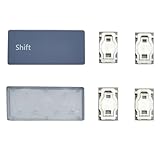
- Compatibility: Compatible with Surface Laptop 3/4/5/6 13.5/15inch Model 1867 1868 1872 1873 1950 1951 1953 1958 1959 1978 1979 series(Note: This product is not suitable for the Laptop 7/Laptop Go/Laptop Studio series. Please make sure to distinguish between them)
- Before purchasing, please make sure that your Laptop and model number are compatible(Please check the model number of the laptop bottom cover, for example, Model 1867)
- The complete key is composed of key cap, white hinge, colorless silicone rebound cup device. If the middle silicone rebound cup device is missing, the problem cannot be solved by replacing the key cap and hinge
- Easy and quick installation, no need to disassemble the machine. (Installation tips If the white hinge is not damaged, you can directly install the key cap. If the hinge is damaged, please install the white hinge first, and then install the key cap)
- Inside the package:1Pcs key cap and 2Pcs white hinge
Before any procedure that takes the transmission out of Park, secure the vehicle. The cited manual warns that the vehicle can roll and instructs drivers to fully set the parking brake and use wheel chocks if appropriate. If the release procedure is needed, have the underlying issue inspected rather than treating the release as a repair. Kia’s manual includes the safety warning.
Independent reader supportYour contribution helps us test, update, and keep practical guides available for everyone.What information helps identify the right fix?
For useful vehicle-specific guidance, provide the year, make, model, transmission if known, and the exact symptom: does the selector leave Park without the brake, or stay in Park when the brake is pressed? Also note whether the brake lamps work consistently and whether a warning light or recall notice is present. The available general guidance cannot identify a failed component or determine recall eligibility without those details.
Quick Recap
Best Value
![Single Keycap for Logitech Keyboard Craft/MX Keys S/MX Keys Mini/MX Keys S for MAC/MX Keys Mini for MAC (Black/Graphite, Left [Shift] Key)](https://m.media-amazon.com/images/I/31MUS41CF0L._SL160_.jpg)
- Designed with meticulous attention to detail, each keycap is a perfect fit for your Logitech Master Series keyboard, ensuring seamless integration and a like-new typing experience. Whether a single keycap has seen better days or multiple ones need replacing, this set has you covered, allowing you to quickly and easily restore your keyboard's original functionality and appearance.
- Crafted from durable materials, our keycaps are built to last, withstanding the rigors of everyday use while maintaining a smooth, comfortable typing feel. Say goodbye to uneven surfaces, sticky keys, or faded lettering – with this replacement set, your keyboard will look and feel fresh, ready to tackle whatever tasks come your way.
- Installation is a breeze, requiring no special tools or technical expertise. Simply remove the damaged keycap and replace it with the corresponding one from our set. The result? A keyboard that performs like new, ready to accompany you through countless hours of productive work or creative pursuits.
- Don't let worn or damaged keycaps hold you back. Keep your Logitech Craft, MX Keys, or MX Keys Mini keyboard functioning at its best with our universal keycap replacement set. Invest in the longevity of your keyboard and enjoy a seamless typing experience, day in and day out.
Rank #4

- Brand new left shift key for 2016 2017 Macbook pro A1706 A1707 A1708.
- It will make your mac back to work without replacing the entire keyboard.
- Good choice for borken lost missing sticky keys on your macbook pro keyboard.
- Package including a key cap and a white hinge piece.
- If the hinge is ok,you don't have to replace it,just need to clean the base of key then follow the instrctions to install the keycap.
Product prices and availability are accurate as of the date/time indicated and are subject to change. Any price and availability information displayed on Amazon at the time of purchase will apply.




