Do these 3 things before closing this tab:
1Fix the driver behind crashes, sound loss and screen glitches2Repair Windows errors before they cause bigger problems3Scan for outdated or missing drivers - takes under a minuteIf your Nintendo Switch screen looks scrambled, distorted, or blurry while the console is undocked, update the system software and restart the console. If the fault is limited to one game, follow Nintendo’s game-card or downloaded-game troubleshooting. If it affects all games or applications and remains after those first steps, Nintendo recommends requesting console service.
First, identify where the image problem appears
Nintendo’s guidance for a scrambled, distorted, or blurry console screen applies while the Nintendo Switch, Switch Lite, or Switch – OLED Model is undocked. A picture problem that occurs only on a TV while docked follows a separate troubleshooting path.
- Undocked screen: Use the steps below for the built-in display.
- One game only: Check whether it is a game card or downloaded software, then follow the relevant game-specific steps.
- TV only while docked: Go to Nintendo’s TV image troubleshooting. Switch Lite does not support TV mode.
Troubleshoot the undocked Switch screen
1. Update the system and restart
Make sure the console has the latest system update. Then restart it. To access power options, hold the POWER button for at least three seconds, select Power Options, then choose Restart. Follow Nintendo’s current steps for a scrambled, distorted, or blurry console screen if menu labels or options differ on your system.
2. If the issue occurs in one game
Do not assume the console is faulty if the display problem is limited to a single title. Nintendo separates troubleshooting by how you play the game:
#1 Best Overall

- 【Compatible – Check Your Console Model】Suitable for Nintendo Switch HAC-001 V1 and HAC-001(-01) V2.This is a full LCD + touch screen assembly – touch is fully functional. Does NOT fit Switch Lite or Switch OLED. Please check your model in System Settings before ordering.
- 【What This Fixes – LCD + Touch Together】Replaces both cracked LCD and broken touch at once. Fixes: cracked screen, dead pixels, touch not working, unresponsive touch, display issues, wrong colors, frozen screen. One assembly restores full display + touch function.
- 【Installation Warning – Read Before You Start】⚠️ Test before final mounting – connect the new screen first without mounting accessories. Confirm display and touch work. Do not bend the LCD cable over 90°. Professional installation recommended if you lack experience. Watch a YouTube tutorial before starting.
- 【What‘s in the Box – No Hidden Costs】Includes: 1x LCD + Touch Screen Assembly for Switch HAC-001 V1 / HAC-001(-01) V2, 1x Tempered Glass Screen Protector, 1x Repair Tool Kit (screwdrivers, pry tools, etc.), 1x Mounting Accessories. Everything you need – open the box and start.
- 【Warranty & Support】All screens are fully tested before shipment. 6-month warranty for manufacturing defects (non-man-made damage). 24/7 customer support via Amazon message – we reply within 24 hours.
- Game card: Turn the console off, remove and reinsert the card, check for a game update, and identify the game’s publisher. Nintendo’s support page provides the current decision steps. If the problem remains with the card, Nintendo says the card needs service; do not send the console in for that card issue.
- Downloaded game: For Nintendo-published software, check for corrupt data and redownload the game if needed. If the problem persists with one downloaded game, Nintendo says the console needs service. For other publishers’ games, contact the publisher as directed by Nintendo’s page.
3. If all games or applications are affected
After updating and restarting, check whether the scrambled or blurry image still appears across games and applications. If it does, Nintendo says the console needs service. If possible, include at least two game cards that show the problem when arranging service.
If the image problem is on a TV instead
These checks are for a picture that is wrong on the television while the console is docked—not for a fault confined to the undocked screen. Start by undocking the console and checking whether the same symptom appears on its own display. Nintendo’s separate TV procedure then includes these checks:
Rank #2
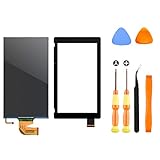
- √【COMPATIBILITY】: Compatible with Nintendo Switch 2017, replace your broken Nintendo Switch screen. (Warning: its the 2017 LCD replacement not for 2019 Switch, not for switch lite or switch OLED).
- √【STRICT QUALITY CONTROL】: We tested every NS Screen before shipment, make sure the screen has no scratches or spots.(Remove The 2 Sides Film Before Installation)
- √【EASY INSTALLATION】: Installing this replacement screen is simple and easy. It comes with an installation kit and can also be installed in Youtube with the video. Need professional skills.
- √【PACKAGE INCLUDE】: 1 X LCD screen, 1 X Digitizer, 2 X warp tabs,1*Y Screwdriver, 1*+ Screwdriver, 1* Tweezer, 1* Opener
- ❤【WORRY-FREE-AFTER SALES】: If you have any dissatisfaction after purchasing the product, please feel free to contact us by email, we will do our best to solve your problem and 7*24 hours waiting for you.
- Update the system software and restart the console.
- Unplug the original Nintendo Switch AC adapter (model HAC-002) from both ends for 30 seconds, then reconnect it.
- Inspect and reseat the HDMI cable. Connect the dock directly to the TV rather than through another device.
- Try another HDMI port, cable, TV, or dock if one is available.
If the fault is limited to the TV output and persists across multiple HDMI-capable televisions, Nintendo says the console may need service; its instructions say to include the dock and HDMI cable. See Nintendo’s docked-TV troubleshooting page for the live steps. These HDMI and adapter checks are not remedies for an undocked handheld-screen fault.
Independent reader supportYour contribution helps us test, update, and keep practical guides available for everyone.When to request service
For a persistent fault on the built-in screen, follow Nintendo’s service guidance after the update-and-restart steps and the applicable game-specific checks. The symptom alone does not establish which component has failed. Nintendo’s troubleshooting directs persistent console-wide display problems to service rather than a do-it-yourself repair.
Quick Recap
Best Value

- COMPATIBILITY----Touch Screen Replacement only For Nintendo Switch V1 HAC-001 (Only Digitizer Screen Replacement, without LCD Screen). Please check your tablet's model carefully before ordering.
- Package List----1x Screen, 1x Opening Tools Kits, 1x Double-sided Adhesive Tape. Our products are professionally packaged to ensure that the products will not be damaged during transportation. If the packaging is damaged when you receive the product due to uncontrollable reasons and the product is damaged, please take a photo and send it to us, we will immediately reissue a new product for you.
- APPLICATION----It is used to replace or repair faulty screen: such as the touch screen been damaged, the touch function does not work, and the touch function is not sensitive. Note: If your device is not only a problem with the touch screen, if the LCD screen is also not working, please do not buy the screen from this link, you need to replace both the LCD screen and the touch screen.
- INSTALLATION PRECAUTIONS----Removal and installation of touch screen requires professional equipment to separate the touch screen and the LCD screen, If you are not a professional maintenance personnel, you have no experience in installing screens and no professional maintenance equipment, we recommend that you go to local repairs shop to have a professional replace the screen for you to avoid unnecessary damage to your device.
- LIFE-TIME SERVICE----There is a 100% inspection by professional QC team for each screen before shipping. We provide LIFE-TIME exchange for non-human damages to make your purchase risk-free. If you need further help for any problem about this touch screen replacement, we highly suggest to contact us for technical support and to get satisfactory solutions.
Rank #4

- 【Device Match – Check Before Order】Suitable for Nintendo Switch HAC-001 and HAC-001(-01) (original model, 6.2 inch). ⚠️ This is LCD display only – touch screen is NOT included. Does NOT fit Switch Lite or Switch OLED. Please check your console model before ordering.
- 【What This Fixes】Perfect for: cracked glass, dead pixels, display issues, wrong colors, or frozen screen. ⚠️ Does NOT fix touch issues – if your touch screen is broken or unresponsive, this LCD only replacement will not help. You need a full LCD + digitizer assembly.
- 【Quality You Can Trust】Each screen is fully tested before shipment – no dead pixels, no scratches, no display defects. We don‘t ship flaws. Just reliable quality for your repair.
- 【What’s in the Box】Complete kit – no hidden costs. Includes: 1x LCD Screen, 1x Tempered Glass Screen Protector, 1x Repair Tool Kit (screwdrivers, pry tools, etc.), 1x Mounting Accessories.
- 【Installation Tips】Test before installation – connect the screen without mounting accessories first. Watch YouTube tutorial "For Switch screen replacement" before starting. Professional installation recommended if you lack experience. Contact us via Amazon message for help – we reply within 24 hours.
Rank #3

- TheCoolCube Touch Digitizer Window Panel Replacement Screen Glass Compatible with Nintendo Switch (2017) (Not include LCD)
- It’s front Touch screen glass only, not include LCD. No instructions manual include. Professional technician is needed for installation. We won’t responsible for any damage due to improper operation.
- Repair/Replacing old, broken, cracked, damaged faulty touch screen
- Compatible with: Nintendo Switch (2017) (Please check the model before your purchase)
- Pacakge include: 1x Touch screen
Product prices and availability are accurate as of the date/time indicated and are subject to change. Any price and availability information displayed on Amazon at the time of purchase will apply.




