Optical discs store information that a compatible drive reads with laser light. CDs, DVDs and Blu-ray discs belong to the broader optical-media category, but their formats and device compatibility are not interchangeable. For game collections and other media, check the disc type your console or player supports, handle discs carefully, and treat long-term preservation as an ongoing process—not a guaranteed lifespan.
What is an optical disc?
An optical disc is a physical storage medium read using laser light. A compatible drive focuses a beam on the disc to retrieve data; drives designed for recordable media can also write data to compatible discs. The Smithsonian Institution Archives/NIST guide explains these basics for CDs and DVDs, while the National Archives identifies formats including CDs, DVDs, Blu-ray discs and LaserDiscs. The category covers different formats, so the label “optical drive” alone does not establish that a device can read every disc.
How do optical discs work?
On a pressed read-only disc, such as CD-ROM or DVD-ROM, the information is manufactured onto the disc and intended to be read. Recordable and rewritable discs work differently: the drive must support the media type as well as the disc format.
- ROM (read-only): Pressed media such as CD-ROM and DVD-ROM is read, not recorded on by the user.
- R (recordable): Examples include CD-R, DVD-R and DVD+R. These are write-once formats; the guide describes dye-based recording examples.
- RW and RAM (rewritable): CD-RW, DVD-RW and DVD+RW are examples of rewritable media that use phase-change recording; DVD-RAM is another rewritable example.
These are examples, not a complete taxonomy of every optical format. A disc’s format and the particular drive or player’s capabilities both matter. Before buying, burning or attempting to play a disc, check the device documentation for explicit support for that format.
#1 Best Overall

- Portable storage wallet for CDs, DVDs and data disc collections; 400 disc capacity
- Durable, protective exterior case construction with zipper enclosure and carrying handle
- Interior binder sleeves feature soft fabric backing; each page holds 4 discs per side (400 discs total)
- Neatly protect, store and organize music, movies, media and more CD and DVD collections in one place
- Dimensions: 12.2 x 11.7 x 6.6 inches (LxWxH)
What is the difference between CD, DVD and Blu-ray?
They are different optical-disc families, not interchangeable names for the same format. The sources cited here establish that CDs and DVDs use laser light and that Blu-ray is also an optical-disc format, but they do not establish format capacities, a complete compatibility matrix or a device recommendation. For a game, movie or data disc, rely on the console or player’s stated support for the exact format rather than assuming that support for one optical disc implies support for another.
How should you clean and handle a disc?
Dust, grit, fingerprints, deposits and scratches on the data surface can interfere with a drive’s ability to read a disc. The National Archives recommends these steps:
Rank #2

- Large Capacity: Siveit CD case can store 96 CDs/DVDs and keep them well organized, saving you more space. With 15 color choices, you can choose the color you like and store CDs into several categories by color.
- Strong & Durable: Siveit CD/DVD case is made of hard durable plastic, PP film with non-woven fabric material. It can store your CDs/DVDs for a long time and protect damage from dust, moisture, and scratches.
- High Quality: To effectively protect CD and DVD discs, we tested PP films and non-woven fabrics of different thicknesses and chose the most suitable thickness to ensure long-term use without scratching the disc. The zipper is smooth and easy to use, it can be easily closed after 96 CDs are filled.
- Easy to Use: Each slot has a slide lock to prevent your CDs/DVDs from sliding out. We removed the redundant T-shaped edge material in the slot so you can store cs/dvd directly. Note: T-shaped edge materials are removed manually. Please understand if there are some individual materials.
- Service Guarantee: A high-quality product is often reflected in every detail of the product, and an excellent business is often reflected in customer service. If you are not satisfied with the product, please contact us for a refund.
- Hold the disc by its outer edge and center hole. Avoid flexing it.
- If loose dust is present, gently remove it with an air puffer bulb.
- For visible fingerprints, wipe with a dry, soft, lint-free cloth in straight strokes from the center toward the edge. Do not wipe in circles.
- If needed, use distilled or deionized water, then let the disc dry fully before storage or playback.
Small, occasional scratches may not prevent reading, but a scratch deep enough to affect readability cannot be corrected through routine holdings-maintenance procedures, according to the National Archives. Circular scratches are more damaging than radial ones, which is why cleaning should go straight outward rather than around the disc.
How should you store optical discs?
Store each disc upright in its own plastic jewel case; the National Archives prefers polypropylene cases. A case helps protect against dust and contact, but it does not stop the disc from aging. Avoid adhesive labels and writing on the disc. If labeling is unavoidable, use a non-solvent or water-based felt-tip marker on the clear inner hub.
Recommended Free Tools
Rank #3
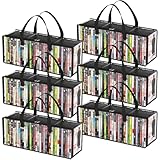
- Sturdy Zipper Window Design: Convenient front window with zipper on the DVD storage bag enables easy access while maintaining stackability
- Protect Your Collectibles: Made from 20-gauge thickened transparent PVC, these DVD storage bags shield DVDs from scratches while showcasing collections
- Large Capacity: 6-piece DVD storage box set, with each box measuring 20.5" (52 cm) x 6.3" (16 cm) x 7.9" (20 cm). Each bag can hold up to 35 DVDs, allowing for a total capacity approximately 210 DVDs—perfect for organizing extensive collections
- Portable Carry Handles: Reinforced double-stitched side handles on both side of this DVD case ensure secure and comfortable transport, preventing drops during moves
- Versatile Use: Multi-functional DVD storage box stores books, photos, DVDs and more, ideal for any space in your home
How long do CDs, DVDs and Blu-ray discs last?
There is no universal lifespan figure supported for all CDs, DVDs or Blu-ray discs. Disc type, manufacturing quality, storage and handling, and the drive used to read the disc all matter. The National Archives warns that many optical-disc types are unstable and present long-term preservation challenges.
ISO/IEC 16963:2017 is a test method for estimating retrievability lifetime in recordable and rewritable optical media. Its reference conditions include 25 °C and 50% relative humidity for controlled storage, and 30 °C and 80% relative humidity for a harsh condition. Those are inputs to an accelerated-aging test, not a consumer-disc lifespan prediction or everyday storage guarantee. The method models temperature and relative humidity; as its abstract states, “The methodology includes only the effects of temperature and relative humidity.” It does not model light, corrosive gases, contaminants, handling, variation in playback systems or complex failure mechanisms.
Rank #4
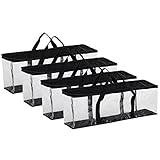
- Large Capacity: Pack of 4, Bags measure 22" X 8 3/8" X 6 ¼", holds approx. 40 movies each for a total of 160 movies, perfect storage cases to stack on a shelf or in a closet, or slide under a bed for easy, out-of-the-way movie collection organization
- High Quality Material: Each DVD storage bags is crafted with clear PVC and durable polyester fabric material that makes it easier to finding the movie you want to watch quickly
- Convenient Handle: A handy solution for storing and transporting your entertainment library. The DVD holders also have reinforced double-stitched handles so that you can carry them around without worrying that your precious DVDs will fall and break
- Unique Zipper Design: The zippered top and horizontal design makes it simple to open and access your DVD collection without making a mess. It can be placed anywhere you want like the living room, bedroom, office, kitchen etc
- Protect Your Collection: By keeping your movies in our storage bag, you can protect them from scratches, dirt, and moisture for long-term care
What does long-term preservation require?
Keeping a disc physically intact is only part of preserving its contents. Access also depends on having a suitable, working drive and technology capable of reading the format. The Smithsonian Institution Archives/NIST guide emphasizes that digital preservation requires an ongoing technology strategy as media becomes outdated.
ISO/IEC 18630:2023 and Ecma International’s ECMA-421 (second edition, June 2024) describe quality discrimination and storage-system operation for long-term preservation of optical discs, including recordable and read-only media. These standards support a measured preservation workflow; they do not promise that any individual consumer disc will last indefinitely.
Free tools Windows power users keep installed
One-click scans. No signup required.
Quick Recap
Best Value

- Large Capacity Storage: This 4-piece DVD storage box set has individual dimensions of 15.7"(40 cm) x 7.9"(20 cm) x 6.3"(16 cm) and can hold up to 25 standard DVD cases. The entire set can accommodate 100 DVDs. These boxes can be stacked on shelves or cabinets, making it easy to organize your DVD collection.
- Premium Material: Thickened, tear-resistant non-woven fabric and reinforced 2.0 mm thick cardboard ensure long-lasting and protection for your DVD collection
- Stackable Design: These DVD storage boxes come with lids to ensure your DVDs are kept safe, making them perfect for stacking and maximizing your storage space. Say goodbye to cluttered areas
- Portable Handles: Reinforced side handles make it easy to carry and transport your DVD storage box without worrying about breakage or spills
- Versatile: Our storage boxes can also be used to store books, photos, clothes, blankets, and more. You can place them anywhere in your home, such as the living room, bedroom, or media room
- Keep more than one copy of important data, with a separate copy reserved for preservation.
- Use appropriate storage, handle discs carefully and assess media quality rather than assuming appearance guarantees readability.
- Monitor whether the discs and the drives needed to read them remain accessible.
- Plan to migrate important content to current storage when the media or playback technology becomes difficult to use.
Product prices and availability are accurate as of the date/time indicated and are subject to change. Any price and availability information displayed on Amazon at the time of purchase will apply.




