To export a Litematica schematic, create an area selection around the build, make sure all chunks in that selection are loaded, then save the selection as a schematic from Litematica’s menu. The default menu key is M, though it can differ with your keyboard layout or custom keybinds.
1. Create and check the area selection
In the world containing the build, create an area selection that covers everything you want to export. Litematica saves the selected area, not the whole world or whatever happens to be visible on screen. See the Litematica Area Selections documentation for details on creating and adjusting a selection.
2. Load every chunk in the selection
Before saving, ensure the chunks across the entire selection have loaded. If the selected build extends beyond the chunks currently around your player, move through the area so those chunks come into range. Litematica displays a “Missing Chunks” message with the number still missing; wait until the selection is fully loaded before exporting.
3. Save the selection as a schematic
- Open the Litematica menu with the default M key. If that does not open it, check the Litematica or malilib keybind settings; the key may differ on non-QWERTY layouts or if you changed the binding.
- Choose the action to save the current area selection as a schematic. The exact screen sequence can vary by version.
- Enter a file name and save the schematic.
The Litematica FAQ describes the workflow as creating an area selection and then saving it as a schematic.
#1 Best Overall
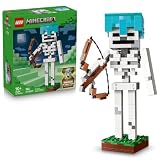
- SKELETON BUILDING TOY – Treat gamers, LEGO builders and collectors of gaming decor to the LEGO Minecraft The Skeleton (21594) building toy, inspired by one of the most iconic Minecraft characters
- LEGO MINECRAFT FIGURE – Featuring a jointed neck and arms, this buildable skeleton figure stands firmly on a grass base and can be easily posed for dynamic display
- MODEL BUILDING KIT – This striking piece of gaming merchandise features a removable diamond helmet and holds a brick-built bow and arrow
- UNLOCK AN IN-GAME ITEM – Players can scan a QR code on the building instructions to redeem a diamond skull cap for use in the Minecraft video game
- GIFT FOR GAMERS – This birthday, holiday or anytime gift for boys and girls ages 10 years old and up makes a great treat for fans of gaming and Minecraft merch
Saving in single-player versus on a server
The data available in a schematic can depend on where it is saved. Litematica’s Basic Operations documentation says single-player schematics include block-entity and entity NBT data and scheduled block ticks because the mod saves from the integrated server’s server-side world. On a server, server-side access can limit which data is available, so do not assume every entity, block entity, or scheduled tick will be preserved.
Prepare redstone builds before saving
Turn off redstone contraptions before saving when possible. Litematica’s Basic Operations documentation recommends this because moving piston heads or powered observers can leave problematic states in the schematic. Scheduled block ticks may also be needed when pasting a working contraption back, so the saved result may not fully capture a contraption’s intended behavior.
Rank #2

- LEGO MINECRAFT TOY WITH ANIMALS – The Baby Pig House is packed with pretend play fun for girls and boys ages 7 years old and up who have a passion for Minecraft, home-building, animals and farms
- MINECRAFT FIGURES – This set includes a hero character in a wolf skin, a baby pig, bee, an adult pig and a zombified piglin
- BUILDABLE PLAYSET – Kids build a pig-shaped house that comes with a farm plot where potatoes and beets grow, plus a field with a gate to guide the baby pig through and more
- AUTHENTIC DETAILS – Inside the house, there’s a Minecraft crafting table, a bed and a bookcase to inspire imaginative play
- MINECRAFT EASTER GIFT FOR KIDS – This build-and-play toy is a fun birthday, holiday or any-day gift idea for girls and boys
Load the schematic later
To load the saved file, place it in .minecraft/schematics/, open Litematica’s menu with M, and choose Load Schematics, as described in the FAQ. If your menu key has been changed, use the configured key instead.
Version and format notes
The menu’s exact save sequence can vary across Litematica versions. The available documentation does not establish a complete compatibility matrix or universal format-conversion steps for every Litematica and Minecraft version. For version-specific options, check the documentation matching your installation rather than assuming a conversion workflow applies universally.
Quick Recap
Best Value

- NOT MODEL SET!!!!! NOT MODEL SET!!!!! NOT MODEL SET!!!!! NOT MODEL SET!!!!! NOT MODEL SET!!!!! NOT MODEL SET!!!!! NOT MODEL SET!!!!! NOT MODEL SET!!!!! NOT MODEL SET!!!!!
- IMPORTANT NOTE: This item is only the LED lighting for your Model Set. All Model sets showed in pictures and videos are not included.
- Easy to install. Each lighting kit comes with a simple user manual. Then please follow the prompts to download the detailed PDF installation instruction. Just follow the instruction to install step by step.
- The professional lighting solution for your Model Set. The role of this product is to light up your Model, which will be very cool and make your Model Set unique. We are committed to providing the professional lighting solution for Model Set. Our goal is both customer satisfaction and customer loyalty by providing high quality lighting kits and excellent customer service.
- Most of the pictures you seen are original images that have not been beautified. We can completely beautify the pictures, but we hope to let you see the most realistic effect.
Rank #4

- Includes: Peg board, 800 fuse beads, 6 clip-ons, tweezer, 3 double-sided design sheets, ironing paper, instruction sheet.
- Out of This World Design: Create stylized, pixelated characters with the Minecraft Pixel Art set from Tara Toys.
- Design, Fuse, Clip, and Go: Create 5 different designs on a pegboard, cover with ironing paper, have an adult help fuse the design, and add a clip.
- Flair: With 800 fuse beads and lots of design ideas, kids can make 6 clips to keep and share with friends.
- Officially licensed Minecraft product with fun and recognizable designs.
Rank #3

- 【STEM Building Toys For Kids Ages 8-12】 Our model car building toy is designed for 8+ years old kids, includes 287 parts, such as nuts, bolts, screwdrivers, and wrenches, made of durable metal. After the build is completed, the tail can adjustable freely, and the car can slide for a long distance with a little push. This stem building toy incorporates boring engineering knowledge and concepts into funny building games, aiming to improve children's STEM skills.
- 【Easy To Follow Instructions】 We have prepared clear instructions for children, each step is illustrated, step-by-step instructions that are easy to understand. This teaches them to follow instructions and ensures they won't become overwhelmed or frustrated while they build. Wrenches and screwdrivers are also prepared for children to assemble parts easily.
- 【Hands-On STEM Learning Toys】 Children need to build this model car through careful thinking and patience. During about 5 hours of the building process, the child's hands-on ability can be maximized. Children always have infinite creativity! We believe that STEM science education can greatly promote creative learning and brain development.
- 【Metal Made & Bigger Size】 Our model car building toy is made of metal and the model car is sturdy once built without worrying about loosening. With a size is 2.8''H× 10.8''L×4.4''W,. It is become a beautiful display to decorate your desk, office, home, display case. It will definitely become an indispensable model car in the build series.
- 【Suitable For Giving】 Our model car stem building projects set choose stronger, high-quality materials, fine and gentle surface treatment, 100% friendly and no hurt kids, to ensure the safety of your kids, and at the same time have a long-lasting play and construction durability. A great toy for 8 9 10 11 12 13 14 15 16 year old boys and girls. As a stem science education project birthday, give your teenager or student a big surprise.
Product prices and availability are accurate as of the date/time indicated and are subject to change. Any price and availability information displayed on Amazon at the time of purchase will apply.




