Quick wins for a faster PC:
Repair Windows errors before they cause bigger problemsFix Now →Scan for outdated or missing drivers - takes under a minuteDriver Scan →Epilogue’s SN Operator connects a physical Super Nintendo or Super Famicom cartridge to a supported computer or handheld, where you can play it through the Playback app’s in-app emulator. It also provides tools for managing cartridge data and saves. The device does not turn a PC into original SNES hardware: gameplay depends on Playback, and compatibility is not guaranteed for every cartridge.
What the SN Operator does
The SN Operator is a USB-connected interface between a physical cartridge and a compatible host device. Epilogue describes it as a way to play physical Super Nintendo cartridges on a computer using Playback. Playback supplies the emulator and the software interface for managing cartridges; the cartridge remains part of the setup rather than being replaced by a downloaded ROM.
Epilogue lists gameplay, save and game-data backup, cartridge authenticity checking, and controller support among the device’s uses. Playback also offers software features such as achievements. These are manufacturer-described capabilities, not independent verification of how every game or cartridge will behave.
Which systems are supported?
Epilogue lists the following platforms and operating-system requirements on its SN Operator product page:
#1 Best Overall

- 【Two-Way Cartridge Compatibility】Designed to support cartridge use between compatible SNES and SFC consoles. Allows users to connect compatible game cartridges across supported console formats through a single adapter.
- 【Full Support for Enhancement Chip Games】Works with Super FX, SA-1, CX4, DSP, and other special chip cartridges. Fully preserves the original gaming experience.
- 【Built with PETG + PCB construction】Built with a 3D-printed PETG shell for impact resistance, heat resistance, and warp-free durability, plus a PCB core for clean signal traces and reduced interference.
- 【Ideal For Retro Game Collectors】A practical accessory for retro gaming enthusiasts, collectors, and users seeking expanded cartridge compatibility between supported console and cartridge formats.
- 【Important: Does NOT Convert PAL/NTSC】Solves physical slot differences only. Does not convert video formats.
| System | Published support | Setup qualification |
|---|---|---|
| Windows PC | Windows 10 or later | Confirm current requirements and install Playback. |
| Mac | macOS 12 or later | Confirm current requirements and install Playback. |
| Linux PC | Linux via Flatpak | Playback installation is required. |
| Steam Deck | Listed as supported | Use Desktop Mode and a compatible USB-C connection. |
| ASUS ROG Ally and other ASUS ROG handhelds | Listed by Epilogue | Specific configurations may differ; check current vendor guidance. |
| Raspberry Pi | Listed as supported | Check the current software and system requirements. |
Epilogue’s SN Operator FAQ also refers to other Linux-capable devices. That does not establish identical operation on every Linux system, handheld, dock or USB setup.
How to set it up, including on Steam Deck
- Check the host. Make sure the computer or handheld meets Epilogue’s current requirements for Playback. For Steam Deck, switch to Desktop Mode.
- Install Playback. Get the software for your system from Epilogue’s downloads or support materials and follow its installation instructions.
- Connect the Operator. Use the supplied USB-C cable or another compatible connection. For Steam Deck, Epilogue specifically calls for a compatible USB-C connection; it does not promise every dock or cable will work.
- Insert a suitable cartridge. Use a cartridge in good condition. Follow Playback’s on-screen instructions to access gameplay or cartridge-management features.
The box contents listed by Epilogue are the SN Operator, a USB-C cable, Playback software, a setup flyer and a one-year limited warranty. Its published dimensions are 185 × 70 × 37 mm and its stated weight is 230 g (8.1 oz); these are manufacturer specifications, not independent measurements.
Rank #2

- Application: power adapter is specially compatible for SNES NES GENESIS 1 system.This Power adapter only supply the power for one game console at the same time,can not work compatible for NES and SNES Console simultaneously
- AC Adapter Specification: Input: AC 100-245V 60HZ. Output: DC 9V-850mA. Adapter Cable length: 4.9 ft/1.5 m
- AV Cable Length: 1.8 m/5.9 ft
- This is RUITROLIKER brand product
Cartridge regions, games and enhancement chips
Epilogue lists support for North American SNES, Japanese Super Famicom and PAL Super Nintendo cartridges. Its product information and FAQ name enhancement chips including Super FX, SA-1, DSP and CX4. This broad stated support is not a promise that every title or individual cartridge will work: Epilogue explicitly says compatibility is not guaranteed for all games.
The vendor says its testing used authentic cartridges in good condition and a direct USB-C connection to systems meeting recommended specifications. Damaged, corroded or counterfeit cartridges may not function properly and could potentially damage the device. Treat authenticity checking as a listed feature, not a guarantee that every counterfeit will be identified.
What’s actually slowing this PC down?
Pick the symptom - the matching free tool is one click away.
Rank #3

- DUAL PORT ADAPTORS: Includes 2 adapters with dedicated port for nes controllers and dedicated port for snes/Super Famicom controllers, allowing you to use your controllers
- SNAC TECHNOLOGY INCLUDED: Integrated SNAC module with USB 3.0 male connector offering a native connection with very low latency, ideal for games requiring precision and perfect timing
- FULL COMPATIBILITY: Works with Terasic DE10-Nano card, MiSTer IO card and SNAC compatible cores (NES, SNES and others depending on configurations), immediate system recognition
- PLUG-AND-PLAY INSTALLATION: Simple driverless setup required, sturdy and durable construction for heavy use, providing a true feel to vintage consoles
- AUTHENTIC RETROGAMING EXPERIENCE: No noticeable latency thanks to SNAC connection, allows players to use their true Nintendo controllers for a premium gaming experience
Save backups and moving saves between devices
The SN Operator and Playback are intended to help manage game data as well as play games. Epilogue says saves can be synchronized between a computer and console, and Playback documentation describes importing emulator saves back to a cartridge. The exact workflow depends on Playback and the save format or game involved; consult Epilogue’s current Playback documentation for the steps supported by the software.
This distinction matters: a save stored or used by the computer’s emulator is software data, while writing a save back to a physical cartridge involves the cartridge-management workflow. Do not assume every emulator save can be transferred without checking the game-specific support and current Playback instructions.
Rank #4

- 1. Mainly Used: Replacement slot adapter connector to play for games on for SNES consoles.
- 2. Wide Compatibility: The 72 pins slot connector is compatible with most for games and for SNES games.
- 3. Suitable for: 72 pins slot connector is suitable for game consoles for NTSC, for PE, for NJ and for PAL Mega Drive.
- 4. Direct Play: The replacement slot adapter connector plays directly on most retro portable devices.
- 5. Material: 72 pins slot adapter convertor is made of premium ABS material, sturdy and , not easy to damage, long service life.
Performance and compatibility caveats
Epilogue uses “zero-latency” language for gameplay, but its product information qualifies performance by the host computer, USB connection, display, controller and software configuration. It should not be read as a universal, independently measured result. If responsiveness matters, your full setup—not just the Operator—affects the experience.
For the latest requirements, support notes and availability, check Epilogue’s product page and FAQ before buying. Pricing and retail availability can change.
The Tool Desk
Outbyte Driver Updater FREEFix the driver behind crashes, sound loss and screen glitchesFind Drivers →Outbyte PC Repair FREEClear out junk files and repair common Windows errorsFree Scan →Quick Recap
Best Value
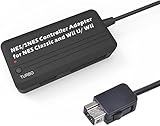
- Compatible with NES Classic Edition Controllers and Wii U/Wii
- Compatible with SNES Controllers to play the games on NES Classic Edition and Wii U/ Wii system
- No extra driver required, plug-n-play
- Built in Turbo
- The D-pad and the left stick can be exchanged
Product prices and availability are accurate as of the date/time indicated and are subject to change. Any price and availability information displayed on Amazon at the time of purchase will apply.




