Jujutsu Infinite’s “console commands” are slash commands sent through the Roblox experience’s in-game chat—not commands for Roblox Studio or a developer console. The latest located command reference, updated May 2026, lists seven commands: three for interacting with other players, three that use available consumables, and one that teleports you to Sandbox. It marks the older tutorial commands as discontinued.
Current Jujutsu Infinite command list
Enter these commands in the game chat, including the leading slash. Commands that name another player require a username in place of [Username].
| Command | What it does | Username needed? |
|---|---|---|
/duel [Username] |
Sends a 1v1 duel request. The other player must accept; it does not force them into a duel. | Yes |
/trade [Username] |
Sends a trade request to another player. | Yes |
/buff |
Automatically applies available buffs from gourds and vials. The result depends on the applicable items you have and current game behavior. | No |
/sandbox |
Teleports you to the Sandbox server or world, a separate environment for trying things. | No |
/invite [Username] |
Sends another player an invitation for a ranked 2v2. The target must accept. | Yes |
/luck |
Automatically consumes applicable luck-based items once. The reference does not specify every item it can use. | No |
/yaki |
Automatically consumes a Takoyaki and Dorayaki. | No |
This is the latest documented list located, not an official developer-maintained specification or a guarantee that no other commands exist. The Roblox listing identifies Jujutsu Infinite as an experience by Awesome Ninja Games and says it is available on mobile, PC, and console: Roblox experience listing.
How to enter a command
- Open Jujutsu Infinite’s in-game chat. On PC, guides describe pressing
/to open it; on mobile, tap the chat icon. The exact control may vary by device. - Type the command, starting with
/. For a player-specific command, replace[Username]with the intended player’s username. - Send the chat message. For a duel or ranked 2v2 invitation, wait for the other player to accept.
These instructions use the experience’s chat box; there is no need to open Roblox Studio or a developer console. The experience is listed for console as well as mobile and PC, but controls for opening chat can differ across platforms.
Quick wins for a faster PC:
Fix the driver behind crashes, sound loss and screen glitchesFind Drivers →Clear out junk files and repair common Windows errorsFree Scan →Scan for outdated or missing drivers - takes under a minuteDriver Scan →#1 Best Overall

- YUJI ITADORI: Complete your next construction with the BLDR Jujutsu Kaisen Yuji Itadori Building Set
- ICONIC CHARACTER: 298-piece set is based on the popular anime Jujutsu Kaisen
- FULLY ARTICULATED: 9.5-inch figure features 19 points of articulation and double-jointed elbows when assembled
- SPECIAL FEATURES: Includes buildable Black Flash accessory and printed elements
- QUIKBRIK PIECE: Designed with our QuikBrik piece for fast and sturdy builds
Which older commands are no longer listed as working?
Some 2025 guides list /tutorial and /tutorialp2 as ways to replay tutorial sections. The later May 2026 command reference classifies both as non-functional or discontinued, so they should not be treated as working commands. Older lists may also differ in which commands they include.
Is there a level requirement for /trade?
An older BO3.gg guide reports that /trade requires level 300, but the newer command reference does not state that requirement, and it is not independently confirmed here. Treat it as unverified rather than a settled current rule.
Rank #2
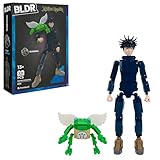
- MEGUMI FUSHIGURO: Build the Ten Shadows Technique sorcerer with the BLDR Jujutsu Kaisen Megumi Fushiguro Building Set
- ICONIC CHARACTER: 321-piece set is based on the powerful jujutsu sorcerer from the popular anime Jujutsu Kaisen
- TWO FIGURES: Features 9.5-inch Megumi and 2-inch Toad buildable action figures
- SPECIAL FEATURES: Megumi can wield Toad to recreate iconic battles from the anime
- QUIKBRIK PIECE: Designed with the BLDR QuikBrik piece for fast and sturdy builds
Sources and command-list limits
The command effects and status above follow the community references below. Because no official developer command list was located, individual commands may change as the experience is updated.
Quick Recap
- JujutsuCalc’s Jujutsu Infinite commands reference (updated May 2026)
- Pro Game Guides: Jujutsu Infinite commands
- Beebom: Jujutsu Infinite commands
- BO3.gg: Jujutsu Infinite commands
Product prices and availability are accurate as of the date/time indicated and are subject to change. Any price and availability information displayed on Amazon at the time of purchase will apply.




