The Tool Desk
Outbyte Driver Updater FREEFix the driver behind crashes, sound loss and screen glitchesFind Drivers →Outbyte PC Repair FREEClear out junk files and repair common Windows errorsFree Scan →In 2024, AMD FSR 3 Frame Generation was intended for AMD Radeon RX 5000-series and newer GPUs, and NVIDIA GeForce RTX 20-series and newer GPUs. Radeon RX 6000/RX 7000 and GeForce RTX 30/RTX 40 cards were the more sensible recommendations because they offered more performance headroom. FSR 3 upscaling alone worked on a broader range of hardware, commonly reaching Radeon RX 590-class and GeForce GTX 10-series-class cards when the individual game supported them.
Intel Arc compatibility existed in some games, but it was game-specific rather than a universal FSR 3 guarantee. The key distinction is that FSR 3 upscaling and FSR 3 Frame Generation have different hardware requirements.
FSR 3 upscaling versus Frame Generation
“FSR 3 support” was not one single compatibility category in 2024. Games could expose two related features:
As an Amazon Associate I earn from qualifying purchases.
Quick wins for a faster PC:
Clear out junk files and repair common Windows errorsFree Scan →Scan for outdated or missing drivers - takes under a minuteDriver Scan →- FSR 3 upscaling: the game renders internally at a lower resolution, then reconstructs an image closer to the selected output resolution. This can improve performance on older GPUs.
- FSR 3 Frame Generation: the game generates additional frames between traditionally rendered frames. This can make motion appear smoother, but it adds processing and presentation overhead and does not reduce the latency of the underlying rendered frames.
A GPU may therefore support FSR 3 upscaling without being a normal target for FSR 3 Frame Generation. A flat list that labels every card as simply “FSR 3 compatible” is misleading.
2024 FSR 3 GPU compatibility table
| GPU family | FSR 3 upscaling | FSR 3 Frame Generation | 2024 classification |
|---|---|---|---|
| AMD Radeon RX 7000 | Yes | Yes | Supported and recommended |
| AMD Radeon RX 6000 | Yes | Yes | Supported and generally recommended |
| AMD Radeon RX 5000 | Yes | Yes | Lowest practical AMD Frame Generation tier |
| AMD Radeon RX 590 / RX 500-class | Generally, where the game allows it | No standard Frame Generation tier | Upscaling-only or game-dependent |
| AMD Radeon RX Vega and older | Some older FSR versions or individual implementations | No standard FSR 3 Frame Generation tier | Do not treat as universally supported |
| NVIDIA GeForce RTX 40 | Yes | Yes | Supported and recommended |
| NVIDIA GeForce RTX 30 | Yes | Yes | Supported and generally recommended |
| NVIDIA GeForce RTX 20 | Yes | Yes | Lowest practical NVIDIA Frame Generation tier |
| NVIDIA GeForce GTX 10 / GTX 16 | Often, where the game permits it | No standard Frame Generation tier | Upscaling-only or game-dependent |
| Intel Arc A-series | Game-dependent | Some 2024 games supported it | Verify the specific title and patch |
This is a practical 2024 compatibility guide, not a manufacturer SKU-by-SKU certification list. The game’s own implementation, minimum requirements, driver support, and graphics API still control whether the option appears and works correctly.
#1 Best Overall

- NVIDIA Volta GV100 Architecture — 4,608 CUDA Cores, 640 1st-Gen Tensor Cores delivering 14 TFLOPS FP32 and 112 TFLOPS deep learning performance for AI training, inference, HPC, and scientific computing workloads
- 32GB HBM2 ECC Memory — 900 GB/s Bandwidth — High-bandwidth memory on a 4096-bit bus with ECC error correction provides the memory capacity and throughput required for the largest AI models, simulations, and datasets
- PCIe 3.0 x16 Interface — 250W TDP — Standard PCIe Gen3 connectivity with passive cooling designed for enterprise rack server deployment in HPE ProLiant, Dell PowerEdge, and Supermicro platforms with adequate chassis airflow
- NVLink — Scale to 96GB Unified Memory — Connect two V100 GPUs via NVLink at 300 GB/s bi-directional bandwidth to scale GPU memory from 32GB to 96GB for larger AI training and HPC workloads
- Multi-Precision Computing — Supports FP64 (7 TFLOPS), FP32 (14 TFLOPS), FP16 (112 TFLOPS) and INT8 precision modes for flexible deployment across training, inference, and scientific simulation workloads
AMD Radeon GPUs that supported FSR 3 Frame Generation
The practical AMD baseline for FSR 3 Frame Generation in 2024 was the Radeon RX 5000 series, based on AMD’s first-generation RDNA architecture. RX 6000 and RX 7000 cards were also within the supported range.
Examples of supported AMD families
- Radeon RX 5000: RX 5500, RX 5600-series, RX 5700, and RX 5700 XT, subject to the game and driver.
- Radeon RX 6000: RX 6500, RX 6600, RX 6700, RX 6800, and related desktop and mobile products.
- Radeon RX 7000: RX 7600, RX 7600 XT, RX 7700 XT, RX 7800 XT, RX 7900 GRE, RX 7900 XT, and RX 7900 XTX.
- Mobile Radeon products: RX 5000M, RX 6000M/S, and RX 7000M/S hardware could be eligible, but laptop drivers, power limits, cooling, and the game’s requirements affected the result.
The RX 5000 series was the compatibility floor, not necessarily the best buying recommendation. AMD’s technical examples separated an RX 5700 XT mainstream class, RX 6800 XT performance class, and RX 7900 XTX enthusiast class. That illustrates the important difference between can run the feature and has enough performance for a good experience.
Do these 3 things before closing this tab:
1Fix the driver behind crashes, sound loss and screen glitches2Repair Windows errors before they cause bigger problems3Scan for outdated or missing drivers - takes under a minuteWhat about the Radeon RX 590?
Radeon RX 590-class hardware was commonly listed in the broader FSR 3 upscaling tier. It should not be presented as an FSR 3 Frame Generation card. An RX 590 may be able to use FSR 3 upscaling in a particular game, but that does not put it in the standard RX 5000-and-newer Frame Generation category.
RX Vega and older Radeon GPUs are even more implementation-dependent. Some may support earlier versions of FSR or a particular game’s upscaler, but they should not be described as universally compatible with FSR 3.
NVIDIA GeForce GPUs that supported FSR 3
FSR is integrated by the game and is not restricted to AMD graphics cards. In 2024, the practical NVIDIA Frame Generation boundary was the GeForce RTX 20 series and newer, including Turing, Ampere, and Ada Lovelace generations.
Rank #2
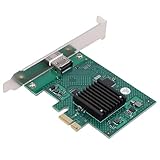
- HIGH COMPATIBILITY: The graphics card supports multiple displays and panels with a maximum resolution of 1920x1440, making it compatible with a wide range of systems for diverse applications.
- QUICK ROTATION: With the ability to quickly rotate screen images at 90°, 180°, and 270°, this graphics card enhances versatility in display orientation for improved user experience and flexibility.
- POWERFUL 2D GRAPHICS ACCELERATION: Equipped with a robust 2D graphics accelerator, the card supports various graphic processing functions, ensuring efficient performance for demanding applications.
- VERSATILE APPLICATION: This accelerator card supports video display layers, making it ideal for a variety of applications, including industrial computers, POS systems, ensuring reliable performance across different fields.
- WIDE OPERATING TEMPERATURE RANGE: Designed for reliable operation in harsh environments, the card functions effectively within a wide temperature range of -40°C to +85°C, ensuring durability and stability in challenging conditions.
Examples of supported NVIDIA families
- GeForce RTX 20: RTX 2060, RTX 2070, RTX 2080, and related variants.
- GeForce RTX 30: RTX 3060, RTX 3070, RTX 3080, RTX 3090, and related variants.
- GeForce RTX 40: RTX 4060 through RTX 4090 families.
RTX 20 cards were the practical compatibility floor, while RTX 30 and RTX 40 cards were generally better recommendations for Frame Generation. Frame Generation itself adds work, so a card that barely reaches a playable base frame rate may not produce a consistently good result after the feature is enabled.
Recommended Free Tools
GTX 10-series and GTX 16-series cards could often use FSR upscaling in games that exposed the option. They should not be included in the standard 2024 FSR 3 Frame Generation list.
Intel Arc support in 2024
Intel Arc needs a game-by-game qualification. Some 2024 titles supported FSR 3 features on Arc GPUs, but AMD’s general compatibility information did not establish one universal Intel Arc SKU list equivalent to the Radeon RX 5000-plus or GeForce RTX 20-plus rules.
For example, a 2024 Forspoken update identified Frame Generation support for Intel Arc 7-series or newer, alongside Radeon RX 5000-series and newer and GeForce RTX 20-series and newer. That confirms support in that game and patch; it does not prove that every FSR 3 title exposed identical Arc support.
The accurate wording is: Intel Arc A-series GPUs supported FSR 3 in some games, with exact requirements determined by the game; certain 2024 patches specified Arc 7-series or newer for Frame Generation.
Rank #3

- Chipset: NVIDIA GeForce GT 1030
- Video Memory: 4GB DDR4
- Boost Clock: 1430 MHz
- Memory Interface: 64-bit
- Output: DisplayPort x 1 (v1.4a) / HDMI 2.0b x 1
Recommended hardware versus merely supported hardware
Use these tiers when deciding whether a GPU is a sensible FSR 3 purchase or upgrade:
| Purpose | AMD recommendation | NVIDIA recommendation |
|---|---|---|
| Minimum practical Frame Generation tier | Radeon RX 5000 | GeForce RTX 20 |
| Preferred 2024 Frame Generation tier | Radeon RX 6000 or newer | GeForce RTX 30 or newer |
| Newest 2024 feature tier | Radeon RX 7000 | GeForce RTX 40 |
| Upscaling-focused older hardware | RX 590-class, where supported | GTX 10-series-class, where supported |
If you are upgrading specifically for the feature, cards such as a Radeon RX 7600 graphics card, Radeon RX 7700 XT, Radeon RX 7800 XT, Radeon RX 7900 XTX, or a comparable GeForce RTX 4070 graphics card belong to the supported modern class. The right choice still depends on resolution, ray tracing settings, the rest of the system, price, and the games you play; compatibility alone is not a performance ranking.
Independent reader supportYour contribution helps us test, update, and keep practical guides available for everyone.Why base frame rate matters
Frame Generation creates additional displayed frames, but it does not make the original game simulation or input response equivalent to a genuinely higher native render rate. If the game is producing an unstable 25–30 frames per second before interpolation, enabling Frame Generation cannot fully remove the responsiveness and frame-pacing problems.
A sensible setup process is:
- Install a driver that meets the game’s requirements and update the game to a version with native FSR 3 support.
- Test the game with Frame Generation disabled.
- Use native resolution or FSR 3 upscaling to establish a stable base frame rate. The exact target depends on the game, display, and settings, but stability matters more than a brief peak.
- Enable Frame Generation separately and check frame pacing, input response, ghosting, UI artifacts, and fast camera movement.
- Keep the feature enabled only if the smoother presentation outweighs its latency and artifact trade-offs.
FSR 3’s overhead varies by GPU class, resolution, and implementation. A nominally supported RX 5700 XT or RTX 2060 should therefore not be expected to deliver the same experience as a faster RX 7000 or RTX 40 card.
Game, API, driver, and Windows requirements
FSR 3 is not a driver-level switch that automatically works in every PC game. The developer must integrate the relevant FSR version. Native FSR 3 implementations use supported rendering paths such as DirectX 12 or Vulkan, and the title must correctly provide elements such as motion vectors, UI composition, and frame presentation.
Before troubleshooting the GPU, check:
- Whether the game has native FSR 3 integration rather than only an older FSR mode.
- Whether Frame Generation is a separate toggle from FSR upscaling.
- Whether the title uses a supported DirectX 12 or Vulkan implementation.
- Whether the GPU driver and operating system meet the game’s requirements.
- Whether the game’s minimum and recommended specifications are realistic for the selected resolution and quality preset.
On supported Windows configurations, AMD’s integration guidance recommends hardware-accelerated GPU scheduling for the best FSR 3 Frame Generation results and discusses variable-refresh-rate behavior. These settings can improve an implementation, but they do not make an unsupported GPU compatible.
Rank #4

- Four Mini DisplayPort 1.2 Connectors
- The NVIDIA Quadra K1200 offers incredible 3D application performance in a compact footprint.
- 3-Year Warranty
Quick answer by GPU
- Radeon RX 7000: FSR 3 upscaling and Frame Generation; recommended modern AMD tier.
- Radeon RX 6000: FSR 3 upscaling and Frame Generation; generally recommended.
- Radeon RX 5000: FSR 3 upscaling and Frame Generation; practical AMD minimum.
- Radeon RX 590 / older RX 500: commonly upscaling-capable when the game permits it; not a normal Frame Generation tier.
- Radeon RX Vega and older: game- and FSR-version-dependent; do not assume universal FSR 3 support.
- GeForce RTX 40: FSR 3 upscaling and Frame Generation; recommended modern NVIDIA tier.
- GeForce RTX 30: FSR 3 upscaling and Frame Generation; generally recommended.
- GeForce RTX 20: FSR 3 upscaling and Frame Generation; practical NVIDIA minimum.
- GeForce GTX 10 / GTX 16: often suitable for game-dependent FSR upscaling, but not the standard Frame Generation tier.
- Intel Arc: verify the individual game; some 2024 titles specified Arc 7-series or newer.
Frequently Asked Questions
Does FSR 3 only work on AMD graphics cards?
No. FSR 3 is a game-integrated, cross-vendor technology. In 2024, GeForce RTX 20-series and newer cards were in the practical Frame Generation tier, while some Intel Arc GPUs were supported in specific games.
Can an RX 590 or GTX 1060 use FSR 3?
They may be able to use FSR 3 upscaling in a game that supports that hardware, but they should not be listed as standard FSR 3 Frame Generation GPUs. Check the individual game’s requirements and graphics options.
Is an RTX 2060 good enough for FSR 3 Frame Generation?
It was within the practical 2024 NVIDIA compatibility tier, but compatibility does not guarantee a good experience. Test the game’s base frame rate first, then evaluate frame pacing, latency, and image artifacts with Frame Generation enabled.
Does enabling FSR 3 Frame Generation lower input latency?
No. It can increase displayed smoothness, but generated frames do not replace the latency of the underlying rendered frames and can add processing or presentation overhead.
The Bottom Line
Bottom line: For the 2024 FSR 3 Frame Generation list, use Radeon RX 5000-series and newer or GeForce RTX 20-series and newer. Prefer RX 6000/RX 7000 or RTX 30/RTX 40 for stronger performance headroom. Treat RX 590-class and GTX 10-series-class cards as upscaling-only or game-dependent, and verify Intel Arc support separately for every title.
Quick Recap
Product prices and availability are accurate as of the date/time indicated and are subject to change. Any price and availability information displayed on Amazon at the time of purchase will apply.
What’s actually slowing this PC down?
Pick the symptom - the matching free tool is one click away.




