Free tools Windows power users keep installed
One-click scans. No signup required.
AmpShell is a legitimate, GPLv3-licensed Windows front-end for DOSBox. It gives classic DOS games a graphical library, categories, per-game settings, and double-click launching, so you do not have to repeatedly type mount and startup commands. It does not replace DOSBox, include commercial games, or automatically fix every game’s configuration.
The latest version shown on the official AmpShell website is 1.3.8, released June 29, 2021. That makes AmpShell an older but potentially useful utility in 2026—not a front-end that should be described as actively maintained or officially compatible with Windows 11.
As an Amazon Associate I earn from qualifying purchases.
What is AmpShell?
AmpShell is a graphical front-end that sits on top of DOSBox. The distinction matters:
- DOSBox emulates the DOS environment required by many older PC games.
- AmpShell organizes those games and tells DOSBox how to launch each one.
- The game files still come from you and must be obtained legally.
Without a front-end, launching a game may involve opening DOSBox, mounting a directory, changing drives, selecting the correct executable, and applying game-specific settings. AmpShell stores much of that information in a library entry, allowing a double-click launch instead.
#1 Best Overall

- AIR X-Size Portability: Weighs only 286g with a compact 203×87×16.8mm body and 5.5-inch 1920×1080 IPS screen (450 nits). Fits naturally in hands and bags, built for commutes, travel, and bedside retro gaming.
- Smooth Retro Emulation & Streaming: Qualcomm Snapdragon 662 with Adreno 610 GPU, 4GB LPDDR4X RAM, and Android 14 handles PSP, PS1, NDS, GBA, SNES, Arcade emulators, plus cloud gaming and light native Android titles via Google Play.
- Drift-Free Hall Controls: GB wide-angle Hall effect joysticks and Hall triggers deliver precise, wear-resistant input with no stick drift. 6-axis gyroscope support enhances motion-controlled games and streaming.
- Active Cooling & All-Day Battery: Single-fan active cooling keeps temps and throttling under control during long sessions. 5000mAh battery with 15W charging provides hours of play, while WiFi 5 and BT 5.0 ensure stable low-latency connections.
- Expandable & Well-Connected: 64GB eMMC storage with TF/microSD slot for ROM and media libraries. USB Type-C, 3.5mm headphone jack, and video-out capability let you charge, listen, and connect to bigger screens with ease.
It is best understood as a lightweight launcher and profile manager, not as a complete emulation platform or automatic game configurator.
AmpShell’s official feature list includes per-game executable paths, icons, setup programs, configuration files, CD images or folders, additional DOSBox commands, categories, multiple display modes, and portable operation.
Is AmpShell really open source?
Yes. AmpShell is distributed under the GNU General Public License version 3 (GPLv3), and its source is associated with the project’s GitHub repository. The DOSBox Frontend Comparison also identifies it as source-available.
Recommended Free Tools
However, three ideas should not be conflated:
- Open source: supported by the stated GPLv3 license and source availability.
- Actively maintained: not established by the available evidence. The official site still shows version 1.3.8 from 2021.
- Safe to download: this should not be assumed without checking the current download provenance, archive contents, and any available signatures or hashes.
The DOSBox comparison labels AmpShell “active” in its own data, but that classification should not override the more concrete fact that the latest official release currently identified is several years old.
What can AmpShell do?
Organize a DOS game library
You can create categories that appear as tabs or groups in the interface. Useful examples include Adventure, Strategy, First-person shooters, games requiring CD images, or games configured for a particular DOSBox build.
Rank #2
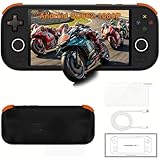
- AIR X-Size Portability: Weighs only 286g with a compact 203×87×16.8mm body and 5.5-inch 1920×1080 IPS screen (450 nits). Fits naturally in hands and bags, built for commutes, travel, and bedside retro gaming.
- Smooth Retro Emulation & Streaming: Qualcomm Snapdragon 662 with Adreno 610 GPU, 4GB LPDDR4X RAM, and Android 14 handles PSP, PS1, NDS, GBA, SNES, Arcade emulators, plus cloud gaming and light native Android titles via Google Play.
- Drift-Free Hall Controls: GB wide-angle Hall effect joysticks and Hall triggers deliver precise, wear-resistant input with no stick drift. 6-axis gyroscope support enhances motion-controlled games and streaming.
- Active Cooling & All-Day Battery: Single-fan active cooling keeps temps and throttling under control during long sessions. 5000mAh battery with 15W charging provides hours of play, while WiFi 5 and BT 5.0 ensure stable low-latency connections.
- Expandable & Well-Connected: 64GB eMMC storage with TF/microSD slot for ROM and media libraries. USB Type-C, 3.5mm headphone jack, and video-out capability let you charge, listen, and connect to bigger screens with ease.
Games can be displayed as:
- Large icons
- Small icons
- Tiles
- List
- Details
Custom icons make a small library easier to scan, while the list and details views are more practical when you have many entries.
Save settings for each game
The most important feature is per-game configuration. A game entry can contain:
The Tool Desk
Outbyte PC Repair FREERepair Windows errors before they cause bigger problemsFix Now →Outbyte Driver Updater FREEFix the driver behind crashes, sound loss and screen glitchesFind Drivers →- The executable to launch
- An optional icon
- A separate setup executable such as
SETUP.EXEorSNDSETUP.EXE - A default or custom DOSBox
.CONFfile - A CD image or CD-root folder to mount as drive
D: - Additional DOSBox commands and options
This is more useful than the visual library alone. Older games often need different sound, speed, video, memory, mount, or startup settings. Saving those choices per title avoids changing one global configuration every time you switch games.
Use different DOSBox configurations
AmpShell can use a default DOSBox executable and configuration file, while individual games can use their own settings. The official documentation also describes editing configuration files from within AmpShell using the text editor of your choice.
AmpShell is not a universal automatic configurator. You may still need to adjust:
Rank #3

- 【40000+ Classic Games Ready to Play】No manual downloads needed The PandoraGame R60MAX comes with a 128GB card pre-loaded with over 40000 retro games Search by game name to find your favorites instantly
- 【6.0-Inch HD IPS Screen for Stunning Visuals】Game visuals pop on the 6.0-inch IPS display with 1280x720 HD clarity Choose full screen or keep original aspect ratio Tempered glass delivers sharp colors Built-in speaker and 3.5mm jack
- 【Smooth Performance with Open Source Linux】The open-source Linux environment is built for efficiency It handles background tasks intelligently so switching between game saves and main menu stays fast and stable
- 【All-Day Gaming with 6000mAh Battery】A massive 6000mAh battery keeps you gaming for hours Perfect for commutes travel or long evenings Lightweight design you can take anywhere
- 【Precision Control with Dual 3D Joysticks】Ergonomic body with responsive dual 3D joysticks Natural grip angle and tactile buttons for precise control in fighting games and action titles A solid pick for gamers of all ages
- CPU cycles or emulation speed
- Sound Blaster and MIDI settings
- Graphics scaler and video output
- Full-screen resolution
- Directory and drive mounts
- CD-image handling
- Game-specific startup commands
A project-maintainer description on VOGONS also discusses using different DOSBox versions for individual games, including DOSBox ECE, SVN builds, DOSBox-X, and the DOSBox Debugger. That is potentially valuable for advanced users, but it should be treated as a documented community workflow rather than a guarantee that every current build combination will work without adjustment.
Portable mode
AmpShell offers portable operation, but “portable” does not simply mean copying one executable to a USB drive. According to the official documentation:
- DOSBox files must be in the same directory as AmpShell.
- The games must also be in that directory or one of its subdirectories.
- AmpShell should not be placed inside
Program Filesfor this mode.
An illustrative layout might look like this:
AmpShell
├── AmpShell.exe
├── DOSBox
├── Games
│   ├── GameOne
│   └── GameTwo
└── Config
The names and exact structure are examples, not a required official directory layout. The important point is to keep the complete AmpShell, DOSBox, game, and configuration relationship together. Moving only AmpShell or only the game folder can invalidate saved paths.
Launch programs without DOSBox
Community documentation describes AmpShell as capable of launching programs either through DOSBox or directly. That could make it useful for some native Windows games or utilities as well, but this capability should be attributed to the community description rather than treated as unlimited compatibility for every AmpShell release.
How to install AmpShell
The official installation model is simple:
- Download the zipped AmpShell executable or the project’s portable pack from the official site.
- Extract it to a normal folder. For portable use, avoid
Program Files. - Confirm that the published build’s required .NET Framework 4 is available.
- Run AmpShell.
- If DOSBox is not detected, browse to the actual DOSBox executable.
The official documentation says AmpShell was tested on Windows XP through Windows 10. Because the latest listed release is from June 2021, Windows 11 compatibility is not officially established by those published tests. Try it in a non-critical folder and keep backups of any library or configuration files.
Rank #4

- 🎮【ultra-high definition screen】4.96 inch IPS HD screen (720x1280 resolution), Natural color reproduction for a more detailed and realistic gaming experience.
- 🕹️【Upgrade Chip】this handheld game console powered by the Allwinner A133P chip (1.8GHz) and Linux OS, emulates various kinds classics without lag.It also can connect USB handle for co-op battles.
- 🔋【Endurance 6 hours】The 5000mAh battery delivers 6+ hours of gameplay. Retro gaming console measures 7.38*3.14*0.68 inches and is only 229g,it's pocket-sized design slips into jeans or backpacks, ready for spontaneous gaming sessions at parks, airports, or coffee shops.
- ⚡【Retro Gaming Console with RGB LED 】The Trimui Smart Pro have middle logo charging indicator light and RGB double Joystick mood light, syncing with gameplay to create arcade-style excitement—ideal for late-night dorm hangouts, camping trips, or retro gaming parties.
- 🎁【Pack list】1x Trimui Smart Pro Game Console, 1x 64G TF Card,1x USB-C Charging Cable, 1x User Manual.
When selecting DOSBox, choose the emulator executable itself—not an installer, shortcut, or unrelated program. If you maintain more than one DOSBox build, record which one each game uses so that future troubleshooting is easier.
How to add and launch a game
The following workflow follows the documented interface, although menu wording and screenshots may vary slightly in the 1.3.8-era application:
- Open AmpShell.
- Select File → New Game.
- Browse to the game’s launch file, commonly an
.EXEor.COM. - Select an icon if desired.
- Optionally specify a setup program such as
SETUP.EXE. - If the game is CD-based, select its CD image or CD-root folder for mounting as drive
D:. - Choose the default DOSBox configuration or assign a custom
.CONFfile. - Add any required DOSBox commands or options.
- Save the game entry.
- Double-click the new entry to launch it.
If the game does not start, do not assume the front-end itself is broken. First try launching the same title directly in DOSBox. That separates an AmpShell profile problem from a DOSBox or game-configuration problem.
Configuring difficult DOS games
Many DOS games need more than an executable path. Run the game’s setup utility when available and configure its sound card, music, digital audio, joystick, and graphics choices to match the DOSBox configuration.
Quick wins for a faster PC:
Fix the driver behind crashes, sound loss and screen glitchesFind Drivers →Clear out junk files and repair common Windows errorsFree Scan →A game may also require a batch file rather than its main executable. In that case, select the correct startup file or add the necessary command sequence. Check the game’s expected working directory and confirm that its data files are mounted at the drive letter it expects.
Best Value

- Kids Friendly Design: This P30S handheld game console is specially designed for kids. It has a stylish arcade - like appearance. The body fits a child's hand, and the game settings also cater to kids psychology, thus being very attractive.
- Excellent Gaming Experience: Equipped with a 3.0 - inch high - definition screen and excellent speaker sound, it provides an excellent visual and auditory experience for video games. This handheld game console is small and lightweight, convenient for kids to use and carry. Its ergonomic design ensures a comfortable grip, allowing children to fully enjoy the games.
- Rich Collection of Classic Games: This retro handheld game console contains 220 interesting kids video games, including various types such as entertainment, sports, and adventure games, just like those found in many retro game consoles. While playing these games, kids can cultivate skills such as hand - eye coordination, thinking, and problem - solving.
- Convenient Rechargeable and Long - lasting Battery: The video game console is equipped with an 860mAh lithium - ion battery. It ensures that kids can play games without interruption, because there is no need for frequent battery replacement, which is very suitable for playing portable games outdoors. It is a great addition to the world of handheld games for children and can bring more fun to them.
- Absolutely Surprising Gift: Our handheld game toy is a surprising gift for kids, teenagers, and even adults. It is the best gift for birthdays, Christmas, Halloween, and Thanksgiving. Customer satisfaction is our top priority. Our customer support team will serve you wholeheartedly.
For games with conflicting requirements, create separate configuration files instead of continually modifying one global file. Typical differences include slower or faster emulated CPU speed, different Sound Blaster settings, a CD mount, a different scaler, or windowed rather than full-screen output.
Independent reader supportYour contribution helps us test, update, and keep practical guides available for everyone.Troubleshooting AmpShell
| Problem | What to check |
|---|---|
| AmpShell cannot find DOSBox | Open its preferences or automatic-configuration prompt and select the actual DOSBox executable. Confirm that it is the intended build. |
| The entry launches but nothing happens | Verify the executable, working directory, startup batch file, mounts, configuration file, and DOSBox build. Run the game directly in DOSBox to isolate the cause. |
| The game needs sound setup | Run the game’s setup utility and make its selected sound hardware match the Sound Blaster or MIDI settings in DOSBox. |
| A CD-based game fails | Confirm that the image or CD folder is selected, the game expects drive D:, the mount command is present, and the selected DOSBox build supports the image format. |
| Full-screen graphics tear or glitch | Try windowed mode and different DOSBox video, scaler, and resolution settings. A third-party guide reported this behavior in one setup, so it should be treated as configuration-dependent rather than a universal AmpShell defect. |
| Games break after moving folders | Restore the original directory relationship or recreate the affected entries. Portable mode relies on AmpShell, DOSBox, and game files remaining in the expected locations. |
| It does not work on modern Windows | Remember that published testing reaches Windows 10, not Windows 11. Try a writable folder, check the .NET Framework requirement, and retain backups before changing configurations. |
A community report on Reddit describes a game that did not launch after setup. It is a useful reminder that AmpShell simplifies command entry but cannot correct an invalid executable, mount, or emulator configuration automatically.
AmpShell compared with alternatives
| Option | Best for | Trade-off |
|---|---|---|
| AmpShell | Windows users wanting a small, categorized DOSBox launcher with per-game settings. | Older interface, legacy .NET requirement, and no established Windows 11 support or current maintenance claim. |
| DOSBox directly | Users who want maximum control and are comfortable with commands, batch files, and configuration files. | Less convenient for browsing a graphical game library. |
| D-Fend Reloaded | Windows users wanting a more comprehensive profile-oriented DOSBox front-end. | Broader and potentially less minimal than AmpShell; verify current project status separately. |
| DOSBox Game Launcher | Users seeking a cross-platform, open-source front-end. | May be a better fit outside Windows, but its workflow differs from AmpShell. |
| DBGL | Users who want another profile-based DOSBox front-end and do not mind a Java dependency. | Java adds an extra prerequisite for users seeking a small Windows utility. |
| LaunchBox | Users building a broad library with artwork, metadata, controllers, DOSBox, and other emulators. | Much broader than AmpShell and less focused on being a lightweight DOSBox-only launcher. |
The DOSBox Frontend Comparison is a useful starting point for platform, source, portability, and front-end distinctions. Current maintenance, availability, and commercial edition details can change and should not be inferred from an older comparison.
Who should use AmpShell?
AmpShell remains a sensible choice if you use Windows, already have DOSBox and legally obtained DOS games, prefer double-click launching, and are comfortable making occasional manual configuration changes. Its strongest advantage is not the artwork or tabs; it is the ability to keep each game’s executable, mounts, setup choices, and DOSBox configuration in one profile.
Choose direct DOSBox instead if you want the fewest layers or prefer writing your own batch files. Consider DOSBox Game Launcher or DBGL if cross-platform support matters. D-Fend Reloaded may suit users who want a fuller Windows profile manager, while LaunchBox is better for a large multi-emulator library rather than a compact DOSBox collection.
Verdict
AmpShell is genuinely open source and still potentially useful, but its age is central to the decision. The official website lists version 1.3.8 from June 29, 2021, and its published compatibility information stops at Windows 10. It should therefore be approached as legacy Windows software that may simplify DOSBox for the right user—not as a modern, actively maintained emulator ecosystem.
For a Windows player who wants a lightweight game list, categories, per-game profiles, and double-click launching, AmpShell is worth trying. For users who require current maintenance, guaranteed Windows 11 support, macOS or Linux compatibility, automatic configuration, or a polished metadata-driven library, another front-end is likely the better choice.
What’s actually slowing this PC down?
Pick the symptom - the matching free tool is one click away.
Quick Recap
Product prices and availability are accurate as of the date/time indicated and are subject to change. Any price and availability information displayed on Amazon at the time of purchase will apply.




