What’s actually slowing this PC down?
Pick the symptom - the matching free tool is one click away.
ARC Raiders uses different default controls for keyboard and mouse, Xbox, and PlayStation. The lists below are a practical reference; check Settings > Controls in your current game build because bindings and menus may change with updates.
Default controls for ARC Raiders
The default mappings below are documented by the community-driven ARC Raiders Wiki. They are not a current official control manual, so use the in-game Controls screen to confirm any binding that differs.
PC keyboard and mouse
| Action | Default input |
|---|---|
| Move | W, A, S, D |
| Fire, throw, or deploy | Left mouse button |
| Aim | Hold right mouse button |
| Jump | Space |
| Sprint | Hold Left Shift |
| Crouch | Hold Left Control |
| Dodge roll | Left Alt |
| Interact | E |
| Reload | R |
| Open inventory | Tab |
| Open map | M |
| Ping | Middle mouse button |
Xbox controller
| Action | Default input |
|---|---|
| Move | Left stick |
| Fire, throw, or deploy | Right trigger |
| Aim | Left trigger |
| Jump | A |
| Sprint | Press left stick |
| Crouch | B |
| Dodge roll | Double-tap B |
| Interact or reload | X |
| Swap shoulders | Press right stick |
| Equip or swap weapons | Y |
| Open inventory | View |
| Open map | Hold View |
| Ping | Right bumper |
PlayStation controller
| Action | Default input |
|---|---|
| Move | Left stick |
| Fire, throw, or deploy | R2 |
| Aim | L2 |
| Jump | X |
| Sprint | Press left stick |
| Crouch | Circle |
| Dodge roll | Double-tap Circle |
| Interact or reload | Square |
| Swap shoulders | Press right stick |
| Equip or swap weapons | Triangle |
| Open inventory | Touchpad |
| Open map | Hold touchpad |
| Ping | R1 |
On both consoles, a single button can serve more than one action, and the inventory/map shortcut uses a tap versus a hold. The community wiki also lists other configurable inputs, including item, weapon, flashlight, emote, and push-to-talk controls; consult the in-game binding list for their current assignments. ARC Raiders Wiki: Settings
How to change controls
Embark’s support instructions, published October 1, 2025, give different menu paths by platform. Labels can change, so treat them as a guide and follow the current menu shown in your game.
#1 Best Overall

- Game-Themed Mechanical Spider Desktop OrnamentClassic ARC Raiders Leaper stylized geometric mecha shape, premium 3D printed home decorative figurine, perfectly fits game room, desk, shelf, cabinet display, unique futuristic industrial style home decor to elevate your space atmosphere.
- Remote Controlled RGB Glowing Atmosphere LightBuilt-in colorful RGB LED luminous core, equipped with dedicated infrared remote control. Freely switch multiple light colors, breathing flash, steady glow & gradient lighting modes, create cool sci-fi ambient night light decor for bedroom, game space and workstation.
- Highly Detailed Articulated Display SculptureFull movable ball joint structure, adjustable diverse posing angles, stable shape retention & exquisite mechanical texture.
- Premium Durable Eco-Friendly 3D Print CraftHigh-toughness environmental printing material
- Perfect for birthday, holiday, housewarming present, stylish decorative accent for man cave, game room, office desk and living room.
- On PC: Open the gear icon, then go to Settings > Controls to adjust controls and bindings.
- On console: Open the Social menu, select the gear icon, then choose Accessibility for adjustable button mappings.
- In the current build: Review the displayed controls after changing a binding, especially when an action uses a hold, toggle, or double-tap.
Embark describes button mapping as an accessibility option. Its support article also covers colorblind modes and subtitle adjustments. Embark Games Help Center: Accessibility options
Controller remapping and settings
The community wiki’s update 1.13.0 notes describe an options-menu tab that allows free rebinding of most gamepad buttons. That is version-specific documentation, not a guarantee that every button can be rebound on every platform or in every build. ARC Raiders Wiki: Update 1.13.0
Rank #2
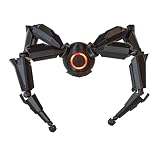
- Design: Hand-fine modeled to replicate the iconic in-game Leaper character with precise details.
- High-Quality 3D Printing: Crafted via 3D printing for sharp details and sturdy structure, ideal for collection.
- Smart Remote Control RGB Lights: Features upgraded remote-controlled LED lighting with 13 optional colors and stepless brightness adjustment. Easily switch colors and adjust light intensity remotely to create diverse cool visual atmospheres.
- Specified Size: Measuring 5.1"×5.1", the space-saving size fits perfectly on desks, shelves and display cabinets. It works as a stylish ornament to build a unique gaming-themed space.
- Perfect Fan Collection & Gift:Blending highly restored modeling and customizable lighting, it boasts high ornamental and collection value. An ideal gift for game fans and model collectors for birthdays and various festivals.
The wiki also lists controller options such as aim assist, interact/reload behavior, inversion, sensitivity, zoom multipliers, and look response curve. Available settings and names may vary by platform or version; check the Controls menu in your game rather than relying on an older list.
Independent reader supportYour contribution helps us test, update, and keep practical guides available for everyone.Choosing or checking a control scheme
There is no universally best layout. Compare the input method and the action behavior: keyboard-and-mouse bindings differ from gamepad layouts, console labels differ, and some actions require a hold or double-tap rather than a single press.
Do these 3 things before closing this tab:
1Repair Windows errors before they cause bigger problems2Fix the driver behind crashes, sound loss and screen glitches3Clear out junk files and repair common Windows errorsRank #3

- INSPIRED DESIGN: This controller stand features iconic Arc Raiders artwork, including the signature heart monitor logo, pink racing stripes, and a detailed sci-fi aesthetic that any fan will love.
- UNIVERSAL COMPATIBILITY: Designed to hold virtually any gaming controller, this stand fits controllers from major gaming platforms, keeping your desk tidy and your gear within easy reach.
- 3D PRINTED CRAFTSMANSHIP: Expertly crafted using 3D printing technology, this stand showcases fine detail and a multi-color finish that brings the Arc Raiders theme to life on your gaming desk.
- DESKTOP ORGANIZER AND DECOR: Doubles as a functional desk organizer and a striking display piece, adding a unique gaming-themed accent to any setup or collection.
- GREAT GIFT FOR GAMERS: A must-have for Arc Raiders fans and gaming enthusiasts alike, this controller stand makes a thoughtful and unique gift for any occasion.
- Check the displayed binding for any action you use frequently, particularly dodge roll, interact/reload, and map access.
- If a control is uncomfortable or inaccessible, look for a remapping option in the platform’s current menu; the available rebinding scope can vary.
- When using a controller, confirm that it is compatible with your platform. The documented layouts do not establish a best controller model.
The ARC Raiders Wiki describes itself as community-driven and supported by Embark Studios; its main page reported a last edit on September 30, 2026. That describes the wiki’s relationship and edit date, not official verification of every listed binding. ARC Raiders Wiki
Quick Recap
Best Value

- 【Size】 Dimensions: 16" x 32" (41 x 82 cm) with thickness of 0.12" (3 mm) providing ample space for mouse movement and keyboard placement
- 【Material】100% polyester top surface with anti-slip natural rubber base ensuring stability during use
- 【Quality Craftsmanship】Hemmed edges and premium product by Raiders Market, #1 ARC Raiders fan merch shop.
- 【Unique Design】 Features data on hostile ARCs with authentic blueprint styling for gaming enthusiasts
- 【Enhanced Surface Smooth polyester surface optimized for precise mouse tracking and control during gameplay
Rank #4

- Durable solid 3D printed structure for long-lasting daily use
- Exact in-game Mk.3 loot crate replica for ARC Raiders collectors
- Weighted anti-slip base to avoid sliding and tipping over
- Smooth matte finish prevents scratches on all gamepad surfaces
- Fully pre-assembled compact design, ready for instant desktop display
Product prices and availability are accurate as of the date/time indicated and are subject to change. Any price and availability information displayed on Amazon at the time of purchase will apply.




