
The LG UltraGear 32GS75Q-B is the best default choice for most people shopping for a 32-inch 1440p gaming monitor. Its flat IPS panel, 180Hz refresh rate, adaptive-sync support, DisplayHDR 400 certification, and height-adjustable stand create a well-balanced package for PC gaming and everyday use.
If price matters most, the curved LG UltraGear 32GS60QC-B is the standout budget option. Choose the Gigabyte M32Q when KVM-style multi-device use is important, or the Samsung Odyssey G7 C32G75T only if you specifically want a 240Hz curved VA monitor and find it at a strong discount.
As an Amazon Associate I earn from qualifying purchases.
One important qualification: 32-inch 1440p is immersive and detailed, but it is not as sharp as 27-inch 1440p or 32-inch 4K. The larger screen gives games more presence; the lower pixel density makes small text and interface elements look softer at close viewing distances.
Quick picks
| Pick | Panel and refresh rate | Flat or curved | Best for | Price observed* | Main drawback |
|---|---|---|---|---|---|
| LG UltraGear 32GS75Q-B | 32-inch IPS, 2560×1440, 180Hz | Flat | Best overall | $399.99 | DisplayHDR 400 is entry-level HDR |
| LG UltraGear 32GS60QC-B | 32-inch VA, 2560×1440, 180Hz | 1000R curved | Best budget option | $189.99 | Possible dark smearing and aggressive curve |
| Gigabyte M32Q | 32-inch IPS, 1440p, 165Hz-class | Flat | Gaming and productivity | Varies | Older model and limited PS5 VRR behavior |
| Samsung Odyssey G7 C32G75T | 32-inch VA, 2560×1440, 240Hz | 1000R curved | High-refresh gaming | Varies | Reported bugs and weaker value |
| Samsung Odyssey G5 G50D LS32DG502ENXZA | 32-inch Fast IPS, 2560×1440, 180Hz | Flat | Samsung alternative | $429.99 | Usually poor value beside the cheaper LG |
*Prices observed on U.S. manufacturer pages around August 16–18, 2026. Promotions, stock, taxes, shipping, and regional availability can change.
#1 Best Overall

- Ascend your game with the speed of UltraGear - Experience next-level QHD gaming performance.
- 180Hz Refresh Rate & 1ms GtG - Gear up for smooth gameplay at up to 180Hz refresh rate and 1ms GtG. The faster speed and smoother action lets you respond quickly to stay a step ahead of the competition.
- 1000R Curved Screen - This UltraGear monitor's dramatic and steep 1000R curve draws you in with game play by extending the periphery to feel like you're surround by the action.
- AMD FreeSync - AMD FreeSync equips gamers with a fluid, virtually tear-free gaming experience. With up to a 180Hz refresh rate at Full HD resolution and low latency gameplay, you'll never miss a frame of the action as you play at peak performance.
- Gamer-Centric Design - Lose yourself in the game with a three-side virtually borderless, ultra-thin design that optimizes space on your battlestation. With two HMDI ports and DisplayPort connectivity on a tilt adjustable display, game to your specs.
Best overall: LG UltraGear 32GS75Q-B
The LG 32GS75Q-B is the safest all-around recommendation because it avoids the biggest compromises associated with this category. Its flat IPS panel is a sensible choice for gaming, web browsing, work, and shared viewing, while its 180Hz refresh rate is fast enough for smooth competitive play without demanding the frame rates required by a 240Hz display.
- 2560×1440 resolution on a 32-inch panel
- 180Hz maximum refresh rate
- 1ms GtG response-time rating claimed by LG
- DisplayHDR 400
- sRGB 99% typical coverage claim
- AMD FreeSync and NVIDIA G-SYNC Compatible support listed by LG
- Height, tilt, and pivot adjustment
- Three-side virtually borderless design
The adjustable stand is a meaningful advantage. A large 32-inch monitor can easily sit too low or too close, and height adjustment makes it easier to position the top of the screen near eye level. The stand also makes the monitor more practical for work than inexpensive gaming displays that offer tilt adjustment only.
LG’s U.S. listing showed the monitor at $399.99, reduced from $449.99, when captured. Treat that as a dated price signal rather than a permanent sale price. Check the official product page and an authorized retailer before buying.
Who should buy it?
Choose the 32GS75Q-B if you want one large monitor for fast PC gaming and general productivity, prefer a flat screen, or are sensitive to the dark trailing that some VA panels show. It is also the strongest starting point if you use either an AMD or NVIDIA graphics card, although the exact adaptive-sync behavior depends on the connection, graphics hardware, driver, and supported range.
Who should choose something else?
This is not the right model if deep blacks and high native contrast matter more than viewing-angle consistency, or if you expect spectacular HDR. DisplayHDR 400 is a baseline certification, not equivalent to OLED or a well-implemented Mini LED display. It also does not provide USB-C docking or KVM functionality simply because it is a modern gaming monitor; those features must be verified in the model specifications.
Best budget option: LG UltraGear 32GS60QC-B
The LG 32GS60QC-B is the value pick when a curved VA panel suits your setup. LG’s U.S. listing showed it at $189.99, reduced from $299.99, making it dramatically cheaper than the flat IPS alternatives at the time of capture. It offers a 32-inch 1440p display, 180Hz refresh rate, a 1000R curve, AMD FreeSync, HDR10, and a manufacturer-listed 1ms response-time rating.
VA technology generally delivers higher native contrast than IPS, so dark scenes can look deeper in a dim room. The 1000R curve can also make a single-player game, racing title, or simulator feel more enclosed and immediate when you sit directly in front of the screen.
There are important trade-offs. VA response behavior varies widely between models and overdrive settings, and dark transitions can produce visible black smearing or trailing. A claimed “1ms” does not eliminate that possibility. The aggressive 1000R curvature can also be distracting for spreadsheets, graphic design, straight lines, and multi-monitor arrangements.
This monitor is best for a low-cost gaming-first setup. It is less universally suitable than the 32GS75Q-B for office work, shared viewing, or users who dislike curved displays. Buy from a retailer with a clear return and dead-pixel policy so you can evaluate both the panel’s dark-scene motion and the curve in your own room.
Best for gaming plus productivity: Gigabyte M32Q
The Gigabyte M32Q remains a strong mixed-use option because it combines a 32-inch 1440p IPS panel with gaming-oriented performance and a KVM-focused workflow. KVM features can let one keyboard and mouse control multiple connected systems, which is useful if the same monitor serves a gaming PC and a work computer.
Rank #2

- 31.5-inch QHD 1500R Curved Gaming Monitor: Features ultra-fast 180Hz refresh rate designed for professional gamers and immersive gameplay with 2560 x 1440 resolution
- Ultra-Fast Response Time: 0.5ms (GTG) response time delivers smooth gameplay, and ASUS Extreme Low Motion Blur (ELMB ) technology further reduces ghosting and motion blur
- FreeSync Technology: Delivers a seamless, tear-free gaming experience by enabling VRR (variable refresh rate) by default for synchronized frame rates
- Shadow Boost Technology: Enhances image details in dark areas, brightening scenes without over-exposing bright areas for better visibility during gameplay
- Package Contents: Includes DisplayPort cable, L-shaped Screwdriver, Power cord, Quick start guide, and Warranty Card
Its weakness is age and price sensitivity. Newer 180Hz monitors may offer similar headline gaming specifications for less, so the M32Q should not receive an automatic value award. Compare its current price and stock with newer models before choosing it. Its KVM and connectivity advantages may justify the difference, but only if you will actually use them.
Free tools Windows power users keep installed
One-click scans. No signup required.
Console buyers should be especially careful. RTINGS documented a PS5 VRR limitation in its testing because the PS5 uses HDMI Forum VRR while the monitor’s supported VRR implementation did not provide the same compatibility. PC performance does not guarantee identical behavior on a PS5 or Xbox.
Best specialist high-refresh choice: Samsung Odyssey G7 C32G75T
The Samsung Odyssey G7 C32G75T is the specialist pick for buyers who specifically want a 32-inch curved VA panel running at 240Hz. That combination can make sense for competitive players with a powerful PC that consistently produces very high frame rates.
Its VA panel offers stronger native contrast than typical IPS displays, and the 1000R curve creates an immersive single-screen presentation. However, the 240Hz specification alone does not make it a better purchase than a well-tuned 165Hz or 180Hz monitor. RTINGS reports bugs and notes that less expensive alternatives can deliver nearly the same gaming performance.
Buy the G7 only when its curved VA presentation and 240Hz capability are priorities, your system can feed it enough frames, and the price is compelling. For most buyers, the simpler and cheaper LG 32GS75Q-B is the more rational default.
Do these 3 things before closing this tab:
1Clear out junk files and repair common Windows errors2Scan for outdated or missing drivers - takes under a minute3Repair Windows errors before they cause bigger problemsBest Samsung alternative: Odyssey G5 G50D
The Samsung Odyssey G5 G50D, complete model number LS32DG502ENXZA, is a flat 32-inch Fast IPS monitor with 2560×1440 resolution, 180Hz refresh, a manufacturer-listed 1ms GtG rating, 350-nit typical brightness, 1000:1 typical static contrast, DisplayHDR 400, and G-SYNC Compatible support.
It is a technically appropriate option for someone who prefers Samsung or finds a particularly good retailer promotion. Samsung’s U.S. page listed it at $429.99 when captured, which made it difficult to recommend over the less expensive LG 32GS75Q-B. The page also showed delivery and pickup unavailable for its displayed ZIP-code context; that is location-specific and should not be generalized.
Match the complete model number when shopping. “Odyssey G5” covers multiple generations and panel configurations, so the family name alone is not enough to identify this flat IPS model.
Is 32-inch 1440p sharp enough?
Yes for immersive gaming, but not if “sharp” means the same text density as a 27-inch 1440p monitor. A 32-inch 2560×1440 display has approximately 91.8 pixels per inch. A 27-inch 1440p monitor is about 108.8 PPI, while a 32-inch 4K monitor is about 137.7 PPI.
That difference is visible in small text, fine UI elements, and desktop applications. At roughly arm’s length or farther, games generally look detailed enough and the larger physical image is more immersive. At a close desk distance, text can look softer than expected. Windows scaling may be unnecessary for many users, but people sensitive to text clarity can try 125% scaling, move the monitor farther away, or choose a higher-density display.
Rank #3

- Samsung’s 32” Odyssey G5 QHD Gaming Monitor delivers brilliant visuals for exhilarating gameplay that’s more immersive than ever before.
- QHD resolution (2560 x 1440) boasts incredibly detailed, pin-sharp images.
- With a wide 178° viewing angle, the IPS panel consistently delivers crisp, clear hues from various viewpoints.
- 180Hz Refresh Rate and 1ms response time (GtG) allow fast reactions for ultra-smooth gaming, plus G-Sync compatibility syncs the GPU and panel to reduce choppiness, screen lag, and image tearing.
- HDR10 provides brighter highlights and nuanced shadows for added depth.
Desk depth matters more than many buying guides acknowledge. A 32-inch screen occupies substantially more of your field of view than a 27-inch model, and a 1000R curve can require even more deliberate positioning. Measure the desk, stand footprint, and intended viewing distance before ordering.
IPS versus VA: which panel is better?
| Characteristic | IPS | VA |
|---|---|---|
| Motion | Often cleaner and more consistent on well-tuned gaming models | Can be fast, but dark transitions may smear |
| Contrast | Usually lower; blacks may look gray in a dark room | Usually higher; deeper blacks are a strength |
| Color consistency | Generally more consistent across viewing angles | More susceptible to gamma shifts when viewed off-axis |
| Productivity | Usually the safer mixed-use choice | Good for work if the curve and viewing behavior suit you |
| Gaming image | Clear and consistent, especially in bright scenes | More contrast-rich and cinematic in dark games |
Panel type is only a starting point. A good VA monitor can produce a more convincing dark-room image than a poor IPS monitor, while an IPS monitor can still show overshoot or blur if its overdrive tuning is aggressive. Independent testing should compare response-time consistency, overshoot, input lag, contrast, and VRR behavior rather than relying on the panel label.
How much refresh rate do you need?
- 144–165Hz: Already a substantial improvement over 60Hz and sufficient for many gamers.
- 180Hz: The sensible mainstream target for a new 1440p gaming monitor. It adds useful headroom without making the monitor’s value depend on extreme frame rates.
- 240Hz: Mainly worthwhile for competitive players who can sustain very high frame rates and appreciate every reduction in refresh interval.
The GPU must render enough frames to benefit from the refresh rate. A 240Hz monitor is unlikely to improve your experience much if demanding games normally run at 80–120fps. Adaptive sync is often more important than the difference between 165Hz and 180Hz because it helps synchronize the display with fluctuating frame rates.
PC Slower Than It Used to Be?
A free scan shows the junk files, broken settings and background clutter dragging Windows down - then fixes them in one click.Free scan · Windows 10 & 11Outdated Drivers Are Slowing You Down
One free scan finds every outdated or missing driver and matches the right update for your exact hardware.Free scan · exact hardware matchUpscaling and frame-generation technologies can help a system reach higher displayed frame rates, but they do not remove the need for adequate rendering performance. At 1440p and 180Hz, midrange GPUs may reach high refresh rates in esports games while falling well short in modern, visually intensive AAA titles.
Adaptive sync and GPU compatibility
AMD FreeSync and NVIDIA G-SYNC Compatible are related but not identical labels. A monitor may support both, but the usable VRR range and connection-specific behavior can differ. LG lists both FreeSync and G-SYNC Compatible support for the 32GS75Q-B, with conditions in its product-page footnotes.
For a PC, DisplayPort is often the safest connection for maximum refresh rate and VRR, but check the monitor’s exact DisplayPort version and included cable. HDMI limits vary by monitor and source device. A monitor’s PC VRR support also does not automatically prove that it supports every console’s VRR mode.
HDR: useful feature or marketing label?
DisplayHDR 400 and HDR10 are useful specification labels, but neither guarantees premium HDR. DisplayHDR 400 indicates a baseline level of HDR capability; it does not imply OLED-like black levels, strong local dimming, or a dramatic highlight effect.
Recommended Free Tools
The LG 32GS75Q-B and Samsung G50D carry DisplayHDR 400 claims. On an IPS monitor without effective local dimming, dark scenes may still look gray or subdued. VA monitors generally have better native contrast, but a VA panel without meaningful local dimming is not automatically high-end HDR either.
OLED and Mini LED displays can provide stronger contrast and HDR impact, but they are usually more expensive or less common in this exact 32-inch 1440p category. Treat HDR400 as a bonus rather than the primary reason to choose one of these monitors.
Independent reader supportYour contribution helps us test, update, and keep practical guides available for everyone.Flat or curved?
Choose flat for office work, design and layout-sensitive tasks, multi-monitor setups, shared viewing, or if you dislike geometric distortion. Flat panels are also the more universally flexible choice for one monitor serving several purposes.
Rank #4
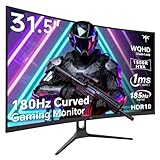
- 1500R Curved Gaming Monitor: This KTC 31.5" 2K monitor has WQHD (2560 x 1440) resolution and 16:9 aspect ratio. 1500R curved HVA panel immerses you in your entertainment and provides a wider field of view.
- 185Hz Refresh Rate: 180Hz refresh rate can be overclocked to 185Hz (via DP). 1ms MPRT response time, whether it is fast-moving action scenes or intense screen transitions, bringing an excellent gaming experience.
- Adaptive-Sync Technology: Adaptive FreeSync technology eliminates freeze, lag and image tearing, for a motion-blur-free and stutter-free gaming experience.
- Wide Color Gamut: 99% sRGB color gamut coverage, 126% sRGB color volume, and 5000:1 contrast ratio provide more vivid colors, deeper blacks, and brighter colors. HDR10 provides vivid, lifelike images.
- Seamless Connectivity: Easily connect to your gaming consoles, laptops, and desktops with DisplayPort 1.4 ×2, HDMI 2.0 ×2 and USB 2.0 ×2. Tilt adjustment of -5°-20° and VESA 100mm×100mm support, bringing ultimate gaming comfort.
Choose curved for a single-screen gaming setup, especially racing and simulation games, or when you sit directly in front of the display and want a more enclosed field of view. A 1000R curve is relatively aggressive. It can be immersive, but it may make straight spreadsheet rows and design work feel unusual.
What’s actually slowing this PC down?
Pick the symptom - the matching free tool is one click away.
Specifications that deserve more attention than “1ms”
Manufacturers’ 1ms claims are not directly comparable. GtG and MPRT are different measurement methods, and a headline figure may apply only to an aggressive overdrive mode. That mode can introduce inverse ghosting, visible bright trails, or overshoot.
Real motion clarity depends on refresh rate, response-time tuning, overshoot, VRR behavior, and frame rate. Look for independent measurements of input lag and response behavior where available. For example, the Tom’s Hardware review of the Gigabyte GS32Q illustrates the value of checking measured refresh behavior and color-gamut data instead of repeating only the manufacturer’s headline specifications.
Ports, stand, and desk setup checklist
Before buying, verify the complete specification sheet rather than assuming a 32-inch gaming monitor includes modern productivity features.
- DisplayPort version and maximum supported refresh rate
- HDMI version and refresh-rate limits
- USB hub and USB-C video input
- USB-C power delivery, if required for a laptop
- KVM functionality for multiple computers
- Height, tilt, swivel, and pivot adjustment
- VESA mounting compatibility
- Headphone output and built-in speakers
- OSD joystick and input-switching controls
- Stand depth, desk clearance, and cable routing
The LG 32GS75Q-B’s height, tilt, and pivot adjustment is one of its practical advantages. In contrast, budget monitors may provide only tilt. If you plan to use a monitor arm, confirm the VESA pattern and the display’s weight without the stand.
The Tool Desk
Outbyte Driver Updater FREEScan for outdated or missing drivers - takes under a minuteDriver Scan →Outbyte PC Repair FREEClear out junk files and repair common Windows errorsFree Scan →Console compatibility: check separately
PS5 and Xbox support for 1440p output, 120Hz, VRR, and particular HDMI modes varies by monitor. PC-oriented FreeSync or G-SYNC Compatible branding does not guarantee console VRR compatibility.
Check the HDMI specifications and independent console testing before buying for a console. The M32Q’s documented PS5 VRR limitation shows why a monitor can be a strong PC choice while still having a platform-specific drawback.
When a different monitor is better
- Choose 27-inch 1440p if sharper text, higher pixel density, or a smaller competitive-gaming field of view matters more than physical screen area.
- Choose 32-inch 4K for productivity, photo and video work, or noticeably cleaner desktop text. It requires more GPU power for gaming at native resolution.
- Choose OLED if deep blacks, near-instantaneous pixel response, and premium HDR matter more than price, burn-in considerations, or this exact size-and-resolution category.
- Choose Mini LED if strong HDR brightness and contrast are priorities and you can accept higher cost and model-specific blooming behavior.
- Choose an ultrawide if a wider field of view and side-by-side game or work windows are more useful than the standard 16:9 format.
- Choose 24-inch 1080p or 27-inch 1440p for a lower-cost competitive setup where pixel density, desk space, and frame rate take priority.
How to choose
- Start with pixel density. If text softness will bother you, consider 27-inch 1440p or 32-inch 4K before comparing gaming features.
- Match the panel to the room and games. Pick IPS for consistency and mixed use; pick VA for stronger contrast and curved immersion if you accept possible dark smearing.
- Match refresh rate to your GPU. Prefer a well-tuned 165–180Hz model over a more expensive 240Hz display your system cannot feed.
- Check the connections. Confirm DisplayPort and HDMI limits, VRR support, USB-C needs, and KVM requirements.
- Measure the desk. Account for screen width, stand depth, viewing distance, and the extra positioning demands of a 1000R curve.
- Check the actual deal. Manufacturer discounts are temporary, retailer inventory differs by location, and return and dead-pixel policies can matter more than a small headline discount.
Final verdict
For most PC gamers, buy the LG UltraGear 32GS75Q-B. It offers the best balance of flat-screen flexibility, IPS image consistency, 180Hz gaming, adaptive sync, and ergonomic adjustment.
Buy the LG UltraGear 32GS60QC-B when the low price and immersive 1000R curve outweigh concerns about VA dark smearing and office usability. Choose the Gigabyte M32Q when KVM-oriented productivity features justify an older model and variable pricing. Choose the Samsung Odyssey G7 C32G75T only for a specific 240Hz curved-VA use case at a compelling price. If desktop text clarity is your top priority, skip the category and choose 27-inch 1440p or 32-inch 4K instead.
Quick wins for a faster PC:
Scan for outdated or missing drivers - takes under a minuteDriver Scan →Clear out junk files and repair common Windows errorsFree Scan →Fix the driver behind crashes, sound loss and screen glitchesFind Drivers →Quick Recap
Product prices and availability are accurate as of the date/time indicated and are subject to change. Any price and availability information displayed on Amazon at the time of purchase will apply.

