
Crashes, No Sound, or Screen Glitches?
Random freezes, missing sound and display glitches usually trace back to one bad driver. Find and replace yours safely.Free scan · under a minutePC Slower Than It Used to Be?
A free scan shows the junk files, broken settings and background clutter dragging Windows down - then fixes them in one click.Free scan · Windows 10 & 11The best emulator depends on the console you want to play. For many systems on PC or Android, start with RetroArch. Choose PPSSPP for PSP, Dolphin for GameCube and Wii, Delta for simple Nintendo emulation on iPhone or iPad, melonDS for Nintendo DS, and DuckStation for PlayStation 1.
This guide covers free emulator software and legally free game software such as homebrew, demos, freeware, public-domain releases, and lawful personal backups where permitted. It does not recommend unauthorized ROM downloads. Copyright and backup rules vary by country.
As an Amazon Associate I earn from qualifying purchases.
Quick recommendations
| Best for | Emulator | Platforms | Why choose it | Main limitation |
|---|---|---|---|---|
| Many older systems | RetroArch | Windows, macOS, Linux, Android, iOS and others | One library and interface using emulator cores | More settings and setup than a standalone app |
| PSP | PPSSPP | Windows, macOS, Linux, Android, iOS and others | Mature, focused, well documented, and generally efficient | Only emulates PSP |
| GameCube and Wii | Dolphin | Windows, macOS, Linux, Android | The leading specialist option for these systems | Performance varies considerably by game and device |
| Simple iPhone or iPad emulation | Delta | iOS and iPadOS | Native interface for several Nintendo systems | Not a PSP, PlayStation 2, or GameCube/Wii solution |
| Broad Apple-device coverage | Provenance | iOS, iPadOS, macOS, tvOS | Multi-system frontend with optional cloud features | Availability, supported systems, and premium features can change |
| Nintendo DS | melonDS | Windows, macOS, Linux, Android, iOS | Dedicated DS controls and configuration | Less convenient than a unified frontend for a mixed library |
| PlayStation 1 | DuckStation | Desktop platforms and Android | Focused PS1 settings and troubleshooting | Check the current official distribution before installing |
What an emulator is—and what it is not
An emulator reproduces enough of another console’s hardware or software environment to run compatible programs. The emulator is an application; it normally does not include commercial games. You supply a compatible game file, and sometimes a BIOS or firmware file.
Compatibility is never universal. Results depend on the title, game dump, emulator version, operating system, CPU, GPU, graphics driver, controller, and configuration. A game that runs perfectly on one phone or computer may stutter, display graphical errors, or fail to boot on another.
#1 Best Overall

- Controller Adapter for Gamecube - Compatible with Nintendo Switch / Wii U / PC / Switch 2 works for nintendo gamecube controller, up to eight player for wii u or switch(need two adapter). Ideal gamecube controller adapter to play super smash bros ultimate.
- Support 4 NGC Controller - The gamecube adapter come with 4 gamecube controller input ports, and most up to 8 player at same time play with two adapter input. 180CM/5.9FT/70IN wired long USB A cable allows you to play no limit.
- Plug and Play No Driver Need - Just plug and then play your games. No lag and no drive install need on wii u/switch. Change the adapter button on WII U to play on WII U and Switch mode, Change the adapter button on PC to play on PC mode.
- Super Smash Bros Choice - You can play the super smash bros on Wii U and Switch, Plug the two usb into game console and then choice Mario or Luigi or what your want to battle with your friends. NOTE: you need enter ssb game by wii u remote control and only support ssb on wii u.
- 70 inch Long Cable - Play more freedom no more distance limited. Support turbo feature that What turbo actually does is replicates the same button pushed by the user over and over again at an extremely fast rate,Enhance your gaming experience.
What “free games” means here
There are three separate questions:
- Is the emulator free? The applications listed here can be downloaded without buying the emulator itself, although optional features or app-store terms may differ.
- Is the game legally free? Homebrew, official demos, freeware, and public-domain releases may be distributed at no cost.
- Can you use a commercial game you own? You may be able to create and use a personal backup, but the answer depends on your country’s law, the game’s license, and what happens if you transfer or sell the original.
A website offering a “free ROM” is not automatically offering a legal copy. The U.S. Copyright Office describes limits on archival copies and warns that downloading or distributing unauthorized copyrighted works can infringe copyright. Nintendo likewise says ROMs obtained through peer-to-peer networks or third-party file links are unauthorized copies of its games. This is general information, not legal advice.
Best overall for many systems: RetroArch
RetroArch is best understood as a frontend rather than one emulator. It uses separate emulator modules called cores. You can install cores for different systems, keep playlists in one interface, and use shared features such as shaders, save states, controller profiles, netplay, achievements, and per-game settings.
Its official platform list includes Windows, macOS, Linux, Android, and iOS, with downloads also available through several storefronts. Store versions can have different capabilities because of platform policies; the full desktop build is generally the better choice when you want its complete feature set and built-in updater.
The Tool Desk
Outbyte PC Repair FREERepair Windows errors before they cause bigger problemsFix Now →Outbyte Driver Updater FREEScan for outdated or missing drivers - takes under a minuteDriver Scan →RetroArch setup
- Download it from the official website or a listed official storefront.
- Open Online Updater and install the core for your target system.
- Use Load Content to open a legally obtained game file, or scan a directory into a playlist.
- Configure your controller under the input settings.
- Only after the game works should you create per-core or per-game overrides.
If a game does not appear in a playlist, try loading it manually. Check the file extension, confirm that the selected core supports the format, and determine whether the system needs a BIOS. Some cores cannot read particular archive formats, so test an uncompressed file when appropriate.
RetroArch is a strong choice for an enthusiast or anyone moving between PC and mobile. It is a poor first choice if you want one console, the fewest menus, or the simplest possible troubleshooting path. In that case, a standalone emulator is usually easier.
Best PSP emulator: PPSSPP
PPSSPP is the clear specialist recommendation for PlayStation Portable games. It has official versions for Windows, macOS, Linux, Android, iOS, and other platforms, with installation options including PC packages, Google Play, Huawei AppGallery, and Apple’s App Store.
Rank #2

- Switch to “Wii U” or “PC” mode by using the switch located on the side.
- The GameCube Controller Adapter allows you to connect up to four GameCube controllers (or wireless GameCube controllers) to a Wii U system, PC USB, Switch/Switch 2.
- Supports the built-in Vibration Feedback with no delays by plugging the two USB ports of the adapter into your Wii U system or PC USB connector ports.
- Compatible with Windows XP, Vista, Windows 7,Windows 8, 10, 11 and Mac OS under the PC mode.
- The driver is required if you need the vibration feedback on the PC mode.
PPSSPP supports transferred PSP game formats including ISO, CSO, and CHD. It does not supply commercial games. Its documentation also points readers toward legal PSP demos and homebrew and explains how to dump games from UMD where permitted.
PPSSPP setup
- Install PPSSPP from its official download page or an official store listing.
- Place a legally obtained game file in accessible storage.
- Open PPSSPP and browse to the file.
- Start with default settings before changing resolution or enhancement options.
- Pair a Bluetooth or USB controller, then map buttons if automatic detection is incorrect.
On Android 10 and older, PPSSPP’s Memory Stick folder may be a /PSP folder in accessible storage. On Android 11 and newer, Android’s storage restrictions generally mean you must create and select a folder yourself. Use Settings > System > Show Memory Stick folder when locating saves or transferring data.
PPSSPP can run well on relatively modest hardware, but “runs well” still depends on the game and device. Some games may need PSP firmware fonts; PPSSPP supplies replacement fonts, while its documentation notes that original PSP fonts can look better in certain titles. APK installations may also require manual updates rather than automatic store updates.
Best GameCube and Wii emulator: Dolphin
Dolphin is the primary choice for GameCube and Wii on Windows, macOS, Linux, and Android. Download the build for your operating system, add a legally obtained game image, configure the controller, and test the title using default graphics settings before increasing resolution or adding enhancements.
Dolphin is more demanding than an emulator for older 8-bit or 16-bit systems. Android performance is especially device-dependent. Dolphin’s FAQ specifies a 64-bit ARMv8/AArch64 environment for Android, so a 32-bit Android device is not an appropriate target.
Do these 3 things before closing this tab:
1Scan for outdated or missing drivers - takes under a minute2Clear out junk files and repair common Windows errors3Fix the driver behind crashes, sound loss and screen glitchesEven on a suitable computer, compatibility is title-specific. A game can boot and still have audio, graphics, shader, or controller problems. Raising internal resolution can cause shader-compilation stutter or expose graphics-driver issues. Test the game first, then adjust one setting at a time. Dolphin should not be presented as a standard official iPhone or iPad recommendation without checking its current distribution and runtime requirements.
Rank #3
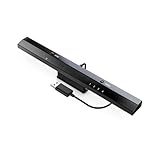
- Wireless sensor dolphin bar can connect your Wii remote plus controller to your PC by Bluetooth.
- Supports cursor anti-shake function, works as a normal keyboard and mouse.
- Allows you to play more quickly and precisely with your GC controllers, Light guns or Racing wheels.
- You can return or skip to the beginning of the current, previous or next chapter and supports Fast reverse, Fast forward, Pause playing, etc.
- Supports the G-sensor function that is the best choice for the Racing Games. Supports the Vibration Feedback.
Best beginner option on iPhone and iPad: Delta
Delta is a simple, Nintendo-focused choice for iOS and iPadOS. Its official material lists NES, SNES, Nintendo 64, Game Boy, Game Boy Color, Game Boy Advance, and Nintendo DS support. Install it through the official iOS distribution route available in your region, import a legally obtained file through the Files app, choose the detected system, and configure touch or physical controls.
Delta is not the right recommendation for PSP, GameCube/Wii, PlayStation 2, or newer demanding systems. App availability and installation paths can vary by country and storefront. Apple’s current App Review Guidelines allow retro-console and PC emulator apps, but developers remain responsible for the software they include or offer.
Best broad Apple-device option: Provenance
Provenance is worth considering when you want a wider multi-system library across iPhone, iPad, Mac, and Apple TV. You can import files through Files, Safari downloads, AirDrop, WebDAV, or another supported route, then select the appropriate system and configure controls.
Free tools Windows power users keep installed
One-click scans. No signup required.
The core experience is free. Provenance’s FAQ describes Provenance Plus as an optional paid tier with features such as iCloud synchronization. The FAQ has listed prices of $3.99 per month, $39.99 per year, and $99.99 lifetime, but App Store pricing, taxes, regional prices, plans, and features can change. Check the current listing before subscribing.
Provenance’s own materials have not always used the same supported-system count, so a precise number should not be treated as permanent. Check its current documentation and release notes rather than choosing it by system count alone.
Best dedicated Nintendo DS emulator: melonDS
melonDS is a dedicated Nintendo DS emulator with official download paths for Windows, macOS, Linux, Android, and iOS. Choose it when DS is your priority and you want system-specific controls rather than a general-purpose frontend.
Rank #4

- Controller compatibility: Xbox Series X Controller, Xbox Series S Controller, Xbox One Bluetooth Controller, PS5/PS4/PS3 Controller, Switch Pro, Wii Mote, Wii U Pro.
- 8BitDo Controller compatibility: all 8BitDo Bluetooth Controllers and arcade stick.
- System compatibility: Switch, Windows, macOS, Steam Deck & Raspberry Pis and more. USB Wireless Adapter 2 is compatible with Steam Deck now.
- Support 6-axis motion on Switch and Vibration on X-input mode.
- Supports ultimate software - customize button mapping, adjust stick & trigger sensitivity, vibration control and create macros with any button combination.
DS emulation has requirements that ordinary single-screen systems do not: two screens, touchscreen input, and, for some games, microphone or other handheld-specific functions. A physical controller can handle buttons, but touch-heavy games may still be more comfortable on a touchscreen device. RetroArch can be convenient if you already use a Libretro library, while Delta is simpler for many iPhone users who want several Nintendo systems together.
PlayStation 1: DuckStation or RetroArch
DuckStation is a specialist PlayStation 1 option for desktop and Android, with project materials describing support for x86-64, ARM32, ARM64, and RV64. Its focused interface can make per-console settings and debugging easier than a multi-system frontend.
Distribution and support details can change, so verify the current official release page and Android listing before installing. RetroArch is a convenient alternative if you already use it for other systems. As with other consoles, BIOS requirements vary by emulator and game; do not download firmware from random websites.
Which emulator fits each console?
| System | Best starting point | Alternative |
|---|---|---|
| NES, SNES, Game Boy family | RetroArch on PC or Android; Delta on iPhone | Provenance on Apple devices |
| Nintendo 64 | RetroArch or Delta on iPhone/iPad | Provenance on Apple devices |
| Sega Genesis and other classic systems | RetroArch | Provenance on Apple devices |
| Nintendo DS | melonDS | Delta, RetroArch, or Provenance depending on device |
| PlayStation 1 | DuckStation | RetroArch |
| PSP | PPSSPP | RetroArch’s PPSSPP core |
| GameCube and Wii | Dolphin | None recommended as a default replacement |
PC, Android, or iPhone?
PC
Windows, macOS, and Linux offer easier file management, more storage, broad controller support, and more graphics-backend choices. They are usually the least frustrating platforms for BIOS files, external drives, backups, and demanding systems. The trade-off is more opportunity for driver conflicts and more unofficial downloads pretending to be legitimate builds.
Android
Android provides broad emulator availability, accessible file managers, and good support for PSP, GameCube/Wii, PS1, DS, and older consoles. USB and Bluetooth controllers are widely useful. Chipset performance varies sharply, storage permissions can complicate saves, and unofficial APK mirrors may contain modified or malicious packages. Use official project links or reputable official stores.
What’s actually slowing this PC down?
Pick the symptom - the matching free tool is one click away.
iPhone and iPad
Apple devices offer safer, simpler storefront installation and strong native options such as Delta, PPSSPP, RetroArch, and Provenance. File imports usually go through Files, cloud storage, AirDrop, or a computer. Availability can vary by country, and iOS restrictions may mean fewer cores or advanced features than on desktop.
Best Value

- 《NOTICE》This adapter is only compatible with Windows PCs equipped with a USB interface. Use with other models is not guaranteed. Supported OS are Windows 10, Windows 8-8.1, Windows 7 (SP1), Windows Vista (SP2), and Windows XP (SP3). This converter has been verified to be compatible only with the Wii Game Classic Controller / Classic Controller Pro. Other controllers have not been tested and cannot be guaranteed.
- 《CLASSIC CONTROLLER / CLASSIC CONTROLLER PRO TO USB》Wii Game Classic Controller or Classic Controller Pro can be connected to your Windows PCs. With a fast response model that allows you to input up to 60 times per second, you can play comfortably without missing button operations. You can set the continuous shooting mode by pressing each button while pressing the HOME button. Perfect for a fast shooter!!
- 《PLUG AND PLAY - NO SOFTWARE or DRIVER INSTALLATION IS NECESSARY》 No need to install any software or driver. Simply just connect the adapter to the USB port to you desktop or laptop computer and ready to go!! It works for Windows OS PCs.
- 《ADAPTER COMPATIBILITY》 Compatible with Windows 10 / Windows 8 / Windows 7 (SP1) / Windows Vista (SP2) / Windows XP (SP3)
- 《PRODUCT DETAILS》 Size: 2.4" X 1" X 0.6" (62mm X 26mm X 17mm). Cable length: 39" (1m). Weight: 32g. Adapter from Wii Classic Controller (RVL-005) / Wii Classic Controller Pro (RVL-005 / RVL-005-02) to USB port. Compatible with Windows 10 / Windows 8 / Windows 7 (SP1) / Windows Vista (SP2) / Windows XP (SP3). The adapter is for only one player.
How to install safely
- Begin at the emulator project’s official website, repository, or linked app-store listing.
- Do not trust a similarly named mobile app merely because it appears in a search result.
- Use the project’s release page and checksums or signatures when provided.
- Keep the emulator and operating system updated.
- Back up saves before changing cores, moving storage folders, or reinstalling.
- Do not install a BIOS, firmware file, or game from an unknown download site.
Where to find genuinely free legal games
Look for games explicitly released as homebrew, freeware, public-domain software, or official demos. Some emulator projects document legal demo and homebrew sources; for example, PPSSPP’s getting-started documentation discusses free PSP demos and homebrew.
For commercial games, create or obtain a personal backup only where local law and the original license permit it. A purchase, physical cartridge, disc, or UMD does not automatically make every download from a third-party ROM site legal. Do not treat the word “backup” on a website as proof of authorization.
Troubleshooting common problems
Black screen or crash
- Restore default graphics and input settings.
- Confirm that you selected the correct core or standalone emulator.
- Test a known-good legal homebrew or game file.
- Check whether the system needs a lawfully obtained BIOS.
- Try a supported graphics backend and update the official emulator build.
If changing one setting fixes the problem, keep a note of it. Changing several settings at once makes the cause harder to identify.
The game runs slowly
Check device architecture and operating-system support first. Then lower internal resolution, disable texture enhancements and shaders, test another graphics backend, and check frame-skip or speed-limit settings. On mobile, battery-saver mode and thermal throttling can reduce performance. No setting can make an underpowered device reliably emulate a demanding system.
The controller does not work
Pair or connect it before opening the emulator, confirm that the operating system sees it, and map buttons manually if automatic detection is wrong. Some games require an analog stick, touchscreen, microphone, dual-screen input, or a different controller layout. On iPhone and iPad, confirm compatibility with the current iOS version and emulator build.
Touch controls feel poor
Use a Bluetooth or wired controller where supported, rotate to landscape orientation, and customize the on-screen layout. Touch controls are acceptable for menus and some slower games but are often uncomfortable for action games or systems designed around physical buttons.
Saves disappeared
Distinguish an ordinary in-game save from an emulator save state. Back up the emulator’s save directory before changing apps or cores. On Android 11 and newer, confirm that the emulator still has access to the selected storage folder. On iOS, check which app files and backup method include your saves. Do not assume cloud synchronization is free or enabled by default.
Quick Recap
Final choice
- Simplest iPhone or iPad option: Delta.
- PSP on any major platform: PPSSPP.
- GameCube or Wii: Dolphin, provided the device is suitable.
- One app for many older systems: RetroArch.
- Broad Apple-device coverage: Provenance.
- Nintendo DS: melonDS for a dedicated experience.
- PlayStation 1: DuckStation for focused controls, or RetroArch for convenience.
Product prices and availability are accurate as of the date/time indicated and are subject to change. Any price and availability information displayed on Amazon at the time of purchase will apply.

