For most players, the Game Boy Advance SP is the best all-round Game Boy: it plays original Game Boy and Game Boy Advance cartridges, folds shut to protect its screen, and has a rechargeable battery. If you want the backlit revision, look for the AGS-101 specifically; the earlier AGS-001 is a different model. The best choice still depends on which games you want to play and whether you value a particular screen, shape, or original-era feel.
How this ranking works
There is no objectively best Game Boy for every player. This ranking weighs cartridge compatibility, practical screen use, portability, and form factor, then matches each system to the reader most likely to enjoy it. Nintendo’s hardware history establishes the models and design details; Nintendo’s compatibility guidance describes which older cartridges work across the family. The AGS-101 distinction comes from the cited 2026 ranking, not an official Nintendo recommendation.
| # | Preview | Product | Price | |
|---|---|---|---|---|
| 1 |

|
Nintendo Game Boy Advance - Indigo (Renewed) | $118.04 | Buy on Amazon |
| 2 |

|
Nintendo Game Boy Advance SP - Cobalt (Renewed) | $170.51 | Buy on Amazon |
| 3 |
![Nintendo Game Boy - Original (Gray) (Renewed) [video game]](https://m.media-amazon.com/images/I/41hTQ10ouWL._SL160_.jpg)
|
Nintendo Game Boy - Original (Gray) (Renewed) [video game] | $154.05 | Buy on Amazon |
| 4 |
|
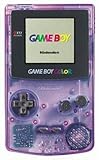
Game Boy Color - Atomic Purple (Renewed) | $119.99 | Buy on Amazon |
| 5 |

|
Game Boy Color - Teal (Renewed) | $129.99 | Buy on Amazon |
| Rank and best fit | Model | Why choose it | Tradeoff |
|---|---|---|---|
| 1. Best overall for most players | Game Boy Advance SP (preferably AGS-101) | Broad support for original Game Boy and GBA cartridges; protective clamshell; rechargeable battery | Used listings vary; verify the revision and battery condition |
| 2. Best for the color-era library | Game Boy Color | Plays original Game Boy games and supported Game Boy Color titles in color | Does not play GBA cartridges |
| 3. Best for GBA games and landscape grip | Game Boy Advance | Plays GBA games and original Game Boy cartridges | The cited ranking describes its original stock screen as unlit |
| 4. Best compact monochrome experience | Game Boy Pocket | A smaller, streamlined original Game Boy option | Monochrome display and a narrower library than Color or Advance |
| 5. Best original-era collector choice | Original Game Boy (DMG) | The original hardware and form factor | Bulky, with a display that lacks modern illumination |
| 6. Best tiny collector or portable option | Game Boy Micro | Very small and backlit | Plays GBA cartridges only, according to the cited ranking; its small screen and controls may not suit everyone |
Which Game Boy cartridges work on which systems?
The central compatibility distinction is between original Game Boy cartridges, Game Boy Color games that support older hardware, and GBA cartridges. Nintendo’s compatibility guidance says original Game Boy Game Paks work on the original Game Boy, Pocket, Color, Advance, and Advance SP. It does not mean every Game Boy Color title runs on monochrome systems: check the cartridge’s markings and compatibility before buying.
- Original Game Boy cartridges: Compatible with the original Game Boy, Pocket, Color, Advance, and Advance SP.
- Dual-mode Game Boy Color games: On Game Boy Color and Advance/SP systems, Nintendo says these can display up to 56 colors from a palette of 32,000. On original Game Boy and Pocket, they appear in four-step grayscale.
- Game Boy Color-only cartridges: Do not assume they work on original Game Boy or Pocket; check the specific game’s compatibility.
- Game Boy Advance cartridges: Choose an Advance, Advance SP, or Micro for the GBA library. The Micro is the compact option, but it does not cover the older Game Boy libraries.
Nintendo’s compatibility page returned an error when accessed for this article, so the compatibility details here reflect the indexed excerpt from that official support page.
The Tool Desk
Outbyte Driver Updater FREEFix the driver behind crashes, sound loss and screen glitchesFind Drivers →Outbyte PC Repair FREERepair Windows errors before they cause bigger problemsFix Now →#1 Best Overall
- It features a more powerful processor than any previous portable system, for faster, smoother gameplay
- The high-resolution, full color screen makes the game jump out at you -- 50% bigger than Game Boy Color
- Two new buttons, L & R, bring you more control & game options
- Extended battery life lets you play for up to 15 hours on a pair of AA batteries
- Compact Game Paks let you store your game progress & are smaller then Game Boy Color Paks
1. Game Boy Advance SP: best overall for most players
The SP offers the widest useful combination of older and newer cartridge support in a compact, protected design. It retains GBA play, supports original Game Boy cartridges, and its clamshell folds the screen inward for carrying. Nintendo’s hardware history dates its release to March 2003 and describes the design as a “smart clam-shell.” Nintendo’s safety guidance also confirms that the SP contains a rechargeable lithium-ion battery.
AGS-101 versus AGS-001
Revision matters when shopping used. The cited 2026 ranking identifies the AGS-101 as the backlit revision and distinguishes it from the earlier AGS-001. A listing that says only “Game Boy Advance SP” does not establish which one is for sale, so ask for a clear photo of the model label and screen powered on. Do not treat a seller’s general “bright screen” description as proof of revision.
Who should choose it
- You want one Nintendo system for original Game Boy and GBA cartridges.
- You value a screen that folds shut and a rechargeable design.
- You are willing to check the exact revision and used-unit condition before buying.
2. Game Boy Color: best for the color-era library
Choose the Game Boy Color if your priority is the Color-era catalog rather than GBA games. It also plays original Game Boy cartridges, making it a natural step up from a monochrome model for someone focused on those earlier libraries. Nintendo introduced Game Boy Color in 1998.
Its main boundary is simple: it does not play Game Boy Advance cartridges. If you are choosing between Color and an Advance-family system, let the specific games you want settle the decision.
Do these 3 things before closing this tab:
1Clear out junk files and repair common Windows errors2Scan for outdated or missing drivers - takes under a minute3Repair Windows errors before they cause bigger problemsRank #3
- Unlike modern handheld consoles, the GB Original does not have a back light and is best used in a well lit room or under a lamp.
3. Game Boy Advance: best for GBA games and landscape play
The original Game Boy Advance is the straightforward choice when you want the GBA library and prefer its landscape grip over the SP’s clamshell. Nintendo’s regional launch dates were March 21, 2001 in Japan, June 11, 2001 in the United States, and June 22, 2001 in Europe. Nintendo’s compatibility guidance also lists original Game Boy cartridges as compatible.
The cited ranking notes that the original stock screen is unlit, a practical drawback if you expect to play in dim rooms. For a foldable design, the SP keeps GBA compatibility; for the smaller backlit GBA-only option, consider the Micro.
Rank #4
- Unlike Modern Handheld Consoles, The Gb Color Does Not Have A Back Light And Is Best Used In A Well Lit Room Or Under A Lamp.
- Product Type-Video Game Hardware
- Package Quantity-1
- Package Weight-0.440924524 Lbs
4. Game Boy Pocket: best compact monochrome experience
The Pocket is for players who want the original Game Boy experience in a smaller system. Nintendo’s 1996 hardware-history entry calls it “a sleeker, 30-percent-smaller version” of the original. It plays original Game Boy cartridges and dual-mode Color games in grayscale, but it is not a color-screen substitute and does not play GBA games.
Independent reader supportYour contribution helps us test, update, and keep practical guides available for everyone.5. Original Game Boy (DMG): best for original-era collecting
Choose the original Game Boy for the original hardware, its larger, unmistakable form, or a collection centered on the system as first released. That is a collector preference, not a universal gameplay advantage. Its bulk and unilluminated display make it less convenient for everyday portable play than later designs.
Best Value
- Unlike Modern Handheld Consoles, The Gb Color Does Not Have A Back Light And Is Best Used In A Well Lit Room Or Under A Lamp.
- Product Type-Video Game Hardware
- Package Quantity-1
- Package Weight-0.440924524 Lbs
6. Game Boy Micro: best tiny collector or portable option
The Micro is the smallest-feeling option in this ranking, with a backlit screen, but it is not the best one-system answer if you want the broader Game Boy family library. Nintendo’s 2005 history entry describes it as “Measuring just 4 inches wide by 2 inches tall” and says it “featured a backlit screen.” Those dimensions are Nintendo’s description, not a new measurement for this article. The cited ranking says the Micro plays GBA cartridges only.
Its compact size is a draw for portability and collecting; the corresponding compromise is a smaller screen and controls that may be less comfortable for some players.
What to check before buying a used Game Boy
Vintage condition and battery performance vary by individual unit, and no current market-average price is established here. Ask the seller for specific evidence of function rather than relying on a broad “works great” claim.
- Confirm the exact model and revision. For an SP, request a clear view of the model label to distinguish AGS-101 from AGS-001.
- Inspect the screen. Ask for a powered-on photo and check for display damage. Nintendo warns against pressure and sharp objects on LCD screens.
- Test buttons, sound, and cartridge reading. Confirm every button responds, the speaker produces sound, and the system loads a compatible game.
- Ask about battery behavior. A rechargeable battery may no longer hold its original capacity; ask how the particular unit behaves unplugged.
- Check the included power accessory. Nintendo advises using the correct model-specific AC adapter, so verify that any included charger is compatible.
- Look for clear condition details. Prefer listings with sharp photos and an explicit description of tested functions; assess the actual unit, not just the model name.
A modern cartridge-playing alternative
The Analogue Pocket is not a Nintendo Game Boy model, so it does not belong in the ranking above. Creative Bloq’s handheld-console buying guide describes it as playing Game Boy, Game Boy Color, and Game Boy Advance cartridges. That guide reported a starting price of $219.99, but price and stock are volatile; that figure should not be treated as current. Consider it only if a modern display and physical-cartridge play matter more to you than buying original Nintendo hardware.
Quick Recap
Product prices and availability are accurate as of the date/time indicated and are subject to change. Any price and availability information displayed on Amazon at the time of purchase will apply.




