The Tool Desk
Outbyte PC Repair FREEClear out junk files and repair common Windows errorsFree Scan →Outbyte Driver Updater FREEScan for outdated or missing drivers - takes under a minuteDriver Scan →Yes, a DIY gaming PC around $1,000 is a realistic target, but a 2025 parts list is not proof that the same basket still fits the budget. The strongest documented example here is GamersNexus’s $778 build guide, published in October 2025; its figure is a historical build-category price, not a guaranteed checkout total today. The component examples are US-oriented. Prices below are not presented as live quotes, and none of the cited lists establishes a current complete total including tax, operating system, monitor, or peripherals.
What a $1,000 gaming PC can reasonably target
For a roughly $1,000 desktop, prioritize a discrete graphics card and treat 1080p as the baseline resolution. GamersNexus frames its example for 1080p gaming and popular esports at 1440p. That does not establish a specific frame rate: results depend on the game, graphics settings, drivers, and the exact parts in the finished system.

Higher-resolution play is possible in some games, but a broad promise of smooth 1440p performance is not supported by the cited build guides. Choose settings and resolution game by game rather than assuming every new release will run at ultra quality.
Two published parts-list examples
These lists show what publishers have considered for the budget category. They are not current shopping carts, and the available sources do not provide a uniform head-to-head GPU benchmark or complete, date-stamped totals calculated under matching inclusion rules.
Recommended Free Tools
#1 Best Overall

- System: AMD Ryzen 7 8700F 4.1GHz 8 Cores | AMD B850 Chipset | 16GB DDR5 | 1TB PCIe 4.0 NVMe SSD | Windows 11 Home
- Graphics: NVIDIA GeForce RTX 5060 Ti 8GB Graphics | 1x HDMI | 2x DisplayPort
- Connectivity: 2 x USB-C 3.2 | 4 x USB-A 3.2 | 2 x USB-A 2.0 | 1 x LAN | WiFi 6 | Bluetooth 5.3 | 7.1 Channel Audio
- Tempered Side Case Panel | Custom RGB Lighting | Keyboard and Mouse
- 1 Year Parts & Labor Warranty, Free Lifetime Tech Support
| Build example | Listed parts | What the source supports |
|---|---|---|
| GamersNexus, October 2025 | Intel Arc B580 Limited Edition or ASRock Arc B580 Challenger OC; AMD Ryzen 5 7500F; Crucial Pro 32GB (2×16GB) DDR5-5600; ASRock B650M-HDV/M.2; Cooler Master Q300L V2; Thermalright Assassin Spirit 120 V2; Thermaltake SMART W3 600W; WD Blue SN5000 1TB PCIe 4.0 M.2 SSD; extra case fans. | The guide presents a $778 build category example aimed at 1080p gaming and popular esports at 1440p. The figure does not verify a current checkout total. It notes that the B580 may require more patience than incumbent GPU vendors and that the motherboard’s VRMs may limit future high-power CPU upgrades. GamersNexus build guide |
| PC Guide, under-$1,000 list | Gigabyte B650 Eagle AX; Ryzen 5 7600X; Gigabyte Radeon RX 7600 XT Gaming OC; Thermalright Peerless Assassin 120; TEAMGROUP T-Create Classic 10L 32GB DDR5; Kingston NV2 1TB NVMe SSD; Thermaltake Toughpower GX2 600W; Zalman S3. | The page claims 1080p and 1440p use, but its date information conflicts: it says “Last Updated on August 23, 2024” and also “Prices correct as of September 21st, 2026.” That conflict means it cannot establish a reliable current price or a freshly verified list. PC Guide build list |
| Tom’s Hardware pricing and fit example | A described approximately $900 configuration includes a Patriot P300 512GB SSD and an MSI A650BN PCIE5 III 650W PSU. RAM is excluded from its build pricing because bundle deals can change quickly. | This is useful evidence that a nominal target can be undermined by volatile memory pricing, and that case GPU-length and cooler-height clearances matter. It is not presented as a complete build under $1,000. Tom’s Hardware gaming build guide |
How to choose between the GPU options
The named options are an Intel Arc B580 and an AMD Radeon RX 7600 XT. The cited guides do not provide a shared test suite comparing them across the same games, settings, and system configuration, so neither can be declared the universal winner from these lists alone.
- Start with benchmarks for the games you actually play and the resolution you intend to use; make sure the test uses the same settings you care about.
- Check the exact GPU model, not just the chip name. Partner-card dimensions, cooling, power connectors, and factory settings can differ.
- For the B580, GamersNexus notes that buyers may need more patience than with incumbent GPU vendors. Verify current stock, drivers, and local support before purchase.
- Compare the final GPU price against the money left for the rest of the system. A graphics card that forces cuts to memory, storage, or a suitable power supply may not make the best complete build.
Compatibility checks before ordering
Compatibility depends on exact model numbers; similarly named components are not automatically interchangeable. Check the manufacturer specifications for every item before paying.
Rank #2

- AMD Ryzen 9 7900X, NVIDIA GeForce RTX 5070 12GB, 32GB DDR5 RGB 4800MHz 16x2 1TB NVMe SSD, WIFI Ready, Windows 11 Home
- Connectivity: 6 x USB 3.1 | 1x RJ-45 Network Ethernet 10/100/1000 | Audio: On board audio
- Special Add-Ons: Tempered Glass RGB Gaming Case | 802.11AC Wi-Fi Included | 16 Color RGB Lighting Case | Free iBuyPower Gaming Keyboard & RGB Gaming Mouse | No Bloatware | AI Workstation PC ready
- CPU and motherboard: Confirm the processor uses the board’s socket and that the motherboard BIOS supports it. The cited AMD examples use the AM5 platform.
- Memory: Match the board’s supported DDR generation and memory configuration. The GamersNexus list specifies 32GB as two 16GB DDR5-5600 modules; do not substitute DDR4 or assume a kit’s advertised speed will be enabled without checking setup requirements.
- GPU and case: Compare the exact graphics card’s length and thickness with the case’s clearance. Check whether fans or drive cages affect the usable space.
- Cooler and case: Check cooler height against the case limit, and verify that the cooler is compatible with the CPU socket. A cooler that is taller than the case allows will not fit.
- Power supply: Confirm wattage and all GPU and motherboard connectors required by the exact models. Do not infer power-supply quality from wattage alone.
- Cooling and included parts: Verify what fans come with the case and whether additional fans are needed. Confirm whether the chosen CPU includes a cooler; the cited examples list separate CPU coolers.
- Storage: Confirm the motherboard supports the chosen M.2 drive and consider whether its capacity is sufficient for your game library.
Is AM5 a worthwhile upgrade path?
The Ryzen 5 7500F and Ryzen 5 7600X examples use AM5 and DDR5, which gives the build a platform path for future compatible processors. That does not mean every future CPU will be a sensible upgrade on every board. GamersNexus specifically flags possible VRM limits on the ASRock B650M-HDV/M.2 when paired with future high-power CPUs. Check the board’s CPU support and power-delivery limits before treating a later processor upgrade as guaranteed.
How to keep the complete build near budget
Recalculate the entire basket immediately before purchase. RAM pricing and bundles can change total cost quickly; Tom’s Hardware says it excludes memory pricing from its builds because short-lived combo deals affect the figure, and PC Guide notes that hardware prices fluctuate.
- Use one region and currency for every component. The examples are US-oriented; do not convert a US parts list into another market’s budget without checking local prices and stock.
- Write down whether your budget includes sales tax, shipping, Windows or another operating system, and any monitor, keyboard, mouse, or headset you still need.
- Price the exact SKUs, including the selected GPU variant, motherboard, memory kit, power supply, and case. Substitute only after repeating the compatibility checks.
- Recheck memory and bundle pricing as part of the same full-basket total, rather than comparing a build total that omits RAM with one that includes it.
- Leave room for price changes and any required case fans or other components not included in the list.
What games can this PC run?
The cited evidence supports a 1080p-oriented gaming target, not a guaranteed list of games or frame rates. Esports titles are a more plausible place to pursue higher frame rates than demanding new releases, but the guides do not provide comparable game-by-game benchmarks for these exact configurations. Look up tests for the specific GPU, game, resolution, and settings you plan to use, and be prepared to lower visual settings in demanding games.
Quick Recap
Best Value

- System: AMD Ryzen 9 9900X 4.4GHz 12 Cores | AMD B850 Chipset | 32GB DDR5 | 1TB PCIe 4.0 NVMe SSD | Windows 11 Home
- Graphics: NVIDIA GeForce RTX 5070 12GB Graphics | 1x HDMI | 3x DisplayPort
- Connectivity: 2 x USB-C 3.2 | 4 x USB-A 3.2 | 2 x USB-A 2.0 | 1 x LAN | WiFi 6 | Bluetooth 5.3 | 7.1 Channel Audio
- Liquid Cool CPU | Tempered Side Case Panel | Custom RGB Lighting | Keyboard and Mouse
- 1 Year Parts & Labor Warranty, Free Lifetime Tech Support
Rank #4
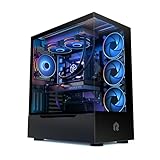
- HIGH-FPS GAMING POWER – Built by gamers, for gamers, this system pairs the AMD Ryzen 7 9700X processor with NVIDIA GeForce RTX 5070 graphics to deliver smooth, high-frame-rate gameplay and stunning visuals across competitive and AAA titles.
- FAST & RESPONSIVE PERFORMANCE – 16 GB of next-generation DDR5 memory keeps your system quick, responsive, and ready for multitasking. Stream, create, and play simultaneously without slowdowns or lag.
- LOAD FAST, STORE MORE – The 1 TB NVMe M.2 SSD delivers ultra-fast load times and instant responsiveness while providing ample storage for your full game library, mods, and creative projects.
- BUILT & TESTED BY GAMERS – Every Build Redux PC is hand-assembled, cable-managed, and stress-tested under real-world gaming conditions to ensure top-tier reliability, thermal performance, and long-term durability.
- READY OUT OF THE BOX – Fully assembled and pre-tested before shipping, your Build Redux gaming PC arrives battle-ready. Simply plug in, power up, and enjoy elite performance backed by a 2-year warranty for peace of mind.
Product prices and availability are accurate as of the date/time indicated and are subject to change. Any price and availability information displayed on Amazon at the time of purchase will apply.




