There is no single proven best graphics preset or control number for car gameplay in American Truck Simulator (ATS). Choose graphics settings that keep play smooth at your display’s resolution, then tune your input device in the Controls menu with small, tested adjustments. The sources available do not establish universal Road Trip car settings or hardware-specific performance benchmarks.
What to know about ATS car gameplay
SCS announced ATS 1.61 as released on September 15, 2026, with map and asset preparation for Road Trip. SCS separately announced the Ford Car Pack for release on September 29, 2026, describing car driving, smaller delivery jobs, customization and exploration. These announcements establish the stated release dates, not current availability on every storefront; check the current game build and DLC listing before installing or troubleshooting. SCS’s 1.61 announcement and Ford Car Pack announcement provide the details.
SCS says its 1.58 update refined vehicle behavior and input response in preparation for lighter, shorter and sometimes more powerful vehicles. It also introduced an optional double-tap throttle system for keyboard input. That feature can change how acceleration feels, but it is not a universally recommended control setting. Read the 1.58 update notes.
Best graphics settings for ATS
Use the game’s graphics options to find the balance between image quality and performance that suits your PC, display resolution and smoothness target. The ATS manual explains that the Graphics section lets players change resolution and adjust that balance; it does not name a best preset or a hardware-specific frame-rate target. Consult the ATS manual and support information.
#1 Best Overall

- Which 18 wheeler do you like most? Discover many new American and Euro truck brands.
- Drive your big rig truck across USA, Canada and Mexico
- New and improved graphics engine!
- Different climate locations: desert, snow, mountain, city
- Improved Controls (tilt steering, buttons or virtual steering wheel)
- Start with a sustainable baseline. Select a quality level your PC can run smoothly, using your display’s resolution as the starting point.
- Check play before raising quality. Drive in the same kind of area where you expect to play. If performance is not smooth enough, lower image-quality options until it is.
- Raise quality gradually. Once performance is acceptable, increase settings selectively and check the result after each change. Keep the balance that feels best at your resolution and target frame rate.
- Change a specific setting only to address a specific issue. Vegetation density or distant traffic detail may be worth adjusting if those visuals matter to you, but there is no evidence that raising every option improves the experience on every system.
The SCS Modding Wiki documents graphics-related variables such as graphics quality, grass density and traffic vehicle LOD distance. These are technical configuration options, not a recommendation to edit configuration files or maximize every value. Beginners should use the in-game menu first. See the SCS Modding Wiki’s configuration variables.
Best control settings for American Truck Simulator car gameplay
Set up the device you actually use in ATS’s Controls menu, then test steering, throttle and braking in a quiet area. Treat steering sensitivity, steering non-linearity, deadzone, brake intensity and wheel rotation as device- and preference-dependent. Begin near the current game defaults, change one variable at a time in small increments, and keep a note of settings that make the car easier to control. The available sources do not publish validated numerical values for Road Trip cars.
Rank #2

- Enjoy a trucking experience focused on your career as a truck driver
- Become immersed as you follow Nathan’s story about becoming a successful truck driver
- Work on your relationships as you get closer to your family and the local community with each job
- Customize your truck to your heart’s content with tons of new parts and paint jobs to choose from
- Navigate the open road as you encounter different landscapes and interesting locations
Keyboard
- Map steering and essential actions to keys you can use comfortably, then check whether you can make and correct turns without oversteering.
- Try the optional double-tap throttle if its behavior suits you: holding the key applies partial throttle for cruising, while double-tapping gives full acceleration, according to SCS’s 1.58 update.
- If acceleration feels wrong, test with the feature on and off before changing other controls.
Gamepad
- Configure the gamepad in Controls and confirm that steering, throttle and brake inputs register as intended before driving.
- Adjust deadzone or sensitivity only if you observe a specific problem, such as unwanted input at rest or steering that feels too abrupt.
- Retest after each change so you can identify what helped.
The ATS manual specifically describes gamepad setup as a supported configuration path. See the manual and support information.
Steering wheel and pedals
- Configure the wheel in Controls and check steering and pedal calibration before setting off.
- If using ATS force feedback, disable spring-centering effects in the wheel’s hardware profile. SCS gives the Windows Game Controllers/joy.cpl menu as an example of where such effects may be offered. Read SCS’s Force Feedback FAQ.
- Do not assume that a wheel rotation or force-feedback strength recommended for truck driving is ideal for car gameplay; the reviewed sources establish no best wheel model or numerical force-feedback setting for Road Trip cars.
Should you use graphics or physics mods for cars?
A current SCS forum listing for Realistic Brutal Graphics & Weather claims compatibility with ATS 1.61.x and describes a broad visual and weather overhaul. That is the mod author’s compatibility claim, not independent confirmation. Check the listing’s current version and avoid combining mods that replace the same weather, rain, climate, skybox or graphics systems. Check the mod listing and its compatibility warnings.
Rank #3

- Ca. 6000 km of motorway and 600 km of country road, to a scale of 1:10
- Numerous detailed models of motorway interchanges
- 16 cities, some of them with unique road designs (e.g. roundabouts or bridges)
- Numerous POIs in cities and near motorways and country roads
- All large waterways.Ground based on real satellite data.Licensed vehicles from Scania and MAN.Purchase trucks and trailers.Hire drivers
The Ultra Realistic Truck Physics & Cabin Motion listing concerns truck physics, not evidence of improved car handling. Its author warns against combining mods that change the same steering, suspension, braking or truck-physics parameters. Do not treat it as a car-mode handling fix. See the truck physics mod listing.
Quick Recap
Best Value
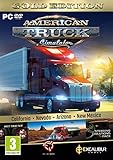
- Highly detailed officially licensed 3D truck models
- Huge selection of tuning accessories
- Rich variety of companies and industries to work for
- Become the king of the road, start your own business and build your fleet into a trucking empire
- Steering wheel, gamepad and other input devices supported
Rank #4

- ✅ The complete game, every mode, level and vehicle unlocked from the first tap
- ✅ Zero ads, zero pop-ups, zero watch a video to continue
- ✅ No in-app purchases, one price, nothing else to buy ever
- ✅ 100% offline play, no account needed
- ✅ Made for Fire tablets, tested on Amazon devices
How to troubleshoot settings that feel wrong
- Performance is too low: Reduce graphics quality until play is smooth, then restore options gradually to find an acceptable balance.
- Steering is twitchy or sluggish: Check device calibration and deadzone first, then make a small sensitivity or non-linearity adjustment and retest.
- Keyboard acceleration is hard to manage: Compare the optional double-tap throttle on and off; keep it only if its partial-throttle and full-acceleration behavior works for you.
- Wheel force feedback pulls toward center unexpectedly: Check for hardware spring-centering effects and disable them when using the game’s force feedback, following SCS’s guidance.
- A mod causes visual or handling conflicts: Check whether another mod changes the same systems, and test with overlapping mods removed rather than stacking replacements.
Product prices and availability are accurate as of the date/time indicated and are subject to change. Any price and availability information displayed on Amazon at the time of purchase will apply.




