The best kids games for Amazon Fire HD tablets are short-session educational games, simple puzzles, creative apps, preschool activities, and supervised family games selected from the current Amazon Appstore. Compatibility and parental controls matter more than a generic Android popularity ranking.
The best kids games for Amazon Fire HD tablets are usually short-session educational games, simple puzzles, creative apps, preschool activities, and local family games—not necessarily the most popular Android games. The important first test is compatibility: a game listed on Google Play is not automatically available or fully functional on Fire OS.
As an Amazon Associate I earn from qualifying purchases.
For most families, start with the current Amazon Appstore listing, then check the age range, reading level, advertising, in-app purchases, internet requirement, privacy features, and performance on the exact Fire model your child uses. Amazon Kids can place the game inside a parent-managed child profile, while Amazon Kids+ offers a curated subscription library of child-oriented content. Neither option removes the need to review an individual game before installing it.
Quick picks by child and play style
| Best for | Look for | Check before installing |
|---|---|---|
| Early learning | Phonics, letter recognition, counting, spelling, shapes, colors, patterns, and basic arithmetic | Reading level, repetition, ads, paid lesson packs, and whether progress can be used without an account |
| Puzzle and logic play | Matching, sorting, mazes, memory, sequencing, and problem-solving with large touch targets | Cluttered menus, hints locked behind purchases, internet dependence, and public or social features |
| Creative play | Drawing, coloring, music, building, and storytelling with open-ended tools | Advertising, user-generated content, external links, microphone or camera access, and paid content |
| Preschool and toddler play | Simple navigation, spoken instructions, minimal text, clear feedback, and brief activities | Whether the child can exit to the Appstore, encounter ads, or make accidental purchases |
| Shared family play | Local, turn-based, pass-and-play, or parent-supervised modes | Online chat, matchmaking, controller support, and whether the game actually supports multiple players on Fire OS |
1. Educational games for early learning
Educational games are the strongest starting point for a younger child because they tend to offer clear goals and repeatable sessions. Good categories include phonics, letter sounds, alphabet recognition, spelling, counting, number comparison, simple addition and subtraction, shapes, colors, and pattern recognition.
Choose an app that matches the child’s actual reading ability rather than only the advertised age range. A preschool game that relies heavily on text may be frustrating for a child who cannot yet read, while an app designed for early readers may be too repetitive for an older child. Spoken instructions, generous touch targets, immediate feedback, and the ability to retry an activity are useful features.
#1 Best Overall

- Develop math, reading, writing, coding, problem-solving and creativity skills with more than 20 educator-approved learning apps that grow with kids
- Find hundreds more games, videos, music and eBooks (sold separately) by going to the LeapFrog App Center and expand the learning experience
- Includes a three-month trial of LeapFrog Academy; subscribe to send kids on learning adventures filled with more than 2,000 engaging games, activities, eBooks, videos, songs and more
- Learning tablet includes a stylus, tough bumper with kickstand and a 7" shatter-safe screen; set time limits, manage apps and explore kid-friendly web content with parent controls
- Intended for ages 3-8 years; rechargeable lithium-ion battery included
Look especially closely at the business model. Some educational apps provide a small free sample and sell additional subjects, levels, or lesson packs. That is not automatically a problem, but parents should know whether the child can reach a purchase screen from the child profile and whether the app remains useful without an ongoing payment. Search terms such as educational games for Fire tablets, reading games for kids, math games for Amazon Fire, and early-learning games can help locate options, but every result still needs a current Appstore and age-rating check.
2. Puzzle and logic games
Puzzle games are often a particularly good hardware fit for Fire HD tablets. Matching, sorting, memory, maze, sequencing, and visual problem-solving activities work naturally with a touchscreen and generally do not require complex controls.
What’s actually slowing this PC down?
Pick the symptom - the matching free tool is one click away.
The best choices for children have large touch targets, few menus, instructions that can be understood without extensive reading, and visible success or failure feedback. A child should be able to start a level, understand the objective, and return to the activity without navigating through several promotional screens.
Offline play is useful for car journeys, flights, and homes where children do not need continuous access to the internet. Do not infer offline support from the game category. Check the listing and test the installed game with Wi-Fi disabled; some apps work offline after installation, while others require an online connection for sign-in, content downloads, advertisements, or progress syncing. Useful searches include puzzle games for kids on Fire HD, logic games for children, and offline puzzle games.
3. Creative games for drawing, music, and building
Creative games can be a better fit than score-based games for children who prefer making things. Drawing, coloring, music, digital building, and storytelling apps can use the touchscreen as an instrument rather than simply presenting a series of buttons to tap.
For a younger child, prioritize a clear canvas, an easy undo button, simple tools, and a way to save or share work without opening a public service. For an older child, more flexible building or storytelling tools may be worthwhile, but inspect the privacy and social features carefully.
Windows Errors? Fix Them Before They Spread
Repair common Windows errors and clear accumulated junk for a smoother, more stable PC - no reinstall needed.Free scan · no reinstallOutdated Drivers Are Slowing You Down
One free scan finds every outdated or missing driver and matches the right update for your exact hardware.Free scan · exact hardware matchRank #2

- Screen-Free Entertainment for All Ages: Boppo is a handheld, screen-free educational tablet that features games, stories, music, and sensory play. It uses tactile mechanical buttons and audio interaction for hands-on play, with ten light-up buttons and a high-quality speaker that make it easy to use at any age. Designed for the whole family, it gives parents peace of mind with safe, screen-free entertainment you can enjoy together.
- One Boppo, Endless Fun: Boppo features a growing library of 40+ screen-free games, songs, stories, and activities that families can enjoy forever with no subscriptions required. We periodically add new, free content to the device, ensuring the adventure stays fresh as your child grows. Buy once and play forever with learning games, music-making, and calming audio experiences ready for screen-free play right out of the box.
- The Ultimate Handheld Travel Game: This is the perfect portable gaming system for long-haul flights, road trips, and boring waiting rooms. It features 32GB of internal storage and a high-capacity rechargeable battery in a portable design. Boppo works offline with no hotspot or WiFi needed so the fun never stops when you leave the house. Optional WiFi access is only needed for podcast streaming, over-the-air updates, or communicating with the phone app.
- An Educational Game System for Kids: Boppo entertains while teaching new topics and important skills, such as problem-solving and cause-and-effect. Whether you are trying to cut down on screen time, engage a young mind, or learn something new, this Boppo has something for everyone. It is a thoughtfully designed learning tablet for kids that turns curiosity into play.
- Pop a Toppo on Your Boppo: Boppo grows with your child through our unique Toppo expansion system. Our interchangeable “Toppo” faceplates pop onto the kids game console to experience entirely new themed worlds. Explore the mysteries of the solar system, discover life on the farm, or conduct a musical symphony. It’s a versatile system that grows alongside your curiosity and skill level, ensuring the fun never becomes obsolete.
Creative apps deserve extra scrutiny because some include user-generated content, external links, cloud accounts, advertising, or access to the camera or microphone. Check those features before adding the app to a child profile. Searching for creative games for kids, drawing games for Fire tablet, or kid-friendly building games is a useful starting point, not proof that a particular result is suitable.
4. Preschool, toddler, and familiar-character games
Recognizable characters can make a child more willing to try a game, but branding is not a quality or safety guarantee. A character-based title may still contain advertising, frequent purchase prompts, complicated navigation, or online features that are inappropriate for the intended age.
Before choosing a preschool or toddler game, check:
- Whether the stated age range matches the child’s developmental and reading level.
- Whether instructions are spoken or rely on text.
- Whether the child can reach advertisements, a browser, a store page, or social features.
- Whether the title uses paid unlocks, subscriptions, or consumable items.
- Whether it is listed in the Amazon Appstore or explicitly available through Amazon Kids+.
- Whether the app requests access to a camera, microphone, location, contacts, or other features it does not obviously need.
Searches such as preschool games for Amazon Fire, toddler games for Fire HD, and character games for kids can surface candidates. Do not assume that an Android or Google Play version carries over to a Fire tablet.
The Tool Desk
Outbyte PC Repair FREEClear out junk files and repair common Windows errorsFree Scan →Outbyte Driver Updater FREEScan for outdated or missing drivers - takes under a minuteDriver Scan →5. Family and multiplayer-adjacent games
For shared play, prefer local, turn-based, pass-and-play, or parent-supervised modes. These give a family a way to play together without exposing a child to public chat, open matchmaking, or strangers.
Multiplayer labels can be misleading. A game might require separate devices, an account, an internet connection, a controller, or a particular operating-system feature. Amazon’s Appstore testing criteria address navigability and game-controller behavior on Fire devices, but that does not mean every game supports a controller or multiplayer play. Verify the current listing and the developer’s documentation for the exact title.
Rank #3
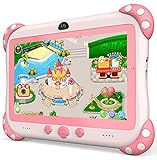
- 【Newest Version Kids Tablet for Toddlers】A multi-functional 7-inch kids tablet designed for kids aged 3-14 years. This latest model toddler tablet comes pre-loaded with GMS-certified IWAWA Kids Apps, offering a safe and engaging experience for young learners. Powered by Android 11.0, tablet for kids features a Quad-core processor, 2 GB RAM, and 32 GB of internal storage (expandable up to 512 GB), 3500mAh10-hour battery life with educational content pre-loadedmaking it a powerful and versatile device. Durable, kid-friendly, and packed with educational content, this tablet for kids 3-7 inspires learning, imagination, and creativity in children, making it the perfect companion for growing minds
- 【PARENTAL CONTROL: KEEP YOUR KIDS SAFE AND HEALTHY】This easy-to-use parental control kids tablet android toddler tablet is designed to ensure a safe and healthy digital experience for your child. With features like screen time management, website filtering, app control, and video channel restrictions, you can customize the content your child accesses. The tablet for toddlers also allows you to add extra security, preventing kids from exiting kid mode without parental permission. As your child grows, the tablet for kids 3-7 security settings can be adjusted to provide age-appropriate content, making it a reliable and adaptable tool for every stage of their development
- 【DUAL CAMERA & LARGE STORAGE TODDLER TABLET】Our toddler tablet for kids is equipped with a 0.3MP front camera and a 2.0MP rear camera, allowing children to capture their favorite moments anytime. The Kids tablet for toddlers also supports video calling, making it easy for kids to connect with friends or grandparents. With 32GB of built-in storage (expandable up to 512GB), this Android kids tablet ensures you can store countless photos, videos, and apps, preserving every wonderful memory. Perfect kids tablets ages 3-7, this tablet combines fun, creativity, and practicality in one device!
- 【MULTI-FUNCTION KIDS TABLET FOR AGE-APPROPRIATE LEARNING】 This kids tablet for kids 3-7 supports over 40 languages, including Spanish, making it a versatile tool for children from diverse backgrounds. Toddler tablet for toddlers comes pre-loaded with offline educational apps like Montessori, STEM, Art and Craft, and Brain Training. Additionally, you can download other popular apps from the Google Play Store, such as Netflix, ABC Mouse, YouTube Kids, Amazon Prime Video, Xfinity Stream, Duolingo, Hulu, and Khan Academy Kids. Kids Tablet designed to help children explore and learn more about the world, this baby tablet is the perfect blend of education and entertainment for growing minds,
- 【BEST Christmas GIFTS & PROFESSIONAL AFTER-SALE SERVICE】This kids learning tablet is the perfect electronics gift for birthdays, holidays, Christmas Gifts, or Halloween. Supporting multiple languages like English, Spanish (tabletas para niños), and French, it's designed to cater to children worldwide. We offer a 30-day exchange and lifetime technical support to ensure your complete peace of mind. If you encounter any issues with our kids tablets or have warranty concerns, please don't hesitate to contact us—we'll resolve any problems promptly. Your 100% satisfaction is our top priority. Note: Recommended for ages 3-14 years old. Children under 2 should use the tablet with adult supervision.
For a family game, test the complete route from launch to play: can everyone understand whose turn it is, can the child recover from an accidental tap, and can the game be closed without entering a store or social area? Those details matter more than a generic multiplayer label.
Amazon Kids and Amazon Kids+: how they change game selection
Amazon Kids child profiles
Amazon Kids is available at no additional cost on compatible devices. It lets a parent create a child profile and manage the content and usage rules separately from the adult profile. Amazon documents controls for sharing or filtering age-appropriate content, setting screen-time limits and educational goals, managing web browsing, controlling in-app purchases, and reviewing activity through the Parent Dashboard.
Do these 3 things before closing this tab:
1Repair Windows errors before they cause bigger problems2Fix the driver behind crashes, sound loss and screen glitches3Clear out junk files and repair common Windows errorsFeature availability can differ by country, marketplace, device generation, and software version. Treat the controls as a useful safety layer rather than a substitute for reviewing the game itself. A game can be technically allowed for a child profile and still be too difficult, too commercial, or too distracting for that particular child.
Amazon Kids+
Amazon Kids+ is a paid subscription that provides access to a curated collection of child-oriented books, movies, apps, games, Audible content, and music. Amazon describes the service as containing thousands of items and says that its content is curated, including through outreach to developers when Amazon wants to include an app.
That makes Amazon Kids+ worth considering for families that want a broader library rather than buying individual games one by one. It does not guarantee that a named game will be included forever, in every country, or on every device. Catalogs, promotions, pricing, and eligibility can change, so check the current offer and the live Kids+ catalog before subscribing. A subscription also does not mean every title has the same offline behavior, purchase model, or suitability for every age.
Child purchase requests
Amazon has a pending-purchase flow for eligible in-app purchases in a child experience. A child can request a purchase and a parent can approve or decline it through the Parent Dashboard. The documented feature supports consumable and entitlement purchases, not subscriptions, and Amazon lists availability for the Amazon.com, Amazon.ca, Amazon.co.uk, and Amazon.de marketplaces.
Recommended Free Tools
Rank #4

- 10 New Activities to Expand Your Screen-Free Experience: The Toppo is the expansion system for the Boppo handheld learning tablet, the screen free educational tablet known for tactile buttons and high-quality audio. Each Toppo is interchangeable and physically pops onto your existing Boppo device to instantly experience 10 new fun, themed screen-free games, stories, and sensory play.
- Step Into Life on the Farm: Transform your game system into an immersive adventure with the Farm Animals Toppo. This expansion features 10 specialized activities where kids explore animal care and rural life through interactive storytelling and tactile games. Designed for ages 1–6, it encourages independent discovery and shared learning.
- Seamless Top-and-Play Technology: Boppo automatically recognizes when a Toppo is added, instantly opening up a new world of handheld kids games, stories, songs, facts and activities. This smart screen-free tablet is designed for effortless transitions; the moment a Toppo is removed, the system seamlessly returns to its original home menu. There are no complicated settings or streaming required, just pop a Toppo on your Boppo to start a new adventure and pull it off to return home.
- Boppo Grows With Your Child: The Toppo expansion system ensures your screen-free tablet for kids remains a favorite for years to come. By swapping your Toppo, you can instantly update the themes and challenges to match your child’s evolving interests and developmental milestones. This modular design transforms your handheld system into a long-term companion, providing fresh activities and new worlds to explore as they grow.
- One Boppo, Endless Fun: We believe in play that lasts without the clutter of subscriptions. Each Toppo is a one-time addition to your Boppo, giving your family permanent access to every new story and game. By choosing physical expansion, you are building a tangible library of discovery that works 100% offline. It’s a straightforward way to keep the adventure going with no hidden fees, just more room for their imagination to grow.
Because marketplace support and purchase types are limited, parents should still review each app’s payment model and configure purchase controls before handing over the tablet. A game that is free to install can still contain paid items.
How to find and install a game safely
- Start with the child’s need. Decide whether the goal is reading practice, quiet puzzle play, creative time, travel entertainment, or supervised family play. This narrows the search better than choosing from a popularity list.
- Search the Amazon Appstore. Use the tablet’s Appstore or the relevant Amazon store page. Confirm that the title has a current listing rather than relying on a Google Play result, an old review, or a general Android compatibility claim.
- Read the listing details. Check the age guidance, description, screenshots, in-app purchases, advertising disclosures, permissions, storage information, and internet requirements. Look for notes about supported Fire devices where provided.
- Install from the adult profile first. This gives the parent an opportunity to inspect the app before making it available to a child. Menu names and content-sharing steps can vary by tablet generation, marketplace, and software version.
- Add or approve it for the child profile. Use the Amazon Kids content controls or the available Kids+ library tools. If the title does not appear as expected, confirm that it is installed on the device and supported in the child profile.
- Test it on the actual tablet. Launch it from the child profile, try the main activities, open and close menus, and check what happens when Wi-Fi is disabled. A real-device test is more dependable than assuming that an Android listing or emulator result represents Fire hardware.
- Recheck after updates. Ads, permissions, purchase prompts, login requirements, and offline behavior can change when an app is updated. Revisit the listing and the child profile if the game becomes a regular part of the child’s routine.
Fire HD compatibility: what parents should know
Fire OS is based on Android, but it is not identical to a standard Google-certified Android tablet. Amazon says Fire tablets support Android apps, HTML5 web apps, and React Native apps, while also warning that not all Android libraries work on Fire devices. Google Play Services are not available on Fire OS, so developers must use compatible Amazon or standard Android alternatives.
In practical terms, a game being available for Android or Google Play is not evidence that it is available in the Amazon Appstore. Even when a similar version exists, sign-in, cloud saves, payments, advertisements, or other functions may behave differently. Use the current Amazon listing as the compatibility starting point.
Amazon’s current Fire tablet device families include the Fire Max 11 from 2023, Fire HD 10 from 2023, Fire HD 8 from 2022, and Fire 7 from 2022. The Fire Max 11 is not an HD-branded model, but it is relevant when a family is comparing Amazon tablets for games.
Quick wins for a faster PC:
Scan for outdated or missing drivers - takes under a minuteDriver Scan →Clear out junk files and repair common Windows errorsFree Scan →Fix the driver behind crashes, sound loss and screen glitchesFind Drivers →| Model family | Published hardware context | What it means for game selection |
|---|---|---|
| Fire HD 10, 2023 | 10.1-inch 1080p display, 3 GB RAM, octa-core processor, and up to 13 hours of battery life according to Amazon’s specifications | The larger screen can be comfortable for shared play, drawing, reading, and games with more on-screen detail. Still check the title’s requirements and storage use. |
| Fire HD 8, 2022 | Amazon describes this generation as 30% faster, with 2 GB or 3 GB RAM options and up to 13 hours of battery life | A portable middle ground. Confirm the exact RAM configuration and avoid assuming that every newer or larger game will perform identically. |
| Fire 7, 2022 | A smaller, lower-positioned Fire tablet in the current device family | Best treated as a model requiring especially careful listing and performance checks. Do not generalize from an HD 10 result. |
| Fire Max 11, 2023 | A larger, newer Fire tablet family listed by Amazon | Relevant for families considering a premium Amazon tablet, but compatibility still belongs to the individual game listing and developer support information. |
Amazon’s published battery figures are estimates under stated test conditions, not a promise of gaming time. RAM, storage, software updates, graphics demands, background activity, and the specific game all affect the experience. Newer hardware may be a better choice for larger games, but hardware specifications cannot replace a title-by-title compatibility check.
Independent reader supportYour contribution helps us test, update, and keep practical guides available for everyone.The parent screening checklist
Before recommending or installing any game, run through this list:
Best Value

- POWERFUL ANDROID 15 PERFORMANCE WITH AI SUPPORT – Powered by Android 15, a fast 4-core processor, and 64 GB of built-in storage, this 10.1-inch kids tablet provides smooth performance for educational apps, videos, games, and everyday entertainment. Expand storage up to 1 TB with a microSD card for more books, photos, music, and videos. With access to Gemini AI, children can explore questions, better understand concepts, and receive interactive learning support under parental guidance.
- GOOGLE KIDS SPACE AND EASY PARENTAL CONTROLS – tablet comes with Google Kids Space, giving children access to age-appropriate books, videos, creative activities, puzzles, and educational apps. Parents can manage screen time, approve or block apps, filter content, and set daily limits through parental controls, helping create a safer and more balanced digital environment for children ages 3 and up.
- 10.1-INCH HD IPS DISPLAY WITH EYE-COMFORT FEATURES – Enjoy clear, colorful visuals on the 1280 × 800 HD IPS glass display. Low-blue-light technology, eye-protection mode, and automatic brightness adjustment help provide a more comfortable viewing experience during reading, learning, video watching, and gaming. The spacious 10.1-inch screen makes content easier for young children to see and navigate.
- KID-PROOF EVA CASE WITH STAND – Designed for everyday bumps and drops, the lightweight EVA protective case provides a comfortable, child-friendly grip and added impact protection. Precisely aligned openings keep the camera, buttons, speakers, and charging port easy to access
- LONG-LASTING BATTERY AND 2-YEAR WARRANTY – The optimized battery system is designed to support extended use for learning apps, videos, reading, and games, while Android 15 helps improve power efficiency. With its educational features, durable protective case, and child-friendly design, this toddler tablet makes a thoughtful gift for birthdays, holidays, and other special occasions. Backed by a 2-year warranty and responsive customer support for added peace of mind.
- Amazon availability: Is there a current Amazon Appstore listing, or is the game explicitly included in the current Amazon Kids+ catalog?
- Age and reading level: Does the actual content suit the child, not merely the store’s broad age label?
- Advertising: Is the game ad-free, supported by third-party advertising, or likely to show promotional material during play?
- Purchases: Are there paid unlocks, consumables, entitlements, or subscriptions? Are purchase requests enabled for the child profile?
- Internet: Does the game work after installation without continuous Wi-Fi? Test this rather than assuming.
- Storage and performance: How much space does it use, and does it behave acceptably on the child’s specific Fire generation and RAM configuration?
- Privacy: Does it use external links, chat, social features, location, camera, microphone, contacts, or an account?
- Navigation: Can a child start, pause, exit, and resume play without reaching adult content or a purchase page?
- Feedback: Are instructions and success or failure states clear enough for the intended age?
- Hardware support: If the game mentions a controller, keyboard, multiplayer, or another accessory, is that feature documented for this Fire model?
- Real-device test: Does it work correctly from the child profile on the actual tablet?
Amazon’s Appstore criteria emphasize a simple user experience, thorough testing, graceful handling of unsupported functionality, and effective use of the Fire tablet screen. Amazon also requires developers to test submissions on physical devices because virtual devices cannot reproduce every hardware behavior. For parents, the practical lesson is simple: the final test should happen on the tablet the child will actually use.
What to avoid
- Google Play-only recommendations: A game may be excellent on another Android tablet but unavailable or incomplete on Fire OS.
- Unverified Kids+ claims: Do not assume a title is included merely because it is child-oriented or appears in an old Kids+ article.
- Always-online games for travel: Check whether login, ads, downloads, or progress syncing make an internet connection necessary.
- Open chat and public social features: These are poor defaults for an unsupervised child profile unless a parent deliberately supervises them.
- Aggressive monetization: Repeated prompts for coins, levels, subscriptions, or paid packs can undermine an otherwise educational game.
- Overly complex interfaces: Small buttons, dense menus, and unclear exit paths are particularly unsuitable for toddlers and early readers.
- Assuming every model performs alike: Fire HD 10, Fire HD 8, Fire 7, and Fire Max 11 differ in display, memory, generation, and software context.
Useful accessories for a child-used Fire tablet
Accessories do not make a game better, but they can solve practical problems. A kid-proof Fire tablet case is useful for travel and drops, while a Fire HD screen protector can help protect a frequently handled display. For shared spaces, kids headphones for Fire tablet can keep game audio from disturbing others; verify the connector or Bluetooth compatibility for the exact tablet and choose a volume-limited model where appropriate.
Free tools Windows power users keep installed
One-click scans. No signup required.
Check the precise model generation before buying any case or screen protector. Fire HD 8 and Fire HD 10 accessories are not interchangeable merely because both tablets use the Fire name.
Which approach is best for your family?
- For a preschooler: Begin with spoken early-learning, matching, coloring, and simple sorting activities. Keep the child profile tightly filtered and test whether the app can be used without exposing ads or purchase prompts.
- For an early reader: Combine reading or spelling practice with puzzle and logic games. Favor apps that let the child retry activities independently and avoid games that require extensive typing.
- For an older child: Consider more involved puzzles, building, storytelling, and supervised local family games. Review social features and account requirements rather than relying only on the age label.
- For travel: Select games that pass an offline test, download them before departure, and confirm that the child profile can launch them without an account or connection.
- For several children sharing one tablet: Favor short, turn-based, or creative activities and use separate profiles or clear parent-approved content where possible.
- For a family buying a new tablet: The Amazon Fire HD 10 tablet is the logical larger-screen option among the models discussed here, especially for drawing, reading, and shared play. It is not a guarantee that every game will run or that every child will need the larger device; compare the game listings with the exact model before buying.
Frequently Asked Questions
Will every Android or Google Play kids game work on a Fire HD tablet?
Not automatically. Fire OS is based on Android, but Google Play Services are not available on Fire OS and Amazon says that not all Android libraries work on Fire devices. Check for a current Amazon Appstore listing or explicit Fire-tablet support.
Do I need Amazon Kids+ to install games for children?
No. Amazon Kids is a parent-managed child experience available at no additional cost on compatible devices. Amazon Kids+ is a separate paid subscription with a curated library of child-oriented books, apps, games, and other content. Availability and catalogs can vary by marketplace and device.
Is the Fire HD 10 better than the Fire HD 8 for kids games?
The Fire HD 10 has the largest screen among the HD models discussed and Amazon lists 3 GB of RAM for the 2023 model. The Fire HD 8 is more compact and has 2 GB or 3 GB RAM options. The right choice depends on the game, storage, portability, and the current listing for the specific model.
How can I tell whether a Fire tablet game works offline?
Look at the current listing for offline or internet requirements, then install the game and test it with Wi-Fi disabled. Some games need an initial download, login, advertisements, or connection for progress syncing even if the main gameplay appears offline.
The Bottom Line
Choose the game category that matches the child’s age and purpose, then verify the live Amazon Appstore listing, purchase and privacy model, offline behavior, and support for the exact Fire tablet. Amazon Kids adds useful parental controls, and Amazon Kids+ can provide a curated library, but neither replaces a parent’s final check inside the child profile.
Quick Recap
Product prices and availability are accurate as of the date/time indicated and are subject to change. Any price and availability information displayed on Amazon at the time of purchase will apply.




