The best PC game for a child depends on what they enjoy and how they will play—not just its age rating. For creative building, consider Minecraft: Java & Bedrock Edition; for family minigames, LEGO Party; and for quieter solo play, Ravensburger Puzzles. Each has different content and play features, and a rating alone does not address online interactions, user-created content, or spending. Check the current PC listing and system requirements before buying.
Best PC games for kids: at a glance
| Game | Best fit | PC rating evidence | What parents should check |
|---|---|---|---|
| Minecraft: Java & Bedrock Edition | Creative building and exploration | PEGI 7 and ESRB Everyone 10+ in Minecraft’s parent guide; Microsoft lists the edition in its PC Family & Kids catalog. | Cartoon combat, multiplayer settings, and Bedrock Marketplace purchases. |
| LEGO Party | Family minigames and competition | ESRB Everyone for Windows PC, with Comic Mischief and Mild Fantasy Violence. | Its rating summary mentions bathroom humor as well as mild fantasy violence. Confirm current PC storefront availability. |
| Ravensburger Puzzles | Jigsaw puzzles and quieter solo play | ESRB Everyone for Windows PC. | Verify current sale status and compatibility; those details are not established by the rating record. |
These are different kinds of games, not a universal ranking. Microsoft’s PC Family & Kids catalog lists Minecraft: Java & Bedrock Edition. ESRB records identify Windows PC versions of LEGO Party and Ravensburger Puzzles. A rating record does not confirm that a game is currently on sale or compatible with a particular computer.
Which game suits your child?
Minecraft: building, exploration, and choices about play
Minecraft suits children who like making things and exploring at their own pace. Its Creative mode supports open-ended building, while Survival adds resource gathering and encounters with creatures. It can be played alone or with others. Minecraft’s parent guide gives the game an age guidance of PEGI 7 and ESRB Everyone 10+; it describes combat as mild and cartoon-styled, without blood. Players can fight creatures and, in multiplayer, other players, so the content may not suit every child.
Java and Bedrock are distinct editions with differences in platforms and services. Bedrock includes a Marketplace where players can buy maps, skins, and minigames. Consider whether those purchases fit your household rules, and check the edition and listing carefully before purchase.
#1 Best Overall

- (Age 4 – 6) Kids build essential Kindergarten skills and get a head start on 1st Grade with the help of fun animal friends, music, and animation!
- Master key skills in Math, Reading, Science, Spelling, and more!
- Auto leveling helps children learn at the pace that suits them.
- Creative games, challenging activities, and educational songs keep children involved for hours of learning fun.
- Seven different learning styles help kids achieve better understanding.
LEGO Party: competitive minigames for shared play
LEGO Party is a party game built around LEGO-themed minigames and competition. ESRB rates its Windows PC version Everyone, with Comic Mischief and Mild Fantasy Violence. The rating summary also mentions bathroom humor, which some families may want to review before choosing it. The rating record establishes a PC version, but not current storefront availability.
Ravensburger Puzzles: jigsaw play without a focus on competition
Ravensburger Puzzles offers digital jigsaw puzzles across categories including animals, landscapes, sports, and fantasy art. ESRB rates the Windows PC version Everyone. It may be a fit for a child who prefers a quieter puzzle activity; the rating record does not establish current sale status or computer compatibility.
Rank #2
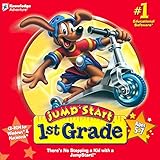
- {htmlentities(JUMP START 1ST GRADE)}
How to judge whether a PC game is kid-friendly
Use the rating as one input, then consider how the game is played and what the child can encounter or buy. ESRB ratings describe content; they do not by themselves settle whether online play, user-created material, or a game’s purchase options suit your family.
- Age rating and descriptors: Read both the age category and content descriptors. A broad label such as Everyone does not mean every household will welcome every joke or fantasy conflict.
- Play style: Decide whether your child wants creative building, puzzles, or competition. Also consider whether the game is intended for solo play or shared play.
- Online communication and user-created content: Check whether players can interact with others or encounter experiences made by users. These features can change the experience beyond the core game.
- Spending: Look for in-game purchases and decide whether purchases should require adult approval.
- Time and access: Set appropriate play schedules and content limits on the child’s account, rather than relying on a game’s rating to control access.
Set up Windows and Xbox family controls
ESRB recommends using child accounts and accurate birth dates. Windows and Xbox family tools can manage allowed content ratings, time schedules, spending approval, and communication options. ESRB’s parental controls guide explains these options. The available controls are account-level safeguards; review settings alongside the individual game’s features.
Do these 3 things before closing this tab:
1Fix the driver behind crashes, sound loss and screen glitches2Clear out junk files and repair common Windows errors3Scan for outdated or missing drivers - takes under a minuteRank #3

- Play as spongebob, patrick and sandy and use their unique sets of skills
- Thwart plankton's evil plan to rule bikini bottom with his army of wacky robots
- Meet countless characters from the beloved series
- Brand new horde mode multiplayer for up to two players, online and splitscreen
- Restored content that was cut from the original game like the robot squidward boss fight and more
Minecraft multiplayer and purchases: what parents should know
Minecraft’s parent guide says multiplayer is off by default on child accounts, and an adult Microsoft account holder manages family settings. If your child will play with others, review those settings rather than assuming the default is the intended long-term arrangement. Bedrock’s Marketplace offers purchasable maps, skins, and minigames, so check the family spending controls if you want purchases approved or restricted.
Is Roblox a good alternative for kids?
Roblox is a platform containing many user-created experiences, not one individual game. In an ESRB parent guide dated August 6, 2025, the platform is assigned a Teen rating with the descriptor “Diverse Content: Discretion Advised” and interactive elements for user interaction and in-game purchases including random items. ESRB warns that some user-created experiences may be inappropriate for children. As ESRB President Patricia E. Vance put it: “While Roblox’s millions of users are free to create and play a wide range of games, some may be inappropriate for kids.”
Rank #4

- FROM SCREEN TIME TO BRAIN TIME: Move your child off the couch and into the developer's seat. This premium gift box turns their favorite Roblox obsession into a productive, confidence-boosting computer programming hobby.
- BUILT AROUND WHAT THEY LOVE: No boring lectures. Kids learn genuine 3D game design by using the real Roblox Studio engine to script games in Lua. They'll build custom obbys, adventure maps, and interactive games that they can actually publish and play with friends.
- 100% PARENT-FRIENDLY & SELF-PACED: Zero technical experience required from parents. Our award-winning, 8- to 10-minute bite-size video lessons guide them step-by-step. Every purchase features access to our friendly online human mentor help desk via email or screenshare if they ever get stuck.
- REAL SKILLS FOR THE FUTURE: While it feels like playing a video game to them, they are learning fundamental concepts like loops, conditionals, and variables. They build transferable computational logic and math skills used by professional application developers.
- THE PERFECT GAMER GIFT: Beautifully designed and ready to wrap, this physical box contains a registration card providing 12 months of unlimited platform access, 100+ hours of student projects, 19 modules, 53 quests, and 161 challenges. Compatible with PC & Mac.
Roblox announced that Roblox Kids and Roblox Select accounts became globally available on June 16, 2026. The company says these account types involve age checks, additional game reviews, age-dependent chat restrictions, and parental controls. In its April 2026 announcement, Roblox described parental management of ratings, communication, time, spending, and individual games. Roblox also says exact account ages and features vary by region. Treat platform controls as tools to review and configure—not a guarantee that every experience will be suitable.
Independent reader supportYour contribution helps us test, update, and keep practical guides available for everyone.Check the PC listing before you buy
For each title, verify the current PC storefront listing, system requirements, and availability in your region before purchasing. The cited rating records identify PC versions for LEGO Party and Ravensburger Puzzles but do not establish current stock, price, or compatibility. Microsoft’s catalog result lists Minecraft: Java & Bedrock Edition for PC; confirm the specific edition and purchase details on the listing you intend to use.
Quick wins for a faster PC:
Scan for outdated or missing drivers - takes under a minuteDriver Scan →Clear out junk files and repair common Windows errorsFree Scan →Fix the driver behind crashes, sound loss and screen glitchesFind Drivers →Quick Recap
Best Value
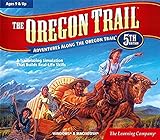
- Explore the West! Live the Adventure! Survive the Trail! (Age 9 and Up)
- Create Your Journey. Decide your occupation, who you‘ll take with you, and where you‘re headed!
- Talk with & learn from pioneers - Irish, African Americans, Native Americans, and other settlers. Share their dreams, fears, and adventures.
- Blaze a Trail. Ford raging rivers. Hunt, fish, and forage for food. Be a part of the taming of the wild West. From the banks of the great Mississippi to the sweeping Williamette Valley, you‘ll carve your own trail through an historic adventure.
- Windows XP, Vista, 7, 8 compatible
Product prices and availability are accurate as of the date/time indicated and are subject to change. Any price and availability information displayed on Amazon at the time of purchase will apply.




