Do these 3 things before closing this tab:
1Repair Windows errors before they cause bigger problems2Scan for outdated or missing drivers - takes under a minute3Clear out junk files and repair common Windows errorsThere is no single Thermaltake gaming PC that is best for every buyer: Thermaltake’s 2025 LCGS announcement covered ten complete systems across several CPU and graphics-card tiers, while its U.S. RTX 50-series page lists a separate set of named higher-tier desktops. Choose by the exact configuration and local availability—not the model name alone.
What “best Thermaltake gaming PC” means in 2025
Thermaltake announced 10 new complete LCGS gaming PCs on August 1, 2025, for its German shop. The announcement describes systems ranging from entry level to high end, with Ryzen 5000-, 7000- and 9000-series processors or Intel Core i5/i7 processors, paired with RTX 5060, RTX 5070, RTX 5070 Ti or RTX 5080 graphics. Thermaltake’s announcement establishes the range, but it does not provide a complete side-by-side specification and price comparison for all ten systems.
As an Amazon Associate I earn from qualifying purchases.
Thermaltake’s U.S. RTX 50-series page names examples in its 5080 and 5070 Ti series: View 9880-380, Reactor 9880S, Apollo u2880, View u2870TS-380, Reactor u2670T and View 7870TS-270. Those examples come from a U.S. listing, not the German 2025 launch catalog; regional models and availability may differ. The page does not supply enough comparative data to identify a universal winner. See Thermaltake USA’s RTX 50-series desktops.
Recommended Free Tools
How to compare Thermaltake LCGS desktops
Start with the exact components in the retailer or Thermaltake listing you could actually buy. Two systems in a named series—or with similar-looking case names—are not necessarily equivalent configurations.
#1 Best Overall
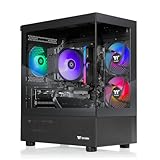
- Intel Core i5-14400F CPU, Intel B760 Chipset motherboard, 16GB DDR5 6000MT/s RGB, 1TB NVMe M.2, WiFi, Windows 11
- NVIDIA GeForce RTX 5060, Display Port/HDMI
- ARGB Tower Air Cooler
- 2x USB 3.0, 1x Headphone, 1x Mic
- PSU Power cover with Filtered Ventilated Vertical Side mount Radiator support
- Check the graphics card. Confirm the full GPU model in the listing. The RTX 5060, 5070, 5070 Ti and 5080 tiers are useful first filters, but a GPU name alone does not establish frame rates in a particular game or at a particular resolution.
- Check the processor. Record the exact CPU model, not only “Ryzen 7000” or “Core i7.” The 2025 German announcement spans multiple processor generations and Intel tiers.
- Verify memory and storage. Compare memory capacity and type, plus SSD capacity. The announcement does not provide these details for every system, so rely on the full SKU specification.
- Inspect cooling and case details. Check the cooling configuration, case size and airflow information, and whether the layout suits your desk and upgrade plans. Thermaltake says its LCGS series choices reflect case type, but that alone does not establish temperatures, noise or upgrade ease.
- Confirm seller, price and stock. Check the exact SKU, included components, local price and availability at the point of purchase. The German launch and U.S. RTX 50 listing should not be treated as one shared catalog.
- Read the warranty for your purchase. Verify coverage against the exact SKU, seller and country before ordering.
Which Thermaltake gaming desktop should you buy?
Choose an RTX 5060 or RTX 5070 configuration when the exact listing fits
The German 2025 announcement includes RTX 5060 and RTX 5070 systems as well as higher GPU tiers. These can be candidates if their complete specifications and price suit your needs. The available manufacturer information does not establish game benchmarks or a best-value ranking, so compare independent, model-specific testing before making performance claims or decisions based on expected frame rates.
Consider an RTX 5070 Ti desktop as a named U.S. option
Thermaltake’s U.S. page lists 5070 Ti examples including Apollo u2880, View u2870TS-380, Reactor u2670T and View 7870TS-270. Treat these as leads to check, not as a ranked shortlist: confirm that a model is currently offered in your market and compare its exact CPU, memory, SSD, cooling and price against alternatives.
Rank #2

- AMD Ryzen 5 5600 CPU, AMD B550 Chipset motherboard, 16GB DDR4 3600Mhz RGB Memory, 1TB NVMe M.2, WiFi, Windows 11 Home
- AMD Radeon RX 6600, Display Port/HDMI, Keyboard & Mouse
- ARGB Tower Air Cooler
- 3mm Thick Tempered Glass Side Panel
- Full Length PSU Power cover cleans up cables for a professional look.
Consider an RTX 5080 desktop if its full configuration suits your budget
The same U.S. page names View 9880-380 and Reactor 9880S in its 5080 series. The available listing information does not establish that either is faster in a particular game, quieter, cooler, or better value than another Thermaltake configuration. Use exact specifications and relevant independent benchmarks for the games and resolution you care about.
Warranty and regional availability
Thermaltake’s support policy lists a one-year warranty for LCGS systems. Its stated conditions include coverage for the original customer and purchase and operation in the United States. Those terms may not apply to every SKU, seller or country; check Thermaltake’s warranty policy and confirm coverage for the specific system before buying.
Rank #3

- Intel Core i7-14700F CPU, B760 chipset motherboard, 32GB DDR5 6000MT/s RGB Memory, 1TB NVMe M.2, WiFi, Windows 11
- NVIDIA GeForce RTX 5070, Display Port/HDMI
- ARGB Tower Air Cooler
- 2x USB 3.0, 1x Headphone, 1x Mic
- Panoramic Viewing with Front and Side Tempered Glass Panels
The ten-system announcement is dated August 1, 2025, and concerns the German LCGS shop; the RTX 50-series examples are from Thermaltake USA. Neither source guarantees that every system remains in stock or is sold in every region. Verify local listings and full specifications at purchase time.
Quick Recap
Best Value

- Intel Core Ultra 7 265KF CPU, Intel B860 Chipset motherboard, 32GB DDR5 6000MT/s RGB, 1TB NVMe M.2, WiFi, Windows 11
- NVIDIA GeForce RTX 5060 Ti, Display Port/HDMI
- Closed Loop Liquid Cooling with 240mm Radiator
- 2x USB 3.0, 1x Headphone, 1x Mic
- PSU Power cover with Filtered Ventilated Vertical Side mount Radiator support
Rank #4

- Intel Core i9-14900KF CPU, Intel Z790 Chipset motherboard, 32GB DDR5 6000MT/s RGB, 1TB NVMe M.2, WiFi, Windows 11
- NVIDIA GeForce RTX 5070, Display Port/HDMI
- Closed Loop Liquid Cooling with 360mm Radiator
- 1x Type C USB, 2x USB 3.0, 1x Headphone, 1x Mic
- Panoramic Viewing with Front and Side Tempered Glass Panels
Product prices and availability are accurate as of the date/time indicated and are subject to change. Any price and availability information displayed on Amazon at the time of purchase will apply.




