What’s actually slowing this PC down?
Pick the symptom - the matching free tool is one click away.
The safest Xbox 360 vertical stand is one designed for your console’s exact shell, with a broad, stable base that leaves every vent clear. Microsoft allows the Xbox 360 to stand vertically or lie horizontally, but a stand is a support and display accessory—not a cooling upgrade or a guarantee against tipping.
Best Xbox 360 stands to keep your console safe: what matters most
There is no single best stand for every Xbox 360. The original Xbox 360, Xbox 360 S, and Xbox 360 E have different shells, so choose a stand explicitly described for your model. Prioritize a secure fit, a level non-slip base, unobstructed ventilation, and cable routing that will not pull the console over.
Choose by exact Xbox 360 model
Look for the model name in the listing rather than relying on a generic “Xbox 360 stand” label. As a rough size reference, the Xbox 360 S is about 270 × 75 × 264 mm, while the original Xbox 360 is about 325 × 98 × 274 mm; these figures are from a 2026 Wikipedia reference article and are not a substitute for checking your console and the stand’s fit. Dimensions for the Xbox 360 E are not established here.
Dedicated vertical bases and model-specific display stands exist, including third-party and 3D-printed examples. Those reports do not verify any seller’s quality or establish safety certification. Treat a stand as third-party unless its listing provides evidence otherwise.
PC Slower Than It Used to Be?
A free scan shows the junk files, broken settings and background clutter dragging Windows down - then fixes them in one click.Free scan · Windows 10 & 11Outdated Drivers Are Slowing You Down
One free scan finds every outdated or missing driver and matches the right update for your exact hardware.Free scan · exact hardware match#1 Best Overall

- Keeps your 360 Slim nice and cool
- Games and media won't stutter due to the console overheating
- Keeps your controllers organized and out of harm's way
- Powered by system's USB
- Helps to increase longevity of the system by keeping internal temperatures low and prevents fried circuits
Compare a stand against these safety checks
- Fit: The stand identifies the original Xbox 360, Xbox 360 S, or Xbox 360 E it supports.
- Stability: The base is broad, level, and non-slip, and supports the console at its intended contact points.
- Airflow: No stand edge, wall, or nearby object blocks ventilation openings; the stand does not trap the power supply.
- Cables: Cables have enough slack and are routed so a tug is less likely to drag the console off its base.
- Construction: The listing clearly identifies the manufacturer and whether the accessory is Microsoft-branded or third-party.
Microsoft says genuine Xbox 360 accessories typically have embossed Microsoft branding and a holographic label. That is useful when checking a claim of authenticity, but it does not make an unrelated third-party stand unsafe by itself.
Does an Xbox 360 stand work on all 360 models?
No universal fit is established. Because the original Xbox 360, Xbox 360 S, and Xbox 360 E use different shells, buy by the exact model name and check the stand’s dimensions or fit description. A stand that holds one version is not automatically suitable for another.
Rank #2

- Vertical Stand w/ Storage X360
- INTEC
When comparing a listing with your console, check that the support points match and that the console sits flat without rocking. If the seller does not identify compatible models or show how the console is supported, do not assume it fits based on the product title or a similar-looking shell.
Is it safe to stand an Xbox 360 vertically?
Microsoft’s Xbox 360 setup guidance says, “You can position your console horizontally or vertically, whichever you prefer.” It also instructs users to turn the console off and remove any disc from the tray before changing its orientation. Keep the infrared receiver and ventilation openings unobstructed.
Recommended Free Tools
Rank #3

- Securely Position Your Console Upright for the Perfect Setup and Fit
- Position Your Console Vertically with the Vertical Stand
- Vertical Stand only Compatible with the Xbox One S console
- Space saving design vertically position the console to optimize space
- Fashion perfect and convenient ,easy installation simple plug and play setup
Vertical placement does not remove the need for a safe surface. Microsoft advises placing the console on a flat, level, stable surface where all its feet make contact, and keeping that surface clean and free of dust and debris. The company warns that a falling console could cause serious injury, especially to a small child.
Will a vertical stand improve Xbox 360 cooling?
Do not buy a stand on the assumption that it will lower temperatures. The available information does not establish temperature improvements for any stand. Microsoft’s guidance is to keep ventilation openings clear and avoid placing the console or power supply on soft surfaces such as carpet, beds, or sofas, or in a confined, poorly ventilated space.
Rank #4
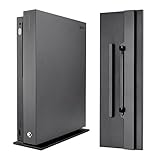
- Fits Model: Ultra fits for Xbox One X console; Not compatible with Xbox One S console & standard Xbox One console
- Stylish Look: Make your console for Xbox One X a new fresh look with this vertical stand; Vertical storage looks better
- Save Place: Safely positions the console for Xbox One X vertically to save space
- Extra Security: Designed to lock onto the console, it adds a stable base to the console for Xbox One X for extra security
- Easy to Apply: See the icons on the faceplate of the bottom of the stand. Once you sit the stand into the slots on the console you have to slide it either forward or backwards depending on your orientation. You'll hear a click and that's when you know it's locked into place
A stand should not cover vents, hold the power supply in a cramped space, or force the console against fabric or another soft material. If a design compromises airflow, choose a different stand—or use the console horizontally on a suitable surface.
How to set up an Xbox 360 vertical stand
- Confirm the model. Identify whether your console is the original Xbox 360, Xbox 360 S, or Xbox 360 E, then confirm that the stand names that exact version.
- Prepare a safe surface. Choose a clean, flat, level, stable surface with room around the console and its vents. Do not place the console or power supply on carpet, a bed, or a sofa.
- Place the stand and console. Make sure the base sits flat and does not rock. Set the console into the stand so its support points are engaged and it cannot easily tip.
- Check airflow and cables. Verify that vents and the infrared receiver remain clear, the power supply is not enclosed, and cables have enough slack that they cannot pull the console off balance.
- Change orientation safely. If you are moving a powered console from horizontal to vertical, turn it off and remove any disc from the tray first, as Microsoft instructs.
Xbox 360 display stand: when to choose one
A display stand can make a console easier to present on a shelf, but appearance should come after fit and stability. Some community posts describe glass-base stands and 3D-printed displays with model-specific variants; these examples show that such accessories exist, not that a particular listing has been tested or certified.
Do these 3 things before closing this tab:
1Fix the driver behind crashes, sound loss and screen glitches2Repair Windows errors before they cause bigger problems3Scan for outdated or missing drivers - takes under a minuteBest Value

- 【Adjustable Mount】-This mount is adjustable and Fit for any device between 2" and 3.9" thick,Compatible with Gaming Consoles(XBOX 360,ONE,PS5,PS5 Slim,PS4,PS3), DVD Players, Cable Boxes,PC and More.
- 【Two Mounting Options】It can be mounted on the wall or under your desk as needed to keep your desk tidy and organized. Mounting hardware is also included for wood and concrete wall installation options.
- 【High Quality Material】The holder is made of high quality steel, which is stronger and more durable compared to other materials. Built in anti-scratch EVA pads inside, it will never scratch your device.
- 【Easy to Install】mounting template can save you more precious time, can accurately locate the location of the hole, but also can be faster drilling.
- 【Package content】 Wall Mount*2 ,Screw *4 Drywall Anchors*2 ●Manual*1 ●mounting template *1
For a shelf or display area, make sure the base rests securely, the console cannot be bumped into a fall, and cables do not cross a walkway or hang under tension. A decorative stand that blocks a vent or leaves the console rocking is a poor choice even if it matches the room.
Quick Recap
Product prices and availability are accurate as of the date/time indicated and are subject to change. Any price and availability information displayed on Amazon at the time of purchase will apply.



