
Blue Icepop is a detachable boom-microphone replacement for selected Logitech G PRO and ASTRO A40 TR headsets. It connects through 3.5 mm, needs no separate cable or driver, and uses a 10 mm condenser capsule, cardioid pickup pattern, and built-in pop filter. Its original launch MSRP was $49.99 in 2021, but current stock and pricing are uncertain. It makes the most sense as a replacement for a damaged microphone or as a modest convenience upgrade—not as a guaranteed transformation into a professional streaming microphone.
What the Blue Icepop is
The Blue Icepop is a headset-mounted boom microphone, not a complete headset and not a standalone USB microphone. It replaces the stock detachable microphone and continues to rely on the headset’s microphone socket, audio cable, MixAmp, controller, USB sound card, or other normal connection path.
As an Amazon Associate I earn from qualifying purchases.
Logitech announced the product in 2021, describing separate versions for Logitech G PRO headsets and ASTRO A40 TR headsets. Its stated specifications include a 10 mm condenser capsule, cardioid voice-focused pickup, built-in pop filtering, and plug-and-play 3.5 mm connectivity.
Recommended Free Tools
“Studio-grade” and “broadcast” descriptions are Logitech marketing claims, not independent guarantees. A headset boom remains convenient and close to the mouth, but it does not offer the placement flexibility of a dedicated microphone on a desk stand or boom arm.
#1 Best Overall
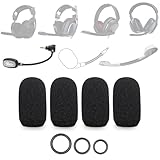
- SUPERIOR NOISE REDUCTION: Crafted from high-density material, this product delivers significant noise reduction. It effectively minimizes the pop sound caused by plosives and breath blasts, ensuring clearer and smoother vocal delivery
- SHIELDS AGAINST BACKGROUND NOISE: It can block out various background noises such as wind noise while motorcycle riding, fan noise in rooms, or computer fan noise. By canceling out these noises, it ensures your voice stands out prominently in voice communication or recording
- WIDE COMPATIBILITY: Compatible with Astro A10, A30, A40 TR Xbox, A50 Gen 4, VZR Model One, Epos H3PRO Hybrid Gaming Headsets, Blue Icepop Microphone, and many other headphone microphones from different brands and models, it offers versatile application options
- FLEXIBLE SIZE ADAPTATION: The foam features an elastic design to fit various microphone shapes and sizes, including those with unique shapes like larger bases, with just a little adjustment. A standout feature of our product is the inclusion of S/M/L O-rings for securing the foam. This thoughtful addition ensures a secure fit for different microphones, giving you the flexibility to choose the right size for your specific needs
- DURABLE AND PRACTICAL: Durable in design, it comes with multiple replacement parts. The inclusion of S/M/L O-rings means that even if you need to replace parts due to unexpected loss or damage, you have the necessary components on hand. This eliminates the need for additional purchases and ensures your microphone foam remains secure and functional
Compatibility guide
| Headset | Compatibility guidance |
|---|---|
| Logitech G PRO | Officially intended; verify the exact model before ordering. |
| Logitech PRO X and related G PRO models | Check the precise generation and connection arrangement. “PRO,” “PRO X,” “PRO X Wireless,” and newer PRO models are not interchangeable names. |
| ASTRO A40 TR | Officially intended, but verify the A40 TR generation and connector arrangement. |
| ASTRO A10, A20, A30, or A50 | Do not assume compatibility; the manufacturer announcement does not establish it. |
| Generic 3.5 mm headsets | Not officially established. A similar connector does not guarantee correct wiring, fit, or microphone behavior. |
The Logitech G PRO version is identified by model number A00143 on Logitech’s support site. Buy the version explicitly labeled for your headset family. The Logitech and ASTRO versions should not be treated as interchangeable simply because both are detachable boom microphones.
For newer headset generations, user reports are not enough to establish official support. If the exact model is not clearly listed by the seller or manufacturer, confirm compatibility with Logitech before relying on the purchase.
How to install the Icepop
- Turn off or disconnect the headset.
- Remove the original detachable boom microphone.
- Insert the correct Blue Icepop version into the headset’s microphone port.
- Reconnect the headset to the PC, console, MixAmp, controller, or usual audio path.
- Test microphone level, mute behavior, sidetone, and background-noise handling in your chat application or device settings.
Logitech describes the connection as plug-and-play with no additional wires or drivers. The exact result can still depend on the headset jack, adapter, MixAmp, controller, and platform. If the microphone is silent, first reseat the connector, check the selected input device, inspect the mute control, and test without adapters. Excessive gain, a damaged socket, incorrect wiring, or counterfeit stock can also cause problems.
Free tools Windows power users keep installed
One-click scans. No signup required.
BLUE VO!CE: what it does and does not do
On supported Logitech G PRO hardware connected to a PC, Logitech G HUB can provide BLUE VO!CE controls such as voice filters, noise reduction, compression, and de-essing. These settings can change the sound substantially.
Rank #2

- Custom three-capsule array: This professional USB mic produces clear, powerful, broadcast-quality sound for YouTube videos, Twitch game streaming, podcasting, Zoom meetings, music recording and more
- Blue VO!CE software: Elevate your streamings and recordings with clear broadcast vocal sound and entertain your audience with enhanced effects, advanced modulation and HD audio samples
- Four pickup patterns: Flexible cardioid, omni, bidirectional, and stereo pickup patterns allow you to record in ways that would normally require multiple mics, for vocals, instruments and podcasts
- Onboard audio controls: Headphone volume, pattern selection, instant mute, and mic gain put you in charge of every level of the audio recording and streaming process
- Positionable design: Pivot the mic in relation to the sound source to optimize your sound quality thanks to the adjustable desktop stand and track your voice in real time with no-latency monitoring
The Icepop itself is an analog plug-in microphone. It does not automatically give every headset or platform access to BLUE VO!CE. Logitech states that advanced BLUE VO!CE and DTS Headphone:X 2.0 features are PC-only through G HUB for the referenced PRO X ecosystem. Console users should therefore evaluate the microphone through the console’s normal voice-chat path, rather than expecting the full PC software feature set.
When comparing the stock microphone with the Icepop, use the same distance, angle, input gain, noise gate, compression, application, and device. Otherwise, a perceived improvement may come from software processing rather than the capsule.
Will it improve voice quality?
It is designed to produce a clearer, more controlled voice than a generic headset microphone. The condenser capsule, cardioid pattern, pop filter, and Blue tuning are sensible features for close-range speech. Cardioid pickup is not active noise cancellation, however: it can help focus pickup toward the front, but it will not eliminate keyboards, fans, room noise, or a loud environment.
The Tool Desk
Outbyte Driver Updater FREEScan for outdated or missing drivers - takes under a minuteDriver Scan →Outbyte PC Repair FREERepair Windows errors before they cause bigger problemsFix Now →Actual improvement depends on microphone placement, input level, headset electronics, console or PC processing, Discord or OBS settings, and the room. Keep the boom close to the corner of your mouth rather than directly in front of it, speak toward the capsule, and reduce gain if your voice clips.
Rank #3

- Custom three-capsule array: This professional USB mic produces clear, powerful, broadcast-quality sound for YouTube videos, Twitch game streaming, podcasting, Zoom meetings, music recording and more
- Blue VO!CE software: Elevate your streamings and recordings with clear broadcast vocal sound and entertain your audience with enhanced effects, advanced modulation and HD audio samples
- Four pickup patterns: Flexible cardioid, omni, bidirectional, and stereo pickup patterns allow you to record in ways that would normally require multiple mics, for vocals, instruments and podcasts
- Onboard audio controls: Headphone volume, pattern selection, instant mute, and mic gain put you in charge of every level of the audio recording and streaming process
- Positionable design: Pivot the mic in relation to the sound source to optimize your sound quality thanks to the adjustable desktop stand and track your voice in real time with no-latency monitoring
Independent review evidence has been cautious. One review found the improvement over a Logitech stock microphone modest and not compelling at the original $50 price for that reviewer’s Logitech PRO X setup. The review did not test the Icepop on an A40, so any claim that A40 owners will see a larger improvement remains speculative. The fairest conclusion is that the Icepop may sound better, but a dramatic improvement is not universal.
Independent reader supportYour contribution helps us test, update, and keep practical guides available for everyone.Blue Icepop versus the alternatives
Keep the stock microphone
If the original microphone sounds acceptable, keeping it is the lowest-risk option. You retain the intended fit and avoid uncertain old-stock pricing.
Buy an official replacement
An official replacement is preferable when available at a lower price. Logitech’s current support page for the G PRO Icepop says that no spare parts are available, so replacement availability should be checked directly rather than assumed.
Buy the Blue Icepop
It is most appealing when your compatible microphone is broken or missing, you want a detachable boom, and you find authentic stock at a sensible price with a return policy. It is less attractive when it costs substantially more than its historical $49.99 MSRP or when you expect dedicated-microphone performance.
Rank #4

- ♫ Professional Snowball Pop Filter ♪ It is special desiged for Blue Snowball Microphone. No more PLOSIVES!
- ♫ 3 Layers Design ♪ Snowball mic shield has double layered steel meshs in outside and one layered foam windscreen in middle. Let you away the annoying poping of "S" "B" and "P". Get a clear and loud sound.
- ♫ Flexible Pop Shield ♪ Swivel 360° flexible metal gooseneck is strong and pliable, supports the pop shield head at any angle to apply different placements and keep it in place.
- ♫ Adjustable Clamp ♪ The C-clamp mount has a 1.85 inch maximum grip for attaching to your microphone. The rubber mat on the clamp could protect your mic without any scratches when you swivel side screw.
- ♫ Protect Your Loved Mic ♪ Let your loved mic stay away from blast saliva, and always keep it clean and health. NOTE: Not Include Blue Snowball Mic.
Use a USB microphone
A separate USB microphone generally offers more control over placement and a clearer upgrade path for streaming, recording, podcasts, or serious voice work. The trade-offs are extra desk space, a separate cable, and less portability.
Replace the headset
A new headset is more logical if the headset itself has worn pads, a damaged cable or jack, failing speakers, or outdated wireless hardware. Buying an Icepop only fixes the microphone.
Buying advice in 2026
The $49.99 figure is the 2021 launch MSRP, not a verified current street price. Logitech’s support page currently reports no spare parts for the G PRO version, but that alone does not prove that the product has been globally discontinued. You may encounter regional inventory, open-box units, used listings, inflated prices, or incorrectly labeled products.
Windows Errors? Fix Them Before They Spread
Repair common Windows errors and clear accumulated junk for a smoother, more stable PC - no reinstall needed.Free scan · no reinstallCrashes, No Sound, or Screen Glitches?
Random freezes, missing sound and display glitches usually trace back to one bad driver. Find and replace yours safely.Free scan · under a minuteBefore buying, confirm:
- the listing names your exact headset family and the correct Icepop version;
- the connector and housing match the photographs and original packaging;
- the seller offers a return period and describes the item’s condition;
- the price is reasonable compared with an official replacement, a basic USB microphone, or a new headset;
- shipping, import charges, warranty coverage, and marketplace authenticity risks are included in the calculation.
Do not buy the Icepop for an A10, A20, A30, A50, or generic 3.5 mm headset without explicit manufacturer confirmation.
Verdict
Buy it if you own a compatible Logitech G PRO or ASTRO A40 TR headset, need a replacement, and find legitimate stock at a reasonable price. Consider it if you want an incremental headset-mounted microphone upgrade and value convenience. Skip it if your stock microphone already works well, the seller is charging a large premium, or you expect broadcast-quality results. For serious streaming and recording, put the money toward a properly positioned USB microphone instead.
Sources: Logitech announcement · Logitech support · BLUE VO!CE information · independent review
Quick Recap
Product prices and availability are accurate as of the date/time indicated and are subject to change. Any price and availability information displayed on Amazon at the time of purchase will apply.

