
Recommended Free Tools
Sometimes, but there is no universal guarantee. A touchscreen controller may recognize a gloved finger, reject water touches, or offer an alternate control method depending on its touch panel, firmware, operating system and accessories. Check the exact device manual first: some panels provide glove, rain or water-detection modes, while others require a clean, dry display. Accessibility settings and supported pointer, switch or voice controls can help when direct tapping is difficult, but they do not make every screen work through every glove or in wet conditions.
What determines whether a touchscreen controller will work?
Touchscreen behavior is a property of the complete device, not just the word “touchscreen” on a specification sheet. For a gaming handheld, arcade panel, ticketing kiosk or other controller, verify these variables together:
As an Amazon Associate I earn from qualifying purchases.
- Touch technology and panel model: Capacitive panels detect a change in electrical coupling from a finger. Other designs use pressure, infrared or optical sensing and can behave differently.
- Device firmware and operating mode: A manufacturer may add glove, rain-sensing or water-detection modes that are unavailable on a similar-looking model.
- Glove construction and fit: Insulating rubber, leather, fabric and multilayer protective gloves do not couple to a capacitive panel in the same way. A conductive fingertip can help, but a loose or thick glove may still miss touches.
- Liquid location and amount: A damp fingertip, droplets on the glass and a display covered in water are different conditions. A controller may tolerate one and disable input for another.
- Software and alternative input: The operating system may offer touch accommodations, a pointer, switch control, voice control or eye tracking. Compatibility depends on that platform and the specific assistive device.
For a game installation, identify the exact make, model and software version before buying gloves or an accessibility accessory. A generic claim that something “works with touchscreens” is not a compatibility test for your controller.
The Tool Desk
Outbyte PC Repair FREERepair Windows errors before they cause bigger problemsFix Now →Outbyte Driver Updater FREEScan for outdated or missing drivers - takes under a minuteDriver Scan →Can I use a touchscreen with gloves?
Why ordinary gloves often fail
On a capacitive screen, a bare fingertip changes the screen’s electrical field. An insulating glove can block that coupling, so a tap, swipe or virtual button press is never detected. Conductive touchscreen gloves add conductive material at the fingertip to create a closer electrical path. This explanation comes from a glove manufacturer describing its product category; it is not evidence that every conductive glove works with every panel.
#1 Best Overall
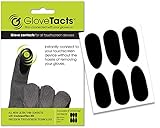
- TOUCH SCREEN: This product is designed to enable the majority of gloves to work seamlessly with touch screen devices. Its specially formulated adhesive possesses strong bonding capabilities, ensuring it adheres effectively to a wide variety of glove materials. With this innovative solution, you can transform your favorite pair of gloves into touch screen compatible accessories, enhancing your convenience and functionality in an increasingly digital world.
- COMPATIBLE: This versatile solution is designed to be compatible with a wide range of glove types, making it a versatile choice for various activities and lifestyles. Whether you have motorcycle gloves, leather gloves, safety gloves, winter gloves, glove liners, ski gloves, snowboard gloves, or even bicycle gloves, this product is engineered to work seamlessly with them all. Its universal compatibility ensures that you can enjoy touchscreen functionality while keeping your hands protected.
- VERSATILE: This product features an exceptionally thin and lightweight material that sets it apart from the rest. Its design incorporates a specialized adhesive with remarkable high-temperature resistance. This combination of features not only ensures minimal bulk and a discreet profile but also guarantees that it can withstand elevated temperatures without losing its adhesive properties.
- VALUE: Every package includes a set of six stickers, providing you with a convenient and ample supply of touchscreen stickers to meet your needs. Whether you have multiple gloves to enhance with touch screen compatibility or you simply want to have some extra stickers on hand for future use, you have an adequate quantity to fulfill your requirements.
- NOTICE: Screen Protectors interfere with touch. Screens with hardened glass screen protectors make touch very unpredictable. If you have a hardened glass screen protector consider switching to another type if you want reliable touch.
Thickness, seams, moisture, finger position and fit all matter. A glove can register a light tap but fail on a diagonal swipe, edge gesture or simultaneous two-finger command. Touchscreen compatibility also says nothing about grip, heat protection, cut resistance or electrical protection.
Glove modes are model-specific
Some industrial-style touch panels expose a sensitivity mode rather than relying on a special glove. Pro-face documentation for specified 15-inch-wide and 19-inch-wide models lists Standard Mode, Water Detection Mode and Glove Mode. Its Glove Mode is intended for gloves, including rubber gloves, but the documentation warns that some glove types may not operate. It also notes that higher sensitivity is more susceptible to environmental noise. Those settings should not be assumed to exist on other products from the same maker or on a gaming controller.
Panasonic’s FZ-X1 manual describes a glove touch mode that raises touch sensitivity. It likewise cautions that some glove types may not work. The FZ-X1 is an older, specific device: its behavior is useful as an example of a manufacturer implementation, not as a current rule for phones, consoles or arcade controls.
PC Slower Than It Used to Be?
A free scan shows the junk files, broken settings and background clutter dragging Windows down - then fixes them in one click.Free scan · Windows 10 & 11Outdated Drivers Are Slowing You Down
One free scan finds every outdated or missing driver and matches the right update for your exact hardware.Free scan · exact hardware matchRank #2

- 【High Sensitivity】Made from silver fiber material, ENPOINT anti-slip touch screen stickers can reduce friction and prevent drag lag, stickiness, anti fingerprint, which will definitely improve sensitivity, gaming experience and performance.
- 【Convenient】With strong bonding adhesive that ensuring effective adhesion to various materials with conductive function used in gloves, these touch screen stickers can easily upgrade your favorite pair of gloves such as winter gloves, work gloves, football gloves, motorcycle gloves, gardening gloves into touch screen gloves. And they are lightweight and portable. Please note that thick gloves will create a large gap between your fingers and the stickers, causing the touch screen function to fail.
- 【Breathable & Anti-Sweat】ENPOINT touch screen stickers are comfortable and smooth.
- 【Package Content】10 Pcs Finger Touch Screen Stickers; Color: Dark Grey
- 【Application】ENPOINT gamer accessories are compatible with various electric devices: mobile phones, drawing tablet no computer needed, computer graphics tablets, tablet computer, iPads, which are suitable for mobile games such as PUBG Mobile, Call of Duty Mobile, Mobile Legends and others.
How to check a gloved setup
- Record the controller’s exact model number and operating-system or firmware version.
- Search that model’s manual for “glove,” “high sensitivity,” “rain sensing,” “water detection” or “touch mode.” Do not enable a setting from a different model’s instructions.
- Put on the gloves exactly as they will be worn during play. Test the smallest on-screen target, a long swipe, an edge gesture and any two-finger command the game requires.
- Try several fingers and both light and firm presses. If only hard presses work, the setup may be too unreliable for fast gameplay.
- Check for accidental inputs when the glove brushes the bezel or rests on the glass. A sensitivity boost can improve detection while increasing false touches.
Conductive gloves: useful option, not a guarantee
Conductive gaming or work gloves can be a practical physical option when the controller is a capacitive panel and the glove’s conductive area reaches the fingertip. Before relying on them, confirm the glove maker’s construction and the device maker’s guidance. Test through any screen protector, because an additional insulating layer can change the result. If the glove is required for a hazardous task, its protective rating remains mandatory; never substitute a thin touchscreen glove for certified protective equipment.
Does a touchscreen work with wet hands?
Wet fingers and a wet display are separate problems
Evidence for “wet hands” is often confused with documentation about liquid on the glass. A damp fingertip may produce an inconsistent signal, while droplets can look like touches, block the electrical field or trigger a device’s liquid-protection logic. The sources for the specific devices discussed here do not establish reliable wet-hand performance for arbitrary controllers.
Do not assume that a controller advertised as water-resistant will accept touch input while wet. Water resistance protects electronics from a specified exposure; it does not promise accurate touch sensing during play.
Rank #3

- TOUCH SCREEN: This product is designed to enable the majority lightweight gloves to work seamlessly with touch screen devices. Its specially formulated adhesive possesses strong bonding capabilities, ensuring it adheres effectively to a wide variety of glove materials. With this innovative solution, you can transform your favorite pair of kightweight gloves into touch screen compatible accessories, enhancing your convenience and functionality in an increasingly digital world.
- COMPATIBLE: This versatile solution is designed to be compatible with a wide range of lightweight, non insulated glove types, making it a versatile choice for various activities and lifestyles. Whether you have motorcycle gloves, leather gloves, safety gloves, glove liners, or even bicycle gloves, this product is engineered to work seamlessly with them all. Its universal compatibility ensures that you can enjoy touchscreen functionality while keeping your hands protected.
- VERSATILE: This product features an exceptionally thin and lightweight material that sets it apart from the rest. Its design incorporates a specialized adhesive with remarkable high-temperature resistance. This combination of features not only ensures minimal bulk and a discreet profile but also guarantees that it can withstand elevated temperatures without losing its adhesive properties.
- VALUE: Every package includes a set of twelve stickers, providing you with a convenient and ample supply of touchscreen stickers to meet your needs. Whether you have multiple lightweight gloves to enhance with touch screen compatibility or you simply want to have some extra stickers on hand for future use, you have an adequate quantity to fulfill your requirements.
- NOTICE: This version of the product is not compatible with insulated or thick gloves. Use only with lightweight, thin gloves. For other gloves use the Universal GloveTacts stickers in the green package.
Water-detection and rain-sensing examples
Pro-face’s documented Water Detection Mode disables touch while liquid is on the screen, treating water as an accidental-input risk. That is a deliberate safety behavior, not a failure to be fixed by pressing harder.
Free tools Windows power users keep installed
One-click scans. No signup required.
Panasonic’s FZ-X1 includes a rain-sensing mode that recognizes touches by applied pressure. Its manual still warns that water can prevent proper operation. The manual states: “Even if rain sensing touch mode is enabled, the unit may not be able to be operated or may not respond properly to touches when the entire screen is wet or depending on the amount of water on the screen.” Panasonic advises putting the unit to sleep temporarily and wiping away water. Follow the model’s own instructions rather than treating rain mode as permission to play on a water-covered display.
Safer procedure when liquid is present
- Stop input if the screen is accumulating droplets or a film of water.
- Use the device’s documented rain, water-detection or glove setting only if that exact model provides it.
- Put the controller to sleep or lock it when the manual recommends doing so.
- Wipe the display with the manufacturer-approved material and let the surface become clear before resuming.
- If touches remain missed or trigger unexpectedly, stop using touch controls until the device and your hands are dry.
How can I control a touchscreen without tapping it directly?
Built-in touch accommodations
On supported Apple devices, Touch Accommodations are available under the device’s accessibility settings. The options include:
Rank #4

- Relieves Symptoms of Electrical Sensitivity: These gloves form a conductive Faraday cage and effectively block radio waves and electromagnetic fields. Symptoms of electrosensitivity.(This product does not include grounding wires, You need to purchase the grounding wire by yourself.)
- Comfortable to wear: Our EMF Protective Gloves are soft, breathable, lightweight and feature a ribbed cuff for a perfect fit around the wrist. Additionally, there is a 1.7mm snap button for the ground wire on each wrist. It can be used as radiation shielding gloves and conductive gloves, and can also be used with beauty instruments.
- Compatible with all touch screens: Gloves are compatible with any touch screen, including smartphones, laptops, tablets, and more. Taking into account warmth and touch screen function.
- Hand washable and machine washable: This protective glove is hand washable and machine washable, the water temperature cannot exceed 40 degrees Celsius, please use neutral detergent.
- High Quality: This product is a gray elastic glove woven from polyester fiber and silver fiber mixed thread. Can be worn all day.
- Hold Duration: requires a touch to remain on the screen for a set time before it is recognized.
- Ignore Repeat: treats rapid repeated contacts as one touch, which can reduce accidental double activation.
- Tap Assistance: helps distinguish a tap from a swipe by using the first or final touch location, depending on the selected behavior.
These settings change how an already detected touch is interpreted. They do not make a screen detect through an insulating glove or operate reliably while covered in water. Names and menu placement can change with the operating-system version, so use the accessibility menu on the device itself.
Pointer, switch and voice control
Apple documents using a pointer with AssistiveTouch to click on-screen icons and navigate the AssistiveTouch menu. Its accessibility overview also lists Switch Control, Voice Control and eye tracking on supported hardware. These methods can help a player who cannot perform accurate taps, but support must exist on both the operating system and the particular input device. A USB, Bluetooth or specialty switch is not automatically accepted merely because the controller has a touchscreen.
For a gaming setup, check whether the game exposes all important actions to the platform’s pointer or switch system. Menus may be accessible while a game’s real-time controls remain touch-only. Confirm focus order, activation timing and the ability to cancel an action before committing to a setup.
Best Value

- Warm and Breathable: Unigear running gloves keep the maximum thermal protection for your body in cold by wicking moisture away from your skin effectively. They are featured the newest fiber material whose fabric bulkiness is 10% higher than other fibers, against the static electricity and fabric pilling.
- Touchscreen-friendly: Do you still tolerate the frozon fingers when running, walking and driving in winter? Wearing our touchscreen gloves, you can easily use your smartphone or other electronic device to protect your hands. The thumb and forefinger tips on both hands are designed with durable conductive fabric for long lasting.
- Versatile Liner Gloves: You can layer up with skiing, cycling and other heavier gloves in harsher conditions. You also can wear them on their own as regular gloves. The palms are printed with anti-slip silicone so you can hold your phone or grip other gear securely. Ideal for running, biking, driving in fall and early winter.
- Soft and Durable: The inner liner is soft to deliver comfort and the 4-Way stretchy fabric provides tight-fitting for hands. Reinforced the elastic stitching on seams and upgraded design on palm, Unigear sporting gloves solve the problem of ripping. No more worry about the seam ripped if you choose the right size.
- Tight Fit Liner : Frozen fingers to get in the way of running, commute, driving? Are you planning on lowering your pace to touch the beautiful nature? Wearing take with a pair of unigear light gloves absorb & retain your body heat in the cold. Great for daily – design for men and women specially, unisex, good looking.
Research prototypes for inaccessible kiosks
A 2023 CHI paper describes Toucha11y, a research prototype that combines a mechanical actuator attached to a kiosk touchscreen with a smartphone interface. The phone uses familiar accessibility features, while the actuator registers selected touches on the kiosk. User evaluations reported that the prototype could help blind users operate inaccessible kiosks. It is a research system, not a generally available retail controller or a universal gaming accessory. Its significance is the design approach: an alternate interface can drive a touch-only surface when the platform permits a physical actuator and a separate control device.
Independent reader supportYour contribution helps us test, update, and keep practical guides available for everyone.Choosing an approach for common gaming situations
| Situation | First check | Most realistic next step | Main limitation |
|---|---|---|---|
| Handheld or portable game controller used with work gloves | Exact manual for glove or high-sensitivity mode | Test a correctly fitted conductive glove and every required gesture | Some glove materials still fail; sensitivity can create false touches |
| Arcade or kiosk panel exposed to rain or splashes | Whether the panel has water-detection or rain-sensing behavior | Use the documented mode, then wipe the screen when liquid accumulates | A water-covered display may disable or misread input |
| Player who cannot tap precisely | Platform accessibility menu and supported pointer or switch protocols | Configure touch accommodations or an approved alternate input | Accessibility settings do not bypass a physically undetectable touch |
| Player who cannot touch the surface at all | Whether the game accepts pointer, switch, voice or eye-control events | Use a supported alternate controller or an actuator-based solution where available | Third-party compatibility is platform- and game-specific |
| Safety-critical glove requirement | Required protection standard for the task | Keep certified protective gloves; add a compatible control method if possible | Touch performance never replaces protective certification |
Troubleshooting missed or false touches
Nothing registers through the glove
- Confirm that the panel is capacitive and that the manufacturer actually supports glove operation.
- Try the documented glove mode, if present, rather than increasing sensitivity through an unrelated setting.
- Check that the conductive patch sits over the fingertip and is not separated by a liner.
- Remove or test without a screen protector if the manual permits; some protectors reduce coupling.
- Test a different finger and a firm, brief tap. If results vary, do not rely on the setup for timing-sensitive play.
The controller activates by itself
- Dry the screen and your glove. Droplets can act as unintended contacts.
- Lower sensitivity or leave Glove Mode if the device documentation says the setting increases environmental noise.
- Keep the palm, cuff and spare fingers off the glass and bezel.
- Inspect for a damaged screen, loose protector or liquid beneath the surface.
Touch stops when the display gets wet
- Check whether Water Detection Mode intentionally disables input.
- Do not keep tapping a water-covered screen to force a response.
- Follow the manual’s sleep, wipe and restart instructions, then test only after the surface is clear.
An accessibility accessory works in menus but not in the game
- Verify that the game supports the same pointer, switch or voice events as the operating system.
- Look for in-game remapping, hold-to-activate timing and focus indicators.
- Test a complete session, including pausing, confirming, cancelling and recovering from an error, before using the setup in a tournament or public kiosk.
Bottom line for touchscreen gaming
Gloves can work when the controller provides a compatible glove mode or when a properly fitted conductive glove supplies the electrical coupling a capacitive panel expects. Wet operation is less predictable: some equipment suppresses water touches, some recognizes pressure in a rain mode, and even those systems can fail when the screen is covered in liquid. Accessibility settings and alternate inputs can reduce or eliminate direct tapping, but only where the operating system and game support them. Start with the exact controller manual, test the real glove or accessory under real conditions, keep the display clear, and preserve every safety requirement independently of touch compatibility.
Quick Recap
Product prices and availability are accurate as of the date/time indicated and are subject to change. Any price and availability information displayed on Amazon at the time of purchase will apply.

